
Remove SD CARD in the Safely Remove Hardware list

amrodelas

New member
Local time
9:40 PM
Messages
1
I have a laptop with 256 SSD. And it is small for me. What I did is I bought an SDCard with 128Gig and use it as my extra drive. It works fine and fast.

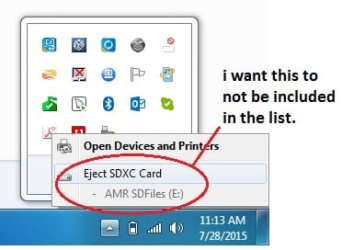
What I want to do next is to make it permanent or set it as a non-removable drive not prevent myself or anyone to unmount it. How can I remove it from the list of Safely Remove Hardware?

Thank you and I hope anyone out there have an idea to work this out. I attached a picture for everyone's reference.

By the way, I'm using Toshiba Portege on Windows 7-64bit.
 

Attachments
  • stackoverflow.jpg
    stackoverflow.jpg
    34.4 KB · Views: 12

My Computer

Computer type
Laptop
Computer Manufacturer/Model Number
Toshiba
OS
Window 7 Pro 64-bit
CPU
Intel Core ii
Memory
8.00 GB
Hard Drives
256 SSD
128 SDXC Card
Antivirus
MSE
Browser
Google Chrome

My Computer

Computer type
PC/Desktop
Computer Manufacturer/Model Number
Custom Build
OS
Windows 7 Ultimate x64 SP1
CPU
AMD Phenom 2 1090T
Motherboard
Gigabyte GA-890FXA-UD5
Memory
2x8GB Kingston HyperX Fury Black 1600Mhz Unganged
Graphics Card(s)
MSI GTX 970 Gaming 4G
Sound Card
Realtek On-Board HD 7.1 Audio / Logitech G35
Monitor(s) Displays
3xAcer GD245HQ
Screen Resolution
1920x1080
Hard Drives
Samsung 850 Pro 512GB SSD - OS /
WD Caviar Black SATA 3 - 1 TBx2 - Dynamic RAID 0 /
WD Caviar Green SATA 2 - 640GBx2 - Dynamic RAID 0 /
WD Caviar Green SATA 2 - 640GB - Internal Backup /
Seagate Barracude SATA 3 - 3TB - External Backup/ Sync
PSU
HighPower 1000W
Case
Cooler Master HAF 932
Cooling
Noctua NH-D14
Keyboard
Logitech G19
Mouse
Logitech G500
Internet Speed
100/4 Mbit Cable (100GB quota)
Antivirus
ZoneAlarm Extreme Security / MBAM Pro / MBAE Free / SAS Free
Browser
IE 11 - Firefox - Chrome
Other Info
Logitech F710/ G27/ G940/ Z5500 // TrackIR 5 // Nvidia 3D Surround Vision
I have a laptop with 256 SSD. And it is small for me. What I did is I bought an SDCard with 128Gig and use it as my extra drive. It works fine and fast.

What I want to do next is to make it permanent or set it as a non-removable drive not prevent myself or anyone to unmount it. How can I remove it from the list of Safely Remove Hardware?

Thank you and I hope anyone out there have an idea to work this out. I attached a picture for everyone's reference.

By the way, I'm using Toshiba Portege on Windows 7-64bit.

I think you will have to go in the device manager under Disk Drives and search something like Generic- SD/MMC USB Device to allow or not the Quick removal setting.

Have a look at this tutorial: Write-Caching - Enable or Disable
 

My Computer

Computer type
PC/Desktop
Computer Manufacturer/Model Number
Custom Build
OS
Windows 7 Professional SP1 - x64 [Non-UEFI Boot]
CPU
Ivy Bridge Core i5 3570K (Delidded)
Motherboard
Asus P8Z77-V LE PLUS
Memory
G.Skill "Ares" DDR3 PC3-12800 - 1600MHz (16Gb)
Graphics Card(s)
Asus Dual-RX480-O4G
Sound Card
Creative Sound Blaster Z w/5.1 sound system
Monitor(s) Displays
Asus IPS 23"
Screen Resolution
16/9
Hard Drives
Internal:
500Go Sata 6Gb/s (x2)
500Go Sata 3Gb/s (x2)
SSD 60Go Sata 6Gb/s
PSU
In Win C 900W Series 80+ Platinum
Case
Thermaltake Chaser A71
Cooling
Custom Water Cooling Loop
Keyboard
Cooler Master QuickFire XTi
Mouse
Razer Imperator 2012 (4G)
Antivirus
MSE
Browser
IE 11.0.xxx Rtm
Other Info
"Raid0" with Intel Smart Response Technology (HDD/SSD)
Back
Top