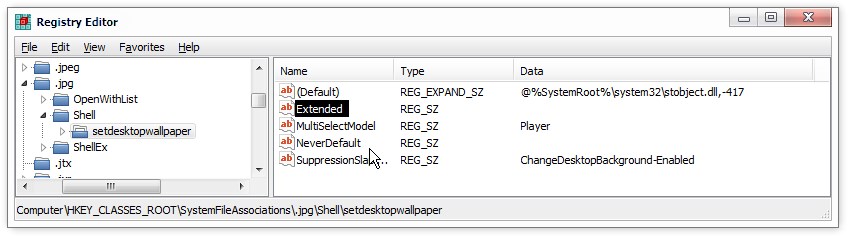
Maybe a little (a lot?) late, but searching for a way to do the very same, finally found the way.
The trick is to remove a registry key:
HKEY_LOCAL_MACHINE\SystemFileAssociations\.jpg\Shell\setdesktopwallpaper
That's for jpg files, but repeat searching the same route with different file extensions and you can delete the context menu option for each one individually. The changes should take effect immediately, without reboot or logoff.

Thank you

, I've been searching the Registry for so long for such an entry to remove. I overlooked
SystemFileAssociation. I even have a bookmark for this key. To make the
Set as desktop background disappear, perhaps the entry could be ranamed, but I opted for deletion instead (I deleted the entries for .jpg, .jpe, .jpeg, .png, .bmp, .gif). I just exported REG files for the keys I deleted, so I can restore them easily.