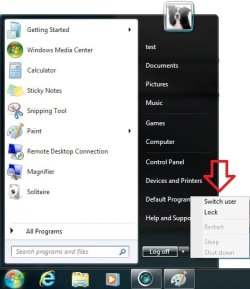
Does anyone know if there is a way to remove the Shut Down option from the Start Menu but leave Restart and Log Off? I can't seem to find any practical solution for this.
The obvious reason is so that I can manage client machines after hours. Sure, the updates can probably wait a day. The real problem is that, in my company, we are running Windows Server 2008 R2 Enterprise with Hyper-V and are starting to deploy RemoteFX enabled VMs to clients using thin clients. If they do a shut down on their machine then they have no way of turning it back on and I would have to do so through the Hyper-V management console.
I know how to easily disable Shut Down and Restart but our procedure for employees here is to do a restart. As many of you may know, changing such a simple procedure is almost always much more difficult than one would think.
Any help, suggestions, or solutions would be greatly appreciated. Thank you.
The obvious reason is so that I can manage client machines after hours. Sure, the updates can probably wait a day. The real problem is that, in my company, we are running Windows Server 2008 R2 Enterprise with Hyper-V and are starting to deploy RemoteFX enabled VMs to clients using thin clients. If they do a shut down on their machine then they have no way of turning it back on and I would have to do so through the Hyper-V management console.
I know how to easily disable Shut Down and Restart but our procedure for employees here is to do a restart. As many of you may know, changing such a simple procedure is almost always much more difficult than one would think.
Any help, suggestions, or solutions would be greatly appreciated. Thank you.
My Computer
- OS
- Windows XP Pro x86, Windows Vista Home Premium x86, Windows 7 Pro x64, Win2k3, Win2k8, Ubuntu
- CPU
- Intel Xeon 5160 3GHz (Dual-Core)
- Memory
- 8GB PC2-5300
- Hard Drives
- OCZ-Agility 2 - 80GB