Solved Remove the "action center" icon from the taskbar area near the clock?

netadict

New member
Member
VIP
Local time
2:49 AM
Messages
155
Location
Egypt
Remove the "action center" icon from the taskbar area near the clock?

I use third party software to update and do other system functions so I don't need the Action Center icon nex to the clock, how do I get rid of it?
 

My Computer My Computer

At a glance

Windows 7 Professional 32 bitPentium D 3.4 GHYz4GBNvidia GE Force 9600 GT
Computer Manufacturer/Model Number
HP Compaq dc7600 Convertible Minitower PC
OS
Windows 7 Professional 32 bit
CPU
Pentium D 3.4 GHYz
Motherboard
original that came with the PC
Memory
4GB
Graphics Card(s)
Nvidia GE Force 9600 GT
Sound Card
intergrated on the motherboard
Monitor(s) Displays
Samsung SyncMaster 713N
Screen Resolution
1280X1024
Hard Drives
Maxtor 6V160E0 ATA
Case
mini tower
Keyboard
standard PS/2
Mouse
PS/2 compatible
Internet Speed
2 M/s ADSL
The notification area is located on the right side of the taskbar by default, and it contains program icons that provide status and notifications about things like incoming e‑mail, updates, and network connectivity. When you install a new program, you can sometimes add an icon for that program to the notification area.

You can expand the notification area to view hidden icons

New computers often come with icons already in the notification area, and some programs automatically add an icon to the notification area during installation. You can change which icons and notifications appear in the notification area, and for certain special icons (called system icons), you can choose whether they show up at all.

You can change the order of the icons in the notification area, and the order of hidden icons, by dragging them to the position you want.

To remove or hide an icon from the notification area
Click the icon in the notification area and then drag it toward the desktop.
 

My Computer My Computer

At a glance

windows 7 home 64bitINTEL-CORE I716GB
Computer Manufacturer/Model Number
W530-3630QM1
OS
windows 7 home 64bit
CPU
INTEL-CORE I7
Memory
16GB
Hard Drives
750GB
Browser
Chrome
Last edited by a moderator:

My Computer My Computer

At a glance

Windows 10 Pro x64 EN-GB1.6 GHz Intel Core i7-720QM Processor6 GBATI Mobility Radeon HD 5850 Graphics
Computer type
Laptop
Computer Manufacturer/Model Number
HP ENVY 17-1150eg
OS
Windows 10 Pro x64 EN-GB
CPU
1.6 GHz Intel Core i7-720QM Processor
Memory
6 GB
Graphics Card(s)
ATI Mobility Radeon HD 5850 Graphics
Sound Card
Beats sound system with integrated subwoofer
Monitor(s) Displays
17" laptop display, 22" LED and 32" Full HD TV through HDMI
Screen Resolution
1600*900 (1), 1920*1080 (2&3)
Hard Drives
Internal: 2 x 500 GB SATA Hard Disk Drive 7200 rpm
External: 2TB for backups, 3TB USB3 network drive for media
Cooling
As Envy runs a bit warm, I have it on a Cooler Master pad
Keyboard
Logitech diNovo Media Desktop Laser (bluetooth)
Mouse
Logitech Performance Mouse MX
Internet Speed
50/10 Mbps VDSL
Antivirus
Windows Defender 4.3.9431.0
Browser
Maxthon 3.5.2., IE11
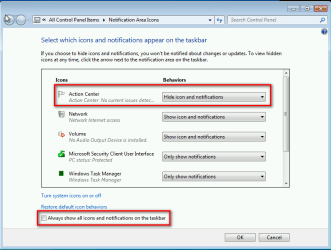
Dragging it to the desktop only hides it behind the small triangle. Customizing the Notification area ans selecting "hide icon and notifications" did exactly the same thing ( put it under the triangle)
 

My Computer My Computer

At a glance

Windows 7 Professional 32 bitPentium D 3.4 GHYz4GBNvidia GE Force 9600 GT
Computer Manufacturer/Model Number
HP Compaq dc7600 Convertible Minitower PC
OS
Windows 7 Professional 32 bit
CPU
Pentium D 3.4 GHYz
Motherboard
original that came with the PC
Memory
4GB
Graphics Card(s)
Nvidia GE Force 9600 GT
Sound Card
intergrated on the motherboard
Monitor(s) Displays
Samsung SyncMaster 713N
Screen Resolution
1280X1024
Hard Drives
Maxtor 6V160E0 ATA
Case
mini tower
Keyboard
standard PS/2
Mouse
PS/2 compatible
Internet Speed
2 M/s ADSL

My Computer My Computer

At a glance

64-bit Windows 11 Pro for WorkstationsIntel i7-8700K OC'd to 5 GHz64 GB (4x16GB) G.SKILL TridentZ RGB DDR4 3600...ASUS ROG-STRIX-GTX1080TI-O11G-GAMING
Computer type
PC/Desktop
Computer Manufacturer/Model Number
Self built custom
OS
64-bit Windows 11 Pro for Workstations
CPU
Intel i7-8700K OC'd to 5 GHz
Motherboard
ASUS ROG Maximus XI Formula Z390
Memory
64 GB (4x16GB) G.SKILL TridentZ RGB DDR4 3600 MHz
Graphics Card(s)
ASUS ROG-STRIX-GTX1080TI-O11G-GAMING
Sound Card
Integrated
Monitor(s) Displays
2 x Samsung Odyssey G7 27"
Screen Resolution
2560x1440
Hard Drives
1TB Samsung 990 PRO M.2,
4TB Samsung 990 PRO PRO M.2,
TerraMaster F8 SSD Plus NAS
PSU
Seasonic Prime Titanium 850W
Case
Thermaltake Core P3
Cooling
Corsair Hydro H115i
Keyboard
Logitech wireless K800
Mouse
Logitech MX Master 4
Internet Speed
2 Gb/s Download and 100 Mb/s Upload
Antivirus
Malwarebyte Anti-Malware Premium
Browser
Google Chrome
Other Info
Logitech Z625 speaker system,
Logitech BRIO 4K Pro webcam,
HP Color LaserJet Pro MFP M477fdn,
APC SMART-UPS RT 1000 XL - SURT1000XLI,
Galaxy S23 Plus phone
Dragging it to the desktop only hides it behind the small triangle. Customizing the Notification area ans selecting "hide icon and notifications" did exactly the same thing ( put it under the triangle)

Right click Taskbar, select Properties from context menu
Click Notification Area > Customize

Select "Turn System icons on or off"
Then on the dropdown next to Action Center select "Off"

Click OK and you should be good to go.
 

My Computer My Computer

At a glance

Windows 7 ultimate x64
Computer Manufacturer/Model Number
Nothing specific....what ever the clients provide for Repair
OS
Windows 7 ultimate x64
Right click Taskbar, select Properties from context menu
Click Notification Area > Customize

Select "Turn System icons on or off"
Then on the dropdown next to Action Center select "Off"

Click OK and you should be good to go.
There is no "Off" option to select anymore, but even "hide" selection won't prevent as it still shows up on the tray.

Any way to actually disabling?

Ultimate x64, SP1
 

My Computer My Computer

At a glance

Windows 7 Ultimate x64
Computer type
PC/Desktop
OS
Windows 7 Ultimate x64
There is no "Off" option to select anymore, but even "hide" selection won't prevent as it still shows up on the tray.

Any way to actually disabling?

Ultimate x64, SP1

I still works for me though :huh:

But if you still want to go ahead and disable it then follow the below steps.

:ar: System Icons - Enable or Disable - Windows 7 Help Forums

  1. Go to Control Panel > Administrative Templates > Select Services
  2. Then go select "Security Center" and stop and disable it
  3. Then click on Start> Run > enter regedit
  4. Go to HKLM\SOFTWARE\Microsoft\Windows\CurrentVersion\Policies\Explorer
  5. Add a string value, name it "HideSCAHealth" with a value of "1"
  6. Reboot and it should be gone.

In case you want to revert back remove the registry key. A word of caution always take a registry backup before you edit it.

Let me know if it works
 
Last edited by a moderator:

My Computer My Computer

At a glance

Windows 7 ultimate x64
Computer Manufacturer/Model Number
Nothing specific....what ever the clients provide for Repair
OS
Windows 7 ultimate x64
I still works for me though :huh:

But if you still want to go ahead and disable it then follow the below steps.

:ar: System Icons - Enable or Disable - Windows 7 Help Forums

  1. Go to Control Panel > Administrative Templates > Select Services
  2. Then go select "Security Center" and stop and disable it
  3. Then click on Start> Run > enter regedit
  4. Go to HKLM\SOFTWARE\Microsoft\Windows\CurrentVersion\Policies\Explorer
  5. Add a string value, name it "HideSCAHealth" with a value of "1"
  6. Reboot and it should be gone.

In case you want to revert back remove the registry key. A word of caution always take a registry backup before you edit it.

Let me know if it works
This worked perfectly, thank you very much for the very fast reply also!
 

My Computer My Computer

At a glance

Windows 7 Ultimate x64
Computer type
PC/Desktop
OS
Windows 7 Ultimate x64
Now within after the next boot, it again starts the show the flag with an X on it in the tray. Any reason persistently showing it up?
 

My Computer My Computer

At a glance

Windows 7 Ultimate x64
Computer type
PC/Desktop
OS
Windows 7 Ultimate x64

My Computer My Computer

At a glance

Windows 10 Pro 64 bitAMD A4-5300 APU with Radeon(tm) HD Graphics8.00 GBAMD Radeon HD 7480D
Computer type
PC/Desktop
Computer Manufacturer/Model Number
ASUS A85XM-A custom build
OS
Windows 10 Pro 64 bit
CPU
AMD A4-5300 APU with Radeon(tm) HD Graphics
Motherboard
ASUSTeK COMPUTER INC. A85XM-A
Memory
8.00 GB
Graphics Card(s)
AMD Radeon HD 7480D
Sound Card
(1) High Definition Audio Device (2) Realtek High Definiti
Monitor(s) Displays
HP W2072a 20 inch Led Backlit Monitor
Screen Resolution
1600 x 900 x 32 bits (4294967296 colors) @ 60 Hz
Hard Drives
TOSHIBA DT01ACA100 SATA Disk Device
Keyboard
Acer
Mouse
Acer
Internet Speed
varies
Antivirus
Windows Defender Antivirus
Browser
Waterfox, Edge
Hi BrecMadak, Have you looked at the tutorial below by Brink, it may help you to see what is triggering

the action centre flag with the cross.


Action Center - Change Message Settings
Glad you mentioned that, his second link worked, just checked and in the behaviours under "turn system icons on/off" somehow 'action center' was selected as on, fixed now!
 

My Computer My Computer

At a glance

Windows 7 Ultimate x64
Computer type
PC/Desktop
OS
Windows 7 Ultimate x64
Back
Top