Solved Remove Unknown User From Network

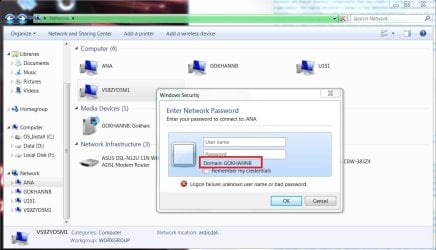
> in this case i assumed Tom was a domain because of the, connect TO Tom's domain.... security prompt screenshot.

The only place that I see the word Domain in info coming from boweasel is in the screenshot attached to the first post. In that screenshot, the prompt mentions Domain: SCOTT-HP, not Domain: TOM. In that same screenshot, TOM is listed as a device on the network. The MAC address for the device named TOM seems to indicate that TOM is a computer made by DELL.

When the user on the computer named SCOTT-HP clicks on the device named TOM in the Network section within Windows Explorer - authentication is automatically attempted. That authentication uses the credentials of the user that is currently logged on to the computer named SCOTT-HP or other credentials that the current user has stored. (There are more credential options - but let's leave it at that.)

If the automatic authentication fails, then the user of the computer named SCOTT-HP is asked to manually provide credentials for the authentication process. That is the prompt that you see in the first screenshot in this thread. If the user of the computer named SCOTT-HP cannot provide the correct credentials, then that user cannot access shared folders and printers (if any) on device named TOM.


The computer named SCOTT-HP is its own domain. In other words, it stores user credentials. The security prompt shown in that first screenshot is letting the user know where the operating system is going to look to verify the credentials being manually supplied for authentication to the device named TOM.
 

My Computer

Computer type
Laptop
Computer Manufacturer/Model Number
Employer provided Dell Latitude
OS
W7 Pro SP1 64bit
CPU
i7
Memory
8GB
Graphics Card(s)
Intel HD Graphics
Hard Drives
crappy SSD
Antivirus
Employer mandated Symantec Endpoint Protection
Browser
Pale Moon 64bit, IE11 64bit & Chrome 64bit
I am such an EFFING IDIOT!!!!

I cannot believe how unthinking I was, and I sincerely apologize to everybody's whose time I've stupidly wasted...

A couple of months ago a neighbor who I'm not particularly close to, asked me to see if I could get anything off of his ancient XP desktop. I plugged an Ethernet cord into an empty port on my modem/router and with some difficulty was able to copy his pictures, music and documents to a USB drive. I gave him the drive, he told me he didn't want the old XP, and that's where I left it - still plugged into my modem/router. I guess it goes without saying that this neighbor/acquaintance is named Tom.

When I went downstairs last night to cycle the modem and router I saw this unknown computer hooked into the unit. It took only a few seconds to realize what had happened. Apparently anything I plug into my modem/router shows up as additional network in Windows Explorer, something I either forgot or didn't know.

Along with my apologies I'm going to add to everybody's reputation. You all deserve so much more.
 

My Computer

Computer type
Laptop
OS
Windows 7 home premium 64 bit
CPU
AMD K10
Motherboard
Hewlett-Packard 1444 (Socket S1G4)
Memory
3.00GB Dual-Channel DDR3 @ 532MHz
Graphics Card(s)
ATI AMD M880G with ATI Mobility Radeon HD 4250 (HP)
Sound Card
Realtek
Screen Resolution
1366 x 768
Hard Drives
465GB Western Digital
Antivirus
MSE
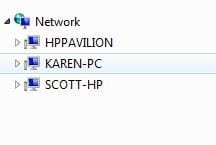
BTW, when I disconnected Tom's old desktop from my modem/router the network TOM disappeared from the Network heading on the left side of Windows Explorer. When I then plugged another old XP desktop into the same port here's what I got. I have no idea why one computer caused the individual's name to display while the other brought up the make and model.
 

Attachments

  • Capture23.JPG
    Capture23.JPG
    12 KB · Views: 12

My Computer

Computer type
Laptop
OS
Windows 7 home premium 64 bit
CPU
AMD K10
Motherboard
Hewlett-Packard 1444 (Socket S1G4)
Memory
3.00GB Dual-Channel DDR3 @ 532MHz
Graphics Card(s)
ATI AMD M880G with ATI Mobility Radeon HD 4250 (HP)
Sound Card
Realtek
Screen Resolution
1366 x 768
Hard Drives
465GB Western Digital
Antivirus
MSE
boweasel,
It was fun and I learned stuff. Glad that it was nothing bad.


GokAy,
Do you agree that Microsoft is calling a Windows 7 Home Basic computer or a Windows 7 Home Premium computer its own domain? I am basing that on the first screenshot in this thread and my testing on a Windows 7 Home Basic VM.
 

My Computer

Computer type
Laptop
Computer Manufacturer/Model Number
Employer provided Dell Latitude
OS
W7 Pro SP1 64bit
CPU
i7
Memory
8GB
Graphics Card(s)
Intel HD Graphics
Hard Drives
crappy SSD
Antivirus
Employer mandated Symantec Endpoint Protection
Browser
Pale Moon 64bit, IE11 64bit & Chrome 64bit
BTW, when I disconnected Tom's old desktop from my modem/router the network TOM disappeared from the Network heading on the left side of Windows Explorer. When I then plugged another old XP desktop into the same port here's what I got. I have no idea why one computer caused the individual's name to display while the other brought up the make and model.

The computer that Tom used was named TOM.

Device names show in that Network section, not users.

And devices can be set to not show in that list :-)
 

My Computer

Computer type
Laptop
Computer Manufacturer/Model Number
Employer provided Dell Latitude
OS
W7 Pro SP1 64bit
CPU
i7
Memory
8GB
Graphics Card(s)
Intel HD Graphics
Hard Drives
crappy SSD
Antivirus
Employer mandated Symantec Endpoint Protection
Browser
Pale Moon 64bit, IE11 64bit & Chrome 64bit
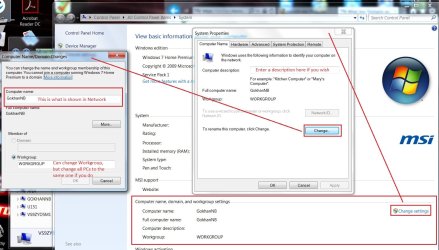
Boweasel: You can change the names of your computers by right clicking Computer (Desktop icon or in Start Menu) and selecting Properties.

computer name.jpg

UNI: Yes, matter of speaking, all standalone PCs are in a "domain" of their own. They are fully authoritative within their boundaries. It is the standard dialog where it says DOMAIN: PCNAME when no domain is found. I don't know why they worded like this, maybe too lazy to put an if statement there in the code? :D

network password.jpg
 

My Computer

Computer type
PC/Desktop
Computer Manufacturer/Model Number
Custom Build
OS
Windows 7 Ultimate x64 SP1
CPU
AMD Phenom 2 1090T
Motherboard
Gigabyte GA-890FXA-UD5
Memory
2x8GB Kingston HyperX Fury Black 1600Mhz Unganged
Graphics Card(s)
MSI GTX 970 Gaming 4G
Sound Card
Realtek On-Board HD 7.1 Audio / Logitech G35
Monitor(s) Displays
3xAcer GD245HQ
Screen Resolution
1920x1080
Hard Drives
Samsung 850 Pro 512GB SSD - OS /
WD Caviar Black SATA 3 - 1 TBx2 - Dynamic RAID 0 /
WD Caviar Green SATA 2 - 640GBx2 - Dynamic RAID 0 /
WD Caviar Green SATA 2 - 640GB - Internal Backup /
Seagate Barracude SATA 3 - 3TB - External Backup/ Sync
PSU
HighPower 1000W
Case
Cooler Master HAF 932
Cooling
Noctua NH-D14
Keyboard
Logitech G19
Mouse
Logitech G500
Internet Speed
100/4 Mbit Cable (100GB quota)
Antivirus
ZoneAlarm Extreme Security / MBAM Pro / MBAE Free / SAS Free
Browser
IE 11 - Firefox - Chrome
Other Info
Logitech F710/ G27/ G940/ Z5500 // TrackIR 5 // Nvidia 3D Surround Vision
Thanks GokAy. I had never thought much about that term as it applies to a Windows 7 Home xxxx install until this thread. Most of the computers that I work with are XP Pro or W7 Pro. I created a W7 Home Basic VM just for this thread so that I could see that Domain: PCname in the credentials prompt.

So, if each Windows computer is its own domain...
...then technically - one can ping a domain :-)
(I knew what you were saying.)


boweasel,
Don't mind us. We are just rambling on in a solved thread :-)
 

My Computer

Computer type
Laptop
Computer Manufacturer/Model Number
Employer provided Dell Latitude
OS
W7 Pro SP1 64bit
CPU
i7
Memory
8GB
Graphics Card(s)
Intel HD Graphics
Hard Drives
crappy SSD
Antivirus
Employer mandated Symantec Endpoint Protection
Browser
Pale Moon 64bit, IE11 64bit & Chrome 64bit
In XP there were a 3rd box for domains (as far as I remember - although domain\user or user@domain would work too. You could select a domain or local computer) while logging on. Can't remember if it was there in network too or just welcome screen though.
 

My Computer

Computer type
PC/Desktop
Computer Manufacturer/Model Number
Custom Build
OS
Windows 7 Ultimate x64 SP1
CPU
AMD Phenom 2 1090T
Motherboard
Gigabyte GA-890FXA-UD5
Memory
2x8GB Kingston HyperX Fury Black 1600Mhz Unganged
Graphics Card(s)
MSI GTX 970 Gaming 4G
Sound Card
Realtek On-Board HD 7.1 Audio / Logitech G35
Monitor(s) Displays
3xAcer GD245HQ
Screen Resolution
1920x1080
Hard Drives
Samsung 850 Pro 512GB SSD - OS /
WD Caviar Black SATA 3 - 1 TBx2 - Dynamic RAID 0 /
WD Caviar Green SATA 2 - 640GBx2 - Dynamic RAID 0 /
WD Caviar Green SATA 2 - 640GB - Internal Backup /
Seagate Barracude SATA 3 - 3TB - External Backup/ Sync
PSU
HighPower 1000W
Case
Cooler Master HAF 932
Cooling
Noctua NH-D14
Keyboard
Logitech G19
Mouse
Logitech G500
Internet Speed
100/4 Mbit Cable (100GB quota)
Antivirus
ZoneAlarm Extreme Security / MBAM Pro / MBAE Free / SAS Free
Browser
IE 11 - Firefox - Chrome
Other Info
Logitech F710/ G27/ G940/ Z5500 // TrackIR 5 // Nvidia 3D Surround Vision
Back
Top