Solved Remove xp completly using win7....?

Vinny

New member
Member
Local time
11:57 AM
Messages
66
Initially i was using xp and its obviously installed in c drive...and a few days back i installed win7 in the e-drive and i am starting to loving it..so i hardly use the xp..so how do i remove xp safetly or completly and use the installed 7..actually i am a rookie in this..so please guide me how to remove xp..and i dont know which is my primary os and which is secondary..i am so dump....
 

My Computer

OS
Windows 7 ultimate 32bit
Hello there.

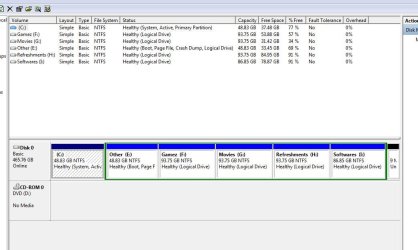
Please post a screenshot of your full Disk Management map, using the Snipping Tool & attaching the file using the paper clip icon in the reply box. In the meantime, you could download partitionwizard.
 

My Computer

Computer Manufacturer/Model Number
Custom/DIY
OS
Windows 7 Ultimate x64
CPU
Intel C2D E8400@4Ghz OC
Motherboard
ASUS P5Q-E, bios 2101
Memory
4x2GB Kingston HyperX 8500@1066Mhz
Graphics Card(s)
Nvidia GTS450 OC
Sound Card
Onboard SoundMax
Monitor(s) Displays
Samsung Syncmaster 17"
Screen Resolution
1280x1024
Hard Drives
WD6402AAEX-640GB(system), WD10EALX-1TB(storage), other external disks & docking stations
PSU
Corsair TX-750 V2
Case
Custom Tower
Cooling
Air: Arctic Cooling 2xF8 & F12; Akasa AK-968, 2xAK-HD-BL
Mouse
Gigabyte M6900
Internet Speed
10M/1M
Ok..
 

Attachments

  • Capture.JPG
    Capture.JPG
    71.2 KB · Views: 21

My Computer

OS
Windows 7 ultimate 32bit

My Computer

Computer type
PC/Desktop
Computer Manufacturer/Model Number
Self Built
OS
Win 10 Pro x64
CPU
Intel I5-2500K @3.3GHz
Motherboard
Asrock P67 Extreme4
Memory
16GB G.Skill Ripjaws X (4x4GB)
Graphics Card(s)
EVGA GeForce 750 Ti SC 2GB
Sound Card
ASUS Xonar DG 5.1 Channels 24-bit 96KHz PCI Interface Sound
Monitor(s) Displays
auria eq2367
Screen Resolution
1920 x 1080
Hard Drives
250GB Samsung 850 EVO SSD
1TB WD Blue
1TB Hitachi
PSU
SeaSonic X 650W 80 Plus Gold
Case
Corsair Obsidian 750D
Cooling
Corsair H60, Three 140mm case fans
Keyboard
Logitech Wireless Keyboard K520
Mouse
Logitech Wireless Mouse M310
Internet Speed
Wave Broadband ~ 100 dn 5 up
Antivirus
Windows Defender, Malwarebytes Premium
Browser
Edge, IE11, Chrome
Other Info
Laptop specs: HP g7-1365dx /
CPU: AMD A6-3420M APU with Radeon(tm) HD Graphics /
RAM: Crucial 8Gb (2x4Gb) /
SSD: Crucial M4-CT128M4SSD2 ATA Device/ FW 000F /
GFX: AMD Radeon HD 6520G /
OS: Windows 10 Pro x64
When i right click on my e drive i am not at all getting the option of "make the partition active"in the dialougf box..so how do i make my e drive active...?
 

My Computer

OS
Windows 7 ultimate 32bit
Hello Vinny, welcome to Seven Forums!


I just looked at your snip and as you have all Extended partition / Logical drives, except the XP C: partition, that has to be left intact so Windows 7 will boot, as a Windows Operating System has to have the boot files on a Primary partition to be able to boot.

If you do anything to the XP partition Windows 7 will not boot at all.


I will add another reply/post in a few minutes, let me think about the best way forward.
 

My Computer

Computer Manufacturer/Model Number
* BFK Customs *
OS
W 7 64-bit Ultimate
CPU
Intel Q9550 Yorkfield
Motherboard
ASUS P5Q Pro
Memory
8GB Dominator 8500C5D
Graphics Card(s)
ATI : XFX 5870
Sound Card
Realtek HD Audio 7-1
Monitor(s) Displays
1x 47" LCD HDMI & 3x 26" LCD HDMI
Screen Resolution
1920x1080P & 1920x1200
Hard Drives
1x 80GB Intel X25-M G2 SSD : 1x 500GB & 1x 640GB WD Caviar Black(s)
PSU
Corsair 620HX
Case
Cooler Master RC-690
Cooling
Tuniq Tower 120, 2x 140mm and 3x 120mm case fans
Keyboard
Microsoft 500
Mouse
Razer Diamondback 3G
Internet Speed
14 Mb/s
Other Info
1x Koutech 3Gb/s SATA HDD Hot Swap Rack
You are not dumb mate, we all have to learn. ;)


Here's what I would do and I feel it would be the easiest way forward.

I would use the information contained in this tutorial at the link below to reinstall Windows 7 to the XP partition after you have made back-ups of the data you need to save from the the XP partition.

That will get Windows 7 on a Primary partition at the front of the Hard Disk Drive and do away with XP at the same time, you can deal with the "old" Windows 7 later after you have the "new" Windows 7 running.

How to Do a Clean Installation with Windows 7

Just be sure to select the XP partition to do the install to durring the installation process as outlined in step #7 of the tutorial and be sure to post back with any further questions you may have and to keep us informed.
 

My Computer

Computer Manufacturer/Model Number
* BFK Customs *
OS
W 7 64-bit Ultimate
CPU
Intel Q9550 Yorkfield
Motherboard
ASUS P5Q Pro
Memory
8GB Dominator 8500C5D
Graphics Card(s)
ATI : XFX 5870
Sound Card
Realtek HD Audio 7-1
Monitor(s) Displays
1x 47" LCD HDMI & 3x 26" LCD HDMI
Screen Resolution
1920x1080P & 1920x1200
Hard Drives
1x 80GB Intel X25-M G2 SSD : 1x 500GB & 1x 640GB WD Caviar Black(s)
PSU
Corsair 620HX
Case
Cooler Master RC-690
Cooling
Tuniq Tower 120, 2x 140mm and 3x 120mm case fans
Keyboard
Microsoft 500
Mouse
Razer Diamondback 3G
Internet Speed
14 Mb/s
Other Info
1x Koutech 3Gb/s SATA HDD Hot Swap Rack
Using Acronis True Image free version which comes with any WD or Seagate HD (on their Support Downloads webpage) you can convert a Logical partition to Primary, mark Active, and also change the drive letter during reimaging to another partition. This would be the easiest way to move it over to C from the Extended, then boot the WIn7 DVD or Repair CD to run Startup Repair up to 3 separate times with reboots.

Others may know if free Macrium Reflect or Paragon 11 also have this flexibility - Win7 imaging doesn't.
 
As drive E has Win 7 and drive C has XP on it, download(if you haven't already) Partition Wizard bootable CD, burn the image to a CD (use ImgBurn or any other burning software).
When you do all the above, boot from the Partition Wiz CD,
rightclick C>Modify>Set as Inactive, OK.

Next - rightclick E>Modify>Convert to Primary, OK.

Next - rightclick E>Modify>Set to Active, OK. Apply all steps.

Next boot into Win 7 DVD repair console or repair CD, click through to Recovery Tools list to run Startup Repair up to 3 separate times with reboots to write the System MBR to Windows 7 and start it.
Startup Repair - Run 3 Separate Times
Here's a tutorial explaining the use of:
Partition Wizard : Use the Bootable CD

Let me know if you have any problems.
 

My Computer

Computer Manufacturer/Model Number
Custom/DIY
OS
Windows 7 Ultimate x64
CPU
Intel C2D E8400@4Ghz OC
Motherboard
ASUS P5Q-E, bios 2101
Memory
4x2GB Kingston HyperX 8500@1066Mhz
Graphics Card(s)
Nvidia GTS450 OC
Sound Card
Onboard SoundMax
Monitor(s) Displays
Samsung Syncmaster 17"
Screen Resolution
1280x1024
Hard Drives
WD6402AAEX-640GB(system), WD10EALX-1TB(storage), other external disks & docking stations
PSU
Corsair TX-750 V2
Case
Custom Tower
Cooling
Air: Arctic Cooling 2xF8 & F12; Akasa AK-968, 2xAK-HD-BL
Mouse
Gigabyte M6900
Internet Speed
10M/1M
The problem is that you have to move all of the data off to delete all of the other logical subpartitions to get PW CD to convert E to Primary so it will mark Active and accept Repairs. PW can also rightclick C to delete it and Resize E into its space.

This is why I suggested using imaging instead, especially free Acronis's feature which allows you to choose Primary Active while reimaging, even change the drive letter. You will still need to run the three Startup Repairs to write the System boot files to Win7 when done.

It might be easier just to reinstall.
 
First thank all of you for responding...and you all are making me confused...i think the easy method is of "bare foot kid"...he says to install the 7 once again to c drive and then format the existing win7 ...but my problem is i dont have the 7 cd ..i installed it from a pen drive...so can i again install the seven to c-drive using my pen drive..and if i install the the seven again to c..will the newly installed 7 overwrite the existing xp on c drive or it will be accompanied along the xp making me leave with 3 os's....?
 

My Computer

OS
Windows 7 ultimate 32bit
You are not dumb mate, we all have to learn. ;)


Here's what I would do and I feel it would be the easiest way forward.

I would use the information contained in this tutorial at the link below to reinstall Windows 7 to the XP partition after you have made back-ups of the data you need to save from the the XP partition.

That will get Windows 7 on a Primary partition at the front of the Hard Disk Drive and do away with XP at the same time, you can deal with the "old" Windows 7 later after you have the "new" Windows 7 running.

How to Do a Clean Installation with Windows 7

Just be sure to select the XP partition to do the install to durring the installation process as outlined in step #7 of the tutorial and be sure to post back with any further questions you may have and to keep us informed.

It might be easier just to reinstall.

YES,Best way.

First thank all of you for responding...and you all are making me confused...i think the easy method is of "bare foot kid"...he says to install the 7 once again to c drive and then format the existing win7 ...but my problem is i dont have the 7 cd ..i installed it from a pen drive...so can i again install the seven to c-drive using my pen drive..and if i install the the seven again to c..will the newly installed 7 overwrite the existing xp on c drive or it will be accompanied along the xp making me leave with 3 os's....?

Yes, you can use your pen drive.
 

My Computer

OS
ME/XP/Vista/Win7
Ok experts ...another thing is that i dont need any back up from xp partition..is it necessary to take any file as back up..? Then this is what i do ..
i open my windows 7(or should i do it with xp) installed in e drive and then plug in the pendrive containing win7 installer file..i install the 7 again to the c drive containing the xp and the new win7 takes over the xp removing it...? Then i have to format the old win7 in e drive...! Is that it...? And will my other drives data remaini unharmed...?
 

My Computer

OS
Windows 7 ultimate 32bit
Reply guys...please...!
 

My Computer

OS
Windows 7 ultimate 32bit
Ok experts ...another thing is that i dont need any back up from xp partition..is it necessary to take any file as back up..? Then this is what i do ..
i open my windows 7(or should i do it with xp) installed in e drive and then plug in the pendrive containing win7 installer file..i install the 7 again to the c drive containing the xp and the new win7 takes over the xp removing it...? Then i have to format the old win7 in e drive...! Is that it...? And will my other drives data remaini unharmed...?
In that case, if you don't need back ups of any of the 2 OS,
the simplest thing to do is this:

1. Boot from your USB pendrive which has the Win7 installer
2. Set your language preferences and click on the Next button
3. Click on the Install Now button to start the installation & check the I accept the license termsbox and click on Next
4. Click on the Custom (advanced) option
5. In the where do you want to install Windows screen, click the Drive options (advanced), then just delete C & E partitions & keep the rest. This will give you unallocated space (almost 100GB). Now create a new partition in the unallocated space and install Windows 7 there; it will create the "system reserved" partition by default.
There you go, quick, clean and hassle free. :)
Here are some useful links if you need them:
clean install windows 7
partition the hard drive in a windows 7 install
 

My Computer

Computer Manufacturer/Model Number
Custom/DIY
OS
Windows 7 Ultimate x64
CPU
Intel C2D E8400@4Ghz OC
Motherboard
ASUS P5Q-E, bios 2101
Memory
4x2GB Kingston HyperX 8500@1066Mhz
Graphics Card(s)
Nvidia GTS450 OC
Sound Card
Onboard SoundMax
Monitor(s) Displays
Samsung Syncmaster 17"
Screen Resolution
1280x1024
Hard Drives
WD6402AAEX-640GB(system), WD10EALX-1TB(storage), other external disks & docking stations
PSU
Corsair TX-750 V2
Case
Custom Tower
Cooling
Air: Arctic Cooling 2xF8 & F12; Akasa AK-968, 2xAK-HD-BL
Mouse
Gigabyte M6900
Internet Speed
10M/1M
Ok experts ...another thing is that i dont need any back up from xp partition..is it necessary to take any file as back up..? Then this is what i do ..
i open my windows 7(or should i do it with xp) installed in e drive and then plug in the pendrive containing win7 installer file..i install the 7 again to the c drive containing the xp and the new win7 takes over the xp removing it...? Then i have to format the old win7 in e drive...! Is that it...? And will my other drives data remain unharmed...? And how do i remove my old windows 7..just format it...? Or format it using partition wizard..?
 

My Computer

OS
Windows 7 ultimate 32bit
Look at the post above yours...
 

My Computer

Computer Manufacturer/Model Number
Custom/DIY
OS
Windows 7 Ultimate x64
CPU
Intel C2D E8400@4Ghz OC
Motherboard
ASUS P5Q-E, bios 2101
Memory
4x2GB Kingston HyperX 8500@1066Mhz
Graphics Card(s)
Nvidia GTS450 OC
Sound Card
Onboard SoundMax
Monitor(s) Displays
Samsung Syncmaster 17"
Screen Resolution
1280x1024
Hard Drives
WD6402AAEX-640GB(system), WD10EALX-1TB(storage), other external disks & docking stations
PSU
Corsair TX-750 V2
Case
Custom Tower
Cooling
Air: Arctic Cooling 2xF8 & F12; Akasa AK-968, 2xAK-HD-BL
Mouse
Gigabyte M6900
Internet Speed
10M/1M
Ok...i was not able to delete the partiton and make it one..so i installed new 7 to c..now how do i remove my old win7 in e drive..so that i get only one during boot..
 

My Computer

OS
Windows 7 ultimate 32bit
Please guys this is my last question..how do i remove my old win7 in e drive safetly..just format it(using windows option or partition wizard) so that i can use the space...
 

My Computer

OS
Windows 7 ultimate 32bit

My Computer

Computer type
PC/Desktop
Computer Manufacturer/Model Number
Self Built
OS
Win 10 Pro x64
CPU
Intel I5-2500K @3.3GHz
Motherboard
Asrock P67 Extreme4
Memory
16GB G.Skill Ripjaws X (4x4GB)
Graphics Card(s)
EVGA GeForce 750 Ti SC 2GB
Sound Card
ASUS Xonar DG 5.1 Channels 24-bit 96KHz PCI Interface Sound
Monitor(s) Displays
auria eq2367
Screen Resolution
1920 x 1080
Hard Drives
250GB Samsung 850 EVO SSD
1TB WD Blue
1TB Hitachi
PSU
SeaSonic X 650W 80 Plus Gold
Case
Corsair Obsidian 750D
Cooling
Corsair H60, Three 140mm case fans
Keyboard
Logitech Wireless Keyboard K520
Mouse
Logitech Wireless Mouse M310
Internet Speed
Wave Broadband ~ 100 dn 5 up
Antivirus
Windows Defender, Malwarebytes Premium
Browser
Edge, IE11, Chrome
Other Info
Laptop specs: HP g7-1365dx /
CPU: AMD A6-3420M APU with Radeon(tm) HD Graphics /
RAM: Crucial 8Gb (2x4Gb) /
SSD: Crucial M4-CT128M4SSD2 ATA Device/ FW 000F /
GFX: AMD Radeon HD 6520G /
OS: Windows 10 Pro x64
Back
Top