remove xp dual boot from win7 original installation

paascal

New member
Member
Local time
6:16 AM
Messages
74
hello,

original install win7 on msata SSD
second install xp on XP partition that is on secondary HDD (that never installed properly)

deleted the xp partion, installed XP with vmware and it works fine (the one you see on the screen captures attached

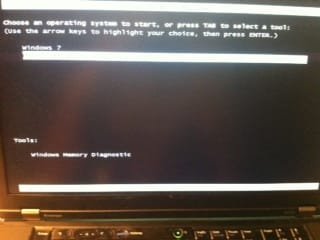
unfortunatly, i still have the dual boot option that shows up and i cand get it to go away, any idea?

thanks
 

Attachments

  • admin.pdf
    admin.pdf
    69.3 KB · Views: 10
  • photo 1.JPG
    photo 1.JPG
    15.4 KB · Views: 151
  • photo 2.JPG
    photo 2.JPG
    13 KB · Views: 110

My Computer My Computer

Computer type
PC/Desktop
Computer Manufacturer/Model Number
lenovo w520
OS
win 7 u x64
Memory
8gb
Graphics Card(s)
intel hd graphics 3000 & nvidia quadro 1000m
Have you tried removing it using msconfig.exe?

But would you like to talk about your SSD install. I assume you imaged, or used some other method to move your old install?
 

My Computer My Computer

Computer Manufacturer/Model Number
Homebuilt
OS
Windows 7 x64
CPU
i7-2600K
Motherboard
Asus P8Z77-v Pro
Memory
8 G
Graphics Card(s)
GTX 480
Sound Card
Onboard
Monitor(s) Displays
LG W2753V
Screen Resolution
1920x1080
Hard Drives
Crucial M4 128 G SSD
noything shows up in msconfig

the first os isntall is win7 on the ssd.

the xp install went on a secondary hdd where i made a partition ton try to have dual boot. i was never able have win xp x64 work so i deleted the that xp partition and installed xp x64 thru vmware on that partition.

problem is, the dual boot is still there! and i cant get rid of it!
 

Attachments

My Computer My Computer

Computer type
PC/Desktop
Computer Manufacturer/Model Number
lenovo w520
OS
win 7 u x64
Memory
8gb
Graphics Card(s)
intel hd graphics 3000 & nvidia quadro 1000m
My Computer My Computer

Computer type
PC/Desktop
Computer Manufacturer/Model Number
Skylake Special #666
OS
Windows 10 Pro x64
CPU
Intel Core i7 6700K
Motherboard
Asus Sabertooth Z170 Mark 1
Memory
GSkill TridentZ RGB 16GB 3600 16-16-16-36
Graphics Card(s)
EVGA GTX 980 Ti SC x2
Sound Card
Realtek High Definition
Monitor(s) Displays
AOC G2460PG
Screen Resolution
1920 x 1080 144Hz
Hard Drives
Samsung 860 Pro 256GB, Seagate Barracuda 4TB x2
PSU
EVGA 1000 P2, EVGA White Custom Braided Cables
Case
Corsair Vengeance C70 Gunmetal Black
Cooling
Corsair H100i v2, Corsair ML120 x2, Thermal Grizzly Kryonaut
Keyboard
Logitech G910 Orion Spectrum
Mouse
Logitech G700s
Internet Speed
Verizon Fios Quantum Gateway 75/75
Antivirus
Windows Defender, Malwarebytes Free 3.8.3
Browser
Chrome
Other Info
Corsair SP120 x4, LG Blu-ray Drive, Durabrand HT-395 100 Watt Dolby Digital Amp, Corsair H2100 Wireless 7.1 Headset
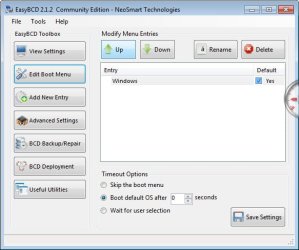
i dont see where to delete the xp of the dual boot or remove the dual boot!
 

Attachments

  • bcd.jpg
    bcd.jpg
    37.2 KB · Views: 11

My Computer My Computer

Computer type
PC/Desktop
Computer Manufacturer/Model Number
lenovo w520
OS
win 7 u x64
Memory
8gb
Graphics Card(s)
intel hd graphics 3000 & nvidia quadro 1000m
Tic Skip the boot menu. Save settings and reboot.
 

My Computer My Computer

Computer type
PC/Desktop
Computer Manufacturer/Model Number
Skylake Special #666
OS
Windows 10 Pro x64
CPU
Intel Core i7 6700K
Motherboard
Asus Sabertooth Z170 Mark 1
Memory
GSkill TridentZ RGB 16GB 3600 16-16-16-36
Graphics Card(s)
EVGA GTX 980 Ti SC x2
Sound Card
Realtek High Definition
Monitor(s) Displays
AOC G2460PG
Screen Resolution
1920 x 1080 144Hz
Hard Drives
Samsung 860 Pro 256GB, Seagate Barracuda 4TB x2
PSU
EVGA 1000 P2, EVGA White Custom Braided Cables
Case
Corsair Vengeance C70 Gunmetal Black
Cooling
Corsair H100i v2, Corsair ML120 x2, Thermal Grizzly Kryonaut
Keyboard
Logitech G910 Orion Spectrum
Mouse
Logitech G700s
Internet Speed
Verizon Fios Quantum Gateway 75/75
Antivirus
Windows Defender, Malwarebytes Free 3.8.3
Browser
Chrome
Other Info
Corsair SP120 x4, LG Blu-ray Drive, Durabrand HT-395 100 Watt Dolby Digital Amp, Corsair H2100 Wireless 7.1 Headset
Skip boot menu doesn't work
 

My Computer My Computer

Computer type
PC/Desktop
Computer Manufacturer/Model Number
lenovo w520
OS
win 7 u x64
Memory
8gb
Graphics Card(s)
intel hd graphics 3000 & nvidia quadro 1000m
Tried startup repair 3 times doeant work... I can't wipe it theres 400 gig I need isn't there another way?!
 

My Computer My Computer

Computer type
PC/Desktop
Computer Manufacturer/Model Number
lenovo w520
OS
win 7 u x64
Memory
8gb
Graphics Card(s)
intel hd graphics 3000 & nvidia quadro 1000m
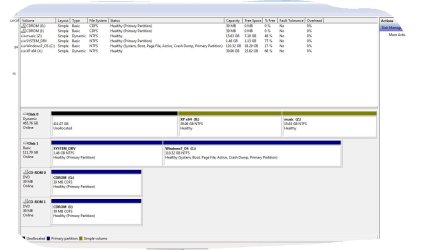
Please post back a screenshot of your maximized Disk Management drive map and listings:

1. Type Disk Management in Start Search box.
2. Open Disk Mgmt. window and maximize it.
3. Type Snipping Tool in Start Search box.
4. Open Snipping Tool, choose Rectangular Snip, draw a box around full map and all listings.
5, Save Snip, attach using paper clip in Reply Box.

Tell us what is on each partition.
 
it was in the pdf of the first message.,. here it is in jpg
 

Attachments

  • 03-08-2012 0-49-08.jpg
    03-08-2012 0-49-08.jpg
    91.8 KB · Views: 18

My Computer My Computer

Computer type
PC/Desktop
Computer Manufacturer/Model Number
lenovo w520
OS
win 7 u x64
Memory
8gb
Graphics Card(s)
intel hd graphics 3000 & nvidia quadro 1000m
Make sure the Win7 HD is set first to boot in BIOS setup, then unplug the XP HD to see if WIn7 can boot without it as it should.

If so then plug back in the XP HD, Delete the XP partition and the 1.46 gb System drive using free Partition Wizard bootable CD partition-Specific wipe: Partition Wizard Use the Bootable CD. This may be enough to rid the ghost listing.

If you're virtualizing XP in Win7 then I would install it to Win7.
 
i deleted the 1.46gb and tu dual boot still shows up NOT LOL... :s
 

My Computer My Computer

Computer type
PC/Desktop
Computer Manufacturer/Model Number
lenovo w520
OS
win 7 u x64
Memory
8gb
Graphics Card(s)
intel hd graphics 3000 & nvidia quadro 1000m
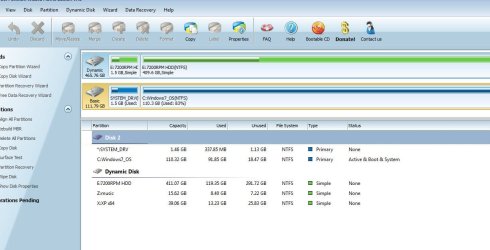
the dual boot xp is on the dynamic disk, used to be on drive x:, i deleted it and reinstalled on the x drive my actual vmware xp there that works fine.

i just need to get rid of the dual boot. i tried rebuild mbr, dual boot is still there
 

Attachments

  • pwiz.jpg
    pwiz.jpg
    80.9 KB · Views: 12

My Computer My Computer

Computer type
PC/Desktop
Computer Manufacturer/Model Number
lenovo w520
OS
win 7 u x64
Memory
8gb
Graphics Card(s)
intel hd graphics 3000 & nvidia quadro 1000m
You have bigger problems now by converting the HD to Dynamic Disk which is meant to span partitions across multiple HD's not on the same HD. This cannot happen without ignoring clear warnings that this will happen with dire consequences. Why?

You can use PW installed version partition wizard 4.2 free.zip to unzip, install and then follow these steps to convert dynamic disk to basic disk with Partition Wizard.

In the process you've also shifted the System boot files from the System partition into C, which may be causing the Boot menu issue. I would delete that partition, resize C to the left using Partition Wizard bootable CD: http://www.partitionwizard.com/video-help/moveresizepartition/moveresizepartition.html.

Then rebuild MBR since the boot sector has been resized. Have the Win7 DVD or REpair CD standing by if necessary to run Startup Repairs as well.
 
Last edited:
best **** up so far, i deleted the wrong partition with computer management :S, is there a trick to undelete the partition? i did delete volume from the computer management :S
 

My Computer My Computer

Computer type
PC/Desktop
Computer Manufacturer/Model Number
lenovo w520
OS
win 7 u x64
Memory
8gb
Graphics Card(s)
intel hd graphics 3000 & nvidia quadro 1000m
Which partition did you incorrectly delete? If it's formatted or resized over then it's data may be lost. If not you can use Partition Wizard Recovery Wizard to detect and undelete the partition if the space it occupied is still available: http://www.partitionwizard.com/video-help/partition-recovery-wizard/partition-recovery-wizard.html

There is a discrepancy between the Partition Wizard screenshot's listings showing System Disk gone and drive map showing it still there. Please download and burn to CD the PW Boot CD to get a correct reading. You can find the the boot CD for version 4.2 which still offers Dynamic conversion for free here: pw422.zip ISO - Windows Live
 

My Computer My Computer

Computer type
PC/Desktop
Computer Manufacturer/Model Number
HP Pavilion P7-1010
OS
Windows 7 Professional x64 Service Pack 1
CPU
AMD Athlon X4 645
Motherboard
Foxxcon N-Alvorix RS880
Memory
6GB DDR3 1066
Graphics Card(s)
Sapphire Radeon HD 5670 512MB GDDR5
Sound Card
Realtek Integrated Audio
Monitor(s) Displays
HP 2011x
Screen Resolution
1600x900
Hard Drives
1. Crucial M4 128GB SSD
2. 1TB Seagate Barracuda 7200.12 RPM
3. 1TB Western Digital Caviar Green 5400RPM
PSU
Seasonic S12 II Bronze 380 Watt
Case
HP OEM
Cooling
Coolermaster Heatsink, AVC Case Fan
Keyboard
HP OEM- Made by Chicony
Mouse
HP OEM- Made by Logitech
Internet Speed
20MBit Down/4 Up
Antivirus
Microsoft Security Essentials
Browser
Internet Explorer 10
here is the screen cap
 

Attachments

  • Capture.JPG
    Capture.JPG
    92 KB · Views: 9

My Computer My Computer

Computer type
PC/Desktop
Computer Manufacturer/Model Number
lenovo w520
OS
win 7 u x64
Memory
8gb
Graphics Card(s)
intel hd graphics 3000 & nvidia quadro 1000m
Back
Top