remove xp dual boot from win7 original installation

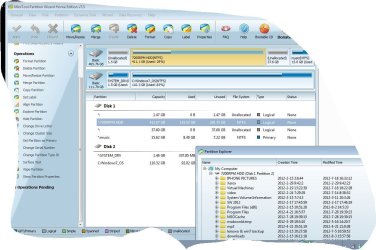
I see that you deleted your data partition. I would immediately try undeleting it using Partition Recovery Wizard of Partition Wizard.

Watch the video here to see how it is done: How to activate Partition Recovery Wizard of partition magic? Partition Wizard Partition Recovery Wizard Video Help.

I do not know why you would delete your main data partition when you were only to Convert the disk to Basic. You have a video tutorial on how to do that: http://www.partitionwizard.com/video-help/diskconvertdynamic/diskconvertdynamic.html

Whether you can recover a Dynamic partition is questionable. But if you do then immediately convert the HD to Basic which is all you were to be doing.
 
thanks for your help, i guess im on the right way :)
i was able to remov the dynamic thing. partitions seem to be back and patition wizzard if i double click i can see my files i had before, it's just i the dont appear in the file explorer...

i wasnt able to "recuperate" all partitions.. but i have the ones i wanted
what am i missing?
 

Attachments

  • snip.JPG
    snip.JPG
    138.1 KB · Views: 8
  • Capture.JPG
    Capture.JPG
    21.4 KB · Views: 20

My Computer My Computer

At a glance

win 7 u x648gbintel hd graphics 3000 & nvidia quadro 1000m
Computer type
PC/Desktop
Computer Manufacturer/Model Number
lenovo w520
OS
win 7 u x64
Memory
8gb
Graphics Card(s)
intel hd graphics 3000 & nvidia quadro 1000m
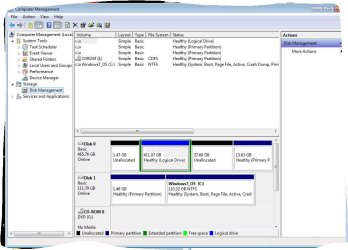
Can we see a Disk Mgmt screenshot as well?

Why are there Program files on the large data partition?

I would run a Disk Check on all partitions. This can be done also using PW installed version by rightclicking on each lettered partition to Check File System.
 
i just have a 125gb msata ssd... so most of my soft that dont need to go fast and my work emails are on the 7200rpm hdd partition... the apps i was to run fast are on the ssd (with win7)
 

Attachments

  • Capture.JPG
    Capture.JPG
    85.4 KB · Views: 9

My Computer My Computer

At a glance

win 7 u x648gbintel hd graphics 3000 & nvidia quadro 1000m
Computer type
PC/Desktop
Computer Manufacturer/Model Number
lenovo w520
OS
win 7 u x64
Memory
8gb
Graphics Card(s)
intel hd graphics 3000 & nvidia quadro 1000m
Even better is to put the User folders on the HD linked to the SSD via the related Library - Include a Folder - Windows 7 Forums

This should make enough space to install the programs on the SSD where they will benefit most.

If you're extra careful you can gather the Unallocated space into whichever adjacent partition you want it using Partition Wizard bootable CD Resize function, for which I linked a video tutorial earlier. This will also check the file system at the same time.
http://www.partitionwizard.com/video-help/moveresizepartition/moveresizepartition.html
 
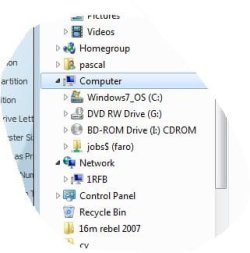
how can i get to see my recovered partitions in the drive tree? i cant see them in there... all i see is my c: (ssd) and the cd/dvd drive
 

My Computer My Computer

At a glance

win 7 u x648gbintel hd graphics 3000 & nvidia quadro 1000m
Computer type
PC/Desktop
Computer Manufacturer/Model Number
lenovo w520
OS
win 7 u x64
Memory
8gb
Graphics Card(s)
intel hd graphics 3000 & nvidia quadro 1000m
i dont need the others ill just reformat them... the ones i need atre the 411Gb and 15.6 GB
 

My Computer My Computer

At a glance

win 7 u x648gbintel hd graphics 3000 & nvidia quadro 1000m
Computer type
PC/Desktop
Computer Manufacturer/Model Number
lenovo w520
OS
win 7 u x64
Memory
8gb
Graphics Card(s)
intel hd graphics 3000 & nvidia quadro 1000m
THANK YOU SO MUCH FOR YOUR HELP!

the stupid dual boot is still there but you fixed my partitions :)
 

My Computer My Computer

At a glance

win 7 u x648gbintel hd graphics 3000 & nvidia quadro 1000m
Computer type
PC/Desktop
Computer Manufacturer/Model Number
lenovo w520
OS
win 7 u x64
Memory
8gb
Graphics Card(s)
intel hd graphics 3000 & nvidia quadro 1000m
i reinstalled everytthing to get rid of the stupid dual booot i coulnd get rid of and that wasnt doing anything...

now, lets say i had xp on another drive, i would plug this drive in and then add the xp partition with partition wizzard to have a dual boot, would this mess up anything to my win7 (like being unable to remove the dual boot like it happened previously) or would it work nicely?

thanks
 

My Computer My Computer

At a glance

win 7 u x648gbintel hd graphics 3000 & nvidia quadro 1000m
Computer type
PC/Desktop
Computer Manufacturer/Model Number
lenovo w520
OS
win 7 u x64
Memory
8gb
Graphics Card(s)
intel hd graphics 3000 & nvidia quadro 1000m
If you have XP on a separate HD, I would keep it separate for best overall performance.

Install it with the other HD unplugged, or plug it in, boot it using the one-time BIOS Boot Menu key.

Keep Win7 HD set first HD to boot in BIOS setup.
 
If you have XP on a separate HD, I would keep it separate for best overall performance.

Install it with the other HD unplugged, or plug it in, boot it using the one-time BIOS Boot Menu key.

Keep Win7 HD set first HD to boot in BIOS setup.

sorry for asking just want to be sure considering how much time it takes to install all this stuff :)

So youre saying not to bother with dual boot and that if xp is installed on a seperate hdd, witout the win7 hdd on the computer, that i just need to set boot priority to the xp hdd to boot xp and set to win7 to boot in win7?
 

My Computer My Computer

At a glance

win 7 u x648gbintel hd graphics 3000 & nvidia quadro 1000m
Computer type
PC/Desktop
Computer Manufacturer/Model Number
lenovo w520
OS
win 7 u x64
Memory
8gb
Graphics Card(s)
intel hd graphics 3000 & nvidia quadro 1000m
But the xp should be installed without win7 hdd being there... I dont want to end up with a dual boot that I cAnt remove!

If i install xp without the win7 hdd in, you say I could add a dual boot with bcd and remove it ? Like I said when I did it with win7 hdd in I couldn't see the xp boot note in bcd...

Thanks
 

My Computer My Computer

At a glance

win 7 u x648gbintel hd graphics 3000 & nvidia quadro 1000m
Computer type
PC/Desktop
Computer Manufacturer/Model Number
lenovo w520
OS
win 7 u x64
Memory
8gb
Graphics Card(s)
intel hd graphics 3000 & nvidia quadro 1000m
So youre saying not to bother with dual boot and that if xp is installed on a seperate hdd, witout the Windows 7 hdd on the computer, that i just need to set boot priority to the xp hdd to boot xp and set to Windows 7 to boot in Windows 7?
Absolutely - that is the best way of doing it provided you unplug the Win7 HDD during the XP installation. Both systems won't 'know' each other.

For cleaning up a dual boot configuration, I have written this tutorial - just in case you run into this situation again. If you do it right, it is not a big deal.
 

My Computer My Computer

At a glance

Vista, Windows7, Mint Mate, Zorin, Windows 8from 1.6GHz Duo to i7
Computer Manufacturer/Model Number
HP, Dell, Gateway, Toshiba - 4 laptops and 2 desktops
OS
Vista, Windows7, Mint Mate, Zorin, Windows 8
CPU
from 1.6GHz Duo to i7
Monitor(s) Displays
2x HP w2207
Hard Drives
5x HDD, 7x SSD, 12x Externals
Keyboard
with trackball - no mices
Mouse
Trackball mice
Internet Speed
DSL 6000
I suggested you use the cleanest method when you have OS's on separate HD's which is to boot your choice via the BIOS. Then the OS HD's can come and go as you please.

However if the HD's are separately bootable like that, then you can also if you prefer add the other OS from Win7 using EasyBCD and each HD will still remain separately bootable and can come and go as you please.

You may need to remove it's listing from EasyBCD if it remains after being disconnected.
 
xpmode

hello

i was wondering if it was possible to use more processors when in xpmode, it seems like it runs only on 1 core of 1 processors (i have 4 processors)

thanks
 

My Computer My Computer

At a glance

win 7 u x648gbintel hd graphics 3000 & nvidia quadro 1000m
Computer type
PC/Desktop
Computer Manufacturer/Model Number
lenovo w520
OS
win 7 u x64
Memory
8gb
Graphics Card(s)
intel hd graphics 3000 & nvidia quadro 1000m
Searching the web I can only find a recommendation for WMWare as using more than one core.
 
Back
Top