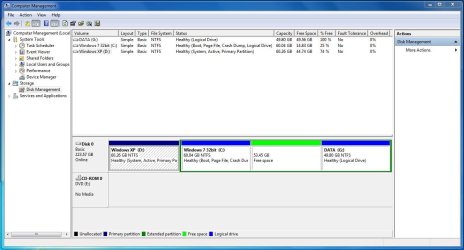
The System Active flags show us the 7 System Boot files are on XP partition which is why it won't delete yet. These need to be moved to 7 partition, but it's a Logical partition which can't be marked Active to receive the System boot files until it's converted to Primary. Here's how:
Boot free
Partition Wizard bootable CD, rightclick on C to Modify>Set to Primary, click OK.
Then rightclick again on C to Modify>Set to Active, click OK.
Now click on the Win7 HD # to higlight it, from Disk tab select Rebuild MBR, click OK. Apply all steps.
Reboot, if Win7 will not start boot into the Win7 DVD or
System Repair Disk to run
Startup Repair - Run up to 3 Separate Times until Win7 starts and the System Active flags are on C now.
You can now boot back into PW CD to rightclick XP to Delete, OK. Then rightclick C to Resize, drag left border all the way to the left to take up the preferrred lower HD address for an OS, readjust right border as you wish including the Free Space if you want., click OK, then Apply all steps.
Win7 should reboot although in rare cases it will require repair again since you just resized on the boot sector, but you already know it is going to start which is why we kept the XP partition around until the boot files moved successfully.