Removing Add-Ons

CJW

New member
Power User
VIP
Local time
2:17 PM
Messages
439
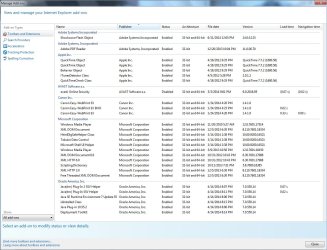
I have 7 Pro 64Bit w/SP1 & IE10 w/all sorts of Add-Ons.
Which Add-Ons are TRUELLY needed & how do I remove what I do not need/want?
 

Attachments

  • Add-Ons.jpg
    Add-Ons.jpg
    155.7 KB · Views: 12

My Computer

Computer type
PC/Desktop
Computer Manufacturer/Model Number
Self built comfuser
OS
10 Pro. 64Bit
CPU
AMD FX 4100, 4-Core Black Edition. Socket AM3+ ~ 3.60GHz
Motherboard
ASUS M5A97 LE R2.0
Memory
2x 4GB Kingston HyperX DDR3-1866 (PC3-14900) - 8GB Total
Graphics Card(s)
ASUS Radeon HD 6670-2GD3
Sound Card
Onboard High Definition Audio Device
Monitor(s) Displays
HP 2009m LCD
Screen Resolution
1600x900, True Color (32bit), 60Hertz
Hard Drives
WD Blue - 1TB, 3D NAND - SATA SSD
PSU
XFX Pro 450W Core Edition - Fully Wired
Case
Antec Super Lanboy
Cooling
Stock CPU fan + 2 (1 front, 1 back) 120mm Antec fans
Keyboard
Logitech MK700/MK710
Mouse
Logitech M705
Internet Speed
Frontier FiOS 50/50
Antivirus
Windows Security
Browser
Vivaldi
Other Info
1x ASUS DRW-24B1ST Multi-DVD Rewriter
1x RocketFish AIO Media Card Reader
1x WD 1TB Passport USB External Drive

My Computer

Computer type
PC/Desktop
Computer Manufacturer/Model Number
Self built custom
OS
64-bit Windows 11 Pro for Workstations
CPU
Intel i7-8700K OC'd to 5 GHz
Motherboard
ASUS ROG Maximus XI Formula Z390
Memory
64 GB (4x16GB) G.SKILL TridentZ RGB DDR4 3600 MHz
Graphics Card(s)
ASUS ROG-STRIX-GTX1080TI-O11G-GAMING
Sound Card
Integrated
Monitor(s) Displays
2 x Samsung Odyssey G7 27"
Screen Resolution
2560x1440
Hard Drives
1TB Samsung 990 PRO M.2,
4TB Samsung 990 PRO PRO M.2,
TerraMaster F8 SSD Plus NAS
PSU
Seasonic Prime Titanium 850W
Case
Thermaltake Core P3
Cooling
Corsair Hydro H115i
Keyboard
Logitech wireless K800
Mouse
Logitech MX Master 4
Internet Speed
2 Gb/s Download and 100 Mb/s Upload
Antivirus
Malwarebyte Anti-Malware Premium
Browser
Google Chrome
Other Info
Logitech Z625 speaker system,
Logitech BRIO 4K Pro webcam,
HP Color LaserJet Pro MFP M477fdn,
APC SMART-UPS RT 1000 XL - SURT1000XLI,
Galaxy S23 Plus phone
Hi,
Along with Brink's link,
Modern browsers really don't need any of the add-ons you posted,
The only exceptions might be Flash and reader,
ITunes/ QuickTime section might be the easiest to uninstall the programs offered by Apple but that depends on if you actually use Quicktime it's offered by Apple on every update to iTunes but it is optional,

You really don't need Java from Oracle unless you play allot of online games but even then it's best to Disable the browser add-ons until you actually need them,

So from the list there is only 2 which you might really need not even Avast's add-ons are needed,
Reset using this process will disable all except Flash not sure why flash is excluded though ?

See a tutorial here to Reset Internet explorer,
http://www.sevenforums.com/tutorials/1222-internet-explorer-reset.html
After Resetting ie9 or 10 click the images to zoom in,
I would add this to the tutorials process
Full process,
Reset process first opening Internet explorer
 

My Computer

Computer type
PC/Desktop
Computer Manufacturer/Model Number
Custom assembled by me :}
OS
Win-7-Pro64bit 7-H-Prem-64bit
CPU
i7-5930K 2nd i9-9940x both water blocked VRM's too
Motherboard
ASUS SABERTOOTH X99 2nd ASUS x299 Apex
Memory
Trident-z 3200C14 2nd Trident-z 3600C16
Graphics Card(s)
EVGA 1080ti ftw3 2nd Titan Xp both water blocked
Sound Card
Built-in Realtek
Monitor(s) Displays
1-AOC G2460PG 24"G-Sync 144Hz/ 2nd 1-ASUS VG248QE 24" 144Hz
Screen Resolution
1920 x 1080 144Hz
Hard Drives
2-Samsung M.2 Evo & Evo Plus
2-Samsung 850 EVO 500GB SSD's/ 3-2.5 W.D. Black 1tb-&3-1tb/3-3.5 WD Black 1tb hdd's
PSU
EVGA SuperNOVA 1000-P2 2nd 1200-P2
Case
2-Corsair Obsidian Series 450D Black ATX Mid Tower
Cooling
Custom water loops
Keyboard
Logitech G710+/ 2nd Logitech G910
Mouse
2-RedDragon M901 Perdition 16400 dpi Gaming mouse = wired
Internet Speed
Comcast Ping 19ms 89.31mbps download speed 6.12mbps upload
Antivirus
Malwarebytes Pro/ Superantispyware Pro
Browser
FireFox & Pale moon
Other Info
2nd ASUS X299 Apex/Intel i9-9940x with Custom water loop/7H-Prem-x64/Corsair 450D case/Ram Trident-z 3600C16 4x8gb / Samsung970Evo plus 500gb SSD/Dual ssd EZ swap evo/PSU EVGA SuperNova 1200w-P2 80+Platinum/GPU Titan Xp /8-ML-140 on push-pull on 2-280GTX rads
I do use iTunes v10, but not QuickTime (I use VLC for my video watching & QT was only installed because my iTunes installation needed it). I don't play any online games & some of the listings under Microsoft, I don't even know what they are! But I do want to keep my Canon add-ons enabled.

I'll disable a few & repost w/my results in a few days. Thank you.
 

My Computer

Computer type
PC/Desktop
Computer Manufacturer/Model Number
Self built comfuser
OS
10 Pro. 64Bit
CPU
AMD FX 4100, 4-Core Black Edition. Socket AM3+ ~ 3.60GHz
Motherboard
ASUS M5A97 LE R2.0
Memory
2x 4GB Kingston HyperX DDR3-1866 (PC3-14900) - 8GB Total
Graphics Card(s)
ASUS Radeon HD 6670-2GD3
Sound Card
Onboard High Definition Audio Device
Monitor(s) Displays
HP 2009m LCD
Screen Resolution
1600x900, True Color (32bit), 60Hertz
Hard Drives
WD Blue - 1TB, 3D NAND - SATA SSD
PSU
XFX Pro 450W Core Edition - Fully Wired
Case
Antec Super Lanboy
Cooling
Stock CPU fan + 2 (1 front, 1 back) 120mm Antec fans
Keyboard
Logitech MK700/MK710
Mouse
Logitech M705
Internet Speed
Frontier FiOS 50/50
Antivirus
Windows Security
Browser
Vivaldi
Other Info
1x ASUS DRW-24B1ST Multi-DVD Rewriter
1x RocketFish AIO Media Card Reader
1x WD 1TB Passport USB External Drive
Hi,
I don't know of any install of iTunes that makes Quicktime mandatory ?
Look forward to an update,
If you still end up having trouble,
Click Start and type in the search box,
msconfig
Click on the suggestion on top or hit the Enter key,
Go to the Startup section and take some screen shots for a complete list,
Go to the Services section and on the bottom left Check the box to Hide All Microsoft services,
Repeat the screen shots,
See the links above my signature on how to take and upload screen shots here,
Cheers.
 

My Computer

Computer type
PC/Desktop
Computer Manufacturer/Model Number
Custom assembled by me :}
OS
Win-7-Pro64bit 7-H-Prem-64bit
CPU
i7-5930K 2nd i9-9940x both water blocked VRM's too
Motherboard
ASUS SABERTOOTH X99 2nd ASUS x299 Apex
Memory
Trident-z 3200C14 2nd Trident-z 3600C16
Graphics Card(s)
EVGA 1080ti ftw3 2nd Titan Xp both water blocked
Sound Card
Built-in Realtek
Monitor(s) Displays
1-AOC G2460PG 24"G-Sync 144Hz/ 2nd 1-ASUS VG248QE 24" 144Hz
Screen Resolution
1920 x 1080 144Hz
Hard Drives
2-Samsung M.2 Evo & Evo Plus
2-Samsung 850 EVO 500GB SSD's/ 3-2.5 W.D. Black 1tb-&3-1tb/3-3.5 WD Black 1tb hdd's
PSU
EVGA SuperNOVA 1000-P2 2nd 1200-P2
Case
2-Corsair Obsidian Series 450D Black ATX Mid Tower
Cooling
Custom water loops
Keyboard
Logitech G710+/ 2nd Logitech G910
Mouse
2-RedDragon M901 Perdition 16400 dpi Gaming mouse = wired
Internet Speed
Comcast Ping 19ms 89.31mbps download speed 6.12mbps upload
Antivirus
Malwarebytes Pro/ Superantispyware Pro
Browser
FireFox & Pale moon
Other Info
2nd ASUS X299 Apex/Intel i9-9940x with Custom water loop/7H-Prem-x64/Corsair 450D case/Ram Trident-z 3600C16 4x8gb / Samsung970Evo plus 500gb SSD/Dual ssd EZ swap evo/PSU EVGA SuperNova 1200w-P2 80+Platinum/GPU Titan Xp /8-ML-140 on push-pull on 2-280GTX rads
I did Disable all the Apple, Inc. & Oracle America, Inc. listings. I wasn't looking for any speed improvement, just don't want items running if they are not needed & I haven't seen any changes in speed/the way webpages load & look, except for the Adam & Eve website.

It's not a big deal, but when I re-Enable the listings, A&E's website still doesn't act the way it did before I 1st Disabled said listings, but I can't be certain if it was something I did/something on A&E's end. When I look through the A&E website, I can no longer sort items by Price, A to Z, Top Rated, etc. Anyone have any idea if this was caused by me/if it's on A&E's end?
 

My Computer

Computer type
PC/Desktop
Computer Manufacturer/Model Number
Self built comfuser
OS
10 Pro. 64Bit
CPU
AMD FX 4100, 4-Core Black Edition. Socket AM3+ ~ 3.60GHz
Motherboard
ASUS M5A97 LE R2.0
Memory
2x 4GB Kingston HyperX DDR3-1866 (PC3-14900) - 8GB Total
Graphics Card(s)
ASUS Radeon HD 6670-2GD3
Sound Card
Onboard High Definition Audio Device
Monitor(s) Displays
HP 2009m LCD
Screen Resolution
1600x900, True Color (32bit), 60Hertz
Hard Drives
WD Blue - 1TB, 3D NAND - SATA SSD
PSU
XFX Pro 450W Core Edition - Fully Wired
Case
Antec Super Lanboy
Cooling
Stock CPU fan + 2 (1 front, 1 back) 120mm Antec fans
Keyboard
Logitech MK700/MK710
Mouse
Logitech M705
Internet Speed
Frontier FiOS 50/50
Antivirus
Windows Security
Browser
Vivaldi
Other Info
1x ASUS DRW-24B1ST Multi-DVD Rewriter
1x RocketFish AIO Media Card Reader
1x WD 1TB Passport USB External Drive
Hi,
See what these free scanners find,
Manually Update them before running full scans,
Try not to use your computer while the scans are running, (one at a time of course).
Uncheck the box to Activate the Free trial from the final install options,
Also use the Custom scan option not the Threat scan,
Select the drive to scan usually C,
If your really infected check the box to scan for Rootkits = this scan option will take several hours to complete,
Never use your machine while scans are running for best results,
http://www.malwarebytes.org/products/malwarebytes_free
http://www.superantispyware.com/?tag=SUPERANTISPYWARE
This one is the longest up to 4 hours, the others are only about 45 minutes,
http://www.microsoft.com/security/scanner/en-us/default.aspx
Post any scan results,

Also when ie is open,
Use Ctrl+Shift+Delete or Alt+TD
Uncheck All of the boxes and check on delete,
The only section that will actually be deleted is the top section,
Save changes and close ie then reopen and test,
Cheers.
 

My Computer

Computer type
PC/Desktop
Computer Manufacturer/Model Number
Custom assembled by me :}
OS
Win-7-Pro64bit 7-H-Prem-64bit
CPU
i7-5930K 2nd i9-9940x both water blocked VRM's too
Motherboard
ASUS SABERTOOTH X99 2nd ASUS x299 Apex
Memory
Trident-z 3200C14 2nd Trident-z 3600C16
Graphics Card(s)
EVGA 1080ti ftw3 2nd Titan Xp both water blocked
Sound Card
Built-in Realtek
Monitor(s) Displays
1-AOC G2460PG 24"G-Sync 144Hz/ 2nd 1-ASUS VG248QE 24" 144Hz
Screen Resolution
1920 x 1080 144Hz
Hard Drives
2-Samsung M.2 Evo & Evo Plus
2-Samsung 850 EVO 500GB SSD's/ 3-2.5 W.D. Black 1tb-&3-1tb/3-3.5 WD Black 1tb hdd's
PSU
EVGA SuperNOVA 1000-P2 2nd 1200-P2
Case
2-Corsair Obsidian Series 450D Black ATX Mid Tower
Cooling
Custom water loops
Keyboard
Logitech G710+/ 2nd Logitech G910
Mouse
2-RedDragon M901 Perdition 16400 dpi Gaming mouse = wired
Internet Speed
Comcast Ping 19ms 89.31mbps download speed 6.12mbps upload
Antivirus
Malwarebytes Pro/ Superantispyware Pro
Browser
FireFox & Pale moon
Other Info
2nd ASUS X299 Apex/Intel i9-9940x with Custom water loop/7H-Prem-x64/Corsair 450D case/Ram Trident-z 3600C16 4x8gb / Samsung970Evo plus 500gb SSD/Dual ssd EZ swap evo/PSU EVGA SuperNova 1200w-P2 80+Platinum/GPU Titan Xp /8-ML-140 on push-pull on 2-280GTX rads
I did all 3 scans & only Malwarebytes' found anything, here are all 3 results:
Code:
===============
Malwarebytes Anti-Malware
[URL="http://www.malwarebytes.org/"]www.malwarebytes.org[/URL]
Scan Date: 7/6/2014
Scan Time: 10:52:46 PM
Logfile: 
Administrator: Yes
Version: 2.00.2.1012
Malware Database: v2014.07.07.01
Rootkit Database: v2014.07.03.01
License: Free
Malware Protection: Disabled
Malicious Website Protection: Disabled
Self-protection: Disabled
OS: Windows 7 Service Pack 1
CPU: x64
File System: NTFS
User:
Scan Type: Custom Scan
Result: Completed
Objects Scanned: 469730
Time Elapsed: 53 min, 4 sec
Memory: Enabled
Startup: Enabled
Filesystem: Enabled
Archives: Enabled
Rootkits: Enabled
Deep Rootkit Scan: Enabled
Heuristics: Enabled
PUP: Warn
PUM: Warn
Processes: 0
(No malicious items detected)
Modules: 0
(No malicious items detected)
Registry Keys: 5
PUP.Optional.Conduit, HKLM\SOFTWARE\WOW6432NODE\CLASSES\CLSID\{3c471948-f874-49f5-b338-4f214a2ee0b1}, , [42e04d4e285356e03f58c26dc63a0df3], 
PUP.Optional.InstallCore.A, HKU\S-1-5-21-684683572-4111098070-2607721421-1000-{ED1FC765-E35E-4C3D-BF15-2C2B11260CE4}-0\SOFTWARE\INSTALLCORE\1I1T1Q1S, , [44ded1ca66158aacfd9188519e640ff1], 
PUP.Optional.InstallCore.A, HKU\S-1-5-21-684683572-4111098070-2607721421-1000-{ED1FC765-E35E-4C3D-BF15-2C2B11260CE4}-0\SOFTWARE\INSTALLCORE, , [6ab8ecaf4d2e082ef7a5925d30d337c9], 
PUP.Optional.SearchProtect.A, HKU\S-1-5-21-684683572-4111098070-2607721421-1000-{ED1FC765-E35E-4C3D-BF15-2C2B11260CE4}-0\SOFTWARE\SEARCHPROTECT, , [1a089209087375c1923c1fd63dc6926e], 
PUP.Optional.CrossRider.A, HKU\S-1-5-21-684683572-4111098070-2607721421-1001-{ED1FC765-E35E-4C3D-BF15-2C2B11260CE4}-0\SOFTWARE\APPDATALOW\SOFTWARE\Crossrider, , [57cb772488f364d219ea6f95897b4eb2], 
Registry Values: 2
PUP.Optional.InstallCore.A, HKU\S-1-5-21-684683572-4111098070-2607721421-1000-{ED1FC765-E35E-4C3D-BF15-2C2B11260CE4}-0\SOFTWARE\INSTALLCORE|tb, 0I1N1D1B0L1K1N1O1T0V, , [6ab8ecaf4d2e082ef7a5925d30d337c9]
PUP.Optional.SearchProtect.A, HKU\S-1-5-21-684683572-4111098070-2607721421-1000-{ED1FC765-E35E-4C3D-BF15-2C2B11260CE4}-0\SOFTWARE\SEARCHPROTECT|IELastInstalledTBHomepage, [URL="http://search.conduit.com/?SearchSource=10&CUI=UN36277985312158101&UM=2&ctid=CT3309655"]Search[/URL], , [1a089209087375c1923c1fd63dc6926e]
Registry Data: 2
PUM.Hijack.StartMenu, HKU\S-1-5-21-684683572-4111098070-2607721421-1000-{ED1FC765-E35E-4C3D-BF15-2C2B11260CE4}-0\SOFTWARE\MICROSOFT\WINDOWS\CURRENTVERSION\EXPLORER\ADVANCED|Start_ShowMyComputer, 0, Good: (1), Bad: (0),,[68ba8714c9b24aecf3b72a6754b03ac6]
PUM.Hijack.StartMenu, HKU\S-1-5-21-684683572-4111098070-2607721421-1001-{ED1FC765-E35E-4C3D-BF15-2C2B11260CE4}-0\SOFTWARE\MICROSOFT\WINDOWS\CURRENTVERSION\EXPLORER\ADVANCED|Start_ShowMyComputer, 0, Good: (1), Bad: (0),,[75ad99026b10e74fb1f9f59cc0440cf4]
Folders: 0
(No malicious items detected)
Files: 2
PUP.Optional.Conduit, C:\Program Files (x86)\Conduit\Community Alerts\Alert.dll, , [42e04d4e285356e03f58c26dc63a0df3], 
PUP.Optional.YourfileDownloader.A, C:\Windows\System32\Tasks\YourFile DownloaderUpdate, , [3fe3a7f46a1194a25be89b1bf01235cb], 
Physical Sectors: 0
(No malicious items detected)
 
(end)
{I've looked through the Registry to get a better idea of Malwarebytes' findings, but I can't figure out most of it, except that the PUM.Hijack.StartMenu entries are setting I've done myself & are fine to ignore. I also don't know what installed Conduit & if I still need it (it's 1 file: C:\Program Files (x86)\Conduit\Community Alerts\Alerts.dll) or what PUP.Optional.YourfileDownloader is.
Anyone have any ideas & is my machine 'clean'?}
===============
SUPERAntiSpyware Scan Log
[URL="http://www.superantispyware.com/"]SUPERAntiSpyware | Remove Malware | Remove Spyware - AntiMalware, AntiSpyware, AntiAdware![/URL]
Generated 07/07/2014 at 00:24 AM
Application Version : 5.7.1026
Core Rules Database Version : 11353
Trace Rules Database Version: 9165
Scan type : Custom Scan
Total Scan Time : 00:01:10
Operating System Information
Windows 7 Professional 64-bit, Service Pack 1 (Build 6.01.7601)
UAC Off - Limited User
Memory items scanned : 375
Memory threats detected : 0
Registry items scanned : 70308
Registry threats detected : 0
File items scanned : 7367
File threats detected : 0
===============

 

Attachments

  • MS Safety Scan.jpg
    MS Safety Scan.jpg
    16.5 KB · Views: 43
Last edited by a moderator:

My Computer

Computer type
PC/Desktop
Computer Manufacturer/Model Number
Self built comfuser
OS
10 Pro. 64Bit
CPU
AMD FX 4100, 4-Core Black Edition. Socket AM3+ ~ 3.60GHz
Motherboard
ASUS M5A97 LE R2.0
Memory
2x 4GB Kingston HyperX DDR3-1866 (PC3-14900) - 8GB Total
Graphics Card(s)
ASUS Radeon HD 6670-2GD3
Sound Card
Onboard High Definition Audio Device
Monitor(s) Displays
HP 2009m LCD
Screen Resolution
1600x900, True Color (32bit), 60Hertz
Hard Drives
WD Blue - 1TB, 3D NAND - SATA SSD
PSU
XFX Pro 450W Core Edition - Fully Wired
Case
Antec Super Lanboy
Cooling
Stock CPU fan + 2 (1 front, 1 back) 120mm Antec fans
Keyboard
Logitech MK700/MK710
Mouse
Logitech M705
Internet Speed
Frontier FiOS 50/50
Antivirus
Windows Security
Browser
Vivaldi
Other Info
1x ASUS DRW-24B1ST Multi-DVD Rewriter
1x RocketFish AIO Media Card Reader
1x WD 1TB Passport USB External Drive
Update:
Doesn't look as though I have anything to worry about, so that's good & the problem I was having w/the Adam & Eve website ... I was contacted by A&E that they were having technical problems on their side & all is back to normal now.

What would happen/I be missing if I disable the Microsoft Corporation Add-Ons?
 

My Computer

Computer type
PC/Desktop
Computer Manufacturer/Model Number
Self built comfuser
OS
10 Pro. 64Bit
CPU
AMD FX 4100, 4-Core Black Edition. Socket AM3+ ~ 3.60GHz
Motherboard
ASUS M5A97 LE R2.0
Memory
2x 4GB Kingston HyperX DDR3-1866 (PC3-14900) - 8GB Total
Graphics Card(s)
ASUS Radeon HD 6670-2GD3
Sound Card
Onboard High Definition Audio Device
Monitor(s) Displays
HP 2009m LCD
Screen Resolution
1600x900, True Color (32bit), 60Hertz
Hard Drives
WD Blue - 1TB, 3D NAND - SATA SSD
PSU
XFX Pro 450W Core Edition - Fully Wired
Case
Antec Super Lanboy
Cooling
Stock CPU fan + 2 (1 front, 1 back) 120mm Antec fans
Keyboard
Logitech MK700/MK710
Mouse
Logitech M705
Internet Speed
Frontier FiOS 50/50
Antivirus
Windows Security
Browser
Vivaldi
Other Info
1x ASUS DRW-24B1ST Multi-DVD Rewriter
1x RocketFish AIO Media Card Reader
1x WD 1TB Passport USB External Drive
Hi,
Probably nothing would happen disabling the Microsoft add-ons,
There are 2 windows media player add-ons ?
That's also why I said to reset that would clear all then you can enable the ones you want to ;)
Including the printer ones,
Cheers.
 

My Computer

Computer type
PC/Desktop
Computer Manufacturer/Model Number
Custom assembled by me :}
OS
Win-7-Pro64bit 7-H-Prem-64bit
CPU
i7-5930K 2nd i9-9940x both water blocked VRM's too
Motherboard
ASUS SABERTOOTH X99 2nd ASUS x299 Apex
Memory
Trident-z 3200C14 2nd Trident-z 3600C16
Graphics Card(s)
EVGA 1080ti ftw3 2nd Titan Xp both water blocked
Sound Card
Built-in Realtek
Monitor(s) Displays
1-AOC G2460PG 24"G-Sync 144Hz/ 2nd 1-ASUS VG248QE 24" 144Hz
Screen Resolution
1920 x 1080 144Hz
Hard Drives
2-Samsung M.2 Evo & Evo Plus
2-Samsung 850 EVO 500GB SSD's/ 3-2.5 W.D. Black 1tb-&3-1tb/3-3.5 WD Black 1tb hdd's
PSU
EVGA SuperNOVA 1000-P2 2nd 1200-P2
Case
2-Corsair Obsidian Series 450D Black ATX Mid Tower
Cooling
Custom water loops
Keyboard
Logitech G710+/ 2nd Logitech G910
Mouse
2-RedDragon M901 Perdition 16400 dpi Gaming mouse = wired
Internet Speed
Comcast Ping 19ms 89.31mbps download speed 6.12mbps upload
Antivirus
Malwarebytes Pro/ Superantispyware Pro
Browser
FireFox & Pale moon
Other Info
2nd ASUS X299 Apex/Intel i9-9940x with Custom water loop/7H-Prem-x64/Corsair 450D case/Ram Trident-z 3600C16 4x8gb / Samsung970Evo plus 500gb SSD/Dual ssd EZ swap evo/PSU EVGA SuperNova 1200w-P2 80+Platinum/GPU Titan Xp /8-ML-140 on push-pull on 2-280GTX rads
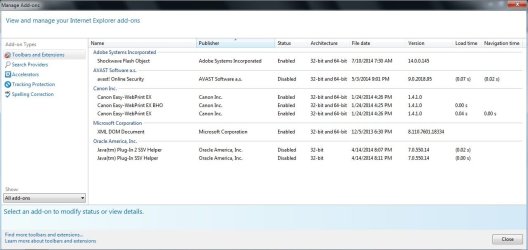
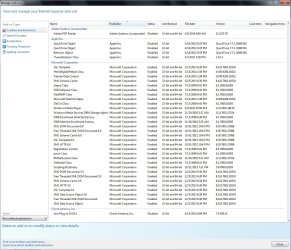
I did a Reset last night & just finished re-customizing everything this morning. I disabled most Add-Ons, including the ones under the 'Run w/o Permission' heading. All seems to be running just fine so far.
I left the Microsoft ones Enabled because I don't know what each is used for.
 

Attachments

  • Add-Ons.jpg
    Add-Ons.jpg
    74.5 KB · Views: 2
  • Add-Ons~2.jpg
    Add-Ons~2.jpg
    188.8 KB · Views: 3

My Computer

Computer type
PC/Desktop
Computer Manufacturer/Model Number
Self built comfuser
OS
10 Pro. 64Bit
CPU
AMD FX 4100, 4-Core Black Edition. Socket AM3+ ~ 3.60GHz
Motherboard
ASUS M5A97 LE R2.0
Memory
2x 4GB Kingston HyperX DDR3-1866 (PC3-14900) - 8GB Total
Graphics Card(s)
ASUS Radeon HD 6670-2GD3
Sound Card
Onboard High Definition Audio Device
Monitor(s) Displays
HP 2009m LCD
Screen Resolution
1600x900, True Color (32bit), 60Hertz
Hard Drives
WD Blue - 1TB, 3D NAND - SATA SSD
PSU
XFX Pro 450W Core Edition - Fully Wired
Case
Antec Super Lanboy
Cooling
Stock CPU fan + 2 (1 front, 1 back) 120mm Antec fans
Keyboard
Logitech MK700/MK710
Mouse
Logitech M705
Internet Speed
Frontier FiOS 50/50
Antivirus
Windows Security
Browser
Vivaldi
Other Info
1x ASUS DRW-24B1ST Multi-DVD Rewriter
1x RocketFish AIO Media Card Reader
1x WD 1TB Passport USB External Drive
Thanks,
Looks to me Avast is the slowest 0.07 to activate,
If it shows any higher uninstall it and re-install the Avast toolbar,
Cheers
 

My Computer

Computer type
PC/Desktop
Computer Manufacturer/Model Number
Custom assembled by me :}
OS
Win-7-Pro64bit 7-H-Prem-64bit
CPU
i7-5930K 2nd i9-9940x both water blocked VRM's too
Motherboard
ASUS SABERTOOTH X99 2nd ASUS x299 Apex
Memory
Trident-z 3200C14 2nd Trident-z 3600C16
Graphics Card(s)
EVGA 1080ti ftw3 2nd Titan Xp both water blocked
Sound Card
Built-in Realtek
Monitor(s) Displays
1-AOC G2460PG 24"G-Sync 144Hz/ 2nd 1-ASUS VG248QE 24" 144Hz
Screen Resolution
1920 x 1080 144Hz
Hard Drives
2-Samsung M.2 Evo & Evo Plus
2-Samsung 850 EVO 500GB SSD's/ 3-2.5 W.D. Black 1tb-&3-1tb/3-3.5 WD Black 1tb hdd's
PSU
EVGA SuperNOVA 1000-P2 2nd 1200-P2
Case
2-Corsair Obsidian Series 450D Black ATX Mid Tower
Cooling
Custom water loops
Keyboard
Logitech G710+/ 2nd Logitech G910
Mouse
2-RedDragon M901 Perdition 16400 dpi Gaming mouse = wired
Internet Speed
Comcast Ping 19ms 89.31mbps download speed 6.12mbps upload
Antivirus
Malwarebytes Pro/ Superantispyware Pro
Browser
FireFox & Pale moon
Other Info
2nd ASUS X299 Apex/Intel i9-9940x with Custom water loop/7H-Prem-x64/Corsair 450D case/Ram Trident-z 3600C16 4x8gb / Samsung970Evo plus 500gb SSD/Dual ssd EZ swap evo/PSU EVGA SuperNova 1200w-P2 80+Platinum/GPU Titan Xp /8-ML-140 on push-pull on 2-280GTX rads
MBam found P.U.P.s .......these are "potentially unwanted programs". Have MBam clean the adware up, or get rid of it using AdwCleaner. This junk is causing the slowness on your computer.


Please download AdwCleaner by Xplode and save to your Desktop.
Step 1.
  • Double click on AdwCleaner.exe to run the tool.
    Vista/Windows 7/8 users right-click and select Run As Administrator.
  • Click on the Scan button.
  • AdwCleaner will begin...be patient as the scan may take some time to complete.
  • After the scan has finished, click on the Report button...a logfile (AdwCleaner[R#].txt) will open in Notepad for review (where the largest value of # represents the most recent report).
  • The contents of the log file may be confusing. Unless you see a program name that you know should not be removed, don't worry about it. If you see an entry you want to keep, let me know about it.
  • Copy and paste the contents of that logfile in your next reply.
  • A copy of all logfiles are saved in the C:\AdwCleaner folder which was created when running the tool.


Step 2.
Using AdwCleaner v3: Scan & Clean:
This time click on the Clean button.
Press OK when asked to close all programs and follow the onscreen prompts.
Press OK again to allow AdwCleaner to restart the computer and complete the removal process.
After rebooting, a logfile report (AdwCleaner[S#].txt) will open automatically (where the largest value of # represents the most recent report).
Copy and paste the contents of that logfile in your next reply.
A copy of that logfile will also be saved in the C:\AdwCleaner folder
******Post both .txt logs
 

My Computer

Computer type
PC/Desktop
Computer Manufacturer/Model Number
Bruce ... somewhere in his 40's
OS
Windows 7 Ultimate 32bit SP1
CPU
Intel(R) Core(TM)2 Quad CPU @ 2.40GHz, 2400 MHz
Motherboard
INTEL/D975XBX2
Memory
4 GB
Graphics Card(s)
ATI Radeon HD 2600 Pro
Monitor(s) Displays
Samsung SyncMaster 914v
Screen Resolution
1280 x 1024
Hard Drives
2/500GB each ... ST3500630AS ATA Device.
One is not connected
PSU
Rocketfish 700 W
Case
G.Skill Gigabyte Chassis
Keyboard
Standard PS/2 Keyboard
Mouse
Microsoft PS/2 Mouse
Internet Speed
DSL
Antivirus
Avira Internet Security
Browser
IE 11
Other Info
ATI HDMI Audio
Code:
# AdwCleaner v3.215 - Report created 14/07/2014 at 09:33:40
# Updated 09/07/2014 by Xplode
# Operating System : Windows 7 Professional Service Pack 1 (64 bits)
# Username : C - SI
# Running from : C:\Program Files (x86)\AdwCleaner.exe
# Option : Scan
***** [ Services ] *****
 
***** [ Files / Folders ] *****
File Found : C:\Windows\System32\Tasks\YourFile DownloaderUpdate
Folder Found : C:\Program Files (x86)\Conduit
Folder Found : C:\Users\C\AppData\Local\PackageAware
Folder Found : C:\Users\C\AppData\Roaming\EZDownloader
***** [ Shortcuts ] *****
 
***** [ Registry ] *****
Key Found : HKCU\Software\1ClickDownload
Key Found : HKCU\Software\AppDataLow\{1146AC44-2F03-4431-B4FD-889BC837521F}
Key Found : HKCU\Software\AppDataLow\{4A0F38A9-FE55-4B89-B73F-E60FDC0F72E9}
Key Found : HKCU\Software\AppDataLow\{5F189DF5-2D05-472B-9091-84D9848AE48B}
Key Found : HKCU\Software\AppDataLow\Software\ConduitSearchScopes
Key Found : HKCU\Software\AppDataLow\Software\SmartBar
Key Found : HKCU\Software\Conduit
Key Found : HKCU\Software\InstallCore
Key Found : HKCU\Software\RegisteredApplicationsEx
Key Found : HKCU\Software\SearchProtect
Key Found : HKCU\Software\Softonic
Key Found : [x64] HKCU\Software\1ClickDownload
Key Found : [x64] HKCU\Software\Conduit
Key Found : [x64] HKCU\Software\InstallCore
Key Found : [x64] HKCU\Software\RegisteredApplicationsEx
Key Found : [x64] HKCU\Software\SearchProtect
Key Found : [x64] HKCU\Software\Softonic
Key Found : HKLM\Software\{1146AC44-2F03-4431-B4FD-889BC837521F}
Key Found : HKLM\Software\{3A7D3E19-1B79-4E4E-BD96-5467DA2C4EF0}
Key Found : HKLM\Software\{4A0F38A9-FE55-4B89-B73F-E60FDC0F72E9}
Key Found : HKLM\Software\{5F189DF5-2D05-472B-9091-84D9848AE48B}
Key Found : HKLM\Software\{6791A2F3-FC80-475C-A002-C014AF797E9C}
Key Found : HKLM\Software\{77D46E27-0E41-4478-87A6-AABE6FBCF252}
Key Found : HKLM\SOFTWARE\Classes\AppID\{C007DADD-132A-624C-088E-59EE6CF0711F}
Key Found : HKLM\SOFTWARE\Classes\CLSID\{1AA60054-57D9-4F99-9A55-D0FBFBE7ECD3}
Key Found : HKLM\SOFTWARE\Classes\CLSID\{3C471948-F874-49F5-B338-4F214A2EE0B1}
Key Found : HKLM\SOFTWARE\Classes\Interface\{4E6354DE-9115-4AEE-BD21-C46C3E8A49DB}
Key Found : HKLM\SOFTWARE\Classes\Interface\{E3ED53C5-7AD5-4DF5-9734-AFB6E7E5D9DB}
Key Found : HKLM\SOFTWARE\Classes\Interface\{FC073BDA-C115-4A1D-9DF9-9B5C461482E5}
Key Found : HKLM\SOFTWARE\Classes\Toolbar.CT3309655
Key Found : HKLM\Software\Conduit
Key Found : HKLM\SOFTWARE\Microsoft\Internet Explorer\SearchScopes\{BB74DE59-BC4C-4172-9AC4-73315F71CFFE}
Key Found : HKLM\SOFTWARE\Microsoft\Tracing\au__rasapi32
Key Found : HKLM\SOFTWARE\Microsoft\Tracing\au__rasmancs
Key Found : HKLM\SOFTWARE\Microsoft\Tracing\BrowseFox_Setup_RASAPI32
Key Found : HKLM\SOFTWARE\Microsoft\Tracing\BrowseFox_Setup_RASMANCS
Key Found : HKLM\SOFTWARE\Microsoft\Tracing\mconduitinstaller_RASAPI32
Key Found : HKLM\SOFTWARE\Microsoft\Tracing\mconduitinstaller_RASMANCS
Key Found : HKLM\SOFTWARE\Microsoft\Tracing\MegaBrowse_RASAPI32
Key Found : HKLM\SOFTWARE\Microsoft\Tracing\MegaBrowse_RASMANCS
Key Found : HKLM\SOFTWARE\Microsoft\Tracing\updateMegaBrowse_RASAPI32
Key Found : HKLM\SOFTWARE\Microsoft\Tracing\updateMegaBrowse_RASMANCS
Key Found : HKLM\SOFTWARE\Microsoft\Tracing\utilMegaBrowse_RASAPI32
Key Found : HKLM\SOFTWARE\Microsoft\Tracing\utilMegaBrowse_RASMANCS
Key Found : HKLM\SOFTWARE\Microsoft\Windows\CurrentVersion\Uninstall\{7DD5E91C-3864-77EC-7635-D14910C2A03E}
Key Found : HKLM\SOFTWARE\Microsoft\Windows\CurrentVersion\Uninstall\{C670DCAE-E392-AA32-6F42-143C7FC4BDFD}
Key Found : HKLM\Software\SearchProtect
Key Found : [x64] HKLM\SOFTWARE\Classes\Interface\{E3ED53C5-7AD5-4DF5-9734-AFB6E7E5D9DB}
***** [ Browsers ] *****
-\\ Internet Explorer v10.0.9200.16843
 
*************************
AdwCleaner[R0].txt - [3912 octets] - [14/07/2014 09:33:40]
########## EOF - \AdwCleaner\AdwCleaner[R0].txt - [3972 octets] ##########
 
Last edited by a moderator:

My Computer

Computer type
PC/Desktop
Computer Manufacturer/Model Number
Self built comfuser
OS
10 Pro. 64Bit
CPU
AMD FX 4100, 4-Core Black Edition. Socket AM3+ ~ 3.60GHz
Motherboard
ASUS M5A97 LE R2.0
Memory
2x 4GB Kingston HyperX DDR3-1866 (PC3-14900) - 8GB Total
Graphics Card(s)
ASUS Radeon HD 6670-2GD3
Sound Card
Onboard High Definition Audio Device
Monitor(s) Displays
HP 2009m LCD
Screen Resolution
1600x900, True Color (32bit), 60Hertz
Hard Drives
WD Blue - 1TB, 3D NAND - SATA SSD
PSU
XFX Pro 450W Core Edition - Fully Wired
Case
Antec Super Lanboy
Cooling
Stock CPU fan + 2 (1 front, 1 back) 120mm Antec fans
Keyboard
Logitech MK700/MK710
Mouse
Logitech M705
Internet Speed
Frontier FiOS 50/50
Antivirus
Windows Security
Browser
Vivaldi
Other Info
1x ASUS DRW-24B1ST Multi-DVD Rewriter
1x RocketFish AIO Media Card Reader
1x WD 1TB Passport USB External Drive
Please re-read and follow the second step to "clean" this stuff off your computer.
 

My Computer

Computer type
PC/Desktop
Computer Manufacturer/Model Number
Bruce ... somewhere in his 40's
OS
Windows 7 Ultimate 32bit SP1
CPU
Intel(R) Core(TM)2 Quad CPU @ 2.40GHz, 2400 MHz
Motherboard
INTEL/D975XBX2
Memory
4 GB
Graphics Card(s)
ATI Radeon HD 2600 Pro
Monitor(s) Displays
Samsung SyncMaster 914v
Screen Resolution
1280 x 1024
Hard Drives
2/500GB each ... ST3500630AS ATA Device.
One is not connected
PSU
Rocketfish 700 W
Case
G.Skill Gigabyte Chassis
Keyboard
Standard PS/2 Keyboard
Mouse
Microsoft PS/2 Mouse
Internet Speed
DSL
Antivirus
Avira Internet Security
Browser
IE 11
Other Info
ATI HDMI Audio
I ran AdwCleaner & had it clean the PUPs out. After I rebooted, I scanned the computer w/Avast! then AdwCleaner, MBAM, Microsoft Safety Scanner & SUPERAntiSpyware. All looks fine to me, but I attached the results just in case anyone else sees something amiss.

Code:
# AdwCleaner v3.215 - Report created 17/07/2014 at 09:07:09
# Updated 09/07/2014 by Xplode
# Operating System : Windows 7 Professional Service Pack 1 (64 bits)
# Username : C - SI
# Running from : C:\Program Files (x86)\Non-Installs\AdwCleaner.exe
# Option : Scan
***** [ Services ] *****
 
***** [ Files / Folders ] *****
 
***** [ Shortcuts ] *****
 
***** [ Registry ] *****
 
***** [ Browsers ] *****
-\\ Internet Explorer v10.0.9200.16843
 
*************************
AdwCleaner[R1].txt - [648 octets] - [17/07/2014 00:13:48]
AdwCleaner[R2].txt - [571 octets] - [17/07/2014 09:07:09]
########## EOF - C:\AdwCleaner\AdwCleaner[R2].txt - [630 octets] ##########
===============
Malwarebytes Anti-Malware
[URL="http://www.malwarebytes.org/"]www.malwarebytes.org[/URL]
Scan Date: 7/17/2014
Scan Time: 9:49:05 AM
Logfile: MBAM.txt
Administrator: Yes
Version: 2.00.2.1012
Malware Database: v2014.07.17.04
Rootkit Database: v2014.07.14.01
License: Free
Malware Protection: Disabled
Malicious Website Protection: Disabled
Self-protection: Disabled
OS: Windows 7 Service Pack 1
CPU: x64
File System: NTFS
User: C
Scan Type: Threat Scan
Result: Completed
Objects Scanned: 334366
Time Elapsed: 6 min, 56 sec
Memory: Enabled
Startup: Enabled
Filesystem: Enabled
Archives: Enabled
Rootkits: Enabled
Deep Rootkit Scan: Enabled
Heuristics: Enabled
PUP: Warn
PUM: Enabled
Processes: 0
(No malicious items detected)
Modules: 0
(No malicious items detected)
Registry Keys: 0
(No malicious items detected)
Registry Values: 0
(No malicious items detected)
Registry Data: 0
(No malicious items detected)
Folders: 0
(No malicious items detected)
Files: 0
(No malicious items detected)
Physical Sectors: 0
(No malicious items detected)
(end)
===============
SUPERAntiSpyware Scan Log
[URL="http://www.superantispyware.com/"]SUPERAntiSpyware | Remove Malware | Remove Spyware - AntiMalware, AntiSpyware, AntiAdware![/URL]
Generated 07/17/2014 at 11:05 AM
Application Version : 5.7.1026
Core Rules Database Version : 11374
Trace Rules Database Version: 9186
Scan type : Complete Scan
Total Scan Time : 00:08:41
Operating System Information
Windows 7 Professional 64-bit, Service Pack 1 (Build 6.01.7601)
UAC On - Limited User
Memory items scanned : 353
Memory threats detected : 0
Registry items scanned : 67337
Registry threats detected : 0
File items scanned : 32161
File threats detected : 0
===============

I didn't add the Avast! results because it is just sooo long, but nothing bad was found.
 
Last edited by a moderator:

My Computer

Computer type
PC/Desktop
Computer Manufacturer/Model Number
Self built comfuser
OS
10 Pro. 64Bit
CPU
AMD FX 4100, 4-Core Black Edition. Socket AM3+ ~ 3.60GHz
Motherboard
ASUS M5A97 LE R2.0
Memory
2x 4GB Kingston HyperX DDR3-1866 (PC3-14900) - 8GB Total
Graphics Card(s)
ASUS Radeon HD 6670-2GD3
Sound Card
Onboard High Definition Audio Device
Monitor(s) Displays
HP 2009m LCD
Screen Resolution
1600x900, True Color (32bit), 60Hertz
Hard Drives
WD Blue - 1TB, 3D NAND - SATA SSD
PSU
XFX Pro 450W Core Edition - Fully Wired
Case
Antec Super Lanboy
Cooling
Stock CPU fan + 2 (1 front, 1 back) 120mm Antec fans
Keyboard
Logitech MK700/MK710
Mouse
Logitech M705
Internet Speed
Frontier FiOS 50/50
Antivirus
Windows Security
Browser
Vivaldi
Other Info
1x ASUS DRW-24B1ST Multi-DVD Rewriter
1x RocketFish AIO Media Card Reader
1x WD 1TB Passport USB External Drive
Back
Top