Removing animation in W7

olezha

New member
Local time
7:03 AM
Messages
1
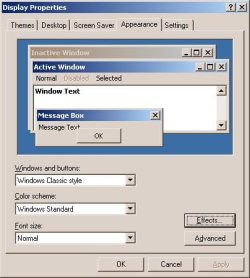
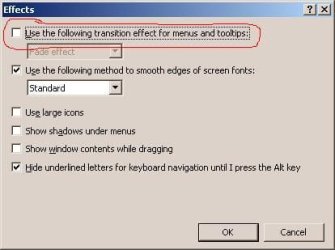
Problem: How to remove window and menu animation effects in W7. In WinXP it was done through Display Properties -> Appearance -> Effects
 

Attachments

  • p1.JPG
    p1.JPG
    26.4 KB · Views: 43
  • p2.JPG
    p2.JPG
    18 KB · Views: 32

My Computer

OS
Windows 7 x64 Ultimate
Control Panel > System > Advanced system settings > Advanced tab > Settings (under Performance). You should find what you're looking for under the Visual Effects tab.
 

My Computer

Computer Manufacturer/Model Number
Myself
OS
Microsoft Windows 7 Ultimate x64
CPU
Intel C2Q Q9550
Motherboard
Asus P5Q-E
Memory
Corsair 4 GB
Graphics Card(s)
Sapphire Radeon HD 4870 (512 MB)
Sound Card
Non-external
Monitor(s) Displays
LG Flatron
Screen Resolution
1680x1050
Keyboard
Logitech G15 (both versions)
Mouse
Logitech G5 2007 Ed.
Internet Speed
10/10 Mbps fiber-optic
You can do this by typing the following under "Start" - Search - and put in "SystemPropertiesPerformance.exe" as search-string... than execute the finding and look there for your option.

(Sorry for my english, it's bin a long time...;) and i'm using a German Version of Win7...)

 

My Computer

OS
Windows 7 Ultimate 64bit RTM
CPU
Intel C2D E8400 @380FSB/3420MHz@ Standard VCore
Motherboard
Gigabyte GA-EP45-UD3R Rev.1.0 @ Bios F10f
Memory
4x 1GB A-Data Vitesta Extreme Edition PC800@912
Graphics Card(s)
ECS Elitegroup N8800GT-512MX+ HS @ Accelero S1
Sound Card
onboard
Monitor(s) Displays
Samsung SyncMaster 1100p CRT
Screen Resolution
1600x1200
Hard Drives
Samsung SP2504C @ICH10R
Samsung HD252KJ @ICH10R
PSU
X-Spice Croon BF 850 Watt
Case
Antec P180
Cooling
Air - CPU @ Xigmatek HDT-S1283
Keyboard
Cherry Marlin
Mouse
Cherry
Internet Speed
DSL 16000
Back
Top