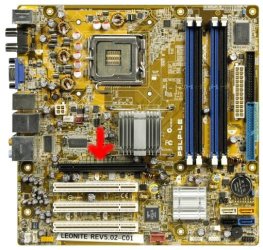
Removing my graphics card

saroy94

New member
Member
VIP
Local time
4:45 AM
Messages
150
I opened up my computer to look at my graphics card, as it was the first time I had opened it :p but when I did open it, I couldn't really find a graphics card. I have a Intel(R) 82945G Express Chipset Family graphics card. All I saw was the back of a blue VGA port and it was on a big, yellow board.

Could anyone explain how i could remove this? I really need a new graphics card, as this isn't really up to the standards I'm looking for.
 

My Computer

Computer Manufacturer/Model Number
HP-Pavilion m7755.uk
OS
Windows 7 Ultimate x32
CPU
Intel Core 2 Duo E6600 @ 2.40GHz
Motherboard
P5LP-LE (Leonite)
Memory
3GB PC2-5300 DDR2-667Mhz
Graphics Card(s)
XFX ATI Radeon HD 4870 1GB
Monitor(s) Displays
Generic PnP Monitor
Screen Resolution
1440 x 900
Hard Drives
SAMSUNG HD400LJ Hard drive 400GB
PSU
OCZ Modxstream 600W
you have onboard video.

you can buy a video card and put it in, but I would recommend having a friend that is knowledgeable help you out.

The GTX285 in the pic below is what a video card looks like,
gtx285.jpg
 

My Computer

Computer Manufacturer/Model Number
HAL-9000
OS
Windows 7 Ultimate 64bit
CPU
Intel i7 3770K
Motherboard
Asus Sabertooth Z77
Memory
16GB DDR3 1333 Corsair XMS3
Graphics Card(s)
XFX HD6950 2GB EyeFinity
Sound Card
Logitech G35 & Sennheiser PC135 & VIA HD
Monitor(s) Displays
23" HP 2310e, 23" Samsung B2230, 21.5" Viewsonic
Screen Resolution
5760x1080
Hard Drives
16TB of Storage
128GB & 256GB Crucial M4 SSD's, 2X 1TB WD Black, 3x 2TB WD, 3x 2TB Samsung F4, 1.5TB Seagate, WD 500GB,
PSU
Antec True Power New 650watt
Case
Cooler Master HAF-932
Cooling
Corsair H60 Hydro Cooler, 3x 230mm Fans, 2x120mm Fan
Keyboard
Logitech G15 and G13
Mouse
Logitech G700 Gaming Mouse
Internet Speed
50/10 Mbit
Other Info
Speakers : Alesis M1 Active Mk2 Studio Monitors , APC RS 1200 UPS, HP 4500DN Color Laser, HP P1006 mono Laser, Kodak 8500 Dye-Sub, Epson 1280 inkjet, Epson Worforce 610 MFC
OHH, so I just put the graphics card at the bottom?
 

My Computer

Computer Manufacturer/Model Number
HP-Pavilion m7755.uk
OS
Windows 7 Ultimate x32
CPU
Intel Core 2 Duo E6600 @ 2.40GHz
Motherboard
P5LP-LE (Leonite)
Memory
3GB PC2-5300 DDR2-667Mhz
Graphics Card(s)
XFX ATI Radeon HD 4870 1GB
Monitor(s) Displays
Generic PnP Monitor
Screen Resolution
1440 x 900
Hard Drives
SAMSUNG HD400LJ Hard drive 400GB
PSU
OCZ Modxstream 600W
OHH, so I just put the graphics card at the bottom?

no, it has to go in a specific slot either an AGP type or a PCI/PCI-E type slot its very much motherboard dependent ;)
 

My Computer

Computer type
PC/Desktop
Computer Manufacturer/Model Number
self build
OS
win 7 ultimate32bit, Win8.1pro wmc 32bit
CPU
amd phenom x4 9600
Motherboard
asus m2n32-sli deluxe
Memory
corsair twinxs 2x2gb
Graphics Card(s)
2x nvidia 1gb 8500gt
Sound Card
onboard
Monitor(s) Displays
23" PB Viseo 233d
Screen Resolution
1920x1080
Hard Drives
maxtor sata 500gb
maxtor sata 320gb
fujitsu sata200gb
PSU
oryxx tornado 750w
Case
thermaltake xaser lll
Cooling
artic freezer64 pro + 7 case fans
Follow Zepher advice.
This is the HP-Pavilion RS919AA-ABU m7755.uk MOBO,

c00864951.jpg
 

My Computer

OS
ME/XP/Vista/Win7

My Computer

Computer type
PC/Desktop
Computer Manufacturer/Model Number
Me
OS
Win 7 Ultimate x64
CPU
FX-8350 @ 4.6 GHz so far
Motherboard
Asus M5A97 EVO
Memory
ADATA XPG V1 Series Black 8GB DDR3 1600
Graphics Card(s)
Sapphire R9 270x Dual-X
Sound Card
Xonar DGX w/ Corsair Vengence 1300
Monitor(s) Displays
Acer S232HL Abid
Screen Resolution
1920x1080
Hard Drives
120 GB OCZ Vertex 3
500 GB Seagate 7200.12
PSU
Antec Earthwatts 650W Green
Case
Antec Three Hundred
Cooling
Cooler Master 212 EVO
Keyboard
Logitech G510
Mouse
Logitech G500s
Internet Speed
35000/3000

My Computer

Computer Manufacturer/Model Number
HP-Pavilion m7755.uk
OS
Windows 7 Ultimate x32
CPU
Intel Core 2 Duo E6600 @ 2.40GHz
Motherboard
P5LP-LE (Leonite)
Memory
3GB PC2-5300 DDR2-667Mhz
Graphics Card(s)
XFX ATI Radeon HD 4870 1GB
Monitor(s) Displays
Generic PnP Monitor
Screen Resolution
1440 x 900
Hard Drives
SAMSUNG HD400LJ Hard drive 400GB
PSU
OCZ Modxstream 600W
Yes it would.
 

My Computer

Computer type
PC/Desktop
Computer Manufacturer/Model Number
Me
OS
Win 7 Ultimate x64
CPU
FX-8350 @ 4.6 GHz so far
Motherboard
Asus M5A97 EVO
Memory
ADATA XPG V1 Series Black 8GB DDR3 1600
Graphics Card(s)
Sapphire R9 270x Dual-X
Sound Card
Xonar DGX w/ Corsair Vengence 1300
Monitor(s) Displays
Acer S232HL Abid
Screen Resolution
1920x1080
Hard Drives
120 GB OCZ Vertex 3
500 GB Seagate 7200.12
PSU
Antec Earthwatts 650W Green
Case
Antec Three Hundred
Cooling
Cooler Master 212 EVO
Keyboard
Logitech G510
Mouse
Logitech G500s
Internet Speed
35000/3000
Alright thanks a lot :)
 

My Computer

Computer Manufacturer/Model Number
HP-Pavilion m7755.uk
OS
Windows 7 Ultimate x32
CPU
Intel Core 2 Duo E6600 @ 2.40GHz
Motherboard
P5LP-LE (Leonite)
Memory
3GB PC2-5300 DDR2-667Mhz
Graphics Card(s)
XFX ATI Radeon HD 4870 1GB
Monitor(s) Displays
Generic PnP Monitor
Screen Resolution
1440 x 900
Hard Drives
SAMSUNG HD400LJ Hard drive 400GB
PSU
OCZ Modxstream 600W
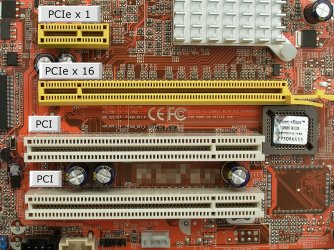
Here is what the slots will look like

Make sure you remove the rear plate that aligns with the slot you will use, connect the video connection on the video card, use the screw that you removed from the plate to hold the video card in place, apply power and reboot. You may have to disable the onboard video in your BIOS if not done automatically and this will free up the memory it uses for your PC's applications.
 

Attachments

  • 30-pcie.jpg
    30-pcie.jpg
    155.3 KB · Views: 1

My Computer

Computer Manufacturer/Model Number
DELL XPS Studio 435T
OS
Vista 64 Ultimate, Windows 7 64 Ultimate, Ubuntu 9.10
CPU
i7 975 3.3 GHz Extreme (Factory OC'd to 3.6 GHz)
Motherboard
DELL provided
Memory
18 Gb Tri-Channel 1066
Graphics Card(s)
ATI 5970 2048 Mb
Sound Card
X-Fi Extreme Gamer
Monitor(s) Displays
Vizio 37" HD-TV
Screen Resolution
1920 x 1080
Hard Drives
1.5 Tb HDD
1.5 Tb HDD
2.0 Tb Network Drive
512 Gb Crucial SSD
PSU
DELL Provided 475 watts
Case
DELL
Cooling
3 fans
Keyboard
Logitech Performance K350 Wireless
Mouse
Logitech Performance MX Wireless
Internet Speed
3 Mb up 750 Kb down
Other Info
Bamboo Fun Tablet, Belkin N+ Wireless router, Pioneer Dolby System Wireless Headphones, Bose 5.1 Dolby Surround Sound System, LifeCam VX 3000 Webcam, Blu-Ray/Hi Def DVD +RW combo and Blu-ray +RW,l 15 in 1 media card reader, Logitech Rumblepad 2, Hauppauge 2250 DTV Tuner with MS Media Center Remote

Laptop:Alienware M17x, Q9100 CPU, 8Gb RAM, 1920x1200 WUXGA LCD driven by 4870's in CrossFireX, Bl
Here is what the slots will look like

Make sure you remove the rear plate that aligns with the slot you will use, connect the video connection on the video card, use the screw that you removed from the plate to hold the video card in place, apply power and reboot. You may have to disable the onboard video in your BIOS if not done automatically and this will free up the memory it uses for your PC's applications.


It doesn't look like that, but I get what you mean. Thanks for that too :) but how do I disable the onboard video in my BIOS?
 
Last edited:

My Computer

Computer Manufacturer/Model Number
HP-Pavilion m7755.uk
OS
Windows 7 Ultimate x32
CPU
Intel Core 2 Duo E6600 @ 2.40GHz
Motherboard
P5LP-LE (Leonite)
Memory
3GB PC2-5300 DDR2-667Mhz
Graphics Card(s)
XFX ATI Radeon HD 4870 1GB
Monitor(s) Displays
Generic PnP Monitor
Screen Resolution
1440 x 900
Hard Drives
SAMSUNG HD400LJ Hard drive 400GB
PSU
OCZ Modxstream 600W
Yeah I was trying to give you a view of the different types of slots not being able to find your specific mobo.

As far as getting into your BIOS and disabling the onboard video, generally speaking hitting f2 before the launch of the Windows 7 theme and booting into the desktop will get you into your BIOS. Each PC is somewhat different, your BIOS screen will give you the information on what the sections there refer to and not all have functions some simply are information. Choose the screen that refers to video and the line should say something like Onboard Graphichs or Integrated Graphics with the choice being on or off and possibly enable disable. Refer to you manual before getting into your BIOS the first time it can be overwhelming first go around.
 

My Computer

Computer Manufacturer/Model Number
DELL XPS Studio 435T
OS
Vista 64 Ultimate, Windows 7 64 Ultimate, Ubuntu 9.10
CPU
i7 975 3.3 GHz Extreme (Factory OC'd to 3.6 GHz)
Motherboard
DELL provided
Memory
18 Gb Tri-Channel 1066
Graphics Card(s)
ATI 5970 2048 Mb
Sound Card
X-Fi Extreme Gamer
Monitor(s) Displays
Vizio 37" HD-TV
Screen Resolution
1920 x 1080
Hard Drives
1.5 Tb HDD
1.5 Tb HDD
2.0 Tb Network Drive
512 Gb Crucial SSD
PSU
DELL Provided 475 watts
Case
DELL
Cooling
3 fans
Keyboard
Logitech Performance K350 Wireless
Mouse
Logitech Performance MX Wireless
Internet Speed
3 Mb up 750 Kb down
Other Info
Bamboo Fun Tablet, Belkin N+ Wireless router, Pioneer Dolby System Wireless Headphones, Bose 5.1 Dolby Surround Sound System, LifeCam VX 3000 Webcam, Blu-Ray/Hi Def DVD +RW combo and Blu-ray +RW,l 15 in 1 media card reader, Logitech Rumblepad 2, Hauppauge 2250 DTV Tuner with MS Media Center Remote

Laptop:Alienware M17x, Q9100 CPU, 8Gb RAM, 1920x1200 WUXGA LCD driven by 4870's in CrossFireX, Bl
Yeah I was trying to give you a view of the different types of slots not being able to find your specific mobo.

As far as getting into your BIOS and disabling the onboard video, generally speaking hitting f2 before the launch of the Windows 7 theme and booting into the desktop will get you into your BIOS. Each PC is somewhat different, your BIOS screen will give you the information on what the sections there refer to and not all have functions some simply are information. Choose the screen that refers to video and the line should say something like Onboard Graphichs or Integrated Graphics with the choice being on or off and possibly enable disable. Refer to you manual before getting into your BIOS the first time it can be overwhelming first go around.

ok thanks(:
 

My Computer

Computer Manufacturer/Model Number
HP-Pavilion m7755.uk
OS
Windows 7 Ultimate x32
CPU
Intel Core 2 Duo E6600 @ 2.40GHz
Motherboard
P5LP-LE (Leonite)
Memory
3GB PC2-5300 DDR2-667Mhz
Graphics Card(s)
XFX ATI Radeon HD 4870 1GB
Monitor(s) Displays
Generic PnP Monitor
Screen Resolution
1440 x 900
Hard Drives
SAMSUNG HD400LJ Hard drive 400GB
PSU
OCZ Modxstream 600W
It's F2 or DEL you hold on most PC at Power on Self Test (POST for us nerdy types)
That gets you into the BLUE screens of fun, BIOS setup, look for DISABLE/ENABLE ON BOARD VIDEO, it will be on a sub menu, set to AUTO or DISABLE is what you want.

SAVE and EXIT BIOS with probably F10, and away you go once you have a video card in place.
 

My Computer

Computer type
PC/Desktop
Computer Manufacturer/Model Number
Self Built Custom
OS
Windows 7 Ultimate Retail Box (64-bit installed) + Service Pack 1
CPU
AMD FX-8350 CPU v1.15 (or 1.0F) BIOS was required!
Motherboard
MSI 890FXA-GD70
Memory
8G CAS-7 G-Skill DDR3 @1333 (2 fours) [mobo nonOC max rec'd]
Graphics Card(s)
Radeon HD 7950 [3 gigs of GDDR5] MSI Twin Frozr model
Sound Card
Realtek High Definition Audio (onboard mobo, ALC-889 chip)
Monitor(s) Displays
2 WS LED Monitors: One LG One Viewsonic
Screen Resolution
1920 by 1080
Hard Drives
SSD for OS: Samsung 840 Pro
SSD for VM and utilities: Adata SX900
7200 RPM SATA HDs for the rest: Hitachi and Seagate
PSU
Corsair TX850 - 850W max, in service since August 2010.
Case
Thermaltake Armor A90
Cooling
Thermaltake Spin Q CPU Cooler, in service since August 2010
Keyboard
Logitech G11
Mouse
Logitech M310 Wireless
Internet Speed
100 Megabit broadband supposedly upgraded from 50 (Cable)
Antivirus
Bitdefender Internet Security 2014 suite
Browser
Pale Moon 64-bit main, also IceDragon, Opera, and Maxthon.
Other Info
CompTIA A+ certified (220-800 series) in July 2013.
Thanks again! I think you answered in my other thread too, sorry for the hassle :P
 

My Computer

Computer Manufacturer/Model Number
HP-Pavilion m7755.uk
OS
Windows 7 Ultimate x32
CPU
Intel Core 2 Duo E6600 @ 2.40GHz
Motherboard
P5LP-LE (Leonite)
Memory
3GB PC2-5300 DDR2-667Mhz
Graphics Card(s)
XFX ATI Radeon HD 4870 1GB
Monitor(s) Displays
Generic PnP Monitor
Screen Resolution
1440 x 900
Hard Drives
SAMSUNG HD400LJ Hard drive 400GB
PSU
OCZ Modxstream 600W
I saw what this was covering and tossed in that extra info, these forum messages get searched and it's good to have it included. :D

That helps make these forums the best!!!!
 

My Computer

Computer type
PC/Desktop
Computer Manufacturer/Model Number
Self Built Custom
OS
Windows 7 Ultimate Retail Box (64-bit installed) + Service Pack 1
CPU
AMD FX-8350 CPU v1.15 (or 1.0F) BIOS was required!
Motherboard
MSI 890FXA-GD70
Memory
8G CAS-7 G-Skill DDR3 @1333 (2 fours) [mobo nonOC max rec'd]
Graphics Card(s)
Radeon HD 7950 [3 gigs of GDDR5] MSI Twin Frozr model
Sound Card
Realtek High Definition Audio (onboard mobo, ALC-889 chip)
Monitor(s) Displays
2 WS LED Monitors: One LG One Viewsonic
Screen Resolution
1920 by 1080
Hard Drives
SSD for OS: Samsung 840 Pro
SSD for VM and utilities: Adata SX900
7200 RPM SATA HDs for the rest: Hitachi and Seagate
PSU
Corsair TX850 - 850W max, in service since August 2010.
Case
Thermaltake Armor A90
Cooling
Thermaltake Spin Q CPU Cooler, in service since August 2010
Keyboard
Logitech G11
Mouse
Logitech M310 Wireless
Internet Speed
100 Megabit broadband supposedly upgraded from 50 (Cable)
Antivirus
Bitdefender Internet Security 2014 suite
Browser
Pale Moon 64-bit main, also IceDragon, Opera, and Maxthon.
Other Info
CompTIA A+ certified (220-800 series) in July 2013.
I saw what this was covering and tossed in that extra info, these forum messages get searched and it's good to have it included. :D

That helps make these forums the best!!!!

yeahh true :D
 

My Computer

Computer Manufacturer/Model Number
HP-Pavilion m7755.uk
OS
Windows 7 Ultimate x32
CPU
Intel Core 2 Duo E6600 @ 2.40GHz
Motherboard
P5LP-LE (Leonite)
Memory
3GB PC2-5300 DDR2-667Mhz
Graphics Card(s)
XFX ATI Radeon HD 4870 1GB
Monitor(s) Displays
Generic PnP Monitor
Screen Resolution
1440 x 900
Hard Drives
SAMSUNG HD400LJ Hard drive 400GB
PSU
OCZ Modxstream 600W
I posted the link to my tutorial for installing a new card in the other thread, but my tutorial does not cover graphics card slot types (I assume that you know those).

In this case, you have a PCIe 16x slot, so any new graphics card will fit. It does not matter whether it is PCIe 1, 1.1, or 2, they are all compatible.

To answer the original question, integrated graphics, or onboard graphics, are not removable. They are built into the motherboard. You just plug in the new video card and attach the cables and the motherboard BIOS should automatically change you over without a hitch. If it doesn't, reboot into BIOS and turn off integrated graphics.

~Lordbob
 

My Computer

Computer Manufacturer/Model Number
Hera
OS
Windows 7 Ultimate x64, Mint 9
CPU
Intel i5-2500k
Motherboard
ASUS P8P67 Pro
Memory
2x 4Gb Corsair VENGEANCE DDR3-1600
Graphics Card(s)
NVidia GeForce N260GTX Twin Frozr
Sound Card
Realtek HD OnBoard Audio
Monitor(s) Displays
ASUS 24" Monitor
Screen Resolution
1920x1080
Hard Drives
G.SKILL Phoenix Series 60GB SATA II MLC Internal Solid State Drive (SSD)
SAMSUNG Spinpoint F3R 1TB 7200 RPM 32MB Cache SATA II
PSU
Cooler Master Real Power Pro 750W
Case
Cooler Master Haf 932
Cooling
Fans
Keyboard
Razer Tarantula
Mouse
Razer Lachesis
Internet Speed
not fast enough
Alright thank you, i'll check out your guide later :)
 

My Computer

Computer Manufacturer/Model Number
HP-Pavilion m7755.uk
OS
Windows 7 Ultimate x32
CPU
Intel Core 2 Duo E6600 @ 2.40GHz
Motherboard
P5LP-LE (Leonite)
Memory
3GB PC2-5300 DDR2-667Mhz
Graphics Card(s)
XFX ATI Radeon HD 4870 1GB
Monitor(s) Displays
Generic PnP Monitor
Screen Resolution
1440 x 900
Hard Drives
SAMSUNG HD400LJ Hard drive 400GB
PSU
OCZ Modxstream 600W
Back
Top