removing norton

Anak

New member
Guru
Gold Member
VIP
Local time
7:27 PM
Messages
5,599
Hi!,

Just purchased new PC two weeks ago, and have 45 days left on 60 day trial.

I know norton is a bear to eradicate, and am trying to prepare to do so, but nothing matches what's been pre-installed.

I have been to norton's site, but even there, there is nothing listed for win7. Do I follow the instructions for Vista?

Is it as simple as they (norton) make it sound, and go through Control Panel?

I can post a screen shot with the 'about' slider open if it will help.


Anak
 

My Computer

Computer type
PC/Desktop
Computer Manufacturer/Model Number
Gateway DX4831-01e (Mid-Tower Desktop)
OS
Originally Win 7 Hm Prem x64 Ver 6.1.7600 Build 7601-SP1 | Upgraded to Windows 10 December 14, 2019
CPU
Intel i3 530 2.93GHz, 2933MHz 2 Cores 4 Logical Processors
Motherboard
Gateway H57M01 133 megahertz
Memory
6GB of 1,333MHz DDR3 SDRAM
Graphics Card(s)
32MB Intel Graphics Media Accelerator HD IGChip
Sound Card
Realtek High Definition Audio
Monitor(s) Displays
Gateway HX2000 20inch TFT active matrix TN
Screen Resolution
1600 x 900 x 59 hertz
Hard Drives
WDC WD10EADS-00M2B0 [HDD] (1000.20 GB) -- drive 0,
HL-DT-ST DVDRAM GH41N [CD-ROM dr]
Four card readers, and Four USB 2.0
PSU
300watts.
Case
Mid-Tower Desktop
Cooling
Stock from Gateway
Keyboard
Natural Ergonomic Keyboard 4000, see Other Info
Mouse
Orig. Gateway wore out now using Insignia USB wired optical
Internet Speed
Vz FIOS 10ms png 57.64Mbps down 65.53Mbps up Speedtest.org
Antivirus
Zamana Anti-logger with Anti-malware, MSE, Windows Firewall,
Browser
IE11.0.9600.19399-Upd ver11.0.135, Firefox 68.0.1 x64
Other Info
System Specs by Belarc.

BIOS: American Megatrends Inc. P01-A0 11/17/2009

Replaced the MS 'Natural' Standard PS/2 Enhanced 101-102 Keyboard with a new Natural Ergonomic Keyboard 4000 on August 1st 2014.

Canon Pixma MG3222 Printer.

Updated to IE11 on 12102015 | Fios Quantum Router g1100

Additional AV: SpywareBlaster, manual Mbam, SAS

My Computer

Computer type
PC/Desktop
Computer Manufacturer/Model Number
Dell XPS 420
OS
Windows 10, Home Clean Install
CPU
Intel Core2 processsor Q8200(2.33Ghz 1333FSB) Quad Core Tech
Motherboard
Dell
Memory
6 gb
Graphics Card(s)
ATI Radeon 256MB HD3650
Sound Card
Intergrated 7.1 Channel Audio
Monitor(s) Displays
Dell SP2009W 20"
Hard Drives
640 GB Serial ATA Hard drive
Cooling
Fan
Keyboard
Dell USB Keyboard
Mouse
Dell Premium Optical USB
Internet Speed
DSL 2.85
If the standard ways of eliminating Norton to not work for you, then use Autoruns to first disable and then to delete everything you find listed by Autoruns that is from Norton.

Norton is still not a friendly program when it comes to removal.

Autoruns for Windows
 

My Computer

Computer Manufacturer/Model Number
Toshiba Satellite S875D-S7239 laptop
OS
MS Windows 7 Ultimate SP1 64-bit
CPU
AMD A10-4600M
Motherboard
AMD Pumori (Socket FT1)
Memory
6.00 GB Dual-Channel DDR3 @ 798MHz (11-11-12-28)
Graphics Card(s)
AMD Radeon HD 7660G
Sound Card
High Definition Audio Device
Monitor(s) Displays
Generic PnP Monitor (1600x900@60Hz)
Screen Resolution
1600x900@60Hz
Hard Drives
SSD 119GB Corsair CSSD-V128GB2 ATA Device
Keyboard
Standard PS/2 Keyboard
Mouse
HP Wireless Optical Mobile Mouse Model FHA-3410
Internet Speed
What the local pub, local coffee shop offers.
Other Info
Optical Drive:MATSHITA BD-CMB UJ160B ATA Device


Also have an Asus ha1002xp netbook with Win 7 Ultimate installed.
Thank you both, Richard, and Karl for the heads-up.

If I have to I'll join Norton Community just to ask questions, and I'm just learning what Autoruns is about.

After norton I'll be eliminating the Word trial the Mfg. installed also, but I don't think that will be as difficult.

I will keep you up-dated on what I find, and my progress. If I can get all my ducks in a row I will not wait the 60days.


Edit:
The removal tool is in the bank, but it's getting late for me. I'll have to read up on it tomorrow.
 
Last edited:

My Computer

Computer type
PC/Desktop
Computer Manufacturer/Model Number
Gateway DX4831-01e (Mid-Tower Desktop)
OS
Originally Win 7 Hm Prem x64 Ver 6.1.7600 Build 7601-SP1 | Upgraded to Windows 10 December 14, 2019
CPU
Intel i3 530 2.93GHz, 2933MHz 2 Cores 4 Logical Processors
Motherboard
Gateway H57M01 133 megahertz
Memory
6GB of 1,333MHz DDR3 SDRAM
Graphics Card(s)
32MB Intel Graphics Media Accelerator HD IGChip
Sound Card
Realtek High Definition Audio
Monitor(s) Displays
Gateway HX2000 20inch TFT active matrix TN
Screen Resolution
1600 x 900 x 59 hertz
Hard Drives
WDC WD10EADS-00M2B0 [HDD] (1000.20 GB) -- drive 0,
HL-DT-ST DVDRAM GH41N [CD-ROM dr]
Four card readers, and Four USB 2.0
PSU
300watts.
Case
Mid-Tower Desktop
Cooling
Stock from Gateway
Keyboard
Natural Ergonomic Keyboard 4000, see Other Info
Mouse
Orig. Gateway wore out now using Insignia USB wired optical
Internet Speed
Vz FIOS 10ms png 57.64Mbps down 65.53Mbps up Speedtest.org
Antivirus
Zamana Anti-logger with Anti-malware, MSE, Windows Firewall,
Browser
IE11.0.9600.19399-Upd ver11.0.135, Firefox 68.0.1 x64
Other Info
System Specs by Belarc.

BIOS: American Megatrends Inc. P01-A0 11/17/2009

Replaced the MS 'Natural' Standard PS/2 Enhanced 101-102 Keyboard with a new Natural Ergonomic Keyboard 4000 on August 1st 2014.

Canon Pixma MG3222 Printer.

Updated to IE11 on 12102015 | Fios Quantum Router g1100

Additional AV: SpywareBlaster, manual Mbam, SAS
Hi!,

Just purchased new PC two weeks ago, and have 45 days left on 60 day trial.

I know norton is a bear to eradicate, and am trying to prepare to do so, but nothing matches what's been pre-installed.

I have been to norton's site, but even there, there is nothing listed for win7. Do I follow the instructions for Vista?

Is it as simple as they (norton) make it sound, and go through Control Panel?

I can post a screen shot with the 'about' slider open if it will help.
Anak

Hi Anak,
I suggest that you use the Norton Removal Tool. See if the information below helps you.

Applicable - Operating System: Windows 7,Windows Vista, Windows XP
Last modified: 4/02/10
Download and run the Norton Removal Tool to uninstall your Norton 2010 product

To remove a failed installation or a damaged Norton product use this link.
Download and run the Norton Removal Tool

Make sure you reboot on completion.

Good luck. Let us know how it goes please.
Jan.
 

My Computer

Computer Manufacturer/Model Number
LAPTOP. HP Pavilion dv7-4010TX .
OS
Win 7 Ultimate 64-bit. SP1.
CPU
Intel i7 -720QM.[1.6GHz Turbo Boost 2.8GHz. 6MB Cache.]
Memory
8 DDR 3 RAM. 1066MHZ
Graphics Card(s)
ATI 1024 MB. DDR3. Radeon HD5650
Monitor(s) Displays
17.3" High Definition Brightview LCD. LED Backlit.
Screen Resolution
1600 x 900.
Hard Drives
640GB
Case
Laptop / notebook.
Mouse
Logitech Anywhere mouse. MX.
Internet Speed
ADSL [ but too slow ]

My Computer

Computer Manufacturer/Model Number
Custom Build
OS
Microsoft Windows 7 Professional X64
CPU
Intel(R) Core(TM) i7 CPU 965 @ 3.20GHz
Motherboard
Intel DX58SO
Memory
Kingston 3x2 GB (DDR3 1600 MHzς)
Graphics Card(s)
NVIDIA GeForce 9800 GT [x2 (SLI Technology)]
Sound Card
RealteK High Definition Audio (On Board)
Monitor(s) Displays
SyncMaster 245BW (Digital)
Screen Resolution
1920X1200 Pixels
Hard Drives
ST3500410AS ATA Device (465.76GB)
WDC WD5000AACS-00G8B1 ATA Device (465.76GB)
PSU
PC Power & Cooling Silencer 750 Quad 750W PSU
Case
Antec Sonata Elite
Cooling
Intel(R) Core(TM) i7 CPU Retail
Keyboard
Microsoft Wireless Optical Desktop 3000 Ergonomics Keyboard
Mouse
Ergonomics Keyboard and Optical Mouse Combo
Internet Speed
54.0 Mbps
Other Info
Linksys WUSB600N Dual-Band Wireless-N USB Network Adapter
I would use Revo Uninstaller in Advanced mode for Norton and Ofc trial removal. Then the Norton Removal tool to check for remnants.

After this, run sfc /scannow to see if their removal damaged any system files beyond repair which often happens. This means you need a clean reinstall. Most tech enthusiasts do one anyway every year or so.
 
What are you going to install after you remove Norton? Did the trial not go well? Norton in 2010 is one of the best av programs around.
 
Last edited:

My Computer

OS
Arch Linux 64-bit
Hi!,

I know norton is a bear to eradicate, and am trying to prepare to do so, but nothing matches what's been pre-installed.

Is it as simple as they (norton) make it sound, and go through Control Panel?

Anak
.
Assuming your PC came with Norton 2009 or 2010 the uninstall process is very fast and generally problem free. You will find the entry in:

"Control Panel/Programs and Features"

If you have problems with the uninstall then step 2 is to download and use the Norton Removal Tool from the Symantec site. It doesn't get any simpler and easier then this.

By the way, Norton Internet Security 2010 is a fine suite.
 

My Computer

Computer type
PC/Desktop
OS
Windows 7 x64
CPU
Intel Core2 Extreme Q6850 3.00GHz
Motherboard
EVGA 132-CK-NF79
Memory
8 GB
Graphics Card(s)
Radeon R7 260X
Sound Card
Xonar DS
Hard Drives
Hitachi Deskstar 1 tb
Start by using free Revo Uninstaller in Advanced mode to get all of the Registry keys (shown in bold) and Files left behind.

Afterwards run sfc /scannow as it can irreparably damage system files which requires clean reinstall to get back to perfect Win7.
 
For JMH:
I downloaded the norton removal tool (n-r-t) located at your first link last night.
I am hoping all goes well, and I won't have to use any of the additional tools at your second link.

I will keep everyone up-dated.

For TOF:
I appreciate the links, and will keep them in consideration after I use the n-r-t, and Revo.

I will paraphrase a statement I made to gregrocker below.
I have always been under the impression that it is always better to use an uninstaller built for a particular program first, then use Revo or Ccleaner.

For gregrocker:
I already have Revo installed.
Could you explain further on your choice to use Revo first, then the n-r-t?
I have always been under the impression that it is always better to use an uninstaller built for a particular program first, then use Revo or Ccleaner.

I had planned on doing a sfc/scannow, and I can only hope there is no damage. The only recovery disks I have are the ones that I made when I brought the PC home.
It seems that, that is the “Industry Standard” nowadays. The Mfg's are even indifferent to passing on the cost to the user.
To heck with the user, lets save some money, time, and effort on disks, and manuals.

If I have to resort to them, I'm afraid I'll be right back into the same boat, owning to the fact that the recov disks will “Restore my computer to the original factory settings” :(

For malexous:
We am going with Comodo firewall and anti-virus.

The norton trial is going okay. The only annoyance for me is that norton is too complicated to shutdown when I am installing new programs.
When I install new programs I want “all” the other processes stopped, I don't want “Bystanders” gumming up the works.

You have to go here to shut-down real-time, but then you have to go elsewhere to kill other processes i.e. anti-fishing, spam and, firewall.
Even norton's “fix now” button doesn't fix entirely; you still have to go in, and check that fishing, spam, and firewall are back on.

For the DW, and me it boils down to a matter of economics. We are on a fixed income, and the added expense is unacceptable.

For Victek:
According to a google search, norton internet security, version 16.8.0.41 is from 2009.
You say “generally problem free” can you elaborate?

I checked the Symantec folder in "Control Panel/Programs and Features" to see if there was an uninstaller (unwise) there, and found no files at all listed, it was an empty folder :shock: That alone doesn't bolster my confidence in Symantec.

I did find a folder in the gateway partition that did have a reference to an "eraser"

For gregrocker:
From your reaction it seems you have had first hand experience in removing norton, would that be true?


For All:
I have no doubt that norton is a fine program, but as stated earlier it is a matter of economics for us.

IMHO:
For most users it does become a matter of economics when looking a PC.

The percentage among all users is low that really have the time, effort, and expertise to track down the parts/programs that they only want or need to build their own PC's.

Because of the volume that Mfg's deal with a user can usually find a deal like we did, but the cost of that deal invariably includes for lack of a better term 'Bloatware', and this includes the OS.
At the end of the trial periods the user has to make a decision on whether or not to upgrade.
 

My Computer

Computer type
PC/Desktop
Computer Manufacturer/Model Number
Gateway DX4831-01e (Mid-Tower Desktop)
OS
Originally Win 7 Hm Prem x64 Ver 6.1.7600 Build 7601-SP1 | Upgraded to Windows 10 December 14, 2019
CPU
Intel i3 530 2.93GHz, 2933MHz 2 Cores 4 Logical Processors
Motherboard
Gateway H57M01 133 megahertz
Memory
6GB of 1,333MHz DDR3 SDRAM
Graphics Card(s)
32MB Intel Graphics Media Accelerator HD IGChip
Sound Card
Realtek High Definition Audio
Monitor(s) Displays
Gateway HX2000 20inch TFT active matrix TN
Screen Resolution
1600 x 900 x 59 hertz
Hard Drives
WDC WD10EADS-00M2B0 [HDD] (1000.20 GB) -- drive 0,
HL-DT-ST DVDRAM GH41N [CD-ROM dr]
Four card readers, and Four USB 2.0
PSU
300watts.
Case
Mid-Tower Desktop
Cooling
Stock from Gateway
Keyboard
Natural Ergonomic Keyboard 4000, see Other Info
Mouse
Orig. Gateway wore out now using Insignia USB wired optical
Internet Speed
Vz FIOS 10ms png 57.64Mbps down 65.53Mbps up Speedtest.org
Antivirus
Zamana Anti-logger with Anti-malware, MSE, Windows Firewall,
Browser
IE11.0.9600.19399-Upd ver11.0.135, Firefox 68.0.1 x64
Other Info
System Specs by Belarc.

BIOS: American Megatrends Inc. P01-A0 11/17/2009

Replaced the MS 'Natural' Standard PS/2 Enhanced 101-102 Keyboard with a new Natural Ergonomic Keyboard 4000 on August 1st 2014.

Canon Pixma MG3222 Printer.

Updated to IE11 on 12102015 | Fios Quantum Router g1100

Additional AV: SpywareBlaster, manual Mbam, SAS
Comodo's antivirus is not particularly good. I suggest trying Avast! 5 Free along with the Comodo Firewall and scanning with the free versions of Hitman Pro and Malwarebytes once a week/month.
 

My Computer

OS
Arch Linux 64-bit
For Victek:
According to a google search, norton internet security, version 16.8.0.41 is from 2009.
You say “generally problem free” can you elaborate?

I checked the Symantec folder in "Control Panel/Programs and Features" to see if there was an uninstaller (unwise) there, and found no files at all listed, it was an empty folder :shock: That alone doesn't bolster my confidence in Symantec.

For All:
I have no doubt that norton is a fine program, but as stated earlier it is a matter of economics for us.
.
So there is no entry for Norton Internet Security in "Control Panel/Programs and Features"? - that's unusual. When I said "generally problem free" I was acknowledging that even the best software can fail sometimes. It may have been better to say that I've uninstalled NIS 2009 and NIS 2010 on my own machines and numerous customers' machines and never had a failure. I've only needed to resort to the Norton Removal Tool with versions older then 2009.

Regarding economic considerations I completely understand. You can put together a good combination of free security products with a little extra effort. One important consideration is whether or not the users can deal with security alerts. Some programs are noisier then others. Good luck!
 

My Computer

Computer type
PC/Desktop
OS
Windows 7 x64
CPU
Intel Core2 Extreme Q6850 3.00GHz
Motherboard
EVGA 132-CK-NF79
Memory
8 GB
Graphics Card(s)
Radeon R7 260X
Sound Card
Xonar DS
Hard Drives
Hitachi Deskstar 1 tb
Comodo's antivirus is not particularly good. I suggest trying Avast! 5 Free along with the Comodo Firewall and scanning with the free versions of Hitman Pro and Malwarebytes once a week/month.
Comodo's installer does give the option to install one or the other or both.

Avast, Hitman Pro, and Malwarebytes (All free Versions) are old friends on our XP Pro SP3 box.

So there is no entry for Norton Internet Security in "Control Panel/Programs and Features"? - that's unusual. When I said "generally problem free" I was acknowledging that even the best software can fail sometimes. It may have been better to say that I've uninstalled NIS 2009 and NIS 2010 on my own machines and numerous customers' machines and never had a failure. I've only needed to resort to the Norton Removal Tool with versions older then 2009.

Regarding economic considerations I completely understand. You can put together a good combination of free security products with a little extra effort. One important consideration is whether or not the users can deal with security alerts. Some programs are noisier then others. Good luck!

My apologies,

I meant to say:
I checked the Symantec folder in....Windows Explorer....to see if there was an uninstaller (unwise) there, and found no files at all listed, it was an empty folder.

Instead of:
I checked the Symantec folder in..."Control Panel/Programs and Features"...to see if there was an uninstaller (unwise) there, and found no files at all listed, it was an empty folder.

It was getting late, and this old brain of mine doesn't work as well as when I was a youngster.

There is a listing in my CP/P&F, and Thank You for the clarification on my question.
 

My Computer

Computer type
PC/Desktop
Computer Manufacturer/Model Number
Gateway DX4831-01e (Mid-Tower Desktop)
OS
Originally Win 7 Hm Prem x64 Ver 6.1.7600 Build 7601-SP1 | Upgraded to Windows 10 December 14, 2019
CPU
Intel i3 530 2.93GHz, 2933MHz 2 Cores 4 Logical Processors
Motherboard
Gateway H57M01 133 megahertz
Memory
6GB of 1,333MHz DDR3 SDRAM
Graphics Card(s)
32MB Intel Graphics Media Accelerator HD IGChip
Sound Card
Realtek High Definition Audio
Monitor(s) Displays
Gateway HX2000 20inch TFT active matrix TN
Screen Resolution
1600 x 900 x 59 hertz
Hard Drives
WDC WD10EADS-00M2B0 [HDD] (1000.20 GB) -- drive 0,
HL-DT-ST DVDRAM GH41N [CD-ROM dr]
Four card readers, and Four USB 2.0
PSU
300watts.
Case
Mid-Tower Desktop
Cooling
Stock from Gateway
Keyboard
Natural Ergonomic Keyboard 4000, see Other Info
Mouse
Orig. Gateway wore out now using Insignia USB wired optical
Internet Speed
Vz FIOS 10ms png 57.64Mbps down 65.53Mbps up Speedtest.org
Antivirus
Zamana Anti-logger with Anti-malware, MSE, Windows Firewall,
Browser
IE11.0.9600.19399-Upd ver11.0.135, Firefox 68.0.1 x64
Other Info
System Specs by Belarc.

BIOS: American Megatrends Inc. P01-A0 11/17/2009

Replaced the MS 'Natural' Standard PS/2 Enhanced 101-102 Keyboard with a new Natural Ergonomic Keyboard 4000 on August 1st 2014.

Canon Pixma MG3222 Printer.

Updated to IE11 on 12102015 | Fios Quantum Router g1100

Additional AV: SpywareBlaster, manual Mbam, SAS
Decisions.....Decisions........

For some reason I went to double check the revouninstaller before I started, and I noticed the free version does not support 64bit, the Pro version does, but ethically do I use the 30day free trial or pay the 39.95?

See here for feature comparisons:
Download Revo Uninstaller Freeware - Free and Full Download


TOF:
Your AppRemover is looking better, and better, and it does support 64bit.
OPSWAT AppRemover
 
Last edited:

My Computer

Computer type
PC/Desktop
Computer Manufacturer/Model Number
Gateway DX4831-01e (Mid-Tower Desktop)
OS
Originally Win 7 Hm Prem x64 Ver 6.1.7600 Build 7601-SP1 | Upgraded to Windows 10 December 14, 2019
CPU
Intel i3 530 2.93GHz, 2933MHz 2 Cores 4 Logical Processors
Motherboard
Gateway H57M01 133 megahertz
Memory
6GB of 1,333MHz DDR3 SDRAM
Graphics Card(s)
32MB Intel Graphics Media Accelerator HD IGChip
Sound Card
Realtek High Definition Audio
Monitor(s) Displays
Gateway HX2000 20inch TFT active matrix TN
Screen Resolution
1600 x 900 x 59 hertz
Hard Drives
WDC WD10EADS-00M2B0 [HDD] (1000.20 GB) -- drive 0,
HL-DT-ST DVDRAM GH41N [CD-ROM dr]
Four card readers, and Four USB 2.0
PSU
300watts.
Case
Mid-Tower Desktop
Cooling
Stock from Gateway
Keyboard
Natural Ergonomic Keyboard 4000, see Other Info
Mouse
Orig. Gateway wore out now using Insignia USB wired optical
Internet Speed
Vz FIOS 10ms png 57.64Mbps down 65.53Mbps up Speedtest.org
Antivirus
Zamana Anti-logger with Anti-malware, MSE, Windows Firewall,
Browser
IE11.0.9600.19399-Upd ver11.0.135, Firefox 68.0.1 x64
Other Info
System Specs by Belarc.

BIOS: American Megatrends Inc. P01-A0 11/17/2009

Replaced the MS 'Natural' Standard PS/2 Enhanced 101-102 Keyboard with a new Natural Ergonomic Keyboard 4000 on August 1st 2014.

Canon Pixma MG3222 Printer.

Updated to IE11 on 12102015 | Fios Quantum Router g1100

Additional AV: SpywareBlaster, manual Mbam, SAS
I had a bad experience with Symantec's software some years ago where I botched my system trying to uninstall it because of system problems on Windows XP. I once thought very highly of Norton Security up until then and have never looked back. I wish I had AppRemover then as well as Revo Uninstaller.

I have never used AppRemover yet, but the review at the following link from CNet is pretty darn good. If you decide to use it, I would be interested in knowing what you think of it. Thanks!

AppRemover - Free software downloads and software reviews - CNET Download.com
 

My Computer

Computer Manufacturer/Model Number
Custom Build
OS
Microsoft Windows 7 Professional X64
CPU
Intel(R) Core(TM) i7 CPU 965 @ 3.20GHz
Motherboard
Intel DX58SO
Memory
Kingston 3x2 GB (DDR3 1600 MHzς)
Graphics Card(s)
NVIDIA GeForce 9800 GT [x2 (SLI Technology)]
Sound Card
RealteK High Definition Audio (On Board)
Monitor(s) Displays
SyncMaster 245BW (Digital)
Screen Resolution
1920X1200 Pixels
Hard Drives
ST3500410AS ATA Device (465.76GB)
WDC WD5000AACS-00G8B1 ATA Device (465.76GB)
PSU
PC Power & Cooling Silencer 750 Quad 750W PSU
Case
Antec Sonata Elite
Cooling
Intel(R) Core(TM) i7 CPU Retail
Keyboard
Microsoft Wireless Optical Desktop 3000 Ergonomics Keyboard
Mouse
Ergonomics Keyboard and Optical Mouse Combo
Internet Speed
54.0 Mbps
Other Info
Linksys WUSB600N Dual-Band Wireless-N USB Network Adapter
Anak,
I have removed Norton successfully many times over the years, using the recommended Uninstall tool only. [ Don't forget to reboot the computer on completion.]
IMO that is all you need to do.
 

My Computer

Computer Manufacturer/Model Number
LAPTOP. HP Pavilion dv7-4010TX .
OS
Win 7 Ultimate 64-bit. SP1.
CPU
Intel i7 -720QM.[1.6GHz Turbo Boost 2.8GHz. 6MB Cache.]
Memory
8 DDR 3 RAM. 1066MHZ
Graphics Card(s)
ATI 1024 MB. DDR3. Radeon HD5650
Monitor(s) Displays
17.3" High Definition Brightview LCD. LED Backlit.
Screen Resolution
1600 x 900.
Hard Drives
640GB
Case
Laptop / notebook.
Mouse
Logitech Anywhere mouse. MX.
Internet Speed
ADSL [ but too slow ]
Anak,
I have removed Norton successfully many times over the years, using the recommended Uninstall tool only. [ Don't forget to reboot the computer on completion.]
IMO that is all you need to do.

The question I have about this method is whether or not Norton completely removes the software, or do they remove certain registry entries and system files "ONLY" that are giving everyone their removal problems? I would rather trust a third party application that has no connection with Norton to get the job done right.
 

My Computer

Computer Manufacturer/Model Number
Custom Build
OS
Microsoft Windows 7 Professional X64
CPU
Intel(R) Core(TM) i7 CPU 965 @ 3.20GHz
Motherboard
Intel DX58SO
Memory
Kingston 3x2 GB (DDR3 1600 MHzς)
Graphics Card(s)
NVIDIA GeForce 9800 GT [x2 (SLI Technology)]
Sound Card
RealteK High Definition Audio (On Board)
Monitor(s) Displays
SyncMaster 245BW (Digital)
Screen Resolution
1920X1200 Pixels
Hard Drives
ST3500410AS ATA Device (465.76GB)
WDC WD5000AACS-00G8B1 ATA Device (465.76GB)
PSU
PC Power & Cooling Silencer 750 Quad 750W PSU
Case
Antec Sonata Elite
Cooling
Intel(R) Core(TM) i7 CPU Retail
Keyboard
Microsoft Wireless Optical Desktop 3000 Ergonomics Keyboard
Mouse
Ergonomics Keyboard and Optical Mouse Combo
Internet Speed
54.0 Mbps
Other Info
Linksys WUSB600N Dual-Band Wireless-N USB Network Adapter
The question I have about this method is whether or not Norton completely removes the software, or do they remove certain registry entries and system files "ONLY" that are giving everyone their removal problems? I would rather trust a third party application that has no connection with Norton to get the job done right.
.
One advantage of Revo Uninstaller is it initially runs the application's uninstaller. Afterward Revo does its' scan and you see what if anything has been left behind. Regarding Norton products keep in mind that they share components, such as liveupdate. So for instance if you're also using Norton Ghost you don't want it to break after uninstalling NIS. There is also a custom uninstall option for NAV 2009/2010 and NIS 2009/2010 which intentionally doesn't remove some information to make it easier to reinstall the product. My point is sometimes information is left behind intentionally and doesn't necessarily imply the product uninstaller is flawed.
 

My Computer

Computer type
PC/Desktop
OS
Windows 7 x64
CPU
Intel Core2 Extreme Q6850 3.00GHz
Motherboard
EVGA 132-CK-NF79
Memory
8 GB
Graphics Card(s)
Radeon R7 260X
Sound Card
Xonar DS
Hard Drives
Hitachi Deskstar 1 tb
Hi Everyone,


You may have thought I forgot about you, and was not going to reply back to let you know how I made out, but I don't operate that way.


The reason for the delay was, I was letting the free trial period run out on the norton program, and that just happened this past Friday before the Memorial holiday.


After spending a considerable amount of time researching here, and on the web on how to remove norton internet security I came up with a plan of action.


First is windows own, Control Panel > Programs and Features > Uninstall; to start the process.


I then followed the procedure on Dave Taylor's site. http://www.askdavetaylor.com/how_to_fully_remove_norton_from_pc.html


Even though the process involves manually editing the registry I have no qualms in doing so as I have previous experience in working with the registry; i.e. making backups, restore points, and using find, find next.
I also restarted where the user (me) was asked to do so.


Both Dave's, Taylor, and Rice like to use CCleaner instead of Revo, to make sure that norton/symantec products were/are removed, why? I don't know, suffice it to say it's a matter of preference for both of them.


Then in succession:
AppRemover 2.2.1.1
Revouninstaller Pro 2.1.5.0
CCleaner 2.0.0.0
And Norton Removal Tool (N-R-T)


I want to use AppRemover as it is an unknown quantity, then Revo Pro.
I decided to go with the trial version of Revo Pro because it has x64 capability, and would better suit my x64 system.


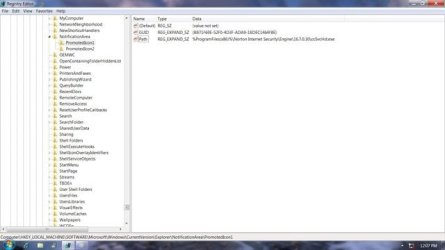
But once I was done with the initial windows un-install. and did the “Taylor/Rice” registry sweep I had only found one remaining reference to norton/symantec as shown in my attached pix's.


This was located in: HKEY_LOCAL_MACHINE\SOFTWARE\Microsoft\CurrentVersion\Explore\NotificationArea\PromotedIcon1

The above mentioned removers:
AppRemover 2.2.1.1
Revouninstaller Pro 2.1.5.0
CCleaner 2.0.0.0
And Norton Removal Tool (N-R-T)

Were all used in sucession, and found only the above registry key


Since I was unable to delete the whole value I decided to leave it to see if it would interfere with the installation of Comodo....Firewall only.
There were no references to norton during the install, and Comodo installed but I ran into difficulties with the update 85.7MB update at 5kbs?


I later found a work around at raymond.cc:
http://www.raymond.cc/blog/archives/2010/06/01/workaround-for-slow-comodo-virus-database-update/


But at this point I had had enough. I went and downloaded MS security essentials (MSE), and that with wins firewall is what we are using now.
http://www.microsoft.com/security_essentials/


Fred Langa review:
http://windowssecrets.com/2010/05/06/01-The-120-day-Microsoft-security-suite-test-drive


MS has acquired: http://www.ravantivirus.com/ And is using that as a base to work off from, and improve MSE.


I started the removal of norton at 11:45 am edt, and with the registry tweaks I finished at 12:20pm edt (35')


Installation (7.8MB), and update of MSE 12:22pm to 12:36pm edt.
Quick Scan – 12:37 to 12:41pm edt
Full Scan 12:46 to 12:57pm edt.

If I have a problem with norton's PromoIcon, I will just go back to the NotificationArea folder to delete the whole PromoIcon1 Folder.

If any one needs help in removing their norton I will be happy to help, and or advise.


Anak
 

Attachments

  • Norton Promotion Icon.jpg
    Norton Promotion Icon.jpg
    22.4 KB · Views: 36
  • Norton Reg Unable to Remove All Values.jpg
    Norton Reg Unable to Remove All Values.jpg
    25 KB · Views: 35
Last edited:

My Computer

Computer type
PC/Desktop
Computer Manufacturer/Model Number
Gateway DX4831-01e (Mid-Tower Desktop)
OS
Originally Win 7 Hm Prem x64 Ver 6.1.7600 Build 7601-SP1 | Upgraded to Windows 10 December 14, 2019
CPU
Intel i3 530 2.93GHz, 2933MHz 2 Cores 4 Logical Processors
Motherboard
Gateway H57M01 133 megahertz
Memory
6GB of 1,333MHz DDR3 SDRAM
Graphics Card(s)
32MB Intel Graphics Media Accelerator HD IGChip
Sound Card
Realtek High Definition Audio
Monitor(s) Displays
Gateway HX2000 20inch TFT active matrix TN
Screen Resolution
1600 x 900 x 59 hertz
Hard Drives
WDC WD10EADS-00M2B0 [HDD] (1000.20 GB) -- drive 0,
HL-DT-ST DVDRAM GH41N [CD-ROM dr]
Four card readers, and Four USB 2.0
PSU
300watts.
Case
Mid-Tower Desktop
Cooling
Stock from Gateway
Keyboard
Natural Ergonomic Keyboard 4000, see Other Info
Mouse
Orig. Gateway wore out now using Insignia USB wired optical
Internet Speed
Vz FIOS 10ms png 57.64Mbps down 65.53Mbps up Speedtest.org
Antivirus
Zamana Anti-logger with Anti-malware, MSE, Windows Firewall,
Browser
IE11.0.9600.19399-Upd ver11.0.135, Firefox 68.0.1 x64
Other Info
System Specs by Belarc.

BIOS: American Megatrends Inc. P01-A0 11/17/2009

Replaced the MS 'Natural' Standard PS/2 Enhanced 101-102 Keyboard with a new Natural Ergonomic Keyboard 4000 on August 1st 2014.

Canon Pixma MG3222 Printer.

Updated to IE11 on 12102015 | Fios Quantum Router g1100

Additional AV: SpywareBlaster, manual Mbam, SAS
Back
Top