Removing Picture Frame On Startup/Login Screen

Try this one - View attachment No Picture Frame Or EAC.zip
Exactly what do you mean by branding and how are you trying to remove it. This will (should) remove eac and the picture frame for you.
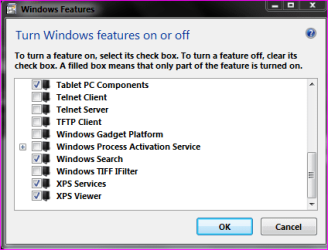
I have come across issues before where windows doesn't recognise the changes straight away, easiest way I found to force it was to turn off the gadget platform in windows features and reboot (you can always switch it back on again afterwards if you are using gadgets).

Danny
 

My Computer My Computer

At a glance

Windows 7 Home Premium x64 SP1intel(R)core(TM)2 duo CPU T6600 @ 2.20GHz3 gb ddr3ati radeon hd4570/512mb
Computer Manufacturer/Model Number
acer aspire 5935g
OS
Windows 7 Home Premium x64 SP1
CPU
intel(R)core(TM)2 duo CPU T6600 @ 2.20GHz
Motherboard
intel gm45/gm47 revision 07
Memory
3 gb ddr3
Graphics Card(s)
ati radeon hd4570/512mb
Monitor(s) Displays
lop156wh2-tle1 15.3 flat
Screen Resolution
1366x768
Hard Drives
OCZ-Agility3 60gig ssd
320gig external hdd
500gig external hdd
Mouse
Optical
Internet Speed
30Mbps Down/30Mbps Up
Hello Danny,

I have tried the file you posted here, and it didn't yield results any different from the previous one : the frame is still removed, but the EAC button is still there (on the bottom left of the screen).

By branding, I mean the "Windows 7 [edition]" picture at the center-bottom of the logon screen, which I tried to remove by modifying the atom(Branding) line in authui.dll and adding layoutpos="none".

After checking to make sure, I do not have the gadget platform activated.
 

My Computer My Computer

At a glance

Windows 7 Pro x64Intel 3770kG-Skill Trident X 16Go (4x4Go)AMD Radeon 7970Ghz Edition
Computer type
PC/Desktop
Computer Manufacturer/Model Number
Custom build
OS
Windows 7 Pro x64
CPU
Intel 3770k
Motherboard
Asrock Z77 Extreme6
Memory
G-Skill Trident X 16Go (4x4Go)
Graphics Card(s)
AMD Radeon 7970Ghz Edition
Hard Drives
Samsung 830 Series 128Gb SSD
1To Western Digital Blue HDD
Antivirus
Microsoft Security Essentials
Browser
Firefox 25
Ok Draizer

3 options.

1 You misunderstood about the gadget platform in programs and features. Its the act of making the alteration that force windows to check the files on reboot. Try ticking the box to activate it and reboot ( Again you can turn it off again afterwards)

2 Depending on how many alterations to system files you have made consider running this and reboot to put all the original system files back and start again from the beginning - http://www.sevenforums.com/tutorials/1538-sfc-scannow-command-system-file-checker.html

3 There is also an authui.dll in C:\windows\sysWOW64 on 64bit systems although I run 64bit and have never had to alter that one as well some have reported they needed to alter both.
(Do not use the same file they are slightly different in System32 and sysWOW64 ) make the alterations to each separately or use mine for system32 (sorry I don't have one already done for sysWOW64)

Run through these steps and let me know how you get on.

Danny
 

My Computer My Computer

At a glance

Windows 7 Home Premium x64 SP1intel(R)core(TM)2 duo CPU T6600 @ 2.20GHz3 gb ddr3ati radeon hd4570/512mb
Computer Manufacturer/Model Number
acer aspire 5935g
OS
Windows 7 Home Premium x64 SP1
CPU
intel(R)core(TM)2 duo CPU T6600 @ 2.20GHz
Motherboard
intel gm45/gm47 revision 07
Memory
3 gb ddr3
Graphics Card(s)
ati radeon hd4570/512mb
Monitor(s) Displays
lop156wh2-tle1 15.3 flat
Screen Resolution
1366x768
Hard Drives
OCZ-Agility3 60gig ssd
320gig external hdd
500gig external hdd
Mouse
Optical
Internet Speed
30Mbps Down/30Mbps Up
1 You misunderstood about the gadget platform in programs and features. Its the act of making the alteration that force windows to check the files on reboot. Try ticking the box to activate it and reboot ( Again you can turn it off again afterwards)

Sorry about the misunderstanding, I used Google to check what the gadget platform is and I got this answer, but this was apparently deactivated indefinitely because of security issues. Since that wasn't what you were referring to, I have to admit I'm a bit clueless (looking up 'force windows to check system files on reboot' yield results about the SFC, but that can't be that since you refer to it in your second point).
 

My Computer My Computer

At a glance

Windows 7 Pro x64Intel 3770kG-Skill Trident X 16Go (4x4Go)AMD Radeon 7970Ghz Edition
Computer type
PC/Desktop
Computer Manufacturer/Model Number
Custom build
OS
Windows 7 Pro x64
CPU
Intel 3770k
Motherboard
Asrock Z77 Extreme6
Memory
G-Skill Trident X 16Go (4x4Go)
Graphics Card(s)
AMD Radeon 7970Ghz Edition
Hard Drives
Samsung 830 Series 128Gb SSD
1To Western Digital Blue HDD
Antivirus
Microsoft Security Essentials
Browser
Firefox 25
No worries go to control panel/add remove programs/turn windows features on/off. Now just make an alteration to any non critical service. The easiest is the gadget platform either check to box if its unchecked or uncheck if its checked. It will then ask you to reboot. I don't know the reasoning behind it but it has worked for others. Post back if not and we will look at another option.

Capture.PNG

Danny
 

My Computer My Computer

At a glance

Windows 7 Home Premium x64 SP1intel(R)core(TM)2 duo CPU T6600 @ 2.20GHz3 gb ddr3ati radeon hd4570/512mb
Computer Manufacturer/Model Number
acer aspire 5935g
OS
Windows 7 Home Premium x64 SP1
CPU
intel(R)core(TM)2 duo CPU T6600 @ 2.20GHz
Motherboard
intel gm45/gm47 revision 07
Memory
3 gb ddr3
Graphics Card(s)
ati radeon hd4570/512mb
Monitor(s) Displays
lop156wh2-tle1 15.3 flat
Screen Resolution
1366x768
Hard Drives
OCZ-Agility3 60gig ssd
320gig external hdd
500gig external hdd
Mouse
Optical
Internet Speed
30Mbps Down/30Mbps Up
great so now i have a black screen. i took ownership of authui.dll and renamed to authui.dll_Bak and then copied the authui.dll file xxxdannyxxx posted. :(:(:(
 

My Computer My Computer

At a glance

Windows 7 Ultimate 32bit2ghz Core2Duo4gbIntel Integrated
Computer type
Laptop
Computer Manufacturer/Model Number
Apple
OS
Windows 7 Ultimate 32bit
CPU
2ghz Core2Duo
Motherboard
Apple Logic Board
Memory
4gb
Graphics Card(s)
Intel Integrated
Hard Drives
250gb SSD
Antivirus
na
Browser
FireFox
okay small update. luckily i made a system restore point... so after getting my hands on a windows 7 .iso i was able to boot from that and run a system restore. just logged into my OS. feeling thankful.

BTW i LOVE this forum. sorry if my first post was kinda whiny. cheers everyone
 

My Computer My Computer

At a glance

Windows 7 Ultimate 32bit2ghz Core2Duo4gbIntel Integrated
Computer type
Laptop
Computer Manufacturer/Model Number
Apple
OS
Windows 7 Ultimate 32bit
CPU
2ghz Core2Duo
Motherboard
Apple Logic Board
Memory
4gb
Graphics Card(s)
Intel Integrated
Hard Drives
250gb SSD
Antivirus
na
Browser
FireFox
Hello Danny
I know this an old thread, if you are reading this I would like to say thank you for the dll. It works fine with Win7 Pro SP1

Regards
Smokes
 

My Computer My Computer

At a glance

Win7 & Win10 both Pro x64 Dual BootAMD X8 FX-8350 4.0Ghz2x8 16GB DDR3Nvidia Ge 610
Computer type
PC/Desktop
OS
Win7 & Win10 both Pro x64 Dual Boot
CPU
AMD X8 FX-8350 4.0Ghz
Motherboard
ASUS M5A78L-M USB3
Memory
2x8 16GB DDR3
Graphics Card(s)
Nvidia Ge 610
Sound Card
OB
Monitor(s) Displays
Samsung 225BW
Screen Resolution
Native Recommended
Hard Drives
1x Samsung EVO 250GB

2 WD Blue Sata 500GB
PSU
Corsair 550w
Case
Cheap one :-)
Cooling
Stock AMD
Keyboard
Logitech ultra thin illuminated
Mouse
Logitech M570
Internet Speed
7Mb
Antivirus
Kaspersky Total Security
Browser
Opera & Firefox
Just like to say ta for the height="0" solution & if anyone is getting the black screen just move the file over using a live linux distro or hirens boot cd.

Windows is not to great an OS when it comes to modifying it while its running so i would suggest trying out your edits on a virtual machine running the same OS you plan to edit & moving your files with something that is not windows.-----virtualbox--create harddrive as a VHD,you can load it with windows with disk management.

Oh and here's some programs that will help you alot if you are planning on messing around with more edits like this or juust to help recovery from any miss adventures......rm prep usb for preparing usb drives & east2boot which can help run more stuff on 1 usb drive then you will ever need.

Peace!
 
Last edited:

My Computer My Computer

At a glance

Windows 7 x64 - Jesus EditionAMD666GBI'm blind so....
Computer type
PC/Desktop
Computer Manufacturer/Model Number
ME
OS
Windows 7 x64 - Jesus Edition
CPU
AMD
Motherboard
Circuit Board no.5
Memory
666GB
Graphics Card(s)
I'm blind so....
Sound Card
Ca Ar Di
Monitor(s) Displays
Braille display.....I'm blind,remember?
Screen Resolution
Many,many,many dots.
Hard Drives
A little hard but not to much,boners are fun!
PSU
This console is shit,i should know as I'm a time traveler!
Case
Unsovled
Cooling
Winter does a good job.
Keyboard
No,i might damage my key!
Mouse
Rats are cooler!
Internet Speed
Took some once...not as good as the homemade stuff.
Antivirus
Immune system!
Browser
Not a fan of shopping!
Other Info
Wouldn't you like to know!
I wasn't sure whether to start a new thread or use this one for the issue I'm having, but since removing the picture frame is part of my issue I figure I might as well not clog up the forum unless told otherwise.
I'm having a bit of a weird issue with my authui file. For information, I have three authui files : the original, untouched one, one I edit myself, and one that was made by xxxdannyxxx two years ago and was posted on the 3rd page of this very topic.

Basically, whatever edits I may make on it isn't taken into account afterwards (yes, I did set up the permissions right, and the changes I make are saved to the file - at least according to Resource Hacker). Therefore, even after following the step-by-step tutorial by Zoppa posted on the 2nd page of this topic multiple times, nothing changed and I still had the picture frame.

However, using the file posted by xxxdannyxxx DOES remove the frame by using the very same technique posted above (adding height="0" to the picturecontainer lines), but does not remove the EAC nor the branding (according to the file's content, it should, but it doesn't). Trying to copy-paste the contents from danny's file to mine yield the exact same results : My file doesn't work, his does.

I simply do not understand these inconsistencies. It's like edit made by myself simply aren't there at all.
If one is running windows 7 64bit:

C:\Windows\System32\authui.dll
C:\Windows\SysWOW64\authui.dll

Both these files need identical changes made to them in order for expected changes to function.

Keep backup copies of original files.

Also, make a system backup using something like Acronis
 

My Computers My Computers

  • At a glance

    Windows 7 Ultimate
    OS
    Windows 7 Ultimate
  • Computer type
    PC/Desktop
Back
Top