Removing the active partition in a dual boot setup

This is one of the toughest ones, like bringing back the dead.

Try running [DVD drive]:\Setup

slmgr commands reference: http://www.mydigitallife.info/2007/...ns-with-windows-vista-product-key-activation/

From here I would boot DVD and try Startup Repair a few more times, System Restore and the Command Line in DVD to see if you have any more luck.

Then I would wait for others' ideas including SIW2 who knows this stuff inside-out and should get my PM by morning to look at this.
 
ok thanks....no I dont get a checkbox---i just get a single line window that allows me to type in what I want to start...and typing in setup or setup.exe doesnt mane any difference either.
 

My Computer My Computer

At a glance

7
OS
7
nope....same thing whether i run it from the new task window or if i go to the command prompt by typing cmd and then hitting CTRL SHIFT ENTER which takes me to the system32 folder by default(that's how i think im running it in admin mode?)---but cant run the setup.exe from there either.
 

My Computer My Computer

At a glance

7
OS
7
I found where SIW2 helped recover a "Windows not genuine blank screen" after user had copied over a partition: http://www.sevenforums.com/installa...in7-partition-another-drive-2.html#post484430

Later I believe he had another use the same fix for a situation similar to yours where the MBR had been recovered into Win7, explaining that the drive letters sometimes get messed up in rare cases.

Maybe using the Paragon rescue will help as it helped those two users with similar screens after a copy and MBR move operation.

I will check back at 10 am EST to see how it is going.
 
Have you tried making the XP partition active again? If you haven't deleted or moved it, a normal boot might be available.

I am also guessing the problem with the not genuine screen has something to do with the drive letter being changed.

Edit: I have duplicated the situation and the instructions. In fairness, my copy of Win 7 is not yet activated, so the Not Genunine message may not happen, even if this senario is exactly as yours.

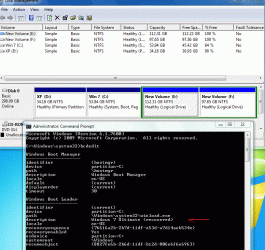
The first picture shows the original install.

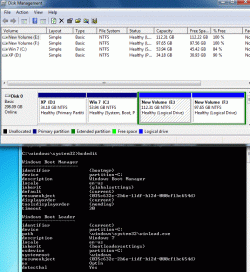
The Second (with red arrow) is after having converted the logical partition to primary and done the Startup Repair to move the system partition to Win 7. As you can see it shows both System and boot. The bcdedit window shows the bcd store after the repair.

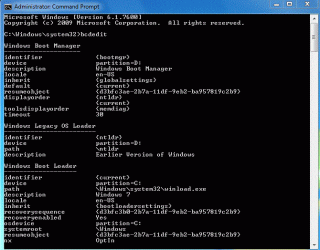
The Third picture shows basically the same thing as the Second, but I used the bcdboot command to place the boot files into the Win 7 partition. Make note of the differences, since it appears to me using bcdboot to add the necessary files is better than running the Startup Repair. And kktk, the third picture is not really meant for your information, but others.

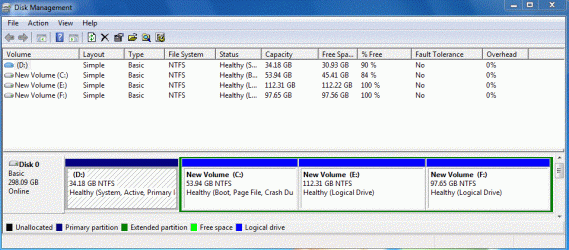
And the last one is the bcd store of the original install, notice XP, after I made the XP partition active again. This one is closer to the bcdboot restoration than the repair.
 

Attachments

  • Logical 1.GIF
    Logical 1.GIF
    78.7 KB · Views: 11
  • Logical 2.GIF
    Logical 2.GIF
    96 KB · Views: 18
  • Logical 3.GIF
    Logical 3.GIF
    87 KB · Views: 13
  • Logical 4.GIF
    Logical 4.GIF
    29.8 KB · Views: 10

My Computer My Computer

At a glance

Windows 7 x64i7-2600K8 GGTX 480
Computer Manufacturer/Model Number
Homebuilt
OS
Windows 7 x64
CPU
i7-2600K
Motherboard
Asus P8Z77-v Pro
Memory
8 G
Graphics Card(s)
GTX 480
Sound Card
Onboard
Monitor(s) Displays
LG W2753V
Screen Resolution
1920x1080
Hard Drives
Crucial M4 128 G SSD
I will get you a snapshot with the details(btw---how does one do that?).

But for now I can tell you what they look like.

The XP partition was left alone (as primary but not active).
The 7 partition was made primary and active--and booting from this gets me to the blank screen(not black but a plain blue one if that matters).

If I set the XP partition back to active and try and boot, I get boot errors---so I am assuming in the process of running the repair from the DVD---the bootmgr was corrected to boot correctly off the 7 partition and it somehow doesnt like going back and booting the way it was.

One thing I noticed was that the Drive letter assignment was not set to C.
that is neither the XP partition or the 7 partition was being assigned the "C" drive letter.
Since the XP partition was the first on the disk, I have tried deleting it(I can restore it if i need to), and shifting the location of the 7 partition to the front of the disk and also making it the only primary partition on the drive....but even that way, the drive letter "C" doesnt get assigned to it.

Maybe that's why I cant run some of those commands?---I dont think it would solve the licensing issue however.

So currently, the 7 partition is active and primary(gets drive letter G).
The other logical drives have drive letters D and E and the DVD drive is getting drive letter L.
 
Last edited:

My Computer My Computer

At a glance

7
OS
7
But is this causing the licensing issue? or will it get me past the errors where I am not able to launch the setup.exe from the new task window like you wanted me to ? and then I will have to re-activate again?
 

My Computer My Computer

At a glance

7
OS
7
From what I read, the not genuine and activation are two different issues. You can have an activated copy of Win 7 and still have it show as not genuine.

It sounds like recovering a partition is a fairly normal operation, but it isn't. It is an emergency operation, and the recovery rarely gives as 100% restore.
 

My Computer My Computer

At a glance

Windows 7 x64i7-2600K8 GGTX 480
Computer Manufacturer/Model Number
Homebuilt
OS
Windows 7 x64
CPU
i7-2600K
Motherboard
Asus P8Z77-v Pro
Memory
8 G
Graphics Card(s)
GTX 480
Sound Card
Onboard
Monitor(s) Displays
LG W2753V
Screen Resolution
1920x1080
Hard Drives
Crucial M4 128 G SSD
kktk;

I hesitate to post in your thread again, as you did not seem to like my earlier suggestions.

However, if this helps: This web site: Multibooters, Vista Dual and Multibooting - Drive Letter Problems suggests you can boot into Windows 7 safemode, start regedit in Administrator mode and open this reg entry: "HKEY_LOCAL_MACHINE\SYSTEM\MountedDevices". You can change a drive letter, delete the drive entry or entries and let Windows assign a new letter when it restarts, or remove the entire folder and allow Windows to rebuild the folder when it restarts.

Fix_drive_letter_01.png

Hope this helps.
Robert
 
Last edited:

My Computer My Computer

At a glance

...
OS
...
Its not that I hesitate to follow your suggestions :)
Its that I dont understand many things---so I dont know what I am doing! :) So I tend to go for one option vs another....I did land up following parts of it to get rid of the existing active primary partition and then convert my logical drive to a primary partition and set it to active and then run the repair.

So as it stands now---i have a few issues.
1. No "C" being assigned.
2. Windows booting up with a "preparing your desktop" and then not really giving me one except the message that the copy isnt genuine.

Thanks to all for helping me understand.
Win7 setup is quite different from the earlier versions----oh well you learn something everyday.
 

My Computer My Computer

At a glance

7
OS
7
But is this causing the licensing issue? or will it get me past the errors where I am not able to launch the setup.exe from the new task window like you wanted me to ? and then I will have to re-activate again?

The issue is likely that the drive letter has slipped, especially since you browsed the HD using Partition Wizard and Win7 now has a new letter (correct?).

So burn Paragon Rescue to CD, follow SIW2's steps to set the Drive letter back correctly.

It worked in both cases previously where it was tried here to fix similar problem.
 
Got it---will do this tonight.
 

My Computer My Computer

At a glance

7
OS
7
Well spotted Greg. That does appear to be the problem.

It's a bit fiddly , but much easier with the Rescue Kit than trying to do it manually.
 

My Computers My Computers

  • At a glance

    7 X64i5 84002x8gb 3200mhz
    Computer type
    PC/Desktop
    OS
    7 X64
    CPU
    i5 8400
    Motherboard
    gigabyte b365m ds3h
    Memory
    2x8gb 3200mhz
    Hard Drives
    various
    PSU
    pure power 11 400w cm
    Case
    Coolermaster
    Cooling
    cryorig m9i
  • At a glance

    7x64g54008gb ddr4 2400
    Computer type
    PC/Desktop
    OS
    7x64
    CPU
    g5400
    Motherboard
    ga b365m ds3h
    Memory
    8gb ddr4 2400
    PSU
    xfx pro 450w
Man..I'm running into some problems here or what! ? :)
Now I cant seem to get Rescue Kit going--this is funny even for me :)
It hangs on loading in normal mode or safe mode....even low graphics mode.

I'll keep trying.
 

My Computer My Computer

At a glance

7
OS
7
Are you booting the CD?

Make sure CD drive is set to boot first in BIOS setup, before HD.

Maybe you need to try burning another CD? If it allows you to choose your own burner, then use ImgBurn at 4x with verify - it never fails.
 
It's booting ok, just not loading. That is very unusual - I haven't come across any difficulties with the v9 Linux kernel.
 

My Computers My Computers

  • At a glance

    7 X64i5 84002x8gb 3200mhz
    Computer type
    PC/Desktop
    OS
    7 X64
    CPU
    i5 8400
    Motherboard
    gigabyte b365m ds3h
    Memory
    2x8gb 3200mhz
    Hard Drives
    various
    PSU
    pure power 11 400w cm
    Case
    Coolermaster
    Cooling
    cryorig m9i
  • At a glance

    7x64g54008gb ddr4 2400
    Computer type
    PC/Desktop
    OS
    7x64
    CPU
    g5400
    Motherboard
    ga b365m ds3h
    Memory
    8gb ddr4 2400
    PSU
    xfx pro 450w
Back
Top