Removing the active partition in a dual boot setup

Yes---booting off the cd...I'll read the other solution and see what that's all about---but if requires launching anything from the command prompt in admin mode--that's something I already havent been able to do(we've tried that before).

Any other utilities that are bootable with changing drive letters as options?

And I have burned 2 CD's already.
 

My Computer My Computer

At a glance

7
OS
7
It only requires you to open Disk Mgmt and Regedit as New Task, so maybe that will work if you follow the tutorial closely.

I would exhaust all the possibilities given because we are running out of options.

Will you lose files if you clean reinstall?

I would zero the drive if you do, which can be done with Diskpart commands from WIn7 DVD.
 
OK---I finally got this solved.
Thanks to all for helping.

Part of the problem was being made worse due to me not doing things right! :)

When I was being asked to run things in admin mode---I was trying that while logged on in normal mode---which wasnt working. I finally booted in safe mode to do the same and I was able to run the setup.exe. this however only gave me the option to install and not repair--so I skipped that.

I then went back to run the activation using the commands and it still errored out like before on some VBS script.

I took the regedit route and went directly after the mounted devices key--and changed what was assigned to C to something else and the drive letter "g" to "c". Then the reboot took care of that issue.
I was presented with a activation window--where I then entered my key again and everything was fine after that.

Thanks once again to all who gave meaningful insights to try and resolve this.

The only other thing that I noticed now----it boots up much slower.
Any ideas why? I have rebooted 4-5 times already and its about 10-12 seconds longer than usual.

 

My Computer My Computer

At a glance

7
OS
7
Click WEI score on Control Panel>System page to use Advanced Tools to check the Diagnostics-Performance log to see if a driver or app is slowing down bootup.

After what you have been through, I would run a http://www.sevenforums.com/tutorials/3413-repair-install.html?ltr=R which reinstalls the OS while keeping programs, files and settings in place. It will also sort out the boot loading and reset the activation.

You attempted the first repairs before posting back a screenshot which I had requested so we could help you with the steps we have helped many use here to delete a dual boot then recover the deleted space, active flag and MBR into Win7. If you would like to complete the space recovery step (now that you know you can recover from anything), it will repair the MBR one after placing Win7 in the preferred lower HD address where performance could be better.
 
Last edited:
I will surely run the WEI and find out more about that.
I have already moved the partitions around now that the system is up and reallocated the space etc....how is that different than specifically moving the MBR to the lower HD address?--and how would we do just that?

It makes sense--but I've never tried that before.
 

My Computer My Computer

At a glance

7
OS
7
You can't move the mbr. It stays where it is.

What are you wanting to do exactly?
 

My Computers My Computers

  • At a glance

    7 X64i5 84002x8gb 3200mhz
    Computer type
    PC/Desktop
    OS
    7 X64
    CPU
    i5 8400
    Motherboard
    gigabyte b365m ds3h
    Memory
    2x8gb 3200mhz
    Hard Drives
    various
    PSU
    pure power 11 400w cm
    Case
    Coolermaster
    Cooling
    cryorig m9i
  • At a glance

    7x64g54008gb ddr4 2400
    Computer type
    PC/Desktop
    OS
    7x64
    CPU
    g5400
    Motherboard
    ga b365m ds3h
    Memory
    8gb ddr4 2400
    PSU
    xfx pro 450w
Was referring to moving the Win7 partition into the lower address, achieved by Resizing with booted Partition Wizard to drag left Win7 partition border over deleted OS space.

This is assuming you had deleted OS in first partition space since we haven't seen the screenshot.

This may be a longshot in regaining startup performance, however. Although the MBR would probably need to be repaired if Win7 is resized in this manner, and that might change startup performance.

My suggestion was more to help you complete the dual boot removal, with the added hope that it would improve delayed startup you are suddenly experiencing.

If not, and Diagnostics Performance log or Boot Logging via F8 don't reveal what is delaying startup, I would personally clean reinstall.
 
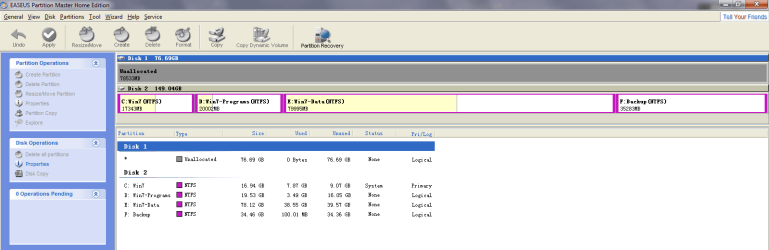
I'll get a screenshot to you guys so you can see---but the OS is on the "C" drive letter and that happens to be on the primary partition which is the first on the list (visually on the left side of the disk when seeing it through a partition tool).

I dont know how that translates to the sectors on the disk or where exactly the MBR lands up in that partition. I was curious as to why
1. The performance got much slower as part of removing the XP partition and moving everything accordingly?
2. And trying to follow gregrocker's suggestion as I havent done that before.
 

My Computer My Computer

At a glance

7
OS
7
Try booting 7 dvd.

When you get to the window that says"Install Now" - don't click that.

Press shift+F10 together.

A command prompt will pop up.

type:

bootsect /nt60 all

then press enter.

You should get a successfully completed message.

Close command window.

Close Install Now window.

See if that helps.
 

My Computers My Computers

  • At a glance

    7 X64i5 84002x8gb 3200mhz
    Computer type
    PC/Desktop
    OS
    7 X64
    CPU
    i5 8400
    Motherboard
    gigabyte b365m ds3h
    Memory
    2x8gb 3200mhz
    Hard Drives
    various
    PSU
    pure power 11 400w cm
    Case
    Coolermaster
    Cooling
    cryorig m9i
  • At a glance

    7x64g54008gb ddr4 2400
    Computer type
    PC/Desktop
    OS
    7x64
    CPU
    g5400
    Motherboard
    ga b365m ds3h
    Memory
    8gb ddr4 2400
    PSU
    xfx pro 450w
Aaah! ok...I can do that....what does do behind the scenes? Just reinstall the OS on top of it?
Will that need new updates etc for patches or does all of that stay as is?
 

My Computer My Computer

At a glance

7
OS
7
It doesn't reinstall the o/s , it rewites the bootsector code - only takes a couple of seconds.

Give it a try.
 

My Computers My Computers

  • At a glance

    7 X64i5 84002x8gb 3200mhz
    Computer type
    PC/Desktop
    OS
    7 X64
    CPU
    i5 8400
    Motherboard
    gigabyte b365m ds3h
    Memory
    2x8gb 3200mhz
    Hard Drives
    various
    PSU
    pure power 11 400w cm
    Case
    Coolermaster
    Cooling
    cryorig m9i
  • At a glance

    7x64g54008gb ddr4 2400
    Computer type
    PC/Desktop
    OS
    7x64
    CPU
    g5400
    Motherboard
    ga b365m ds3h
    Memory
    8gb ddr4 2400
    PSU
    xfx pro 450w
Ok--did this...the commands were successful, but bootup time didnt change. Still taking longer than usual.

If it was a simple fix, I would love to do it, but if it involves reinstalling---I'll wait 10 seconds more :)
 

My Computer My Computer

At a glance

7
OS
7
And probably too late but for what its worth :)
the Other disk is something I just connected and had nothing to do with issue...just an FYI.
 

Attachments

  • Capture.PNG
    Capture.PNG
    27 KB · Views: 18

My Computer My Computer

At a glance

7
OS
7
Did you do the original repartiioning using Easeus, because that is most likely why the drive letter slipped causing your problems. Easeus is not really compatible with Win7, which is why we recommend free Partition Wizard bootable CD which has helped successfully remove over 150 dual boots here.

A couple of things I would consider: Try to move your only HD to DISK0 or DISK1 port. Be sure to change as HD to boot first (after DVD) in BIOS setup. Make sure nothing else is listed before HD.

If there are any other performance problems I would run a Repair Install to sort out everything including the boot.
 
No I used the CD---Easeus is just something I had installed earlier but never used it.
Would the repair install then require me to reinstall patches etc but keep all the programs etc in place?
 

My Computer My Computer

At a glance

7
OS
7
It explains what remains and changes here: http://www.sevenforums.com/tutorials/3413-repair-install.html?ltr=R

This is always a last resort before clean reinstall, but has saved me from having to do one many times.

You might want to monitor performance for awhile longer to see if boot issues can be cleared up, or if other issues arise. You have brought your OS back from the dead, so it bears watching closely.
 
If you don't need XP anymore and you wanna delete it you can use any software dude like EasyBCD. its nice software and easy to use. I had also used this software when i wanted to delete Ubuntu on my wndows 7. its a simple program.
Hopes this can help.
 

My Computer My Computer

At a glance

windows 7 Ultimate 32-bit
OS
windows 7 Ultimate 32-bit
Back
Top