
- Local time
- 12:41 PM
- Messages
- 119
As of two days ago my Bittorent client can not be accessed. There's this blank rectangle on my desktop which appears whenever I open Bittorent preventing me from clicking any option or command on my torrent client window.
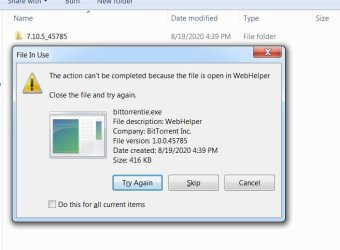
I tried to delete update files in Roaming folder...I succeeded in deleting all of them - but not the most recent update file. I get these warning. So I Googled and tried several solutions including system restore, uninstalling and reinstalling my torrent client, scanning with Kaspersky online scanner, scanning with SuperAntispyware etc. but to no avail.
The blank rectangle is still there on my desktop (though I can cover it with other applications)
How should I get rid of that WebHelper trojan/virus/whatever...?
I tried to delete update files in Roaming folder...I succeeded in deleting all of them - but not the most recent update file. I get these warning. So I Googled and tried several solutions including system restore, uninstalling and reinstalling my torrent client, scanning with Kaspersky online scanner, scanning with SuperAntispyware etc. but to no avail.
The blank rectangle is still there on my desktop (though I can cover it with other applications)
How should I get rid of that WebHelper trojan/virus/whatever...?
Attachments

My Computer
- Computer type
- PC/Desktop
- OS
- Windows 7 Ultimate x64
- CPU
- Intel(R) Xeon(R) CPU E3-1231 v3 @ 3.40GHz
- Motherboard
- ASUSTeK COMPUTER INC. Z97-A Rev 1.xx
- Memory
- 16 GB
- Graphics Card(s)
- AMD Radeon (TM) R9 390 Series
- Sound Card
- (1) AMD High Definition Audio Device (2) Realtek High Defi

