Removing Whitesmoke From Programs/Features

jmrpjb

New member
Local time
4:41 PM
Messages
44
Location
Vancouver, Canada
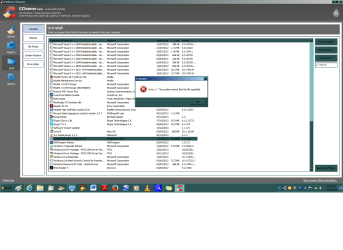
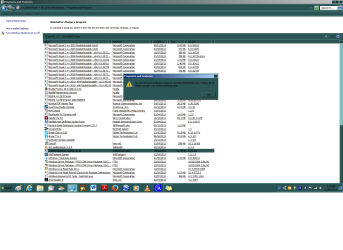
Does anyone know how I can remove 'Whitesmoke' from my computer. I've tried to do it via The Control Panel (please see attached) but I get the message that I don't have the authority and I should see my Administrator (My User Account is an Administrator). I've tried to remove it with CCleaner but I get the message that it can't be found (attached):confused:.

Does anyone know of another way to get rid of this pesky varmint?:mad:

Cheers, and Happy New Year!:party:

P.S. I have tried (and hopefully succeeded) to add my "system specs" to the information in my account so that information should be accessible.
 

Attachments
  • win7.png
    win7.png
    57.5 KB · Views: 7
  • win7a.png
    win7a.png
    60.5 KB · Views: 3

My Computer

Computer type
PC/Desktop
Computer Manufacturer/Model Number
Dell product #00359-OEM-8992687-00095
OS
Microsoft Windows 7 Home Premium 64-bit 7601 Multiprocessor Free Service Pack 1
CPU
Intel(R) Pentium(R) CPU G620T @ 2.20GHz
Motherboard
Dell Inc. 0MTFWP
Memory
4.00 GB
Graphics Card(s)
Intel(R) HD Graphics
Sound Card
(1) Realtek High Definition Audio (2) Bluetooth Audio Devi
Screen Resolution
1600 x 900 x 32 bits (4294967296 colors) @ 60 Hz
Hard Drives
(1) ST500DM002-1BD142 ATA Device (2) Multiple Card Reader USB Device

My Computer

Computer type
PC/Desktop
Computer Manufacturer/Model Number
Home Built Desktop By DataTech
OS
Windows 7 Ultimate X64 SP1
CPU
Intel i5-2550K, Differing ~4.4-4.8GHz No built in GPU
Motherboard
ASUS P8Z68-V PRO/GEN3
Memory
16GB G.Skill Sniper 1866MHz @ 2133MHz 2x8GB
Graphics Card(s)
ASUS GTX650TIB-DC2OC-2GD5, (650TI Boost)
Sound Card
Onboard Realtek 5-1
Monitor(s) Displays
Samsung P2570HD
Screen Resolution
1920x1080
Hard Drives
Samsung 840 Pro 256GB SSD for OS, 500GB Seagate Constellation (Enterprise drive) for Data
PSU
Corsair HX650W
Case
Inwin Dragon Rider
Cooling
Hyper 212 EVO w/two Noctua fans, push-pull, @1300 RPM
Keyboard
E-Z Eyes, bright yellow keys with large characters
Mouse
steelseries SENSEI Laser Pro Gaming
Internet Speed
48-51Mbs Mbs down, 11 Mbs up Xfinity Cable
Antivirus
Norton Internet Security 2013
Browser
IE 10, Opera, Pale Moon if needed
Other Info
4 case fans, LG BluRay-RE, ASUS DVD-RW, Mr. Fusion power supply, 1.21 gigawatts.
What Britton said. :)
 

My Computer

Computer type
Laptop
Computer Manufacturer/Model Number
MSI PE60 6QE
OS
Win 10 Pro x64, Win 7 Pro x64
CPU
Intel Core i7-6700HQ Skylake
Motherboard
MSI MS-16J5
Memory
16gb Crucial DDR4
Graphics Card(s)
NVIDIA GeForce GTX 960M 2 GB
Screen Resolution
1920 x 1080
Hard Drives
Samsung 850 EVO 250 GB M.2 SSD (MZ-N5E250BW)
HGST 1TB @7200 RPM HTS721010A9E630
Case
Plastic
Keyboard
Got one...
Mouse
Yep, one of those too.
Internet Speed
FIOS 75/75
Antivirus
Defender
Browser
Chrome/FFox/Ex-PLODE-r/(L)Edge
Other Info
Defender, Custom Hosts, uBlock, regular backups w/ Macrium (Free)
I downloaded Adware, did the scan (and, I'm sorry, I also did the clean) and I've attached the log for:
after the scan, after the clean and then after another scan.

While I've got you, I've run into the problem of not being able to remove programs because they're not listed in Add/Remove Programs in the Control Panel. As we speak, there's another one called Windows Easy Transfer which I can't remove. So, ideally, I would like to learn how to manually remove programs that don't appear in the Control Panel.

Thank you for your help
 

Attachments

My Computer

Computer type
PC/Desktop
Computer Manufacturer/Model Number
Dell product #00359-OEM-8992687-00095
OS
Microsoft Windows 7 Home Premium 64-bit 7601 Multiprocessor Free Service Pack 1
CPU
Intel(R) Pentium(R) CPU G620T @ 2.20GHz
Motherboard
Dell Inc. 0MTFWP
Memory
4.00 GB
Graphics Card(s)
Intel(R) HD Graphics
Sound Card
(1) Realtek High Definition Audio (2) Bluetooth Audio Devi
Screen Resolution
1600 x 900 x 32 bits (4294967296 colors) @ 60 Hz
Hard Drives
(1) ST500DM002-1BD142 ATA Device (2) Multiple Card Reader USB Device
Back
Top