Removing Windows Install from Data HDD

AstaLaVista

Lost in Cyberspace
Guru
Local time
4:13 AM
Messages
1,962
Location
Miami, Florida
OK so, this one is a Doozy indeed.

Built a PC for a customer/friend about 2 yrs ago, small 60GBs SSD with Win 7 Ultimate 64bit OS and big 1.5TB HDD for Data... good so far.

There was a problem... Bottom Line and Long Story Short, the asshat managed to install a new Windows 7 Ult. 64bit OS on the 1.5TB Data HDD instead of repairing the small SSD like I instructed.

So, he sent his PC to my office and I fix the problem with the small ssd. Matter of Fact I got a newer and bigger SSD for him.

Now, the annoying part (more than a real issue) is the fact that I can not delete or remove the Window Files & Folders that the OS installed (Windows, Boot, Program Files + (x86), etc, etc, etc.) from the 1.5TB Data HDD and I don't have a drive where I could move his Pictures, Music & Documents, otherwise I would do that and Nuke the drive by formatting it and put the data back.

I have google this to death but I can't find a solution.

Any easy solutions than having to buy a new drive so I can move the Data to a new location?
 

My Computer

Computer type
PC/Desktop
Computer Manufacturer/Model Number
Custom Built... Intel/Nvidia/ASRock
OS
Windows 7 x64 (Ultimate)
CPU
Intel i5-4670K
Motherboard
ASRock Z87 Extreme 6
Memory
8GBs Ripjaws 2133Mhz
Graphics Card(s)
Asus GTX660 (2GBs)
Sound Card
Onboard Realtek HD
Monitor(s) Displays
Acer AL2216W
Screen Resolution
1680 x 1050
Hard Drives
Samsung 840 SSD 120GBs
Samsung 750GB 32MB cache
1.5 TB
PSU
PC Cooling 750w Silencer
Case
Thermaltake Spedo Advance
Cooling
Std Cooler
Keyboard
Logitech G15
Mouse
Logitech G9
Internet Speed
Comcast 20Mbit
Antivirus
Avast
Browser
Firefox
How much data is on the 1.5 TB drive that you need to keep ?
Maybe temporarily using Cloud Storage would work ?
Maybe you can delete the "Windows" files if you boot from a non Windows disc such as Linux ?
 

My Computer

Computer type
PC/Desktop
Computer Manufacturer/Model Number
home built
OS
Multi-Boot W7_Pro_x64 W8.1_Pro_x64 W10_Pro_x64 +Linux_VMs +Chromium_VM
CPU
AMD Athlon II x4 620
Motherboard
Gigabyte GA-MA785G-UD3H
Memory
6GB GSkill DDR2 800
Graphics Card(s)
AMD 4670 GPU + AMD 4200 IGP
Sound Card
on board Realtek ALC889A
Monitor(s) Displays
RCA 40" LCD TV, Insignia 32" LCD TV, HP 15" LCD monitor
Screen Resolution
1680 x 1050
Hard Drives
OCZ Vertex 3 120GB,
Samsung F3 1TB (3),
Several others - WD, Seagate, Hitachi, ...
PSU
Corsair 500 W
Case
Rosewill mid tower
Cooling
CM 90mm rifle
Keyboard
Gyration wireless, Logitech wireless, Dell USB wired
Mouse
Gyration wireless, Logitech wireless, V7 USB wired
Internet Speed
Spectrum - 100Mbps D / 10Mbps U
Antivirus
Avast, MBAM3, EMET, WinPatrol
Browser
Pale Moon, Firefox, IE
Other Info
2 multi-boot PC's
Mainly HTPC/Office/Gen purpose (no gaming).
Trendnet USB KVM.
LG DVD burner/Blue Ray Player.
Tray system for removable SATA backup drives.

Not currently OCd, under-volted.
I use Hybrid sleep, rarely re-boot or shutdown.

Hauppauge HD-PVR, Avermedia PCIe TV Tuner, Hauppauge PCI TV Tuner.
Please post back a screenshot of http://www.sevenforums.com/tutorial...nt-post-screen-capture-image.html#post2261610. Tell us what is on each partition.

We will show you how to correctly delete the OS by deleting its partition while preserving the data.

Easiest would be to shrink the OS partition to create a new data partition to move the data into, in steps if necessary. Then when you have everythihg moved over mark the OS partition Inactive and delete it in Disk Mgmt. Partition - Mark as Inactive - Windows 7 Forums.

You can then create a new storage partition in the old OS space or use http://www.partitionwizard.com/download.html bootable CD to Resize or Extend the data partition into the space if its to the left. The PW disk is important to assure no possible data loss, and can also force delete the OS partition if it balks.

It's not best to delete the OS piecemeal but if you do so its easiest to do it from a boot disk method such as http://www.sevenforums.com/tutorials/93347-copy-paste-windows-recovery-console.html.
 
Last edited:

My Computer

Computer type
PC/Desktop
Computer Manufacturer/Model Number
Lenovo IdeaCenter 450
OS
Windows 10 Pro X64
CPU
Intel Quad Core i7-4770 @ 3.4Ghz
Memory
16.0GB PC3-12800 DDR3 SDRAM 1600 MHz
Graphics Card(s)
Intel Integrated HD Graphics
Sound Card
Realtek HD Audio
Monitor(s) Displays
HP 22" LCD
Screen Resolution
1680 x 1050
Hard Drives
250GB Samsung EVO SATA-3 SSD
2TB Seagate ST2000DM001 SATA-2
1.5TB Seagate ST3150041AS SATA
Keyboard
Dell USB
Mouse
Lenovo USB
Internet Speed
Cable via Road Runner 3MB Upload, 30MB Download
Antivirus
Windows Defender, MBAM Pro, MBAE
Browser
Seamonkey
Other Info
UEFI/GPT
PLDS DVD-RW DH16AERSH
How much data is on the 1.5 TB drive that you need to keep ?
Maybe temporarily using Cloud Storage would work ?
Maybe you can delete the "Windows" files if you boot from a non Windows disc such as Linux ?
Hmmm, this may just be the solution I was looking for... any free cloud storage you guys would recommend?

Please post back a screenshot of http://www.sevenforums.com/tutorial...nt-post-screen-capture-image.html#post2261610. Tell us what is on each partition.

We will show you how to correctly delete the OS by deleting its partition while preserving the data.

Easiest would be to shrink the OS partition to create a new data partition to move the data into, in steps if necessary. Then when you have everythihg moved over mark the OS partition Inactive and delete it in Disk Mgmt. Partition - Mark as Inactive - Windows 7 Forums.

You can then create a new storage partition in the old OS space or use Free download Magic Partition Manager Software, partition magic alternative, free partition magic, partition magic Windows 7 and server partition software - Partition Wizard Online bootable CD to Resize or Extend the data partition into the space if its to the left. The PW disk is important to assure no possible data loss, and can also force delete the OS partition if it balks.

It's not best to delete the OS piecemeal but if you do so its easiest to do it from a boot disk method such as http://www.sevenforums.com/tutorials/93347-copy-paste-windows-recovery-console.html.

You could also use a live Linux CD/DVD. Boot it then delete anything you need.

See here: http://www.sevenforums.com/tutorials/287439-emergency-kit-save-your-files-dead-os.html

only instead of backing up your data, use the file browser in Mint to delete the files and folders you don't want.

Guys, thanks for the help but it appears I now have a new problem that came out off left field...

I had use Migrate easy to, well, migrate the OS from the small SSD (60GBS) to the new SSD (120 GBs) and all appeared to have gone well until this morning when it appears something went terribly wrong because now I can not restart the OS... I am going to plug in the old ssd and try again.

I will come back and tell you how it went later on
 

My Computer

Computer type
PC/Desktop
Computer Manufacturer/Model Number
Custom Built... Intel/Nvidia/ASRock
OS
Windows 7 x64 (Ultimate)
CPU
Intel i5-4670K
Motherboard
ASRock Z87 Extreme 6
Memory
8GBs Ripjaws 2133Mhz
Graphics Card(s)
Asus GTX660 (2GBs)
Sound Card
Onboard Realtek HD
Monitor(s) Displays
Acer AL2216W
Screen Resolution
1680 x 1050
Hard Drives
Samsung 840 SSD 120GBs
Samsung 750GB 32MB cache
1.5 TB
PSU
PC Cooling 750w Silencer
Case
Thermaltake Spedo Advance
Cooling
Std Cooler
Keyboard
Logitech G15
Mouse
Logitech G9
Internet Speed
Comcast 20Mbit
Antivirus
Avast
Browser
Firefox
@gregroker...

I am doing this as we speak, I don't think it would have dawned on me to do this in the first place... I thank you for it.

I also want to thanks all of you for lending a hand, if the shrink volume does not hold all the data I need to move, I have a couple of free cloud storage I could use to move the remainder of it.
 

My Computer

Computer type
PC/Desktop
Computer Manufacturer/Model Number
Custom Built... Intel/Nvidia/ASRock
OS
Windows 7 x64 (Ultimate)
CPU
Intel i5-4670K
Motherboard
ASRock Z87 Extreme 6
Memory
8GBs Ripjaws 2133Mhz
Graphics Card(s)
Asus GTX660 (2GBs)
Sound Card
Onboard Realtek HD
Monitor(s) Displays
Acer AL2216W
Screen Resolution
1680 x 1050
Hard Drives
Samsung 840 SSD 120GBs
Samsung 750GB 32MB cache
1.5 TB
PSU
PC Cooling 750w Silencer
Case
Thermaltake Spedo Advance
Cooling
Std Cooler
Keyboard
Logitech G15
Mouse
Logitech G9
Internet Speed
Comcast 20Mbit
Antivirus
Avast
Browser
Firefox
I am not at the office but I will do that on Monday when I am back... Thanks
 

My Computer

Computer type
PC/Desktop
Computer Manufacturer/Model Number
Custom Built... Intel/Nvidia/ASRock
OS
Windows 7 x64 (Ultimate)
CPU
Intel i5-4670K
Motherboard
ASRock Z87 Extreme 6
Memory
8GBs Ripjaws 2133Mhz
Graphics Card(s)
Asus GTX660 (2GBs)
Sound Card
Onboard Realtek HD
Monitor(s) Displays
Acer AL2216W
Screen Resolution
1680 x 1050
Hard Drives
Samsung 840 SSD 120GBs
Samsung 750GB 32MB cache
1.5 TB
PSU
PC Cooling 750w Silencer
Case
Thermaltake Spedo Advance
Cooling
Std Cooler
Keyboard
Logitech G15
Mouse
Logitech G9
Internet Speed
Comcast 20Mbit
Antivirus
Avast
Browser
Firefox
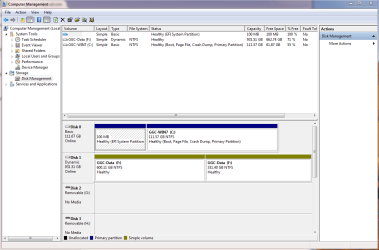
Here it is... as promised.

Same Letter drive but one has +600GB and the other + 300GB... although, on Explore, it shows as a single 1TB drive

Don't really know why one disk is Basic and the other Dynamic but really, those are things that I never seem to understand and as far as I am concerned, as long as this is working, I am ok with that. If it can be fix w/o major surgery, I am willing to attempt, otherwise, the rig will be leaving tomorrow so it will stay that way.
 

Attachments

  • DM.PNG
    DM.PNG
    32.8 KB · Views: 2

My Computer

Computer type
PC/Desktop
Computer Manufacturer/Model Number
Custom Built... Intel/Nvidia/ASRock
OS
Windows 7 x64 (Ultimate)
CPU
Intel i5-4670K
Motherboard
ASRock Z87 Extreme 6
Memory
8GBs Ripjaws 2133Mhz
Graphics Card(s)
Asus GTX660 (2GBs)
Sound Card
Onboard Realtek HD
Monitor(s) Displays
Acer AL2216W
Screen Resolution
1680 x 1050
Hard Drives
Samsung 840 SSD 120GBs
Samsung 750GB 32MB cache
1.5 TB
PSU
PC Cooling 750w Silencer
Case
Thermaltake Spedo Advance
Cooling
Std Cooler
Keyboard
Logitech G15
Mouse
Logitech G9
Internet Speed
Comcast 20Mbit
Antivirus
Avast
Browser
Firefox
I appreciate the help but I will have to decline the offer, first and foremost because they warn you to make a backup of your data and well, I have no other place to save it and if it makes no difference on whether it stays Basic or Dynamic, my friend (or I) won't care ;) :D

I do thank you though, perhaps if this happens again then I will try to do so to learn something new.
 

My Computer

Computer type
PC/Desktop
Computer Manufacturer/Model Number
Custom Built... Intel/Nvidia/ASRock
OS
Windows 7 x64 (Ultimate)
CPU
Intel i5-4670K
Motherboard
ASRock Z87 Extreme 6
Memory
8GBs Ripjaws 2133Mhz
Graphics Card(s)
Asus GTX660 (2GBs)
Sound Card
Onboard Realtek HD
Monitor(s) Displays
Acer AL2216W
Screen Resolution
1680 x 1050
Hard Drives
Samsung 840 SSD 120GBs
Samsung 750GB 32MB cache
1.5 TB
PSU
PC Cooling 750w Silencer
Case
Thermaltake Spedo Advance
Cooling
Std Cooler
Keyboard
Logitech G15
Mouse
Logitech G9
Internet Speed
Comcast 20Mbit
Antivirus
Avast
Browser
Firefox
The drive should not be Dynamic unless it is two separate HD's.
So, if I were to make two partitions, would that be ok? I just don't want to run the risk of something happening to the Data while I do the transition to Basic and I have no where to move all the data, I have about 350GBs worth of Documents, clips, pictures & music.
 

My Computer

Computer type
PC/Desktop
Computer Manufacturer/Model Number
Custom Built... Intel/Nvidia/ASRock
OS
Windows 7 x64 (Ultimate)
CPU
Intel i5-4670K
Motherboard
ASRock Z87 Extreme 6
Memory
8GBs Ripjaws 2133Mhz
Graphics Card(s)
Asus GTX660 (2GBs)
Sound Card
Onboard Realtek HD
Monitor(s) Displays
Acer AL2216W
Screen Resolution
1680 x 1050
Hard Drives
Samsung 840 SSD 120GBs
Samsung 750GB 32MB cache
1.5 TB
PSU
PC Cooling 750w Silencer
Case
Thermaltake Spedo Advance
Cooling
Std Cooler
Keyboard
Logitech G15
Mouse
Logitech G9
Internet Speed
Comcast 20Mbit
Antivirus
Avast
Browser
Firefox
Not two partitions. A Dynamic disk is meant to span a single partition across two or more separate HD's. Working with Basic and Dynamic Disks

But the problems we've seen have only been with a Dynamic OS drive, so you should be okay although any data which is not backed up is always at risk due to possible disk failure. Here is a free method to Sync, Backup and Store your Files to the Cloud with Skydrive - Windows 7 Forums

Once you've got your data safely backed up you can easily and non-destructively Convert a Dynamic Disk to a Basic Disk using Option 1, or Easeus Partition Master free installed version.
 
Ahhhh crap!

Ok, well, here I go again... I will advise if everything worked well. I doubt I'll be able to do it today but perhaps on Monday.

Thanks again
 

My Computer

Computer type
PC/Desktop
Computer Manufacturer/Model Number
Custom Built... Intel/Nvidia/ASRock
OS
Windows 7 x64 (Ultimate)
CPU
Intel i5-4670K
Motherboard
ASRock Z87 Extreme 6
Memory
8GBs Ripjaws 2133Mhz
Graphics Card(s)
Asus GTX660 (2GBs)
Sound Card
Onboard Realtek HD
Monitor(s) Displays
Acer AL2216W
Screen Resolution
1680 x 1050
Hard Drives
Samsung 840 SSD 120GBs
Samsung 750GB 32MB cache
1.5 TB
PSU
PC Cooling 750w Silencer
Case
Thermaltake Spedo Advance
Cooling
Std Cooler
Keyboard
Logitech G15
Mouse
Logitech G9
Internet Speed
Comcast 20Mbit
Antivirus
Avast
Browser
Firefox
There is no hurry if it isn't symptomatic and Dynamic isn't on the System drive.
 
Back
Top