Repair Install - basic questions not covered in tutorial

catalogue

New member
Member
VIP
Local time
5:47 PM
Messages
108
I’ve read the Repair Install tutorial several times and I don’t believe these questions are covered:

1) My computer only came with ‘Factory Restore’ discs (actually, I had to burn them myself). So these are *not* Win 7 discs per se, and I have to download one from the links in the tutorial – correct? (I do know how to work with iso files)

2) How do registration, serial numbers etc. work if I’m downloading a copy of Win 7 from a website? Won’t that just be some sort of demo version? Also, does any of this violate my warranty?

3) I have no idea what this means: “Device drivers – have these ready to install”. Doesn’t a computer have scores if not hundreds of drivers? Where do I find them? Or does that just mean drivers for obvious externals like a wireless adapter?

4) Do I download the x86 or x64 version? My existing Win 7 is 64 bit, but half my programs are in a folder called c:\Program Files (x86). I’m confused.

5) I have Win 7 Pro. How do I know if I have the N version?

Many thanks. This is my last hope for a severely damaged OS!
 

My Computer

Computer type
Laptop
Computer Manufacturer/Model Number
Lenovo Thinkpad T520
OS
7 Pro 64
CPU
Intel Core i5-2540M 2.6 GHz
Memory
6 GB RAM
Hard Drives
1 Tb
1) My computer only came with ‘Factory Restore’ discs (actually, I had to burn them myself). So these are *not* Win 7 discs per se, and I have to download one from the links in the tutorial – correct? (I do know how to work with iso files)
The restore disks should work just fine. Make sure you save all your files to a flash drive or something of the like if you plan on restoring using the disks.
2) How do registration, serial numbers etc. work if I’m downloading a copy of Win 7 from a website? Won’t that just be some sort of demo version? Also, does any of this violate my warranty?
The license code should be on the side of your computer. You just enter that in, and it checks it online. Sometimes, you will need to install the LAN driver first so it can connect, often found on the CD that came with the motherboard titled drivers.
3) I have no idea what this means: “Device drivers – have these ready to install”. Doesn’t a computer have scores if not hundreds of drivers? Where do I find them? Or does that just mean drivers for obvious externals like a wireless adapter?
A single computer requires a few drivers based on hardware. As mentioned, these are either found on a CD, or online. CD drivers can at times be outdated. Online, you can 1. look up the company of your computer to find the drivers, or 2. look up individual components in your computer for the company who made them. If you tell me what your computer is called, I can look it up if you need me to.
4) Do I download the x86 or x64 version? My existing Win 7 is 64 bit, but half my programs are in a folder called c:\Program Files (x86). I’m confused.
64bit will have both x86 and x64, while 32bit will only have x86. Only use 64bit if you have 4GB of RAM or higher.
5) I have Win 7 Pro. How do I know if I have the N version?
Which country are you from? America should only need the regular version. Install Win 7 pro.
 

My Computer

Computer type
PC/Desktop
Computer Manufacturer/Model Number
Custom Asus Build
OS
Microsoft Windows 8.1 Pro 64-bit
CPU
Intel(R) Core(TM) i3-4130 CPU @ 3.40GHz
Motherboard
B85M-E
Memory
8.00 GB
Graphics Card(s)
None
Sound Card
Realtek High Definition Audio
Monitor(s) Displays
Asus 23.6" Monitor
Screen Resolution
1920 x 1080 x 32 bits (4294967296 colors) @ 60 Hz
Hard Drives
INTEL SSDSC2BW180A4
Samsung SSD 840 PRO Series
PSU
Seasonic S12II-380Bronze
Case
Lian Li
Cooling
Fan, Passive
Keyboard
Logitech K120
Mouse
Microsoft Touch Mouse
Internet Speed
4ms Ping, 19.0 Mbps Download, 19.0 Mbps Upload
Antivirus
Eset Endpoint
Browser
Internet Explorer, Chrome
Thanks for the quick reply - much appreciated.

The restore disks should work just fine. Make sure you save all your files to a flash drive or something of the like if you plan on restoring using the disks.


I thought Factory Restore wipes your computer completely 100% clean and puts it back the way it came from the factory – which I don’t want, at this point.

I was under the impression Repair Install was a way to, well, repair the OS while keeping all your files (though of course you have to back up, to be safe) – which is what I want .

And I thought the trade-off is that it keeps your files, but may not repair a severely damaged OS, and that you escalate to Factory Restore if Repair Install doesn’t work. Is this correct?

The license code should be on the side of your computer. You just enter that in, and it checks it online.

My computer doesn’t have that. It didn’t come with anything on paper or on the computer that shows the license code. It’s a normal Thinkpad purchased from the Thinkpad site. Not a bootleg or anything.

Sometimes, you will need to install the LAN driver first so it can connect, often found on the CD that came with the motherboard titled drivers.

I don’t have a separate motherboard.


Online, you can 1. look up the company of your computer to find the drivers

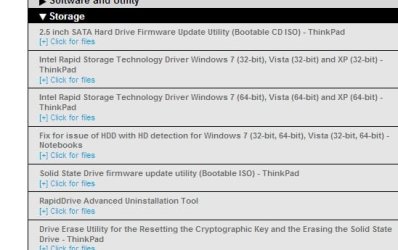
Ah, OK. I looked up my model at the Thinkpad site and there’s roughly 100 drivers(!) In many cases there seem to be alternatives. I mean, not just 32- or 64-bit, but drivers for configurations or features that could be different from one computer to the next, even with the same model number.

Attached is a screengrab showing the bewildering choices, just for the hard drive.

I’m thinking it could be a very bad idea to try to figure out which are the right ones. Or would it be fine to just throw all of them on the computer and let it ignore any unnecessary ones? Could that mess things up?
 

Attachments

  • drivers screengrab.jpg
    drivers screengrab.jpg
    82.9 KB · Views: 14

My Computer

Computer type
Laptop
Computer Manufacturer/Model Number
Lenovo Thinkpad T520
OS
7 Pro 64
CPU
Intel Core i5-2540M 2.6 GHz
Memory
6 GB RAM
Hard Drives
1 Tb
Repair install works fine for most Factory OEM. Just be sure you download the same version and bit rate, burn or write it correctly to stick or DVD. You need the bootable media for rescue purposes and repairs later on.

Reactivation should be automatic since the Factory SLP activation file stays onboard and should be functional. If not use the Product Key on the COA sticker, same as in a Clean Reinstall - Factory OEM Windows 7.

No retail PC can be sold with Windows without a COA sticker as pictured in tutorial. Look under the battery if it isn't on the bottom. If not there, contact HP to ask why they sold you an Thinkpad without the legally-required sticker.

Your drivers will all be in place when it restarts as they are now. If you haven't been keeping up with optional Updates after enabling Automatically get recommended drivers and updates for your hardware, then the latest installer with SP1 may refresh some drivers.

Make your HP Recovery disks, Backup your files and a Win7 backup image so you have a path back although I've only seen one fail without rolling back in the three years we've helped with countless numbers of these.
 
In addition to the great info Greg gave you above,

I thought Factory Restore wipes your computer completely 100% clean and puts it back the way it came from the factory – which I don’t want, at this point.

I was under the impression Repair Install was a way to, well, repair the OS while keeping all your files (though of course you have to back up, to be safe) – which is what I want .

And I thought the trade-off is that it keeps your files, but may not repair a severely damaged OS, and that you escalate to Factory Restore if Repair Install doesn’t work. Is this correct?
Factory restore does restore to the original state, that is why I said you would have to save your files. If you don't want that, then follow Greg's advice on repairing it. Have you tried an SFC scan to see if it would fix it?: http://www.sevenforums.com/tutorials/1538-sfc-scannow-command-system-file-checker.html
That last statement is correct, more or less
It’s a normal Thinkpad purchased from the Thinkpad site.

Sometimes, you will need to install the LAN driver first so it can connect, often found on the CD that came with the motherboard titled drivers.

I don’t have a separate motherboard.

Online, you can 1. look up the company of your computer to find the drivers

Ah, OK. I looked up my model at the Thinkpad site and there’s roughly 100 drivers(!) In many cases there seem to be alternatives. I mean, not just 32- or 64-bit, but drivers for configurations or features that could be different from one computer to the next, even with the same model number.

I’m thinking it could be a very bad idea to try to figure out which are the right ones. Or would it be fine to just throw all of them on the computer and let it ignore any unnecessary ones? Could that mess things up?
Well, what kind of computer is it? And what country are you located in? And if you install the wrong driver, yes, it can mess things up. All 100 drivers are not all particular to your system, unless they list old drivers with new ones.
 
Last edited:

My Computer

Computer type
PC/Desktop
Computer Manufacturer/Model Number
Custom Asus Build
OS
Microsoft Windows 8.1 Pro 64-bit
CPU
Intel(R) Core(TM) i3-4130 CPU @ 3.40GHz
Motherboard
B85M-E
Memory
8.00 GB
Graphics Card(s)
None
Sound Card
Realtek High Definition Audio
Monitor(s) Displays
Asus 23.6" Monitor
Screen Resolution
1920 x 1080 x 32 bits (4294967296 colors) @ 60 Hz
Hard Drives
INTEL SSDSC2BW180A4
Samsung SSD 840 PRO Series
PSU
Seasonic S12II-380Bronze
Case
Lian Li
Cooling
Fan, Passive
Keyboard
Logitech K120
Mouse
Microsoft Touch Mouse
Internet Speed
4ms Ping, 19.0 Mbps Download, 19.0 Mbps Upload
Antivirus
Eset Endpoint
Browser
Internet Explorer, Chrome
I gotta ask, why do you want to know more about a repair install ?
Is there something wrong with the pc ? you don`t say.
 

My Computer

Computer type
PC/Desktop
Computer Manufacturer/Model Number
Skylake Special #666
OS
Windows 10 Pro x64
CPU
Intel Core i7 6700K
Motherboard
Asus Sabertooth Z170 Mark 1
Memory
GSkill TridentZ RGB 16GB 3600 16-16-16-36
Graphics Card(s)
EVGA GTX 980 Ti SC x2
Sound Card
Realtek High Definition
Monitor(s) Displays
AOC G2460PG
Screen Resolution
1920 x 1080 144Hz
Hard Drives
Samsung 860 Pro 256GB, Seagate Barracuda 4TB x2
PSU
EVGA 1000 P2, EVGA White Custom Braided Cables
Case
Corsair Vengeance C70 Gunmetal Black
Cooling
Corsair H100i v2, Corsair ML120 x2, Thermal Grizzly Kryonaut
Keyboard
Logitech G910 Orion Spectrum
Mouse
Logitech G700s
Internet Speed
Verizon Fios Quantum Gateway 75/75
Antivirus
Windows Defender, Malwarebytes Free 3.8.3
Browser
Chrome
Other Info
Corsair SP120 x4, LG Blu-ray Drive, Durabrand HT-395 100 Watt Dolby Digital Amp, Corsair H2100 Wireless 7.1 Headset
He wants to run a Repair Install.

It will already have the drivers installed, or will refresh them if needed from installer.
Yea, I forgot to write that in. The drivers are fine, the reason I put forward the driver suggestion was supposed to be if he wanted to update any old drivers. I try to recommend that if someone wants to.

But if he is fine with the drivers he has now, there is no critical reason why he needs to update them. Thanks for helping to clear this up
 

My Computer

Computer type
PC/Desktop
Computer Manufacturer/Model Number
Custom Asus Build
OS
Microsoft Windows 8.1 Pro 64-bit
CPU
Intel(R) Core(TM) i3-4130 CPU @ 3.40GHz
Motherboard
B85M-E
Memory
8.00 GB
Graphics Card(s)
None
Sound Card
Realtek High Definition Audio
Monitor(s) Displays
Asus 23.6" Monitor
Screen Resolution
1920 x 1080 x 32 bits (4294967296 colors) @ 60 Hz
Hard Drives
INTEL SSDSC2BW180A4
Samsung SSD 840 PRO Series
PSU
Seasonic S12II-380Bronze
Case
Lian Li
Cooling
Fan, Passive
Keyboard
Logitech K120
Mouse
Microsoft Touch Mouse
Internet Speed
4ms Ping, 19.0 Mbps Download, 19.0 Mbps Upload
Antivirus
Eset Endpoint
Browser
Internet Explorer, Chrome
I gotta ask, why do you want to know more about a repair install ?
Is there something wrong with the pc ? you don`t say.

Ha, yes, good question. My computer has lost all of these functions:

- wired and wireless networking
- firewall
- System Restore
- Diagnostic Policy Service

For firewall, I get two error messages. Under Control Panel > Windows Firewall I get Error code 0x6D9. Under Services.msc I get:
"Windows could not start the windows Firewall service on Local Computer. Error 1068: The dependency service or group failed to start."


For Diagnostic Policy Service I get this error:

"Windows could not start the Diagnostic Policy Service service on Local Computer. Error 5: Access is denied"


The reason I didn't post my problems: long story...


I had previously posted them at Microsoft (social.technet...). One time, in the past, I posted a problem to two different sites (NOT two forums within a single site! - and only one such posting) and was severely reprimanded. It appears that some forums will ban people for such things. Whether sevenforums is that way, I have no idea.


Solutions I've tried to sort out this mess include System File Checker, Kaspersky TDSSKiller - neither one found anything - and MS Windows Firewall Fix It.


I'm looking to Repair Install as a way to avoid a total Factory Restore.

I can put this all in a new thread. But maybe these two are the only options?
 
Last edited:

My Computer

Computer type
Laptop
Computer Manufacturer/Model Number
Lenovo Thinkpad T520
OS
7 Pro 64
CPU
Intel Core i5-2540M 2.6 GHz
Memory
6 GB RAM
Hard Drives
1 Tb

My Computer

Computer type
PC/Desktop
Computer Manufacturer/Model Number
Custom Asus Build
OS
Microsoft Windows 8.1 Pro 64-bit
CPU
Intel(R) Core(TM) i3-4130 CPU @ 3.40GHz
Motherboard
B85M-E
Memory
8.00 GB
Graphics Card(s)
None
Sound Card
Realtek High Definition Audio
Monitor(s) Displays
Asus 23.6" Monitor
Screen Resolution
1920 x 1080 x 32 bits (4294967296 colors) @ 60 Hz
Hard Drives
INTEL SSDSC2BW180A4
Samsung SSD 840 PRO Series
PSU
Seasonic S12II-380Bronze
Case
Lian Li
Cooling
Fan, Passive
Keyboard
Logitech K120
Mouse
Microsoft Touch Mouse
Internet Speed
4ms Ping, 19.0 Mbps Download, 19.0 Mbps Upload
Antivirus
Eset Endpoint
Browser
Internet Explorer, Chrome
Repair install works fine for most Factory OEM. Just be sure you download the same version and bit rate, burn or write it correctly to stick or DVD. ...
No retail PC can be sold with Windows without a COA sticker as pictured in tutorial. Look under the battery if it isn't on the bottom. ...

Your drivers will all be in place when it restarts as they are now.

Ahh, OK - all makes sense now. Thanks so much for the clarification about the drivers.

And yes - the sticker turns out to be under the battery. D-oh! Well, I suppose forums can be for simple things as well as complicated issues.

BTW it's gonna be a couple of days until I can get around to the Repair Install operation.
 

My Computer

Computer type
Laptop
Computer Manufacturer/Model Number
Lenovo Thinkpad T520
OS
7 Pro 64
CPU
Intel Core i5-2540M 2.6 GHz
Memory
6 GB RAM
Hard Drives
1 Tb
The drivers are fine, the reason I put forward the driver suggestion was supposed to be if he wanted to update any old drivers. I try to recommend that if someone wants to.

But if he is fine with the drivers he has now, there is no critical reason why he needs to update them.

Many thanks for all your help and patience!
 

My Computer

Computer type
Laptop
Computer Manufacturer/Model Number
Lenovo Thinkpad T520
OS
7 Pro 64
CPU
Intel Core i5-2540M 2.6 GHz
Memory
6 GB RAM
Hard Drives
1 Tb
You might want to try some of the disinfection tools given at the beginning of Troubleshooting Windows 7 Failure to Boot.

At a minimum I'd run bootable Windows Defender or similar from the link of other choices, followed by Malwarebytes in Safe Mode if necessary.

You want to know it's clean by several methods before doing Repairs of any sort.
 
You might want to try some of the disinfection tools given at the beginning of Troubleshooting Windows 7 Failure to Boot.

At a minimum I'd run bootable Windows Defender or similar from the link of other choices, followed by Malwarebytes in Safe Mode if necessary.

You want to know it's clean by several methods before doing Repairs of any sort.

OK thanks. I did the following, none of which turned up anything. I guess it's time for Repair Install.

- Malwarebytes full scan in Safe Mode
- Windows Defender
- Startup Repair
- SFC Scannow
 

My Computer

Computer type
Laptop
Computer Manufacturer/Model Number
Lenovo Thinkpad T520
OS
7 Pro 64
CPU
Intel Core i5-2540M 2.6 GHz
Memory
6 GB RAM
Hard Drives
1 Tb
Keep us posted. When the worst case scenario is having to do the best possible reinstall, you may end up with a PC that's better than new.
 
Keep us posted. When the worst case scenario is having to do the best possible reinstall, you may end up with a PC that's better than new.

Repair Install went off without a hitch. Everything seems to be back just as it was before the problems, including all my files. After the final restart, not only was networking restored but it had found my router and connected using the password.

I was hoping the procedure would somehow clean out Windows and make things run faster or free up hard drive space, but that doesn't seem to be the case.

A huge *thanks* to everyone who posted here. The generosity and patience I've found at Sevenforums are really terrific.
 

My Computer

Computer type
Laptop
Computer Manufacturer/Model Number
Lenovo Thinkpad T520
OS
7 Pro 64
CPU
Intel Core i5-2540M 2.6 GHz
Memory
6 GB RAM
Hard Drives
1 Tb
If this is still the Factory Preinstall and you want to clean it up a bit then there are steps to Clean up the bloatware in my signature picture below.
 
Back
Top