Solved Repair Install Prep Questions Win 7 Ult x64 SP1

Efdy

New member
Member
VIP
Local time
12:10 AM
Messages
137
Location
USA
Hello. May I please ask some questions before trying to do a repair install of Windows 7 Ultimate 64-bit SP1 to make sure I am trying to do this correctly?

1. Do partition and volume mean the same thing, like interchangeable terms?

2. I should only have the keyboard, mouse, and monitors connected? Disconnect speakers too?

3. Is it still necessary to uninstall iTunes before doing a repair install? What about these other Apple things listed in Programs and Features: Apple Software Update, Apple Mobile Device Support, Apple Application Support (32-bit), and Apple Application Support (64-bit)?

I'm not really very confident about trying to fully deactivate third-party security programs, especially in a way that would prevent them from restarting automatically. I may need to uninstall stuff instead before trying to do a repair install.

4. Does Adblock Plus count as a third-party security application that needs to be uninstalled?

5. I have a My Passport Ultra external hard drive. It makes copies of everything except the Windows folder, it look like. In Programs and Features there are listed: WD Backup, WD Security, WD Drive Utilities, and WD Quick View, all of which I think got installed when I started using the external hard drive. Do I need to uninstall any of that stuff? That one says Security.

6. In Malwarebytes Premium, would it be enough to uncheck Web Protection, Exploit Protection, Malware Protection, and Ransomware Protection in settings so they say Off instead of On, or is there more to disable, or should I uninstall Malwarebytes before trying to do a repair install?

7. Should I be able to do repair install by following the tutorial instructions on my desktop PC that has Windows XP and Windows 7 installed on the same hard drive as described in my system specs? Should I still be able to boot into XP and use it as I have been after the Windows 7 repair install procedure? I don't really know anything about Master Boot Record or Windows Boot Manager. Is there something I have to do in there before doing a repair install of Windows 7 on a dual boot system?

8. Brink wrote: "It will need to be the same edition and version of Windows 7 to do a repair install with it." What does edition and version mean? Is edition Windows 7 and version everything else, like Ultimate 64-bit SP1? I have Windows 7 Ultimate 64-bit SP1. SP1 was added by Windows Update, I guess. Someone here looked at my MGDiag report thing and said my copy of Windows 7 is retail. I went to the Microsoft web page where you enter your product key and they let you download ISOs (32 and 64 bit) that include SP1. I downloaded those to use for this. I realize I will only be using one of them. Is that all okay then?

9. I don't fully understand how to proceed regarding where to put the ISO thing. Am I meant to create a new hard drive partition where the ISO I'm using will be extracted? I just do what it says on this page? Partition or Volume - Create New - Windows 7 Help Forums How large should the new partition be, where the ISO is extracted to? It says use a program like 7-Zip to extract the ISO. Will WinRAR do it? That's what I have.

10. Someone posted, "the upgrade asked me for 12.2GB free.." Will I be told how much free hard drive space is required to do my repair install after initiating the procedure or something? My Windows folder is 42GB. How much free hard drive space do you expect I should have available before trying to do the repair install? That space should be located on the C drive where Windows 7 is already installed?

I ran chkdsk for the C drive where Windows 7 is installed, and I did full scans with Windows Malicious Software Removal Tool for April and Malwarebytes with everything checked including scan for rootkits. The results of both types of scans said nothing was found.

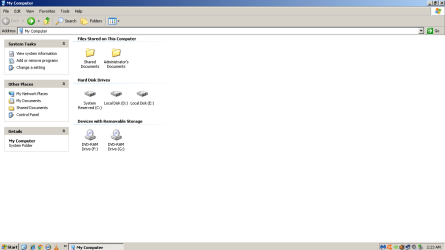
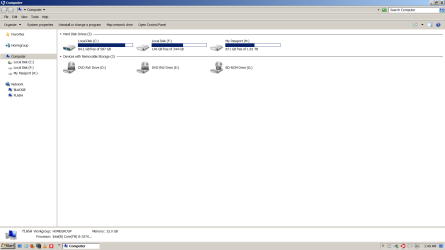
Below are screenshots of what that computer is arranged like, or whatever. In Windows 7, F is where Windows XP Pro SP3 is installed. When I'm in Windows XP, it says Windows XP is installed on D. I don't know what E is for in Windows XP; It looks like there is nothing on it.

Thank you for reading this.
 

Attachments
  • My Computer in Windows 7 screenshot.png
    My Computer in Windows 7 screenshot.png
    35.4 KB · Views: 0
  • My Computer in Windows XP screenshot.PNG
    My Computer in Windows XP screenshot.PNG
    30.5 KB · Views: 0
Last edited:

My Computer My Computer

At a glance

Windows 7 Ultimate 64-bit SP1Intel Core i5-3570KCorsair Vengeance Blue 4x8 GBNvidia GTX 1060
Computer type
PC/Desktop
Computer Manufacturer/Model Number
I do not know. It was put together with separately purchased parts.
OS
Windows 7 Ultimate 64-bit SP1
CPU
Intel Core i5-3570K
Motherboard
ASUS P8Z77-V PRO
Memory
Corsair Vengeance Blue 4x8 GB
Graphics Card(s)
Nvidia GTX 1060
Sound Card
M-Audio Delta 1010LT
Monitor(s) Displays
2 Asus VS247H-P 23.6-Inch LED-Lit LCD monitors
Screen Resolution
1920x1080
Hard Drives
Western Digital WD1002FAEX Caviar Black 1TB SATA III
(no SSD)
My Passport Ultra external hard drive 2TB
PSU
CORSAIR RM650 650W 80 PLUS GOLD Full Modular PSU
Case
Corsair Obsidian Series Black 550D Mid Tower
Cooling
Zalman CNPS9500AT CPU Cooler
Keyboard
Azio Large Print Tri-Color Backlit Wired Keyboard (KB505U)
Mouse
Logitech Gaming Mouse G300
Internet Speed
6-8Mbps down, 2Mbps up
Antivirus
Malwarebytes Premium
Browser
IE, Firefox, Chrome
Other Info
2nd PC: Dell Dimension 4600
OS: Windows 7 Home Premium 32-bit SP1
PSU: EVGA 500W 80+ thingo
CPU: Intel Pentium 4
RAM: 3.00 GB Dual Channel DDR @ 199MHz
MB: Dell 02Y832
GPU: 512MB Nvidia GeForce 6200
HDD: 465GB WDC WD5000AAKS-00A7B2 ATA (SATA)
Opt Drive: HL-DT-ST DVD-ROM GDR8162B ATA Device
Opt Drive: TSSTcorp CD-RW TS-H292C ATA Device
Audio: Creative SB Live
Monitor: Asus-VS247H-P
1. As I understand it, the only difference between a partition and a volume is that a volume is formatted, while a partition is not. In other words, a different name is used for the same thing, to let you know whether or not it is formatted.

2. There is no problem with having your speakers connected when you install Windows 7. In fact, it is helpful to have the speakers connected, because you can listen to the install music while Windows 7 is being installed. But your speakers don't have to be connected; it is optional.

However, I highly recommend that you disconnect all hard drives (and flash drives) except for the one you want to install Windows on; this will ensure that no part of Windows gets installed on any other drive. Then after the install is completely finished, power off and connect any other hard drives that you want to connect.

3, 4, 5, 6: You shouldn't need to uninstall any of this stuff. However, it is possible that you will need to choose "OK" or "Allow" from time to time in Malwarebytes while the install is progressing.

I'm not sure about the other items you asked about.
 

My Computer My Computer

At a glance

Linux Mint 18.2 xfce 64-bit (VMWare host) / W...Haswell4 GB
Computer type
PC/Desktop
Computer Manufacturer/Model Number
Dell
OS
Linux Mint 18.2 xfce 64-bit (VMWare host) / Windows 8.1 Pro 32-bit (VMWare guest)
CPU
Haswell
Memory
4 GB
Monitor(s) Displays
Acer 23"
Screen Resolution
1920 x 1080
Hard Drives
Two hard drives, 1TB each: One for Linux, one for my data.
Keyboard
IBM Model M
Antivirus
Sophos (Linux), Trend Micro (Windows)
Browser
Firefox, Opera
Other Info
I use Samba to share my data drive with the other computers at my house and with my guest session in VMWare Workstation Player.
A volume is a space capable of holding data. A partition is a volume
 

My Computers My Computers

  • At a glance

    7 X64i5 84002x8gb 3200mhz
    Computer type
    PC/Desktop
    OS
    7 X64
    CPU
    i5 8400
    Motherboard
    gigabyte b365m ds3h
    Memory
    2x8gb 3200mhz
    Hard Drives
    various
    PSU
    pure power 11 400w cm
    Case
    Coolermaster
    Cooling
    cryorig m9i
  • At a glance

    7x64g54008gb ddr4 2400
    Computer type
    PC/Desktop
    OS
    7x64
    CPU
    g5400
    Motherboard
    ga b365m ds3h
    Memory
    8gb ddr4 2400
    PSU
    xfx pro 450w
Thank you both for taking time to help me. I appreciate those numbered answers too.
 

My Computer My Computer

At a glance

Windows 7 Ultimate 64-bit SP1Intel Core i5-3570KCorsair Vengeance Blue 4x8 GBNvidia GTX 1060
Computer type
PC/Desktop
Computer Manufacturer/Model Number
I do not know. It was put together with separately purchased parts.
OS
Windows 7 Ultimate 64-bit SP1
CPU
Intel Core i5-3570K
Motherboard
ASUS P8Z77-V PRO
Memory
Corsair Vengeance Blue 4x8 GB
Graphics Card(s)
Nvidia GTX 1060
Sound Card
M-Audio Delta 1010LT
Monitor(s) Displays
2 Asus VS247H-P 23.6-Inch LED-Lit LCD monitors
Screen Resolution
1920x1080
Hard Drives
Western Digital WD1002FAEX Caviar Black 1TB SATA III
(no SSD)
My Passport Ultra external hard drive 2TB
PSU
CORSAIR RM650 650W 80 PLUS GOLD Full Modular PSU
Case
Corsair Obsidian Series Black 550D Mid Tower
Cooling
Zalman CNPS9500AT CPU Cooler
Keyboard
Azio Large Print Tri-Color Backlit Wired Keyboard (KB505U)
Mouse
Logitech Gaming Mouse G300
Internet Speed
6-8Mbps down, 2Mbps up
Antivirus
Malwarebytes Premium
Browser
IE, Firefox, Chrome
Other Info
2nd PC: Dell Dimension 4600
OS: Windows 7 Home Premium 32-bit SP1
PSU: EVGA 500W 80+ thingo
CPU: Intel Pentium 4
RAM: 3.00 GB Dual Channel DDR @ 199MHz
MB: Dell 02Y832
GPU: 512MB Nvidia GeForce 6200
HDD: 465GB WDC WD5000AAKS-00A7B2 ATA (SATA)
Opt Drive: HL-DT-ST DVD-ROM GDR8162B ATA Device
Opt Drive: TSSTcorp CD-RW TS-H292C ATA Device
Audio: Creative SB Live
Monitor: Asus-VS247H-P
Hi Efdy, just a quick tip because you mentioned Malwarebytes Premium - make sure you go to "My Account" and deactivate the license, to free it up for use once you re-install Windows. It's not a big deal if you didn't - you'll still be able to do it from your account, from the malwarebytes website.

8. Simply use the edition (Ultimate) and version (x64) you have been using previously.

I believe Efdy is following this tutorial: Repair Install - Windows 7 Help Forums
 

My Computer My Computer

At a glance

Windows 7 x64
OS
Windows 7 x64
Thank you for the reply, TheDeerDude. Yes, those are the instructions I am following to do the repair install of Windows 7. Reading past the tutorial itself has been helpful. The only mention I recall reading so far about doing this on a dual boot system is where Brink replied to someone's question by writing: "Unless this is a dual boot with XP and Windows 7, then you would need to do a clean install..." Which made it sound like I can do a repair install of Windows 7 on my desktop computer that has both Windows XP and Windows 7 installed, but I wanted to ask and try to make sure before trying it.

Thanks again for helping me.
 
Last edited:

My Computer My Computer

At a glance

Windows 7 Ultimate 64-bit SP1Intel Core i5-3570KCorsair Vengeance Blue 4x8 GBNvidia GTX 1060
Computer type
PC/Desktop
Computer Manufacturer/Model Number
I do not know. It was put together with separately purchased parts.
OS
Windows 7 Ultimate 64-bit SP1
CPU
Intel Core i5-3570K
Motherboard
ASUS P8Z77-V PRO
Memory
Corsair Vengeance Blue 4x8 GB
Graphics Card(s)
Nvidia GTX 1060
Sound Card
M-Audio Delta 1010LT
Monitor(s) Displays
2 Asus VS247H-P 23.6-Inch LED-Lit LCD monitors
Screen Resolution
1920x1080
Hard Drives
Western Digital WD1002FAEX Caviar Black 1TB SATA III
(no SSD)
My Passport Ultra external hard drive 2TB
PSU
CORSAIR RM650 650W 80 PLUS GOLD Full Modular PSU
Case
Corsair Obsidian Series Black 550D Mid Tower
Cooling
Zalman CNPS9500AT CPU Cooler
Keyboard
Azio Large Print Tri-Color Backlit Wired Keyboard (KB505U)
Mouse
Logitech Gaming Mouse G300
Internet Speed
6-8Mbps down, 2Mbps up
Antivirus
Malwarebytes Premium
Browser
IE, Firefox, Chrome
Other Info
2nd PC: Dell Dimension 4600
OS: Windows 7 Home Premium 32-bit SP1
PSU: EVGA 500W 80+ thingo
CPU: Intel Pentium 4
RAM: 3.00 GB Dual Channel DDR @ 199MHz
MB: Dell 02Y832
GPU: 512MB Nvidia GeForce 6200
HDD: 465GB WDC WD5000AAKS-00A7B2 ATA (SATA)
Opt Drive: HL-DT-ST DVD-ROM GDR8162B ATA Device
Opt Drive: TSSTcorp CD-RW TS-H292C ATA Device
Audio: Creative SB Live
Monitor: Asus-VS247H-P
Here is what I still need replies to. It's mostly just yes/no questions.

1. Does the computer tell you how much free hard drive space will be needed to perform the repair install after you initiate the procedure?

2. If not, how much free space would I need to have available to do a repair install if my Windows folder is 42GB?

3. And that space needs to be on the same partition where Windows is already installed?

4. Am I meant to create a new hard drive partition where the downloaded installation ISO with SP1 will be extracted?

5. I just do what it says on this page? Partition or Volume - Create New - Windows 7 Help Forums

5. How large should the new partition be, where the ISO will be extracted to?

6. Can I do a repair install on my computer that has Windows XP and Window 7 both installed on it?

7. I don't really know anything about Master Boot Record or Windows Boot Manager. Is there something I have to do in there before doing a repair install of Windows 7 on a dual boot system?

Thanks again for reading this and for the help. I appreciate it.
 

My Computer My Computer

At a glance

Windows 7 Ultimate 64-bit SP1Intel Core i5-3570KCorsair Vengeance Blue 4x8 GBNvidia GTX 1060
Computer type
PC/Desktop
Computer Manufacturer/Model Number
I do not know. It was put together with separately purchased parts.
OS
Windows 7 Ultimate 64-bit SP1
CPU
Intel Core i5-3570K
Motherboard
ASUS P8Z77-V PRO
Memory
Corsair Vengeance Blue 4x8 GB
Graphics Card(s)
Nvidia GTX 1060
Sound Card
M-Audio Delta 1010LT
Monitor(s) Displays
2 Asus VS247H-P 23.6-Inch LED-Lit LCD monitors
Screen Resolution
1920x1080
Hard Drives
Western Digital WD1002FAEX Caviar Black 1TB SATA III
(no SSD)
My Passport Ultra external hard drive 2TB
PSU
CORSAIR RM650 650W 80 PLUS GOLD Full Modular PSU
Case
Corsair Obsidian Series Black 550D Mid Tower
Cooling
Zalman CNPS9500AT CPU Cooler
Keyboard
Azio Large Print Tri-Color Backlit Wired Keyboard (KB505U)
Mouse
Logitech Gaming Mouse G300
Internet Speed
6-8Mbps down, 2Mbps up
Antivirus
Malwarebytes Premium
Browser
IE, Firefox, Chrome
Other Info
2nd PC: Dell Dimension 4600
OS: Windows 7 Home Premium 32-bit SP1
PSU: EVGA 500W 80+ thingo
CPU: Intel Pentium 4
RAM: 3.00 GB Dual Channel DDR @ 199MHz
MB: Dell 02Y832
GPU: 512MB Nvidia GeForce 6200
HDD: 465GB WDC WD5000AAKS-00A7B2 ATA (SATA)
Opt Drive: HL-DT-ST DVD-ROM GDR8162B ATA Device
Opt Drive: TSSTcorp CD-RW TS-H292C ATA Device
Audio: Creative SB Live
Monitor: Asus-VS247H-P
It will tell you if there isn't enough space. In theory you might get away 10-12gb space. I would suggest 20gb.

Setup may copy the install.wim to a different drive - depending on what it figures out.

Extract the Installation media to a different partition/ drive. Or you can run setup from a usb or dvd if you like. Anything big enough to hold the installation media - 5gb is enough for that.

Run setup from within booted windows 7. That way it will replace the windows 7 system files.

I assume you are dual booting xp and win 7 using different partitions on the same hard drive?
Iirc setup will just add an extra bcd entry, so the xp bcd entry should still be there afterwards.
 

My Computers My Computers

  • At a glance

    7 X64i5 84002x8gb 3200mhz
    Computer type
    PC/Desktop
    OS
    7 X64
    CPU
    i5 8400
    Motherboard
    gigabyte b365m ds3h
    Memory
    2x8gb 3200mhz
    Hard Drives
    various
    PSU
    pure power 11 400w cm
    Case
    Coolermaster
    Cooling
    cryorig m9i
  • At a glance

    7x64g54008gb ddr4 2400
    Computer type
    PC/Desktop
    OS
    7x64
    CPU
    g5400
    Motherboard
    ga b365m ds3h
    Memory
    8gb ddr4 2400
    PSU
    xfx pro 450w
I assume you are dual booting xp and win 7 using different partitions on the same hard drive?
Yes, that's right. Thank you again for helping me.
 

My Computer My Computer

At a glance

Windows 7 Ultimate 64-bit SP1Intel Core i5-3570KCorsair Vengeance Blue 4x8 GBNvidia GTX 1060
Computer type
PC/Desktop
Computer Manufacturer/Model Number
I do not know. It was put together with separately purchased parts.
OS
Windows 7 Ultimate 64-bit SP1
CPU
Intel Core i5-3570K
Motherboard
ASUS P8Z77-V PRO
Memory
Corsair Vengeance Blue 4x8 GB
Graphics Card(s)
Nvidia GTX 1060
Sound Card
M-Audio Delta 1010LT
Monitor(s) Displays
2 Asus VS247H-P 23.6-Inch LED-Lit LCD monitors
Screen Resolution
1920x1080
Hard Drives
Western Digital WD1002FAEX Caviar Black 1TB SATA III
(no SSD)
My Passport Ultra external hard drive 2TB
PSU
CORSAIR RM650 650W 80 PLUS GOLD Full Modular PSU
Case
Corsair Obsidian Series Black 550D Mid Tower
Cooling
Zalman CNPS9500AT CPU Cooler
Keyboard
Azio Large Print Tri-Color Backlit Wired Keyboard (KB505U)
Mouse
Logitech Gaming Mouse G300
Internet Speed
6-8Mbps down, 2Mbps up
Antivirus
Malwarebytes Premium
Browser
IE, Firefox, Chrome
Other Info
2nd PC: Dell Dimension 4600
OS: Windows 7 Home Premium 32-bit SP1
PSU: EVGA 500W 80+ thingo
CPU: Intel Pentium 4
RAM: 3.00 GB Dual Channel DDR @ 199MHz
MB: Dell 02Y832
GPU: 512MB Nvidia GeForce 6200
HDD: 465GB WDC WD5000AAKS-00A7B2 ATA (SATA)
Opt Drive: HL-DT-ST DVD-ROM GDR8162B ATA Device
Opt Drive: TSSTcorp CD-RW TS-H292C ATA Device
Audio: Creative SB Live
Monitor: Asus-VS247H-P
[Edit: I forgot to clarify that I decided to try to use USB flash drive for the extracted ISO files instead of creating a new partition on the hard drive.]

I think I might be ready to begin the repair install. I was confused about if I was meant to create a bootable USB flash drive to which the contents from the folder where the ISO with SP1 was extracted would be copied and pasted.

But that's what I did:
Right clicked on the flash drive in My Computer.
Selected Format.
Selected NTFS, 4096 bytes, and Quick Format.
Followed instructions to create bootable USB flash drive using Elevated Command Prompt, diskpart, etc.
Copied the contents of the folder created when ISO was extracted with WinRAR to the flash drive.

Was I supposed to do that, make a bootable USB flash drive?

Am I supposed to change the boot priority/order/whatever or just leave that how it is?

I don't mean to act stupid. I just really don't understand computers very well. I understand I am meant to be logged in to the administrator account in Windows 7 when I click setup.exe to begin the repair install. I just don't know if I'm supposed to change anything in that boot order thing for whatever reason there may be to do so.

I found what looks like all the drivers that were used when Windows 7 was originally installed in December 2013 and put them on a different flash drive.

I don't presently have sufficient knowledge to make a system image, but I backed up everything besides the Windows folder to the external hard drive. It doesn't have any box to tick to copy that folder where you select stuff to back up.

I know to disconnect the external hard drive before beginning the repair install.

I will switch off the real-time protections in Malwarebytes Premium and automatic updates and deactivate the license per suggestion above by TheDeerDude, so I don't think it will be able to restart any real-time functions that may interfere while I'm trying to do the repair install.

I don't have any other antivirus or anti-malware stuff installed on that computer.

Do I leave Windows Firewall switched on?

Thank you for reading this.
 
Last edited:

My Computer My Computer

At a glance

Windows 7 Ultimate 64-bit SP1Intel Core i5-3570KCorsair Vengeance Blue 4x8 GBNvidia GTX 1060
Computer type
PC/Desktop
Computer Manufacturer/Model Number
I do not know. It was put together with separately purchased parts.
OS
Windows 7 Ultimate 64-bit SP1
CPU
Intel Core i5-3570K
Motherboard
ASUS P8Z77-V PRO
Memory
Corsair Vengeance Blue 4x8 GB
Graphics Card(s)
Nvidia GTX 1060
Sound Card
M-Audio Delta 1010LT
Monitor(s) Displays
2 Asus VS247H-P 23.6-Inch LED-Lit LCD monitors
Screen Resolution
1920x1080
Hard Drives
Western Digital WD1002FAEX Caviar Black 1TB SATA III
(no SSD)
My Passport Ultra external hard drive 2TB
PSU
CORSAIR RM650 650W 80 PLUS GOLD Full Modular PSU
Case
Corsair Obsidian Series Black 550D Mid Tower
Cooling
Zalman CNPS9500AT CPU Cooler
Keyboard
Azio Large Print Tri-Color Backlit Wired Keyboard (KB505U)
Mouse
Logitech Gaming Mouse G300
Internet Speed
6-8Mbps down, 2Mbps up
Antivirus
Malwarebytes Premium
Browser
IE, Firefox, Chrome
Other Info
2nd PC: Dell Dimension 4600
OS: Windows 7 Home Premium 32-bit SP1
PSU: EVGA 500W 80+ thingo
CPU: Intel Pentium 4
RAM: 3.00 GB Dual Channel DDR @ 199MHz
MB: Dell 02Y832
GPU: 512MB Nvidia GeForce 6200
HDD: 465GB WDC WD5000AAKS-00A7B2 ATA (SATA)
Opt Drive: HL-DT-ST DVD-ROM GDR8162B ATA Device
Opt Drive: TSSTcorp CD-RW TS-H292C ATA Device
Audio: Creative SB Live
Monitor: Asus-VS247H-P
You can leave windows firewall as it is.

Do not boot from the flash drive. Repair (upgrade) install can only done from within your existing windows.

Start into windows normally. Plug in the flash, then run setup from the root of the flash drive. It will say Setup is starting". When it asks , select "Upgrade installation."

It might take quite a while. It gathers your files and settings, moves your current installation into a folder called windows.old. It expands the files from install.wim onto your C partition, adds in the files and settings. It reboots a few times during all that.

If you have a lot of settings and programs installed it could take a couple of hours or more.

You will need to reactivate windows with a valid product key.
 

My Computers My Computers

  • At a glance

    7 X64i5 84002x8gb 3200mhz
    Computer type
    PC/Desktop
    OS
    7 X64
    CPU
    i5 8400
    Motherboard
    gigabyte b365m ds3h
    Memory
    2x8gb 3200mhz
    Hard Drives
    various
    PSU
    pure power 11 400w cm
    Case
    Coolermaster
    Cooling
    cryorig m9i
  • At a glance

    7x64g54008gb ddr4 2400
    Computer type
    PC/Desktop
    OS
    7x64
    CPU
    g5400
    Motherboard
    ga b365m ds3h
    Memory
    8gb ddr4 2400
    PSU
    xfx pro 450w
Okay. Thank you for helping me.

I still have the product key. I used it to download the ISO thing with SP1 from a Microsoft web page.

Thanks again.
 

My Computer My Computer

At a glance

Windows 7 Ultimate 64-bit SP1Intel Core i5-3570KCorsair Vengeance Blue 4x8 GBNvidia GTX 1060
Computer type
PC/Desktop
Computer Manufacturer/Model Number
I do not know. It was put together with separately purchased parts.
OS
Windows 7 Ultimate 64-bit SP1
CPU
Intel Core i5-3570K
Motherboard
ASUS P8Z77-V PRO
Memory
Corsair Vengeance Blue 4x8 GB
Graphics Card(s)
Nvidia GTX 1060
Sound Card
M-Audio Delta 1010LT
Monitor(s) Displays
2 Asus VS247H-P 23.6-Inch LED-Lit LCD monitors
Screen Resolution
1920x1080
Hard Drives
Western Digital WD1002FAEX Caviar Black 1TB SATA III
(no SSD)
My Passport Ultra external hard drive 2TB
PSU
CORSAIR RM650 650W 80 PLUS GOLD Full Modular PSU
Case
Corsair Obsidian Series Black 550D Mid Tower
Cooling
Zalman CNPS9500AT CPU Cooler
Keyboard
Azio Large Print Tri-Color Backlit Wired Keyboard (KB505U)
Mouse
Logitech Gaming Mouse G300
Internet Speed
6-8Mbps down, 2Mbps up
Antivirus
Malwarebytes Premium
Browser
IE, Firefox, Chrome
Other Info
2nd PC: Dell Dimension 4600
OS: Windows 7 Home Premium 32-bit SP1
PSU: EVGA 500W 80+ thingo
CPU: Intel Pentium 4
RAM: 3.00 GB Dual Channel DDR @ 199MHz
MB: Dell 02Y832
GPU: 512MB Nvidia GeForce 6200
HDD: 465GB WDC WD5000AAKS-00A7B2 ATA (SATA)
Opt Drive: HL-DT-ST DVD-ROM GDR8162B ATA Device
Opt Drive: TSSTcorp CD-RW TS-H292C ATA Device
Audio: Creative SB Live
Monitor: Asus-VS247H-P
The only program it mentioned when checking compatibility was iTunes. It said something about deauthorizing the computer, but I don't really know what that means, and I don't recall even using iTunes since 2015, so I just clicked the red X, then yes to cancel repair install, uninstalled iTunes, restarted the computer, and started the repair install over from the beginning.

I guess the repair install went okay. It completed anyway. I was going to go back and read what Snick and Brds7t7 wrote about reinstalling Windows updates including using a convenience update or something, but it already started installing a boatload of updates automatically before I got a chance. I thought I would have more time to figure out what to do. I hope the computer, or Windows or whatever, knows what it's doing because I sure don't. I just hope I don't see that "Failure configuring Windows updates" message again. This is so stressful.

Thank you all again for helping me so much.
 

My Computer My Computer

At a glance

Windows 7 Ultimate 64-bit SP1Intel Core i5-3570KCorsair Vengeance Blue 4x8 GBNvidia GTX 1060
Computer type
PC/Desktop
Computer Manufacturer/Model Number
I do not know. It was put together with separately purchased parts.
OS
Windows 7 Ultimate 64-bit SP1
CPU
Intel Core i5-3570K
Motherboard
ASUS P8Z77-V PRO
Memory
Corsair Vengeance Blue 4x8 GB
Graphics Card(s)
Nvidia GTX 1060
Sound Card
M-Audio Delta 1010LT
Monitor(s) Displays
2 Asus VS247H-P 23.6-Inch LED-Lit LCD monitors
Screen Resolution
1920x1080
Hard Drives
Western Digital WD1002FAEX Caviar Black 1TB SATA III
(no SSD)
My Passport Ultra external hard drive 2TB
PSU
CORSAIR RM650 650W 80 PLUS GOLD Full Modular PSU
Case
Corsair Obsidian Series Black 550D Mid Tower
Cooling
Zalman CNPS9500AT CPU Cooler
Keyboard
Azio Large Print Tri-Color Backlit Wired Keyboard (KB505U)
Mouse
Logitech Gaming Mouse G300
Internet Speed
6-8Mbps down, 2Mbps up
Antivirus
Malwarebytes Premium
Browser
IE, Firefox, Chrome
Other Info
2nd PC: Dell Dimension 4600
OS: Windows 7 Home Premium 32-bit SP1
PSU: EVGA 500W 80+ thingo
CPU: Intel Pentium 4
RAM: 3.00 GB Dual Channel DDR @ 199MHz
MB: Dell 02Y832
GPU: 512MB Nvidia GeForce 6200
HDD: 465GB WDC WD5000AAKS-00A7B2 ATA (SATA)
Opt Drive: HL-DT-ST DVD-ROM GDR8162B ATA Device
Opt Drive: TSSTcorp CD-RW TS-H292C ATA Device
Audio: Creative SB Live
Monitor: Asus-VS247H-P
Back
Top