Repair or replace hard drive

onizukaeikichi

New member
Local time
8:42 AM
Messages
4
Hi sevenforums,

I just received a windows message saying that I should repair or replace my harddrive. I am hoping to get some advice.

I am using a lenovo y580, which is known for hard drive heating issue. To resolve this, I took out the DVD drive, bought a HD caddy and replaced my hard drive into the DVD drive bay which reduced the heat significantly.

Right now, I am having the issue of is it a HD caddy failure, DVD drive bay connector failure or the HD failure itself?

Am I resigned to trial and error but running disc check normally or put back the HD into its original bay and test it.

Any help will be much appreciated as I will be buying a new HD or HD caddy. Thanks!
 

My Computer

Computer type
PC/Desktop
OS
Windows 7 Home Premium x64
Download and run the hard drive manufacturer's diagnostic tool. If it's a Western Digital drive, it's called "Data Lifeguard". The other companies have a similar tool.

The tool probably has at least two tests--quick and extended or something like that.
 

My Computer

Computer type
PC/Desktop
Computer Manufacturer/Model Number
Ignatz Special; 4 speed manual gearbox; factory air conditioning; one of one
OS
Windows 7 Home Premium SP1, 64-bit
CPU
Intel Skylake i5-6600K, not overclocked
Motherboard
AsRock Z170M Extreme 4, micro ATX
Memory
8 GB HyperX DDR4-2666 (2 x 4 GB)
Graphics Card(s)
none; graphics are integrated on CPU
Sound Card
onboard: Realtek ALC1150; external: USB Behringer UF0-202
Monitor(s) Displays
Dell S2340M 23 inch IPS
Screen Resolution
1600 x 900
Hard Drives
System: Crucial MX100 series SSD, 128 GB;
Data: Samsung Spinpoint 103SJ, 1 TB;
Backup: WD Caviar Green WD30EZRX-00D8PB0, 3 TB
PSU
Rosewill SilentNight 500 watt fanless, semi-modular
Case
Antec Solo II
Cooling
Noctua NH-U12S; Noctua F12 intake, Noctua S12A exhaust
Keyboard
Microsoft 200 6JH-00001 USB
Mouse
Dell or Microsoft optical wired; USB
Antivirus
Microsoft Security Essentials and Malwarebytes Premium
Browser
Pale Moon
Other Info
All fans PWM; speeds at idle: CPU circa 500 rpm; intake circa 600 rpm; exhaust circa 600 rpm; CPU temps 27 idle and 47 C load in a warm room (27 C/81 F) when running Intel Extreme Tuning Utility stress test.
Go to piriform.com and download and run "Speccy".

That will tell you the brand name of your hard drive.

Once you know that, go to that manufacturer's web site and find the tool for that particular hard drive model.
 

My Computer

Computer type
PC/Desktop
Computer Manufacturer/Model Number
Ignatz Special; 4 speed manual gearbox; factory air conditioning; one of one
OS
Windows 7 Home Premium SP1, 64-bit
CPU
Intel Skylake i5-6600K, not overclocked
Motherboard
AsRock Z170M Extreme 4, micro ATX
Memory
8 GB HyperX DDR4-2666 (2 x 4 GB)
Graphics Card(s)
none; graphics are integrated on CPU
Sound Card
onboard: Realtek ALC1150; external: USB Behringer UF0-202
Monitor(s) Displays
Dell S2340M 23 inch IPS
Screen Resolution
1600 x 900
Hard Drives
System: Crucial MX100 series SSD, 128 GB;
Data: Samsung Spinpoint 103SJ, 1 TB;
Backup: WD Caviar Green WD30EZRX-00D8PB0, 3 TB
PSU
Rosewill SilentNight 500 watt fanless, semi-modular
Case
Antec Solo II
Cooling
Noctua NH-U12S; Noctua F12 intake, Noctua S12A exhaust
Keyboard
Microsoft 200 6JH-00001 USB
Mouse
Dell or Microsoft optical wired; USB
Antivirus
Microsoft Security Essentials and Malwarebytes Premium
Browser
Pale Moon
Other Info
All fans PWM; speeds at idle: CPU circa 500 rpm; intake circa 600 rpm; exhaust circa 600 rpm; CPU temps 27 idle and 47 C load in a warm room (27 C/81 F) when running Intel Extreme Tuning Utility stress test.
Lenovo used to be IBM and may have a Hitachi HDD which also used to be IBM. Check either site for their diagnostic.
 

My Computer

Computer type
PC/Desktop
Computer Manufacturer/Model Number
Customs, Dell, Gateway, HP, Toshiba, Acer, ASUS
OS
Windows 7 Ultimate 64-bit, Windows 8.1 64-bit, Mac OS X 10.10, Linux Mint 17, Windows 10 Pro TP
Keyboard
Microsoft
Mouse
Microsoft
Turns out my HD was a seagate. I downloaded the Seatools.

I ran the fast test and it failed. I restarted with the same result.

I then swapped the HD out of the caddy/dvd drive bay back into its original slot. It passed the fast test.

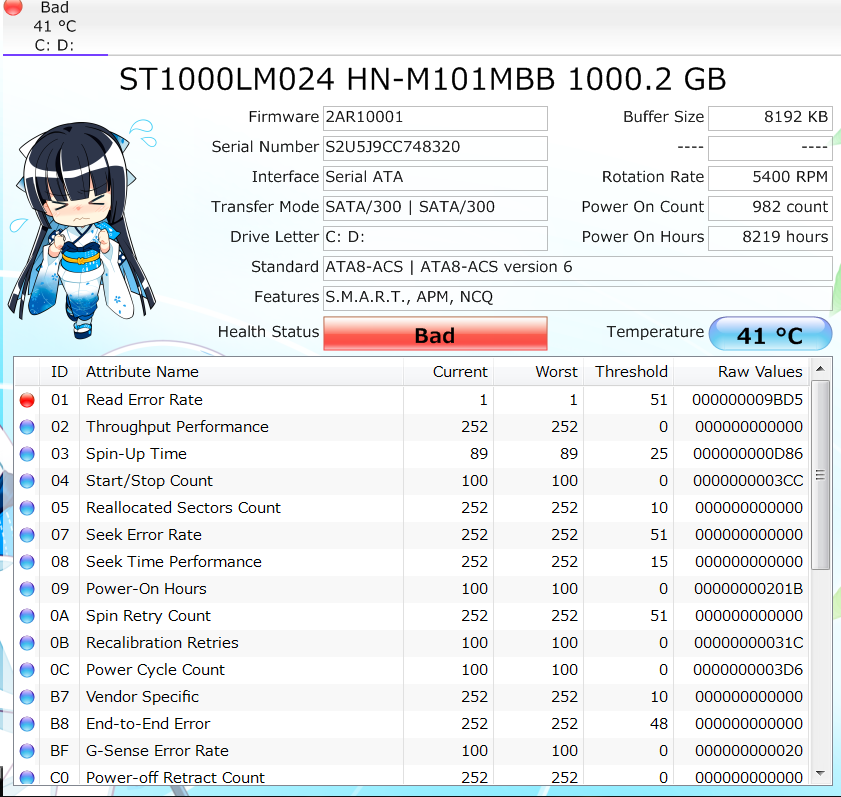
However as per Crystaldisk info (attached picture), I am still getting an error. Right now I am running the Long test to find out. Is Crystaldisk reliable?

AMJaKeE.png


Edit: Seems like I have failed the long test as well now unfortunately.

Seatools DOS does not seem to detect my HD but I can boot it fine. I change the settings in BIOS to compatible which detected the HD but the program froze. Help?
 
Last edited:

My Computer

Computer type
PC/Desktop
OS
Windows 7 Home Premium x64
Bump. Sorry if this isnt allowed.
 

My Computer

Computer type
PC/Desktop
OS
Windows 7 Home Premium x64
Back
Top