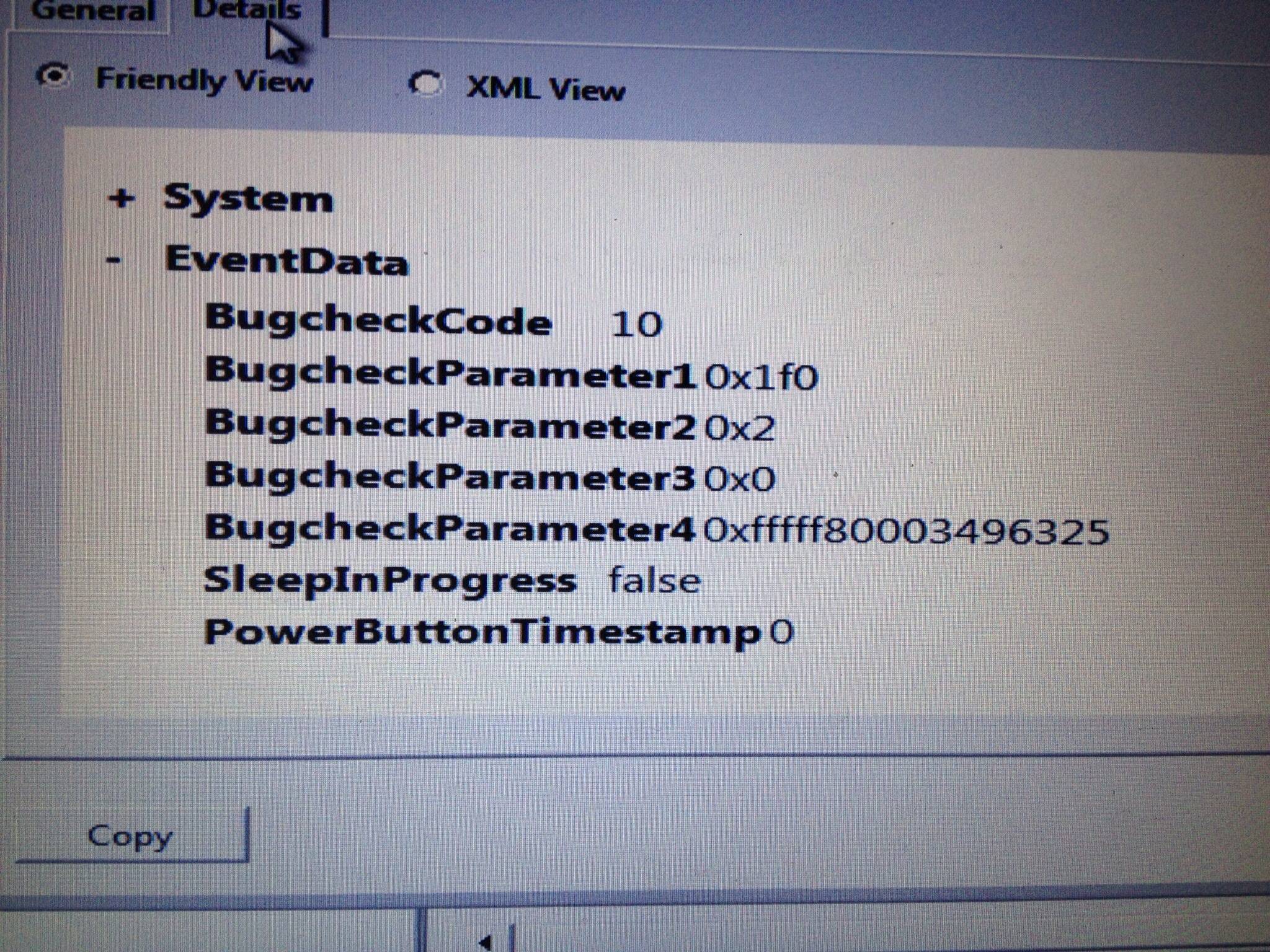
Attached you will find the requested files.
I have had this happen several times in the last few hours. I recently dealt with a virus, removed via MalwareBytes. I ran followup scans with MalwareBytes, AdwCleaner and am in the processof an Avast! scan.
My GFX card drivers are up to date.
I just reinstalled my wireless LAN drivers, and will be able to see if that was the issue.
The built-in Windows RAM testing tool did not how any errors.
CHKDSK finds and removes some errors, I believe as a result of the crashes.
SFC /scannow turned up no integrity errors.
The Intel i7 CPU checking tool showed that the CPU is not the issue.
Between the last YouTube video upload without crashing and now, I have added no new hardware or software.
What happens: I try to upload a video to YouTube, and the page goes unresponsive. This is in the CHROME browser. My computer will become unresponsive. After a few seconds, the Windows taskbar and desktop icons will disappear,and I may regain some slight control of my computer, then the BSOD occurs, usually error 7x or 4a.
Help
update TDSS Killer with verify digital signatures and detect TDLFS finds
"HiPatchService," which I believe comes as a part of the SMITE game from Hi-Rez studios (it is in c:\Program Files (x86)\Hi-Rez Studios\) so I believe I'm rootkit free. Scanning with MSE offline and Avast!
update 2 Attempting to create a Microsoft Defender Offline CD resulted in an error while attempting to burn. Will try to use it anyway..
Could one/more of my drivers be corrupt? How would I know? I'm running the Driver Verifier, but I have not yet BSOD'd as a result.
update 3: MGADIAG
I have had this happen several times in the last few hours. I recently dealt with a virus, removed via MalwareBytes. I ran followup scans with MalwareBytes, AdwCleaner and am in the processof an Avast! scan.
My GFX card drivers are up to date.
I just reinstalled my wireless LAN drivers, and will be able to see if that was the issue.
The built-in Windows RAM testing tool did not how any errors.
CHKDSK finds and removes some errors, I believe as a result of the crashes.
SFC /scannow turned up no integrity errors.
The Intel i7 CPU checking tool showed that the CPU is not the issue.
Between the last YouTube video upload without crashing and now, I have added no new hardware or software.
What happens: I try to upload a video to YouTube, and the page goes unresponsive. This is in the CHROME browser. My computer will become unresponsive. After a few seconds, the Windows taskbar and desktop icons will disappear,and I may regain some slight control of my computer, then the BSOD occurs, usually error 7x or 4a.
Help
update TDSS Killer with verify digital signatures and detect TDLFS finds
"HiPatchService," which I believe comes as a part of the SMITE game from Hi-Rez studios (it is in c:\Program Files (x86)\Hi-Rez Studios\) so I believe I'm rootkit free. Scanning with MSE offline and Avast!
update 2 Attempting to create a Microsoft Defender Offline CD resulted in an error while attempting to burn. Will try to use it anyway..
Could one/more of my drivers be corrupt? How would I know? I'm running the Driver Verifier, but I have not yet BSOD'd as a result.
update 3: MGADIAG
Code:
Diagnostic Report (1.9.0027.0):
-----------------------------------------
Windows Validation Data-->

Validation Code: 0
Cached Online Validation Code: 0x0
Windows Product Key: *****-*****-D96PV-T9B9D-M8X2Q
Windows Product Key Hash: Fq/JsPUI1NdT6veDtiDB8N1RQUs=
Windows Product ID: 00359-OEM-8992687-00246
Windows Product ID Type: 2
Windows License Type: OEM SLP
Windows OS version: 6.1.7601.2.00010300.1.0.003
ID: {630DCF47-44C9-4C3A-B102-06C5F1DDA954}(1)
Is Admin: Yes
TestCab: 0x0
LegitcheckControl ActiveX: N/A, hr = 0x80070002
Signed By: N/A, hr = 0x80070002
Product Name: Windows 7 Home Premium
Architecture: 0x00000009
Build lab: 7601.win7sp1_gdr.140303-2144
TTS Error:
Validation Diagnostic:
Resolution Status: N/A

Vista WgaER Data-->
ThreatID(s): N/A, hr = 0x80070002
Version: N/A, hr = 0x80070002

Windows XP Notifications Data-->
Cached Result: N/A, hr = 0x80070002
File Exists: No
Version: N/A, hr = 0x80070002
WgaTray.exe Signed By: N/A, hr = 0x80070002
WgaLogon.dll Signed By: N/A, hr = 0x80070002

OGA Notifications Data-->
Cached Result: N/A, hr = 0x80070002
Version: N/A, hr = 0x80070002
OGAExec.exe Signed By: N/A, hr = 0x80070002
OGAAddin.dll Signed By: N/A, hr = 0x80070002

OGA Data-->
Office Status: 109 N/A
OGA Version: N/A, 0x80070002
Signed By: N/A, hr = 0x80070002
Office Diagnostics: 025D1FF3-364-80041010_025D1FF3-229-80041010_025D1FF3-230-1_025D1FF3-517-80040154_025D1FF3-237-80040154_025D1FF3-238-2_025D1FF3-244-80070002_025D1FF3-258-3

Browser Data-->
Proxy settings: N/A
User Agent: Mozilla/4.0 (compatible; MSIE 8.0; Win32)
Default Browser: C:\Program Files (x86)\Google\Chrome\Application\chrome.exe
Download signed ActiveX controls: Prompt
Download unsigned ActiveX controls: Disabled
Run ActiveX controls and plug-ins: Allowed
Initialize and script ActiveX controls not marked as safe: Disabled
Allow scripting of Internet Explorer Webbrowser control: Disabled
Active scripting: Allowed
Script ActiveX controls marked as safe for scripting: Allowed

File Scan Data-->

Other data-->
Office Details: <GenuineResults><MachineData><UGUID>{630DCF47-44C9-4C3A-B102-06C5F1DDA954}</UGUID><Version>1.9.0027.0</Version><OS>6.1.7601.2.00010300.1.0.003</OS><Architecture>x64</Architecture><PKey>*****-*****-*****-*****-M8X2Q</PKey><PID>00359-OEM-8992687-00246</PID><PIDType>2</PIDType><SID>S-1-5-21-579242494-2816010496-1188173685</SID><SYSTEM><Manufacturer>Micro-Star International Co., Ltd.</Manufacturer><Model>GE70 0NC</Model></SYSTEM><BIOS><Manufacturer>American Megatrends Inc.</Manufacturer><Version>E1756IMS.10A</Version><SMBIOSVersion major="2" minor="7"/><Date>20120517000000.000000+000</Date></BIOS><HWID>245D3407018400FE</HWID><UserLCID>0409</UserLCID><SystemLCID>0409</SystemLCID><TimeZone>Eastern Standard Time(GMT-05:00)</TimeZone><iJoin>0</iJoin><SBID><stat>3</stat><msppid></msppid><name></name><model></model></SBID><OEM><OEMID>MSI_NB</OEMID><OEMTableID>MEGABOOK</OEMTableID></OEM><GANotification/></MachineData><Software><Office><Result>109</Result><Products/><Applications/></Office></Software></GenuineResults>

Spsys.log Content: 0x80070002

Licensing Data-->
Software licensing service version: 6.1.7601.17514

Name: Windows(R) 7, HomePremium edition
Description: Windows Operating System - Windows(R) 7, OEM_SLP channel
Activation ID: d2c04e90-c3dd-4260-b0f3-f845f5d27d64
Application ID: 55c92734-d682-4d71-983e-d6ec3f16059f
Extended PID: 00359-00178-926-800246-02-1033-7601.0000-1292012
Installation ID: 005005683683826854625905006801358000828065671033661870
Processor Certificate URL: [url]http://go.microsoft.com/fwlink/?LinkID=88338[/url]
Machine Certificate URL: [url]http://go.microsoft.com/fwlink/?LinkID=88339[/url]
Use License URL: [url]http://go.microsoft.com/fwlink/?LinkID=88341[/url]
Product Key Certificate URL: [url]http://go.microsoft.com/fwlink/?LinkID=88340[/url]
Partial Product Key: M8X2Q
License Status: Licensed
Remaining Windows rearm count: 1
Trusted time: 9/9/2014 6:04:38 AM

Windows Activation Technologies-->
HrOffline: 0x00000000
HrOnline: 0x00000000
HealthStatus: 0x0000000000000000
Event Time Stamp: 8:19:2014 11:56
ActiveX: Registered, Version: 7.1.7600.16395
Admin Service: Registered, Version: 7.1.7600.16395
HealthStatus Bitmask Output:


HWID Data-->
HWID Hash Current: MAAAAAEAAQABAAIAAAABAAAAAwABAAEAln1ICgx71oqQzVhDDrdgq6QaoqigVpZj

OEM Activation 1.0 Data-->
N/A

OEM Activation 2.0 Data-->
BIOS valid for OA 2.0: yes
Windows marker version: 0x20001
OEMID and OEMTableID Consistent: yes
BIOS Information:
  ACPI Table Name	OEMID Value	OEMTableID Value
  APIC			MSI_NB		MEGABOOK
  FACP			MSI_NB		MEGABOOK
  HPET			MSI_NB		MEGABOOK
  MCFG			MSI_NB		MEGABOOK
  SLIC			MSI_NB		MEGABOOK
  SSDT			SataRe		SataTabl
  SSDT			SataRe		SataTabl
  SSDT			SataRe		SataTabl
  SSDT			SataRe		SataTabl
  SSDT			SataRe		SataTabl
Last edited:
My Computer
At a glance
Windows 7 Home Premium 64-bit SP1Intel(R) Core i7-3610QM8GBNvidia GeForce GTX 660M
- Computer type
- Laptop
- Computer Manufacturer/Model Number
- MSI
- OS
- Windows 7 Home Premium 64-bit SP1
- CPU
- Intel(R) Core i7-3610QM
- Memory
- 8GB
- Graphics Card(s)
- Nvidia GeForce GTX 660M
- Antivirus
- Avast!
- Browser
- Chrome