reset LAN

awgeez

New member
everytime i boot my pc, within 5 minutes there internet connection is lost. run the troubleshooter and it resets the local area connection. while this does re-connect to the net, the speed is now severely limited to between 1/5th and 1/2 speed. ive done system restore, reset winsock, ipv4, ipv6(dont know what that means, a help forum said to do it) ive used the 'winfix' utility. nothing has cured this most annoying problem.
 

My Computer

Computer Manufacturer/Model Number
Dell inspiron one2205
OS
windows 7 home premium 64 bit
CPU
AMD Athlon II x2 240e 2.8 ghz
Motherboard
dont know
Memory
4gb
Graphics Card(s)
radeon 4200
Sound Card
realtek
Hard Drives
st350041 8as SATA
Awgeez, Hello and welcome to Sevenforums! Lets see if I am able to help you out on this issue.

First, please tell me what antivirus you are running.

Next, have you downloaded the most recent driver for LAN connections? Here is the site for what I believe to be your setup, and it looks like the realtek driver for ethernet is labled as "urgent": Drivers and Downloads | Dell [United States]
 

My Computer

Computer type
PC/Desktop
Computer Manufacturer/Model Number
Custom Asus Build
OS
Microsoft Windows 8.1 Pro 64-bit
CPU
Intel(R) Core(TM) i3-4130 CPU @ 3.40GHz
Motherboard
B85M-E
Memory
8.00 GB
Graphics Card(s)
None
Sound Card
Realtek High Definition Audio
Monitor(s) Displays
Asus 23.6" Monitor
Screen Resolution
1920 x 1080 x 32 bits (4294967296 colors) @ 60 Hz
Hard Drives
INTEL SSDSC2BW180A4
Samsung SSD 840 PRO Series
PSU
Seasonic S12II-380Bronze
Case
Lian Li
Cooling
Fan, Passive
Keyboard
Logitech K120
Mouse
Microsoft Touch Mouse
Internet Speed
4ms Ping, 19.0 Mbps Download, 19.0 Mbps Upload
Antivirus
Eset Endpoint
Browser
Internet Explorer, Chrome
re

Im running Macafee antivirus. i did download a driver update for the lan adapter, but that was thru widows device manager. i will try the dell website when i get home from work.
 

My Computer

Computer Manufacturer/Model Number
Dell inspiron one2205
OS
windows 7 home premium 64 bit
CPU
AMD Athlon II x2 240e 2.8 ghz
Motherboard
dont know
Memory
4gb
Graphics Card(s)
radeon 4200
Sound Card
realtek
Hard Drives
st350041 8as SATA
Awgeez,

Before you do that, I think I may already know the solution to your problem. As I have stated in this thread, McAfee is a big bloated program that tends to cripple the internet. You would be the 4th person I've seen this month alone that has had problems with it. It is highly recommended to get rid of it. I bet you your problems would go away right after you do.

Now, before you load up the ol' control panel, know that Antiviruses need to be removed a special way. I will link you back to this post so that you can follow along and remove it according to factory standards. As I suggested in that link, Microsoft Security Essentials is a pretty good and lightweight antivirus that you might take a liking to, so try it out. Hope I've helped!
 

My Computer

Computer type
PC/Desktop
Computer Manufacturer/Model Number
Custom Asus Build
OS
Microsoft Windows 8.1 Pro 64-bit
CPU
Intel(R) Core(TM) i3-4130 CPU @ 3.40GHz
Motherboard
B85M-E
Memory
8.00 GB
Graphics Card(s)
None
Sound Card
Realtek High Definition Audio
Monitor(s) Displays
Asus 23.6" Monitor
Screen Resolution
1920 x 1080 x 32 bits (4294967296 colors) @ 60 Hz
Hard Drives
INTEL SSDSC2BW180A4
Samsung SSD 840 PRO Series
PSU
Seasonic S12II-380Bronze
Case
Lian Li
Cooling
Fan, Passive
Keyboard
Logitech K120
Mouse
Microsoft Touch Mouse
Internet Speed
4ms Ping, 19.0 Mbps Download, 19.0 Mbps Upload
Antivirus
Eset Endpoint
Browser
Internet Explorer, Chrome
Re

i did the driver update. the net is still slow as hell, but i wont know if the internet connection will fail until i have had pc shut down for awhile. im not sure i understand why macafee would suddenly start causing problems. i know for sure, norton will ruin a pc. also had avg in another unit, lost the hard drive due to inferior protection. ive only stuck with macafee for years because of the secure shredder that comes with it. as you know, windows deletes nothing, ever. recycle bin, temp internet files, things that NEED to be destroyed daily, windows will not do. where do you get windows security essentials?
 

My Computer

Computer Manufacturer/Model Number
Dell inspiron one2205
OS
windows 7 home premium 64 bit
CPU
AMD Athlon II x2 240e 2.8 ghz
Motherboard
dont know
Memory
4gb
Graphics Card(s)
radeon 4200
Sound Card
realtek
Hard Drives
st350041 8as SATA
Awgeez,

You can set the recycle bin to automatically delete files.

McAfee is probably the worst AV of them all, as others on many different forums will tell you. Just try uninstalling it to see if it helps. It is a hog of resources and doesn't play nice. Some like it I guess, but I recommend almost anything else.

Temporary internet files don't need to be destroyed unless you are experiencing slow-downs (on some computers), as it saves information that enables faster web browsing. Any information it discloses to others is minor at best, and shouldn't matter unless you are overly worried about being hidden from "the big guy" or such. You can be sure Microsoft would fear a lawsuit to the point that it will not allow private information to be disclosed to others (And a security update follows provided a flaw is discovered). You can delete those through disk cleanup if you really want to, but it is a hassle when you have to re-enter common information into the web browser because you would refuse to let it save it.

You can find MSE here. Also, here is a thread that discusses some of the best antiviruses out there, so you might check it out and make your decision based off of these opinions: http://www.sevenforums.com/system-security/72070-whats-best-anti-virus.html

Hope this clears some things up for ya. Happy holidays to you.
 
Last edited:

My Computer

Computer type
PC/Desktop
Computer Manufacturer/Model Number
Custom Asus Build
OS
Microsoft Windows 8.1 Pro 64-bit
CPU
Intel(R) Core(TM) i3-4130 CPU @ 3.40GHz
Motherboard
B85M-E
Memory
8.00 GB
Graphics Card(s)
None
Sound Card
Realtek High Definition Audio
Monitor(s) Displays
Asus 23.6" Monitor
Screen Resolution
1920 x 1080 x 32 bits (4294967296 colors) @ 60 Hz
Hard Drives
INTEL SSDSC2BW180A4
Samsung SSD 840 PRO Series
PSU
Seasonic S12II-380Bronze
Case
Lian Li
Cooling
Fan, Passive
Keyboard
Logitech K120
Mouse
Microsoft Touch Mouse
Internet Speed
4ms Ping, 19.0 Mbps Download, 19.0 Mbps Upload
Antivirus
Eset Endpoint
Browser
Internet Explorer, Chrome
well, pc been up and running for about 2 hours now, not even a blip so far. not to mention the 50% improvement in boot-up time. i think i can get a refund from macafee since it just renewed at the begin of this month. as long as it keeps working right, i'd say you got it fixed. thanks brother!!!!!!!!
 

My Computer

Computer Manufacturer/Model Number
Dell inspiron one2205
OS
windows 7 home premium 64 bit
CPU
AMD Athlon II x2 240e 2.8 ghz
Motherboard
dont know
Memory
4gb
Graphics Card(s)
radeon 4200
Sound Card
realtek
Hard Drives
st350041 8as SATA
Awgeez,

You're welcome, and thank you for trusting me enough to test out my theory. I don't know what it is about McAfee, but it just stinks. Best of luck to you!
 

My Computer

Computer type
PC/Desktop
Computer Manufacturer/Model Number
Custom Asus Build
OS
Microsoft Windows 8.1 Pro 64-bit
CPU
Intel(R) Core(TM) i3-4130 CPU @ 3.40GHz
Motherboard
B85M-E
Memory
8.00 GB
Graphics Card(s)
None
Sound Card
Realtek High Definition Audio
Monitor(s) Displays
Asus 23.6" Monitor
Screen Resolution
1920 x 1080 x 32 bits (4294967296 colors) @ 60 Hz
Hard Drives
INTEL SSDSC2BW180A4
Samsung SSD 840 PRO Series
PSU
Seasonic S12II-380Bronze
Case
Lian Li
Cooling
Fan, Passive
Keyboard
Logitech K120
Mouse
Microsoft Touch Mouse
Internet Speed
4ms Ping, 19.0 Mbps Download, 19.0 Mbps Upload
Antivirus
Eset Endpoint
Browser
Internet Explorer, Chrome
lasted 2 whle days. back to doing the same old thing again.
 

My Computer

Computer Manufacturer/Model Number
Dell inspiron one2205
OS
windows 7 home premium 64 bit
CPU
AMD Athlon II x2 240e 2.8 ghz
Motherboard
dont know
Memory
4gb
Graphics Card(s)
radeon 4200
Sound Card
realtek
Hard Drives
st350041 8as SATA
awgeez, would you mind posting a picture of all of your installed programs from within control panel so that I could look through them? You might consider using the snipping tool to snip the image(s) and them upload via this method: http://www.sevenforums.com/tutorials/9733-screenshots-files-upload-post-seven-forums.html

Bear with me buddy...

Are you noticing slowdowns in the computer as well as problems with connecting to the internet? Explain your problems currently so that I know if anything has changed or not. Did you follow that link on how to uninstall McAfee?
 

My Computer

Computer type
PC/Desktop
Computer Manufacturer/Model Number
Custom Asus Build
OS
Microsoft Windows 8.1 Pro 64-bit
CPU
Intel(R) Core(TM) i3-4130 CPU @ 3.40GHz
Motherboard
B85M-E
Memory
8.00 GB
Graphics Card(s)
None
Sound Card
Realtek High Definition Audio
Monitor(s) Displays
Asus 23.6" Monitor
Screen Resolution
1920 x 1080 x 32 bits (4294967296 colors) @ 60 Hz
Hard Drives
INTEL SSDSC2BW180A4
Samsung SSD 840 PRO Series
PSU
Seasonic S12II-380Bronze
Case
Lian Li
Cooling
Fan, Passive
Keyboard
Logitech K120
Mouse
Microsoft Touch Mouse
Internet Speed
4ms Ping, 19.0 Mbps Download, 19.0 Mbps Upload
Antivirus
Eset Endpoint
Browser
Internet Explorer, Chrome
Re

Yes i followed the link and then did the on screen instructions. i will have to do the installed programs after i get home tonite. as for other slowdowns, hmmmm not really, never really paid attention because this Dell runs so much faster than the Acer it replaced. nothing runs like the SFF i built 10 years ago, but it did finally 1 day poop a hard drive. hardware i know, software, eh not so much.
 

My Computer

Computer Manufacturer/Model Number
Dell inspiron one2205
OS
windows 7 home premium 64 bit
CPU
AMD Athlon II x2 240e 2.8 ghz
Motherboard
dont know
Memory
4gb
Graphics Card(s)
radeon 4200
Sound Card
realtek
Hard Drives
st350041 8as SATA
Awgeez,

I appologize for the delay in my response, I misplaced this thread o.0

My fault.

So you put a new hard drive in your computer, and everything else was working fine? If it is a 10 year old computer, is it compatible with windows 7? When you downloaded all the drivers for it, did it list windows 7 drivers or did you install another driver and put it into compatibility mode?

Also waiting on that pic of installed programs.
 

My Computer

Computer type
PC/Desktop
Computer Manufacturer/Model Number
Custom Asus Build
OS
Microsoft Windows 8.1 Pro 64-bit
CPU
Intel(R) Core(TM) i3-4130 CPU @ 3.40GHz
Motherboard
B85M-E
Memory
8.00 GB
Graphics Card(s)
None
Sound Card
Realtek High Definition Audio
Monitor(s) Displays
Asus 23.6" Monitor
Screen Resolution
1920 x 1080 x 32 bits (4294967296 colors) @ 60 Hz
Hard Drives
INTEL SSDSC2BW180A4
Samsung SSD 840 PRO Series
PSU
Seasonic S12II-380Bronze
Case
Lian Li
Cooling
Fan, Passive
Keyboard
Logitech K120
Mouse
Microsoft Touch Mouse
Internet Speed
4ms Ping, 19.0 Mbps Download, 19.0 Mbps Upload
Antivirus
Eset Endpoint
Browser
Internet Explorer, Chrome
nooooooo, the pc i have now is only 4 months old. i say it is waaaayyyyyyy faster than the unit it replaced. im workin on the installed pic. im on call 24/7 and customers keep calling me for things, everybody else is deer hunting.
 

My Computer

Computer Manufacturer/Model Number
Dell inspiron one2205
OS
windows 7 home premium 64 bit
CPU
AMD Athlon II x2 240e 2.8 ghz
Motherboard
dont know
Memory
4gb
Graphics Card(s)
radeon 4200
Sound Card
realtek
Hard Drives
st350041 8as SATA
Control panel

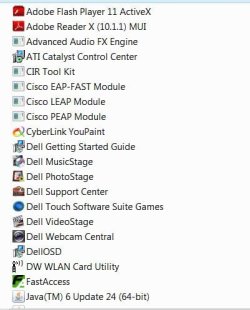
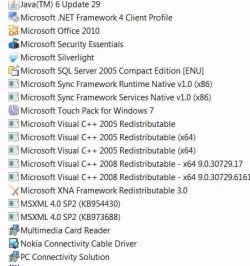
here it is. i dont know why the Samsung programs are listed. its been uninstalled.
 

Attachments

  • control1.JPG
    control1.JPG
    40 KB · Views: 42
  • Control2.JPG
    Control2.JPG
    65.7 KB · Views: 23
  • Control3.JPG
    Control3.JPG
    51.7 KB · Views: 20

My Computer

Computer Manufacturer/Model Number
Dell inspiron one2205
OS
windows 7 home premium 64 bit
CPU
AMD Athlon II x2 240e 2.8 ghz
Motherboard
dont know
Memory
4gb
Graphics Card(s)
radeon 4200
Sound Card
realtek
Hard Drives
st350041 8as SATA
Yea, I am not sure why you have that samsung stuff, so why don't you try this:

  1. Assuming the system specs you entered into this forum are correct, Download the Ethernet Controller HERE. Don't install it yet.
  2. :warn: Create a Restore Point: Create a restore point
  3. Now uninstall Realtek Ethernet Controller Driver and all that Samsung stuff (Assuming you don't need them)
  4. Now install the ethernet thing you just downloaded, and let me know if it fixes anything.
If you want, go to the Dell website HERE and select your computer and look up its drivers. Don't need to download anything, but notice what those drivers are. I would only ever install Recommended and urgent labeled drivers from dell, and leave any optional ones alone. Some of those items are utilities that are more bloatware than anything else. Go into windows update and, if you aren't overly against it, set windows to detect hardware and install the latest drivers for it via this link: Automatically get recommended drivers and updates for your hardware

Now, Some programs I recommend be uninstalled for various reasons, but ultimately your choice to keep or remove. Now I have no way of knowing if you actually use these programs or they were installed through some other means. Let me know what you want to keep and do away with. This will be done through your own discretion. :warn: Don't remove anything that you need. Don't uninstall your wireless utility and driver unless you only want to use LAN. You will need to use a LAN connection if you want internet access at this point, and the wireless driver should be installed through windows update automatically, or manually through Dell:


I would uninstall -
  1. Anything that says Yahoo (messenger & updates)
  2. windows live upload tool
  3. windows live sync
  4. Windows driver package - Nokia pccsmcf
  5. vlc media player
  6. setdisplayconfig
  7. roxio creator starter
  8. Dell musicstage, photostage, touch software suite games, videostage
  9. CIR tool kit
  10. Everything that says Cisco
  11. FastAccess
  12. Java
  13. Cyberlink youpaint
  14. Nokia Connectivity Cable Driver
  15. PC connectivitiy Solution
Now, any drivers should be automatically reinstalled through the windows update, but in case you didn't enable it, do into device manager and look up anything with a yellow exclaimation mark, sorta like this: :warn: (Eh, sorta)

Go into windows update and click "check for updates" Install any optional drivers and all important downloads, etc. Restart computer.

Right click the device, and click update. Search on the web. Let me know if you have any trouble.

 

My Computer

Computer type
PC/Desktop
Computer Manufacturer/Model Number
Custom Asus Build
OS
Microsoft Windows 8.1 Pro 64-bit
CPU
Intel(R) Core(TM) i3-4130 CPU @ 3.40GHz
Motherboard
B85M-E
Memory
8.00 GB
Graphics Card(s)
None
Sound Card
Realtek High Definition Audio
Monitor(s) Displays
Asus 23.6" Monitor
Screen Resolution
1920 x 1080 x 32 bits (4294967296 colors) @ 60 Hz
Hard Drives
INTEL SSDSC2BW180A4
Samsung SSD 840 PRO Series
PSU
Seasonic S12II-380Bronze
Case
Lian Li
Cooling
Fan, Passive
Keyboard
Logitech K120
Mouse
Microsoft Touch Mouse
Internet Speed
4ms Ping, 19.0 Mbps Download, 19.0 Mbps Upload
Antivirus
Eset Endpoint
Browser
Internet Explorer, Chrome
ok, ill give it a shot. what is FastAccess anyway? and setdisplayconfig? except for java and nokia cable driver i dont use any of the things you listed to remove. come to think of it,,,, all this trouble started about the same time as i re-installed yahoo messanger, which i dont use but rarely. roxio, if i uninstall that, will i still be able to burn cds? i usually burn strait from windows media player.
 

My Computer

Computer Manufacturer/Model Number
Dell inspiron one2205
OS
windows 7 home premium 64 bit
CPU
AMD Athlon II x2 240e 2.8 ghz
Motherboard
dont know
Memory
4gb
Graphics Card(s)
radeon 4200
Sound Card
realtek
Hard Drives
st350041 8as SATA
if you don't use roxio, you're good to let it go. Media Player does burn CDs as stated here:


I don't really know what those things are, although i get the feeling fastaccess is a dell driver. No matter, it will be installed again if so. Set display is either your monitor driver or something that can help with monitor issues. either way, you don't need it. Monitors work fine in the windows environment, and if windows gives it to you in an update, well then your choice to have it installed again or not. I don't.
 

My Computer

Computer type
PC/Desktop
Computer Manufacturer/Model Number
Custom Asus Build
OS
Microsoft Windows 8.1 Pro 64-bit
CPU
Intel(R) Core(TM) i3-4130 CPU @ 3.40GHz
Motherboard
B85M-E
Memory
8.00 GB
Graphics Card(s)
None
Sound Card
Realtek High Definition Audio
Monitor(s) Displays
Asus 23.6" Monitor
Screen Resolution
1920 x 1080 x 32 bits (4294967296 colors) @ 60 Hz
Hard Drives
INTEL SSDSC2BW180A4
Samsung SSD 840 PRO Series
PSU
Seasonic S12II-380Bronze
Case
Lian Li
Cooling
Fan, Passive
Keyboard
Logitech K120
Mouse
Microsoft Touch Mouse
Internet Speed
4ms Ping, 19.0 Mbps Download, 19.0 Mbps Upload
Antivirus
Eset Endpoint
Browser
Internet Explorer, Chrome
fast access is part of dell's facial recognition security. biometrics.
 

My Computer

Computer Manufacturer/Model Number
Dell inspiron one2205
OS
windows 7 home premium 64 bit
CPU
AMD Athlon II x2 240e 2.8 ghz
Motherboard
dont know
Memory
4gb
Graphics Card(s)
radeon 4200
Sound Card
realtek
Hard Drives
st350041 8as SATA
fast access is part of dell's facial recognition security. biometrics.

Awgeez,

Do you use it? How is everything going, by the way?
 

My Computer

Computer type
PC/Desktop
Computer Manufacturer/Model Number
Custom Asus Build
OS
Microsoft Windows 8.1 Pro 64-bit
CPU
Intel(R) Core(TM) i3-4130 CPU @ 3.40GHz
Motherboard
B85M-E
Memory
8.00 GB
Graphics Card(s)
None
Sound Card
Realtek High Definition Audio
Monitor(s) Displays
Asus 23.6" Monitor
Screen Resolution
1920 x 1080 x 32 bits (4294967296 colors) @ 60 Hz
Hard Drives
INTEL SSDSC2BW180A4
Samsung SSD 840 PRO Series
PSU
Seasonic S12II-380Bronze
Case
Lian Li
Cooling
Fan, Passive
Keyboard
Logitech K120
Mouse
Microsoft Touch Mouse
Internet Speed
4ms Ping, 19.0 Mbps Download, 19.0 Mbps Upload
Antivirus
Eset Endpoint
Browser
Internet Explorer, Chrome
i've used it a couple times, just because i thought it was cool. connectivity problem is intermittant now. not just every single time i boot up. how do i get rid of the annoying samsung programs from the list? ive gone as far as to re-install it just to try to get rid of them.
 

My Computer

Computer Manufacturer/Model Number
Dell inspiron one2205
OS
windows 7 home premium 64 bit
CPU
AMD Athlon II x2 240e 2.8 ghz
Motherboard
dont know
Memory
4gb
Graphics Card(s)
radeon 4200
Sound Card
realtek
Hard Drives
st350041 8as SATA
Back
Top