Yea, I am not sure why you have that samsung stuff, so why don't you try this:
- Assuming the system specs you entered into this forum are correct, Download the Ethernet Controller HERE. Don't install it yet.
- :warn: Create a Restore Point: Create a restore point
- Now uninstall Realtek Ethernet Controller Driver and all that Samsung stuff (Assuming you don't need them)
- Now install the ethernet thing you just downloaded, and let me know if it fixes anything.
If you want, go to the Dell website
HERE and select your computer and look up its drivers. Don't need to download anything, but notice what those drivers are. I would only ever install Recommended and urgent labeled drivers from dell, and leave any optional ones alone. Some of those items are utilities that are more bloatware than anything else. Go into windows update and, if you aren't overly against it, set windows to detect hardware and install the latest drivers for it via this link:
Automatically get recommended drivers and updates for your hardware
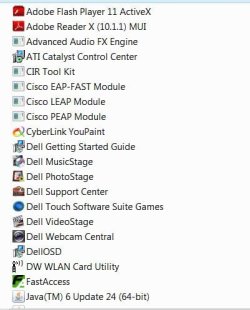
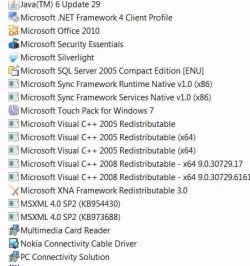
Now, Some programs I recommend be uninstalled for various reasons, but ultimately your choice to keep or remove. Now I have
no way of knowing if you actually use these programs or they were installed through some other means. Let me know what you want to keep and do away with. This will be done through your own discretion. :warn: Don't remove anything that you need. Don't uninstall your wireless utility and driver unless you only want to use LAN. You will need to use a LAN connection if you want internet access at this point, and the wireless driver should be installed through windows update automatically, or manually through Dell:
I would uninstall -
- Anything that says Yahoo (messenger & updates)
- windows live upload tool
- windows live sync
- Windows driver package - Nokia pccsmcf
- vlc media player
- setdisplayconfig
- roxio creator starter
- Dell musicstage, photostage, touch software suite games, videostage
- CIR tool kit
- Everything that says Cisco
- FastAccess
- Java
- Cyberlink youpaint
- Nokia Connectivity Cable Driver
- PC connectivitiy Solution
Now, any drivers should be automatically reinstalled through the windows update, but in case you didn't enable it, do into device manager and look up anything with a yellow exclaimation mark, sorta like this: :warn: (Eh, sorta)
Go into windows update and click "check for updates" Install any optional drivers and all important downloads, etc. Restart computer.
Right click the device, and click update. Search on the web. Let me know if you have any trouble.