
Reset/restore "Frequently Used Programs" in start menu

user587

New member
Local time
9:57 PM
Messages
2
Hi all :)

I've been searching for an hour to find out how to restore my Win7 Start Menu's list of frequently used programs to factory settings. :sleepy: I've clicked 'remove from list' for several programs, and I want to reset all the counts and exclusions to like it is when you first install Win7. Because right now all I have is Sticky Notes sitting atop the list :cry:

Does anyone know how to do this? I would be in your eternal gratitude! :D

Many thanks :party:

Edit: Needed more :party: :cool: :party: :eek: :geek: :) :party: :p
 

My Computer My Computer

Computer type
PC/Desktop
OS
Windows 7 Home Premium 64-Bit

My Computer My Computer

Computer type
PC/Desktop
Computer Manufacturer/Model Number
Golden Mk. I.4
OS
Windows 10 Pro x64 ; Xubuntu x64
CPU
Intel i7 860 @ 2.80 GHz O/C'ed to 4.0GHz
Motherboard
Gigabyte P55A-UD3R Rev.1. Award BIOS F13
Memory
16GB Corsair Vengance DDR3 @ 661 MHz Dual Channel (9-9-9-24)
Graphics Card(s)
EVGA NVidia GTX 560 1024MB
Sound Card
Realtek Integrated
Monitor(s) Displays
Dual Samsung SyncMaster 2494HS
Screen Resolution
1920*1080 and 1920*1080
Hard Drives
1*Samsung 840 EVO 120GB SSD;
1*OCZ Vertex 2 60GB SSD;
2*Samsung F3 SpinPoint 1TB in RAID0;
1*Samsung F1 SpinPoint 1TB;
2*Western Digital 1TB External USB 3.0
1*Western Digital 500GB External USB 3.0
1*Seagate 500GB External USB 2.0
PSU
Thermaltake ToughPower QFan 750W
Case
Thermaltake Element S VK60001W2Z
Cooling
Corsair H60 Water Cooling, 2*230mm and 2*80mm case fans
Keyboard
Logitech G110
Mouse
Logitech MX518

My Computer My Computer

Computer type
Laptop
Computer Manufacturer/Model Number
Sager NP9170
OS
Win 7 Pro x64 / Win 10 Pro
CPU
Intel(R) Core(TM) i7-3630QM CPU @ 2.40GHz
Motherboard
CLEVO P170EM
Memory
12 GB
Graphics Card(s)
(1) Intel(R) HD Graphics 4000 (2) NVIDIA GeForce GTX 675M
Sound Card
(1) Realtek High Definition Audio (2) Intel(R) Display Aud
Monitor(s) Displays
17.3
Screen Resolution
1920x1080
Hard Drives
(1) Samsung 860 EVO 500GB(OS) (1) Samsung 860 EVO 500GB(Data)
Keyboard
Backlite
Antivirus
MSE, Malwarebytes Pro
Browser
Firefox
Other Info
DESKTOP: Custom-built.
OS: Win 10 Pro x64.
CASE: Rosewill R5.
CPU: Intel I5 4670K CPU @ 3.40GHz.
CPU COOLER: Cool Master Hyper 212 EVO.
MOTHERBOARD: Asus Z87-A.
MEMORY: Kingston HyperX 2x4 GB.
GPU: Nvidia Geforce 650 TI.
PSU: Corsair TX750.
DRIVES: (1) Samsung 840 120 GB SSD (2) Western Digital blue 500 GB 7200 RPM.
I had a look through those but unfortunately they weren't what I was after. :(

I'm referring specifically to the list of frequently used programs you see when you left-click the :orb: Start Menu button , on the left above the Run/Search textbox and "All Programs" button.
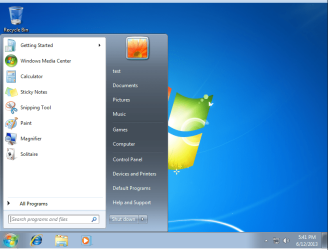
:D
 

My Computer My Computer

Computer type
PC/Desktop
OS
Windows 7 Home Premium 64-Bit
OK I know what you are asking about now, I have not found a way to restore it to default, but look at these 2 tutorials 1 shows how to reset it but I think it clears it all, the 2nd shows how to backup and restore it(after it is backup first).

http://www.sevenforums.com/tutorials/899-start-menu-reset-pin-area.html

http://www.sevenforums.com/tutorials/212930-start-menu-backup-restore-pinned-items-windows-7-a.html

If you want I can install Home Premium in VMware and get a list of default programs.

Let me know
Jerry

I installed Home Premium and here is what it looks like.
hp.PNG
 
Last edited:

My Computer My Computer

Computer type
Laptop
Computer Manufacturer/Model Number
Sager NP9170
OS
Win 7 Pro x64 / Win 10 Pro
CPU
Intel(R) Core(TM) i7-3630QM CPU @ 2.40GHz
Motherboard
CLEVO P170EM
Memory
12 GB
Graphics Card(s)
(1) Intel(R) HD Graphics 4000 (2) NVIDIA GeForce GTX 675M
Sound Card
(1) Realtek High Definition Audio (2) Intel(R) Display Aud
Monitor(s) Displays
17.3
Screen Resolution
1920x1080
Hard Drives
(1) Samsung 860 EVO 500GB(OS) (1) Samsung 860 EVO 500GB(Data)
Keyboard
Backlite
Antivirus
MSE, Malwarebytes Pro
Browser
Firefox
Other Info
DESKTOP: Custom-built.
OS: Win 10 Pro x64.
CASE: Rosewill R5.
CPU: Intel I5 4670K CPU @ 3.40GHz.
CPU COOLER: Cool Master Hyper 212 EVO.
MOTHERBOARD: Asus Z87-A.
MEMORY: Kingston HyperX 2x4 GB.
GPU: Nvidia Geforce 650 TI.
PSU: Corsair TX750.
DRIVES: (1) Samsung 840 120 GB SSD (2) Western Digital blue 500 GB 7200 RPM.
OK this is experimental (composing this as I go), but might have the answers for clearing the MFU, not just fixing jump-list pinning (which is all I see posted)... holler if 'better late than never'!

I've just set Start Menu 'recent programs' to 10, and can see some entries (I've, ahem, highlighted the usual suspects)

GsdGCI4.png


If you just want to clear all data, try the userassist tool, from didier stevens (hint: CLEAR ALL!).

I tried it (first cleared, and the same entries were still visible. I set to 0, then set to 20, and the list is empty).
 
Last edited:

My Computer My Computer

Computer type
Laptop
Computer Manufacturer/Model Number
Dell
OS
Windows 7 Ultimate 64bit
CPU
2.2
Memory
8Gb
Graphics Card(s)
NVIDIA
Screen Resolution
1280/762
Mouse
built in pad || iphone || MS wireless
Internet Speed
100MB
Antivirus
Avast
Browser
Chrome, Chrome portable
Back
Top