
Resetting Icons in Taskbar to Default Without Doing a System Restore

Jesse Williams

New member
Member
VIP
Local time
9:36 AM
Messages
1,944
Location
Pell City, Alabama 35125
How do I reset my taskbar icons without doing a system restore?
 

My Computer My Computer

Computer type
Laptop
Computer Manufacturer/Model Number
Acer 5250-0450
OS
Windows 10 Home 64-bit
CPU
AMD E-350 Zacate 40nm Technology
Motherboard
Acer HMA51-BZ (Socket FT1)
Memory
4 GB DDR3 Memory
Graphics Card(s)
1909MB ATI AMD Radeon HD
Sound Card
Conexant High Definition Audio
Monitor(s) Displays
Generic PnP Monitor (1366x768@60Hz)
Hard Drives
320 GB HDD
Mouse
ONN Wireless Mouse
Antivirus
Norton Internet Security Online
Browser
Microsoft Edge, Internet Explorer 11, and Google Chrome
Other Info
Other Computers:

Laptop: Acer Aspire 5749 Series

Desktop: Acer Aspire XC603G Series
In the case you mean the icons do no longer look like they should do, try Iconfix.
 

My Computer My Computer

Computer type
Laptop
Computer Manufacturer/Model Number
Acer
OS
Windows 7 Home Premium 64-bits
Antivirus
ESET Smart Security 6
Browser
SRWare Iron
No. I have my task bar icons customized. But, I would like to reset them to factory settings so the icons will look like they did when the computer was purchased. How do I do that without resetting the computer or restoring it?
 

My Computer My Computer

Computer type
Laptop
Computer Manufacturer/Model Number
Acer 5250-0450
OS
Windows 10 Home 64-bit
CPU
AMD E-350 Zacate 40nm Technology
Motherboard
Acer HMA51-BZ (Socket FT1)
Memory
4 GB DDR3 Memory
Graphics Card(s)
1909MB ATI AMD Radeon HD
Sound Card
Conexant High Definition Audio
Monitor(s) Displays
Generic PnP Monitor (1366x768@60Hz)
Hard Drives
320 GB HDD
Mouse
ONN Wireless Mouse
Antivirus
Norton Internet Security Online
Browser
Microsoft Edge, Internet Explorer 11, and Google Chrome
Other Info
Other Computers:

Laptop: Acer Aspire 5749 Series

Desktop: Acer Aspire XC603G Series
Well, I thought and remembered. So, I put the File Explorer and Welcome Center back on. I think that's all it came with on the Taskbar. I left my other icons on there.
 

My Computer My Computer

Computer type
Laptop
Computer Manufacturer/Model Number
Acer 5250-0450
OS
Windows 10 Home 64-bit
CPU
AMD E-350 Zacate 40nm Technology
Motherboard
Acer HMA51-BZ (Socket FT1)
Memory
4 GB DDR3 Memory
Graphics Card(s)
1909MB ATI AMD Radeon HD
Sound Card
Conexant High Definition Audio
Monitor(s) Displays
Generic PnP Monitor (1366x768@60Hz)
Hard Drives
320 GB HDD
Mouse
ONN Wireless Mouse
Antivirus
Norton Internet Security Online
Browser
Microsoft Edge, Internet Explorer 11, and Google Chrome
Other Info
Other Computers:

Laptop: Acer Aspire 5749 Series

Desktop: Acer Aspire XC603G Series
Hi would imagine the same process as you did to change them in the first place :)
C:\Users\YourUserName\AppData\Roaming\Microsoft\Internet Explorer\Quick Launch\User Pinned\TaskBar
Right click on each listing and Properties and change Icon,
They should be listed in the default Icons window,
Cheers.
 

My Computer My Computer

Computer type
PC/Desktop
Computer Manufacturer/Model Number
Custom assembled by me :}
OS
Win-7-Pro64bit 7-H-Prem-64bit
CPU
i7-5930K 2nd i9-9940x both water blocked VRM's too
Motherboard
ASUS SABERTOOTH X99 2nd ASUS x299 Apex
Memory
Trident-z 3200C14 2nd Trident-z 3600C16
Graphics Card(s)
EVGA 1080ti ftw3 2nd Titan Xp both water blocked
Sound Card
Built-in Realtek
Monitor(s) Displays
1-AOC G2460PG 24"G-Sync 144Hz/ 2nd 1-ASUS VG248QE 24" 144Hz
Screen Resolution
1920 x 1080 144Hz
Hard Drives
2-Samsung M.2 Evo & Evo Plus
2-Samsung 850 EVO 500GB SSD's/ 3-2.5 W.D. Black 1tb-&3-1tb/3-3.5 WD Black 1tb hdd's
PSU
EVGA SuperNOVA 1000-P2 2nd 1200-P2
Case
2-Corsair Obsidian Series 450D Black ATX Mid Tower
Cooling
Custom water loops
Keyboard
Logitech G710+/ 2nd Logitech G910
Mouse
2-RedDragon M901 Perdition 16400 dpi Gaming mouse = wired
Internet Speed
Comcast Ping 19ms 89.31mbps download speed 6.12mbps upload
Antivirus
Malwarebytes Pro/ Superantispyware Pro
Browser
FireFox & Pale moon
Other Info
2nd ASUS X299 Apex/Intel i9-9940x with Custom water loop/7H-Prem-x64/Corsair 450D case/Ram Trident-z 3600C16 4x8gb / Samsung970Evo plus 500gb SSD/Dual ssd EZ swap evo/PSU EVGA SuperNova 1200w-P2 80+Platinum/GPU Titan Xp /8-ML-140 on push-pull on 2-280GTX rads
Hi would imagine the same process as you did to change them in the first place :)
C:\Users\YourUserName\AppData\Roaming\Microsoft\Internet Explorer\Quick Launch\User Pinned\TaskBar
Right click on each listing and Properties and change Icon,
They should be listed in the default Icons window,
Cheers.

Can you explain that to me more clearer? I'm sorry! I don't undstand.
 

My Computer My Computer

Computer type
Laptop
Computer Manufacturer/Model Number
Acer 5250-0450
OS
Windows 10 Home 64-bit
CPU
AMD E-350 Zacate 40nm Technology
Motherboard
Acer HMA51-BZ (Socket FT1)
Memory
4 GB DDR3 Memory
Graphics Card(s)
1909MB ATI AMD Radeon HD
Sound Card
Conexant High Definition Audio
Monitor(s) Displays
Generic PnP Monitor (1366x768@60Hz)
Hard Drives
320 GB HDD
Mouse
ONN Wireless Mouse
Antivirus
Norton Internet Security Online
Browser
Microsoft Edge, Internet Explorer 11, and Google Chrome
Other Info
Other Computers:

Laptop: Acer Aspire 5749 Series

Desktop: Acer Aspire XC603G Series

My Computer My Computer

Computer type
PC/Desktop
Computer Manufacturer/Model Number
Custom assembled by me :}
OS
Win-7-Pro64bit 7-H-Prem-64bit
CPU
i7-5930K 2nd i9-9940x both water blocked VRM's too
Motherboard
ASUS SABERTOOTH X99 2nd ASUS x299 Apex
Memory
Trident-z 3200C14 2nd Trident-z 3600C16
Graphics Card(s)
EVGA 1080ti ftw3 2nd Titan Xp both water blocked
Sound Card
Built-in Realtek
Monitor(s) Displays
1-AOC G2460PG 24"G-Sync 144Hz/ 2nd 1-ASUS VG248QE 24" 144Hz
Screen Resolution
1920 x 1080 144Hz
Hard Drives
2-Samsung M.2 Evo & Evo Plus
2-Samsung 850 EVO 500GB SSD's/ 3-2.5 W.D. Black 1tb-&3-1tb/3-3.5 WD Black 1tb hdd's
PSU
EVGA SuperNOVA 1000-P2 2nd 1200-P2
Case
2-Corsair Obsidian Series 450D Black ATX Mid Tower
Cooling
Custom water loops
Keyboard
Logitech G710+/ 2nd Logitech G910
Mouse
2-RedDragon M901 Perdition 16400 dpi Gaming mouse = wired
Internet Speed
Comcast Ping 19ms 89.31mbps download speed 6.12mbps upload
Antivirus
Malwarebytes Pro/ Superantispyware Pro
Browser
FireFox & Pale moon
Other Info
2nd ASUS X299 Apex/Intel i9-9940x with Custom water loop/7H-Prem-x64/Corsair 450D case/Ram Trident-z 3600C16 4x8gb / Samsung970Evo plus 500gb SSD/Dual ssd EZ swap evo/PSU EVGA SuperNova 1200w-P2 80+Platinum/GPU Titan Xp /8-ML-140 on push-pull on 2-280GTX rads

My Computer My Computer

Computer type
Laptop
Computer Manufacturer/Model Number
Acer 5250-0450
OS
Windows 10 Home 64-bit
CPU
AMD E-350 Zacate 40nm Technology
Motherboard
Acer HMA51-BZ (Socket FT1)
Memory
4 GB DDR3 Memory
Graphics Card(s)
1909MB ATI AMD Radeon HD
Sound Card
Conexant High Definition Audio
Monitor(s) Displays
Generic PnP Monitor (1366x768@60Hz)
Hard Drives
320 GB HDD
Mouse
ONN Wireless Mouse
Antivirus
Norton Internet Security Online
Browser
Microsoft Edge, Internet Explorer 11, and Google Chrome
Other Info
Other Computers:

Laptop: Acer Aspire 5749 Series

Desktop: Acer Aspire XC603G Series

My Computer My Computer

Computer type
PC/Desktop
OS
Windows 10 Home x64
CPU
INTEL Core i5-750 Quad-Core 3.37GHz
Motherboard
ASUS P7P55D
Memory
HyperX Fury Black Series 8GB (2 x 4GB) 1866Mhz
Graphics Card(s)
EVGA GeForce GTX 750 Superclocked 1GB 128-Bit GDDR5
Monitor(s) Displays
LG 32MA68HY 32" IPS
Screen Resolution
1920 x 1080
Hard Drives
Samsung 840 Evo 120GB, SEAGATE 500GB Barracuda® 7200.12, SATA 3 Gb/s, 7200 RPM, 16MB cache
PSU
ANTEC TruePower New TP-550, 80 PLUS, 550W
Case
ANTEC Three Hundred Illusion
Cooling
COOLER MASTER Hyper 212 Plus, 4 x 120mm 1 x 140mm Noctua's
Internet Speed
85 + Mbps
Antivirus
Avast
Browser
Vivaldi
I deleted the ones that came with the computer as default. I used my mouse, if that tells you anything. I right clicked and selected "Unpin from Taskbar". I didn't use any kind of tool or software.
 

My Computer My Computer

Computer type
Laptop
Computer Manufacturer/Model Number
Acer 5250-0450
OS
Windows 10 Home 64-bit
CPU
AMD E-350 Zacate 40nm Technology
Motherboard
Acer HMA51-BZ (Socket FT1)
Memory
4 GB DDR3 Memory
Graphics Card(s)
1909MB ATI AMD Radeon HD
Sound Card
Conexant High Definition Audio
Monitor(s) Displays
Generic PnP Monitor (1366x768@60Hz)
Hard Drives
320 GB HDD
Mouse
ONN Wireless Mouse
Antivirus
Norton Internet Security Online
Browser
Microsoft Edge, Internet Explorer 11, and Google Chrome
Other Info
Other Computers:

Laptop: Acer Aspire 5749 Series

Desktop: Acer Aspire XC603G Series

My Computer My Computer

Computer type
Laptop
Computer Manufacturer/Model Number
Acer 5250-0450
OS
Windows 10 Home 64-bit
CPU
AMD E-350 Zacate 40nm Technology
Motherboard
Acer HMA51-BZ (Socket FT1)
Memory
4 GB DDR3 Memory
Graphics Card(s)
1909MB ATI AMD Radeon HD
Sound Card
Conexant High Definition Audio
Monitor(s) Displays
Generic PnP Monitor (1366x768@60Hz)
Hard Drives
320 GB HDD
Mouse
ONN Wireless Mouse
Antivirus
Norton Internet Security Online
Browser
Microsoft Edge, Internet Explorer 11, and Google Chrome
Other Info
Other Computers:

Laptop: Acer Aspire 5749 Series

Desktop: Acer Aspire XC603G Series
That was for if you backed them up. If you only unpinned them, you can repin them. Are you just unsure what was there by default? Or are looking for a one click solution to put them back? If you only unpinned them, they are still on your system.

This one will reset and clear...unsure if it restores the default pinned items

http://www.sevenforums.com/tutorials/214711-taskbar-pinned-items-reset-clear-windows-7-a.html

The default icon links on the taskbar is Internet Explorer, Windows Media Player, and Windows Explorer (opens to Libraries).

http://www.sevenforums.com/tutorials/397-taskbar-pin-unpin-program.html

A Guy
 

My Computer My Computer

Computer type
PC/Desktop
OS
Windows 10 Home x64
CPU
INTEL Core i5-750 Quad-Core 3.37GHz
Motherboard
ASUS P7P55D
Memory
HyperX Fury Black Series 8GB (2 x 4GB) 1866Mhz
Graphics Card(s)
EVGA GeForce GTX 750 Superclocked 1GB 128-Bit GDDR5
Monitor(s) Displays
LG 32MA68HY 32" IPS
Screen Resolution
1920 x 1080
Hard Drives
Samsung 840 Evo 120GB, SEAGATE 500GB Barracuda® 7200.12, SATA 3 Gb/s, 7200 RPM, 16MB cache
PSU
ANTEC TruePower New TP-550, 80 PLUS, 550W
Case
ANTEC Three Hundred Illusion
Cooling
COOLER MASTER Hyper 212 Plus, 4 x 120mm 1 x 140mm Noctua's
Internet Speed
85 + Mbps
Antivirus
Avast
Browser
Vivaldi
I am unsure what the default pinned icons were. I will try this today. Thank you!
 

My Computer My Computer

Computer type
Laptop
Computer Manufacturer/Model Number
Acer 5250-0450
OS
Windows 10 Home 64-bit
CPU
AMD E-350 Zacate 40nm Technology
Motherboard
Acer HMA51-BZ (Socket FT1)
Memory
4 GB DDR3 Memory
Graphics Card(s)
1909MB ATI AMD Radeon HD
Sound Card
Conexant High Definition Audio
Monitor(s) Displays
Generic PnP Monitor (1366x768@60Hz)
Hard Drives
320 GB HDD
Mouse
ONN Wireless Mouse
Antivirus
Norton Internet Security Online
Browser
Microsoft Edge, Internet Explorer 11, and Google Chrome
Other Info
Other Computers:

Laptop: Acer Aspire 5749 Series

Desktop: Acer Aspire XC603G Series
Actually, I don't think that will work. I am just unsure what the default icons were.
 

My Computer My Computer

Computer type
Laptop
Computer Manufacturer/Model Number
Acer 5250-0450
OS
Windows 10 Home 64-bit
CPU
AMD E-350 Zacate 40nm Technology
Motherboard
Acer HMA51-BZ (Socket FT1)
Memory
4 GB DDR3 Memory
Graphics Card(s)
1909MB ATI AMD Radeon HD
Sound Card
Conexant High Definition Audio
Monitor(s) Displays
Generic PnP Monitor (1366x768@60Hz)
Hard Drives
320 GB HDD
Mouse
ONN Wireless Mouse
Antivirus
Norton Internet Security Online
Browser
Microsoft Edge, Internet Explorer 11, and Google Chrome
Other Info
Other Computers:

Laptop: Acer Aspire 5749 Series

Desktop: Acer Aspire XC603G Series
That was for if you backed them up. If you only unpinned them, you can repin them. Are you just unsure what was there by default? Or are looking for a one click solution to put them back? If you only unpinned them, they are still on your system.

This one will reset and clear...unsure if it restores the default pinned items

http://www.sevenforums.com/tutorials/214711-taskbar-pinned-items-reset-clear-windows-7-a.html

The default icon links on the taskbar is Internet Explorer, Windows Media Player, and Windows Explorer (opens to Libraries).

http://www.sevenforums.com/tutorials/397-taskbar-pin-unpin-program.html

A Guy

Are you there?
 

My Computer My Computer

Computer type
Laptop
Computer Manufacturer/Model Number
Acer 5250-0450
OS
Windows 10 Home 64-bit
CPU
AMD E-350 Zacate 40nm Technology
Motherboard
Acer HMA51-BZ (Socket FT1)
Memory
4 GB DDR3 Memory
Graphics Card(s)
1909MB ATI AMD Radeon HD
Sound Card
Conexant High Definition Audio
Monitor(s) Displays
Generic PnP Monitor (1366x768@60Hz)
Hard Drives
320 GB HDD
Mouse
ONN Wireless Mouse
Antivirus
Norton Internet Security Online
Browser
Microsoft Edge, Internet Explorer 11, and Google Chrome
Other Info
Other Computers:

Laptop: Acer Aspire 5749 Series

Desktop: Acer Aspire XC603G Series

My Computer My Computer

Computer type
PC/Desktop
Computer Manufacturer/Model Number
Custom assembled by me :}
OS
Win-7-Pro64bit 7-H-Prem-64bit
CPU
i7-5930K 2nd i9-9940x both water blocked VRM's too
Motherboard
ASUS SABERTOOTH X99 2nd ASUS x299 Apex
Memory
Trident-z 3200C14 2nd Trident-z 3600C16
Graphics Card(s)
EVGA 1080ti ftw3 2nd Titan Xp both water blocked
Sound Card
Built-in Realtek
Monitor(s) Displays
1-AOC G2460PG 24"G-Sync 144Hz/ 2nd 1-ASUS VG248QE 24" 144Hz
Screen Resolution
1920 x 1080 144Hz
Hard Drives
2-Samsung M.2 Evo & Evo Plus
2-Samsung 850 EVO 500GB SSD's/ 3-2.5 W.D. Black 1tb-&3-1tb/3-3.5 WD Black 1tb hdd's
PSU
EVGA SuperNOVA 1000-P2 2nd 1200-P2
Case
2-Corsair Obsidian Series 450D Black ATX Mid Tower
Cooling
Custom water loops
Keyboard
Logitech G710+/ 2nd Logitech G910
Mouse
2-RedDragon M901 Perdition 16400 dpi Gaming mouse = wired
Internet Speed
Comcast Ping 19ms 89.31mbps download speed 6.12mbps upload
Antivirus
Malwarebytes Pro/ Superantispyware Pro
Browser
FireFox & Pale moon
Other Info
2nd ASUS X299 Apex/Intel i9-9940x with Custom water loop/7H-Prem-x64/Corsair 450D case/Ram Trident-z 3600C16 4x8gb / Samsung970Evo plus 500gb SSD/Dual ssd EZ swap evo/PSU EVGA SuperNova 1200w-P2 80+Platinum/GPU Titan Xp /8-ML-140 on push-pull on 2-280GTX rads

My Computer My Computer

Computer type
Laptop
Computer Manufacturer/Model Number
Acer 5250-0450
OS
Windows 10 Home 64-bit
CPU
AMD E-350 Zacate 40nm Technology
Motherboard
Acer HMA51-BZ (Socket FT1)
Memory
4 GB DDR3 Memory
Graphics Card(s)
1909MB ATI AMD Radeon HD
Sound Card
Conexant High Definition Audio
Monitor(s) Displays
Generic PnP Monitor (1366x768@60Hz)
Hard Drives
320 GB HDD
Mouse
ONN Wireless Mouse
Antivirus
Norton Internet Security Online
Browser
Microsoft Edge, Internet Explorer 11, and Google Chrome
Other Info
Other Computers:

Laptop: Acer Aspire 5749 Series

Desktop: Acer Aspire XC603G Series
That is a the quickest way to see how bad and deep the issue is,
Repair install would be next if the new account is the same :(
 

My Computer My Computer

Computer type
PC/Desktop
Computer Manufacturer/Model Number
Custom assembled by me :}
OS
Win-7-Pro64bit 7-H-Prem-64bit
CPU
i7-5930K 2nd i9-9940x both water blocked VRM's too
Motherboard
ASUS SABERTOOTH X99 2nd ASUS x299 Apex
Memory
Trident-z 3200C14 2nd Trident-z 3600C16
Graphics Card(s)
EVGA 1080ti ftw3 2nd Titan Xp both water blocked
Sound Card
Built-in Realtek
Monitor(s) Displays
1-AOC G2460PG 24"G-Sync 144Hz/ 2nd 1-ASUS VG248QE 24" 144Hz
Screen Resolution
1920 x 1080 144Hz
Hard Drives
2-Samsung M.2 Evo & Evo Plus
2-Samsung 850 EVO 500GB SSD's/ 3-2.5 W.D. Black 1tb-&3-1tb/3-3.5 WD Black 1tb hdd's
PSU
EVGA SuperNOVA 1000-P2 2nd 1200-P2
Case
2-Corsair Obsidian Series 450D Black ATX Mid Tower
Cooling
Custom water loops
Keyboard
Logitech G710+/ 2nd Logitech G910
Mouse
2-RedDragon M901 Perdition 16400 dpi Gaming mouse = wired
Internet Speed
Comcast Ping 19ms 89.31mbps download speed 6.12mbps upload
Antivirus
Malwarebytes Pro/ Superantispyware Pro
Browser
FireFox & Pale moon
Other Info
2nd ASUS X299 Apex/Intel i9-9940x with Custom water loop/7H-Prem-x64/Corsair 450D case/Ram Trident-z 3600C16 4x8gb / Samsung970Evo plus 500gb SSD/Dual ssd EZ swap evo/PSU EVGA SuperNova 1200w-P2 80+Platinum/GPU Titan Xp /8-ML-140 on push-pull on 2-280GTX rads
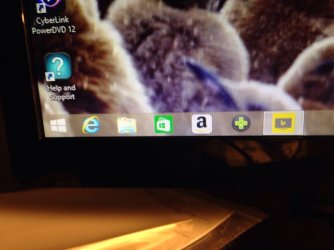
ImageUploadedBySeven Forums1412534190.924444.jpg

When I created the 2nd user, it was default. So, I took this picture to see what default icons I needed to put back on the Taskbar. This is my mom's Windows 8.1 desktop. I will also try it on my Windows 7 Laptop.
 

My Computer My Computer

Computer type
Laptop
Computer Manufacturer/Model Number
Acer 5250-0450
OS
Windows 10 Home 64-bit
CPU
AMD E-350 Zacate 40nm Technology
Motherboard
Acer HMA51-BZ (Socket FT1)
Memory
4 GB DDR3 Memory
Graphics Card(s)
1909MB ATI AMD Radeon HD
Sound Card
Conexant High Definition Audio
Monitor(s) Displays
Generic PnP Monitor (1366x768@60Hz)
Hard Drives
320 GB HDD
Mouse
ONN Wireless Mouse
Antivirus
Norton Internet Security Online
Browser
Microsoft Edge, Internet Explorer 11, and Google Chrome
Other Info
Other Computers:

Laptop: Acer Aspire 5749 Series

Desktop: Acer Aspire XC603G Series
The only problem was, that the Acer games app said that the file couldn't be found or something.
 

My Computer My Computer

Computer type
Laptop
Computer Manufacturer/Model Number
Acer 5250-0450
OS
Windows 10 Home 64-bit
CPU
AMD E-350 Zacate 40nm Technology
Motherboard
Acer HMA51-BZ (Socket FT1)
Memory
4 GB DDR3 Memory
Graphics Card(s)
1909MB ATI AMD Radeon HD
Sound Card
Conexant High Definition Audio
Monitor(s) Displays
Generic PnP Monitor (1366x768@60Hz)
Hard Drives
320 GB HDD
Mouse
ONN Wireless Mouse
Antivirus
Norton Internet Security Online
Browser
Microsoft Edge, Internet Explorer 11, and Google Chrome
Other Info
Other Computers:

Laptop: Acer Aspire 5749 Series

Desktop: Acer Aspire XC603G Series
Back
Top