"Resolving Host" is driving me crazy

Yup

New member
Local time
11:48 PM
Messages
2
15 times a day.. at least.. all of a sudden, for no apparent reason, the internet just stops working for a couple minutes. i can't stand it anymore.

DNS settings, right? i dunno. i've tried the solutions like the "8-8-8-8. 8-8-4-4" or whatever it was, i even download DNSJumper and messed with all that stuff. worked for 2 days.

i'm using chrome, but firefox does it too.

is it my ISP? (CenturyLink.. which is a terrible company to begin with)


*WHAT DO I NEED TO DO*
 

My Computer

Computer type
PC/Desktop
OS
64 bit ultimate
Hi Yup, welcome to 7F! :)

You were on the right track but did you go far enough; Such as clearing the DNS cache in chrome, firefox, and windows?

This should help for chrome just follow the steps: How to Fix Resolving Host Problem in Google Chrome?

For Firefox, go to Tools >options >advanced >Network tab >Cached Web content, click on the Clear Now button to the right then refresh the page to see it drop to 0, by the way if you don't mind me asking, how much disk space was the cache consuming?

This adds one more step for windows, the reset: DNS Resolver Cache - Flush and Reset in Windows

There is the possibility that your anti-malware program could be causing this, but you failed to list it so I couldn't look in that direction: Resolving Host caused by third party anti-malware programs? | google search


Related:
If the flush and reset didn't work try this from post #14
What you're trying to do is remove any junk-ware in case you have some, if you're unsure about deletion, post results for discussion.

"Resolving Host" Issue SevenForums search

"Resolving Host" Issue in Google | Post #3

"Resolving Host" Issue | google search

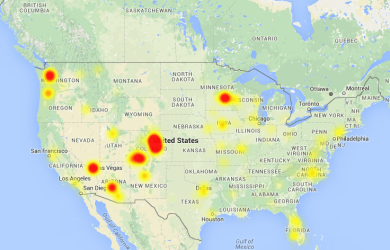
DownDetector Pro | Fair use violation as of Sunday at 8:30pm this is what CL looked like, are you anywhere near the large red areas?
cl.PNG
 

My Computer

Computer type
PC/Desktop
Computer Manufacturer/Model Number
Gateway DX4831-01e (Mid-Tower Desktop)
OS
Originally Win 7 Hm Prem x64 Ver 6.1.7600 Build 7601-SP1 | Upgraded to Windows 10 December 14, 2019
CPU
Intel i3 530 2.93GHz, 2933MHz 2 Cores 4 Logical Processors
Motherboard
Gateway H57M01 133 megahertz
Memory
6GB of 1,333MHz DDR3 SDRAM
Graphics Card(s)
32MB Intel Graphics Media Accelerator HD IGChip
Sound Card
Realtek High Definition Audio
Monitor(s) Displays
Gateway HX2000 20inch TFT active matrix TN
Screen Resolution
1600 x 900 x 59 hertz
Hard Drives
WDC WD10EADS-00M2B0 [HDD] (1000.20 GB) -- drive 0,
HL-DT-ST DVDRAM GH41N [CD-ROM dr]
Four card readers, and Four USB 2.0
PSU
300watts.
Case
Mid-Tower Desktop
Cooling
Stock from Gateway
Keyboard
Natural Ergonomic Keyboard 4000, see Other Info
Mouse
Orig. Gateway wore out now using Insignia USB wired optical
Internet Speed
Vz FIOS 10ms png 57.64Mbps down 65.53Mbps up Speedtest.org
Antivirus
Zamana Anti-logger with Anti-malware, MSE, Windows Firewall,
Browser
IE11.0.9600.19399-Upd ver11.0.135, Firefox 68.0.1 x64
Other Info
System Specs by Belarc.

BIOS: American Megatrends Inc. P01-A0 11/17/2009

Replaced the MS 'Natural' Standard PS/2 Enhanced 101-102 Keyboard with a new Natural Ergonomic Keyboard 4000 on August 1st 2014.

Canon Pixma MG3222 Printer.

Updated to IE11 on 12102015 | Fios Quantum Router g1100

Additional AV: SpywareBlaster, manual Mbam, SAS
thanks for the tips but nothing works. i'm so tired of losing my connection, restarting downloads, 'resolving host', searching out solutions, and then none of them working........... unbelievably ridiculous

WTF
 

My Computer

Computer type
PC/Desktop
OS
64 bit ultimate
You're welcome,
Okay, now that we've got the browsers and operating system [OS] out of the way, I'm going to need a bit more information, like:


  • What type of service do you have with centurylink; DSL, Fiber Optic? Is it just for internet or is your landline phone, TV, and wireless also included?

  • If this is DSL, this is very important, are you using the filters properly? http://Using Filters | www.centurylink.com, no matter if you have a single, double, triple or quad play with centurylink; Except for the modem, you need a filter at every location that shares your landline with the modem.
    Check your DSL filters
    They're the most likely reason you're experiencing problems. Filters are required for DSL service. They keep the signal clear and strong. If they're installed wrong, damaged or missing, your signal will be compromised. For more information, read "Internet & Phone Working Together with Filters." If you need filters, chat with us to order more, or you can purchase them from most electronics stores.
    Quote is Sourced from: Optimize your Internet connection


I checked the centurylink site for filters and I kinda got a run around on trying to find a price which leads me to believe that they either don't have them or they don't want to deal with 'em.
If you need filters, Amazon has a five pack for $25. which is reasonable, they go from about 5bucks up to 20, but the cheaper ones work just as well. Look around at your local electronics shop or walmart, bestbuy, hhgregg.


Related:
Connection Issues
BROADBAND FAQ | DSLReports, ISP Information
CenturyLink forum | DSLReports, ISP Information

This site reminded me about distance if this is DSL:
How DSL Works | HowStuffWorks
A DSL connection works better when you are closer to the provider's central office. The farther away you get from the central office, the weaker the signal becomes.
Do you have any information on how far you are from a centurylink hub?
 

My Computer

Computer type
PC/Desktop
Computer Manufacturer/Model Number
Gateway DX4831-01e (Mid-Tower Desktop)
OS
Originally Win 7 Hm Prem x64 Ver 6.1.7600 Build 7601-SP1 | Upgraded to Windows 10 December 14, 2019
CPU
Intel i3 530 2.93GHz, 2933MHz 2 Cores 4 Logical Processors
Motherboard
Gateway H57M01 133 megahertz
Memory
6GB of 1,333MHz DDR3 SDRAM
Graphics Card(s)
32MB Intel Graphics Media Accelerator HD IGChip
Sound Card
Realtek High Definition Audio
Monitor(s) Displays
Gateway HX2000 20inch TFT active matrix TN
Screen Resolution
1600 x 900 x 59 hertz
Hard Drives
WDC WD10EADS-00M2B0 [HDD] (1000.20 GB) -- drive 0,
HL-DT-ST DVDRAM GH41N [CD-ROM dr]
Four card readers, and Four USB 2.0
PSU
300watts.
Case
Mid-Tower Desktop
Cooling
Stock from Gateway
Keyboard
Natural Ergonomic Keyboard 4000, see Other Info
Mouse
Orig. Gateway wore out now using Insignia USB wired optical
Internet Speed
Vz FIOS 10ms png 57.64Mbps down 65.53Mbps up Speedtest.org
Antivirus
Zamana Anti-logger with Anti-malware, MSE, Windows Firewall,
Browser
IE11.0.9600.19399-Upd ver11.0.135, Firefox 68.0.1 x64
Other Info
System Specs by Belarc.

BIOS: American Megatrends Inc. P01-A0 11/17/2009

Replaced the MS 'Natural' Standard PS/2 Enhanced 101-102 Keyboard with a new Natural Ergonomic Keyboard 4000 on August 1st 2014.

Canon Pixma MG3222 Printer.

Updated to IE11 on 12102015 | Fios Quantum Router g1100

Additional AV: SpywareBlaster, manual Mbam, SAS
Back
Top