
Restore "big icon" file on Windows 7

saulob

New member
Member
Local time
12:50 PM
Messages
44
Restore "big/stylized icon" format on Windows 7

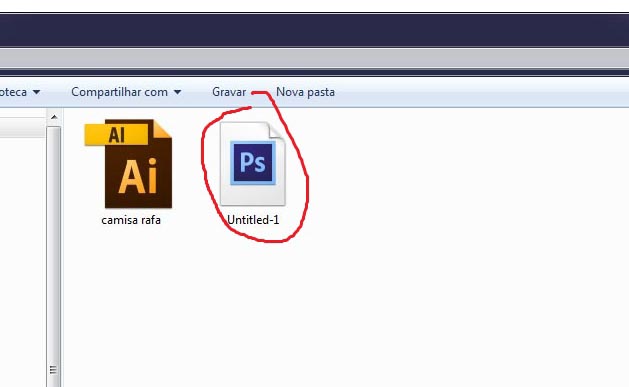
Dunno what happened, but out of nowhere the "big/stylized icon" (don't know how it's called) from my Photoshop files disappeared, went to the "bad/old/small format".

Only the Photoshop files. Check the image
LebKnxL.jpg


Left, the Adobe Illustrator icon is fine, big/stylized, we can see it all, but on the right (marked red by me) the Photoshop is wrong. How can I restore to the default "big/stylized format" from Adobe?

I already tried rebuild the icon cache, deleted, restored, did a lot of these things, the icon remains the "bad format", how can I change to the good "big/stylized icon" format?

Thanks
 
Last edited:

My Computer My Computer

OS
Seven
The icons look the same size to me but you might right-click the Photoshop icon and choose Properties. There's choices to open the Folder containing the .exe file the Shortcut refers to and/or to change the icon which should give you something more relevant to choose. If that doesn't work could be PS needs reinstalling.
 

My Computer My Computer

Computer type
PC/Desktop
Computer Manufacturer/Model Number
Customs, Dell, Gateway, HP, Toshiba, Acer, ASUS
OS
Windows 7 Ultimate 64-bit, Windows 8.1 64-bit, Mac OS X 10.10, Linux Mint 17, Windows 10 Pro TP
Keyboard
Microsoft
Mouse
Microsoft
The icons look the same size to me but you might right-click the Photoshop icon and choose Properties. There's choices to open the Folder containing the .exe file the Shortcut refers to and/or to change the icon which should give you something more relevant to choose. If that doesn't work could be PS needs reinstalling.

Thank you for your reply.

Yeah, you're right, I was talking about the stylized icon format. Going to change my post text.

But, I did what you told, and there's no option to choose the icon, only the program to open the file type. No icon locator/changer. I was unable to find it.

Thanks
 

My Computer My Computer

OS
Seven
Hello guys, anyone?

I'm still stuck with the 'bad design' icon. How can I restore the 'big/nice design' icon?

I already tried all the options I found on the forum. Like restore icon cache and nothing :(

Thanks
 

My Computer My Computer

OS
Seven
Do you have a Restore Point set to before the change took place? Something obviously triggered the change.
 

My Computer My Computer

Computer type
PC/Desktop
Computer Manufacturer/Model Number
Custom Build
OS
W7 Pro x64 SP1 | W10 Pro IP x64 | W8.1 Pro x64 VM | Linux Mint VM
CPU
i7-4790k @ 4GHz (4.4GHz Boost)
Motherboard
ASUS Sabertooth Z87 (BIOS Rev 2004)
Memory
16GB DDR3 Kingston HyperX Fury @ 1600MHz CL 9-9-9-27
Graphics Card(s)
EVGA GTX 980 Classified
Sound Card
Realtek Onboard
Monitor(s) Displays
Samsung S27D390
Screen Resolution
1920 x 1080
Hard Drives
240GB Intel 520 Series SSD |
Samsung 850 EVO 120GB SSD |
2TB WD Caviar Black |
2TB WD Caviar Green
PSU
Corsair HX850-80 Gold Modular
Case
Cooler Master Silencio 650
Cooling
Corsair H80i w/2 x Corsair SP120 | 2 x 120mm Noctua NF-S12B
Keyboard
Microsoft Sidewinder X4
Mouse
Gigabyte M6900 optical
Internet Speed
152mb
Antivirus
F-Secure
Browser
Firefox 38.0
Other Info
Backup Rig: Win 7 Pro 64-bit | AMD A10-5800k | ASUS F2A85-V Pro | 8GB Samsung DDR3 @1600MHz | 120GB Toshiba SDD | 2TB Seagate HDD | Cooler Master Silencio 550
Back
Top