Solved Restore Factory Settings / F8 doesn't offer "repair computer" option

cdcDFW

New member
Local time
7:49 AM
Messages
5
Restore Factory Settings / F8 doesn't offer "repair computer" option

I'm trying to reset my DELL Latitude E7250 (Windows 7 Pro) to wipe all personal data for resale. Attempting to do this though F8 "repair computer". I'm able to get to F8 screen, but there is no option for "repair computer". I've read several threads and attempted troubleshooting, but no luck. Could be since this was given to me from my old company / something to do with their imaging or permissions?

At the end of the day, just trying to wipe my personal detail and restore to factory settings.
 

My Computer My Computer

At a glance

Windows 7 Professional8GB
Computer type
Laptop
Computer Manufacturer/Model Number
DELL Latitude E7250
OS
Windows 7 Professional
Memory
8GB
Hi cdcDFW, welcome to Seven Forums.

Is there no Advanced Boot options available?

I just did a quick Google search and found a thread that recommended the below (I have never had a Dell BTW).
If you haven't already tried this it might be worth a go!

Reboot and tap your F8 key in steady rhythmic taps as soon as you reboot the computer until you get to the boot menu where you select Advanced Boot Options. You might have to try this a few times before you can get to the boot menu. If you have windows 7 and you can get into windows, you can go to Backup and Restore and make a System Repair CD to use as a boot disk. Then you boot to the CD and select repair your computer. That makes it easier to get to the options to return to Factory Settings.

I hope this helps!
 

My Computer My Computer

At a glance

Win 7 HP SP1 64-bit Vista HB SP2 32-bit Linux...Intel(R) Pentium(R) CPU P6200 @ 2.13GHz4.00 GBIntel(R) Graphics Media Accelerator HD
Computer type
Laptop
Computer Manufacturer/Model Number
Fujitsu LIFEBOOK
OS
Win 7 HP SP1 64-bit Vista HB SP2 32-bit Linux Mint 18.3
CPU
Intel(R) Pentium(R) CPU P6200 @ 2.13GHz
Motherboard
FUJITSU FJNBB06
Memory
4.00 GB
Graphics Card(s)
Intel(R) Graphics Media Accelerator HD
Sound Card
[1] Realtek High Definition Audio [2] Intel(R) Display Audio
Screen Resolution
1366 x 768 x 32 bits (4294967296 colors) @ 59 Hz
Hard Drives
TOSHIBA MK5076GSX
Antivirus
AVG FREE
I was able to use F8 to get to the Advanced Boot Options menu, but according to what I've read, the next step would be selecting the "repair your computer" option. That option isn't available in my F8 menu so I'm kind of at a stand-still.
 

My Computer My Computer

At a glance

Windows 7 Professional8GB
Computer type
Laptop
Computer Manufacturer/Model Number
DELL Latitude E7250
OS
Windows 7 Professional
Memory
8GB
I appreciate that fact cdcDFW,

I don't think you read this part:

If you have windows 7 and you can get into windows, you can go to Backup and Restore and make a System Repair CD to use as a boot disk. Then you boot to the CD and select repair your computer. That makes it easier to get to the options to return to Factory Settings.

I hope this helps!
 

My Computer My Computer

At a glance

Win 7 HP SP1 64-bit Vista HB SP2 32-bit Linux...Intel(R) Pentium(R) CPU P6200 @ 2.13GHz4.00 GBIntel(R) Graphics Media Accelerator HD
Computer type
Laptop
Computer Manufacturer/Model Number
Fujitsu LIFEBOOK
OS
Win 7 HP SP1 64-bit Vista HB SP2 32-bit Linux Mint 18.3
CPU
Intel(R) Pentium(R) CPU P6200 @ 2.13GHz
Motherboard
FUJITSU FJNBB06
Memory
4.00 GB
Graphics Card(s)
Intel(R) Graphics Media Accelerator HD
Sound Card
[1] Realtek High Definition Audio [2] Intel(R) Display Audio
Screen Resolution
1366 x 768 x 32 bits (4294967296 colors) @ 59 Hz
Hard Drives
TOSHIBA MK5076GSX
Antivirus
AVG FREE
I have a CD but no drive to put it in.

Should have known to try F8 one more time before replying:p

I made it to "repair my computer" and to "System Restore". Now I'm looking to restore it back to factory settings, but I'm only seeing an option to restore from a point in time, none dating back far enough to ensure no personal data is present.
 

My Computer My Computer

At a glance

Windows 7 Professional8GB
Computer type
Laptop
Computer Manufacturer/Model Number
DELL Latitude E7250
OS
Windows 7 Professional
Memory
8GB
DELL Latitude E7250 (Windows 7 Pro) ... I'm able to get to F8 screen, but there is no option for "repair computer" ... Could be since this was given to me from my old company / something to do with their imaging or permissions?
Yes, that's quite common. If it's a large company, their IT dept. may well have wiped the OEM Windows partition and restored their own custom image. That will break the factory recovery procedure.

When shipped from the factory, Dell's Win7 machines typically had a small "DellUtility" partition (~100 MB), a "Recovery" partition (typically 10-15 GB), and the rest of the disk devoted to the Windows partition.

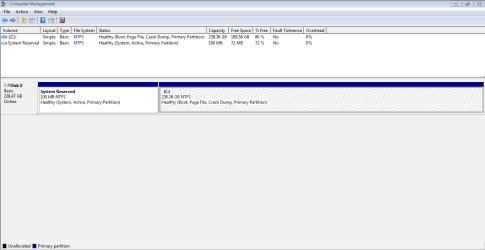
Whether or not you can do a factory recovery ultimately depends on whether you still have the recovery partition and if that partition contains a factory recovery image. If you can post a Disk Management screenshot (instructions here), that may give us a clue.

Note that Microsoft's System Restore will do you no good; that's completely unrelated to "factory recovery".
 

My Computer My Computer

At a glance

Windows 7/8.1/10 multibootIntel Core i7-770048GB (2x16GB Crucial DDR4-3200 + 2x8GB Hynix ...Intel HD630 + AMD Radeon R7 450 PCIe
Computer type
PC/Desktop
Computer Manufacturer/Model Number
Dell Optiplex 7050
OS
Windows 7/8.1/10 multiboot
CPU
Intel Core i7-7700
Motherboard
Dell, Intel Q270 chipset
Memory
48GB (2x16GB Crucial DDR4-3200 + 2x8GB Hynix DDR4-2400)
Graphics Card(s)
Intel HD630 + AMD Radeon R7 450 PCIe
Monitor(s) Displays
Asus VC279 (27")
Screen Resolution
1920x1080
Hard Drives
Toshiba M.2 NVMe (256GB),
Samsung 960 Evo (500GB),
WD Red Plus 80EFBX (8TB)
Check in disk management if you have a hidden partition.
If you have it, you can mark it as active and then the computer's original system recovery will start when you restart your computer

EDIT.
I was to slow, dg1261 beat me;)
 

My Computer My Computer

At a glance

Linux:Debian, Kali.. 2xWin8.1,2x,1x7Pro, Retr...cpu's intel 8088 up to intel i7 gen9.. dual x...oldest 1024KB newest 64GBmostly internals i don't game
Computer type
PC/Desktop
Computer Manufacturer/Model Number
AsusX53, Aspire E1-572. AsusUX32A, HP Pro3130mt+3010mt, HP Proliant ML150G3, 3xCustom, i3, i5, i7
OS
Linux:Debian, Kali.. 2xWin8.1,2x,1x7Pro, Retro:1x2003server.1xXPpro, 1xW2k,1x98SE,1x95,1x3.11
CPU
cpu's intel 8088 up to intel i7 gen9.. dual xenon on server
Motherboard
a lot of them :-)
Memory
oldest 1024KB newest 64GB
Graphics Card(s)
mostly internals i don't game
Sound Card
old retro=soundblaster.. newer ones internal
Monitor(s) Displays
smalest 12" largest 26"
Internet Speed
100/100
Antivirus
NortonInternetSecurity, MS, Avast, (not on the same computer
Browser
IE8, IE9. IE11, Firefox
Other Info
I can't fit all info on all my computers in these fields :-D

Attachments

  • Disk Management.PNG
    Disk Management.PNG
    13.2 KB · Views: 3

My Computer My Computer

At a glance

Windows 7 Professional8GB
Computer type
Laptop
Computer Manufacturer/Model Number
DELL Latitude E7250
OS
Windows 7 Professional
Memory
8GB
The Disk Management screenshot shows you do not have a Recovery partition. Both Dell partitions are gone and the existence of a System Reserved Partition indicates your Win7 partition was a post-factory clean install.

Without a Recovery partition, doing a factory recovery is not an option.

You said you have a Win7 installation "CD" (which I'm guessing is probably a DVD), so you could do a clean install from that. The process would involve:
  • solving the problem of the lack of a DVD drive
  • extracting the product key from the existing installation before nuking it, and hope it's compatible with the installation DVD you have
  • collecting all the Dell-specific drivers (from the Dell website)
  • applying all the hundreds of Win updates to bring the clean install up to date

Those aren't insurmountable problems, but it will command a lot of your time. You'll have to decide if it's worth spending all that time on a machine you're getting rid of.

A much quicker, though less comprehensive, alternative would be to keep it as is and just delete your user account. Go to Control Panel->Users and create a new admin user. Log out of your acct and login to the new acct, then go back to Control Panel->Users from the new acct and delete your old acct. Tick the box to also delete the acct's files. Finally, check Windows Explorer and delete the c:\users\{oldacct} folder, if any part of it still exists.
 

My Computer My Computer

At a glance

Windows 7/8.1/10 multibootIntel Core i7-770048GB (2x16GB Crucial DDR4-3200 + 2x8GB Hynix ...Intel HD630 + AMD Radeon R7 450 PCIe
Computer type
PC/Desktop
Computer Manufacturer/Model Number
Dell Optiplex 7050
OS
Windows 7/8.1/10 multiboot
CPU
Intel Core i7-7700
Motherboard
Dell, Intel Q270 chipset
Memory
48GB (2x16GB Crucial DDR4-3200 + 2x8GB Hynix DDR4-2400)
Graphics Card(s)
Intel HD630 + AMD Radeon R7 450 PCIe
Monitor(s) Displays
Asus VC279 (27")
Screen Resolution
1920x1080
Hard Drives
Toshiba M.2 NVMe (256GB),
Samsung 960 Evo (500GB),
WD Red Plus 80EFBX (8TB)
If you have a COA key, you could download a win7 iso and use rufus or similar to extract it to bootable usb drive.
 

My Computers My Computers

  • At a glance

    7 X64i5 84002x8gb 3200mhz
    Computer type
    PC/Desktop
    OS
    7 X64
    CPU
    i5 8400
    Motherboard
    gigabyte b365m ds3h
    Memory
    2x8gb 3200mhz
    Hard Drives
    various
    PSU
    pure power 11 400w cm
    Case
    Coolermaster
    Cooling
    cryorig m9i
  • At a glance

    7x64g54008gb ddr4 2400
    Computer type
    PC/Desktop
    OS
    7x64
    CPU
    g5400
    Motherboard
    ga b365m ds3h
    Memory
    8gb ddr4 2400
    PSU
    xfx pro 450w

My Computer My Computer

At a glance

Linux:Debian, Kali.. 2xWin8.1,2x,1x7Pro, Retr...cpu's intel 8088 up to intel i7 gen9.. dual x...oldest 1024KB newest 64GBmostly internals i don't game
Computer type
PC/Desktop
Computer Manufacturer/Model Number
AsusX53, Aspire E1-572. AsusUX32A, HP Pro3130mt+3010mt, HP Proliant ML150G3, 3xCustom, i3, i5, i7
OS
Linux:Debian, Kali.. 2xWin8.1,2x,1x7Pro, Retro:1x2003server.1xXPpro, 1xW2k,1x98SE,1x95,1x3.11
CPU
cpu's intel 8088 up to intel i7 gen9.. dual xenon on server
Motherboard
a lot of them :-)
Memory
oldest 1024KB newest 64GB
Graphics Card(s)
mostly internals i don't game
Sound Card
old retro=soundblaster.. newer ones internal
Monitor(s) Displays
smalest 12" largest 26"
Internet Speed
100/100
Antivirus
NortonInternetSecurity, MS, Avast, (not on the same computer
Browser
IE8, IE9. IE11, Firefox
Other Info
I can't fit all info on all my computers in these fields :-D
dg1261, I went with the quicker option. Thanks, everyone, very much for the assistance! You guys are awesome.
 

My Computer My Computer

At a glance

Windows 7 Professional8GB
Computer type
Laptop
Computer Manufacturer/Model Number
DELL Latitude E7250
OS
Windows 7 Professional
Memory
8GB
Back
Top