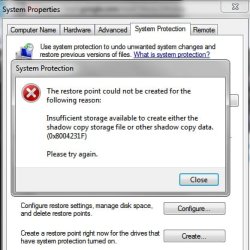
Restore Point ERROR (0x80004231F) Please try again.

peatantics

New member
Local time
10:22 PM
Messages
4
Location
Clontarf, QLD. 4019 AU.
Restore Point ERROR (0x8004231F) Please try again.

Hi all,

Cannot create a restore point.
Event viewer shows error.
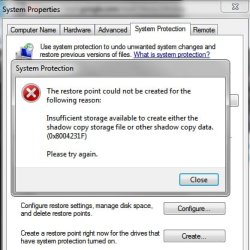
Below are the screens shots.
Anybody have any good ideas?
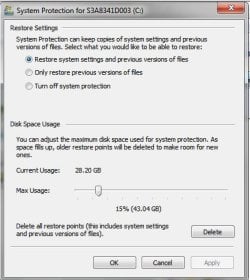
2011-12-17-restore point problem B.jpg

2011-12-17-restore point problem.jpg

Spending most of my time keeping computer running is :mad:

luv peat
 
Last edited:

My Computer My Computer

Computer Manufacturer/Model Number
Toshiba Tecra A11 PTSE 1A 00M00S
OS
Windows 7 Professional 32 bit
CPU
Intel Core i7 620M
Motherboard
Manufacturer TOSHIBA
Memory
4096 bytes
Graphics Card(s)
Intel(R) Graphics Media Accelerator HD
Sound Card
Realtek High Definition Audio (With EC)
Monitor(s) Displays
Generic PnP Monitor on Intel Graphics Media A
Hard Drives
Manufacturer Hitachi
Product Family Travelstar
Series Prefix Standard
Model Capacity For This Specific Drive 500GB
Heads 16
Cylinders 16383
Case
Laptop
Cooling
Laptop
Keyboard
Laptop
Mouse
Wacom Pen Tablet
Internet Speed
Wireless Broadband
Hi, welcome to the forums :)

How much free space do you have on your restore drive?

You'll find that Windows Restore does not overwright the previous restore point so if you have a lot of "Automatic" retore points they can drastic reduce the amount of free space you have available.
 

My Computer My Computer

Computer Manufacturer/Model Number
Compaq Desktop
OS
Windows 7 Ultimate x64
CPU
AMD Sempron Dual Core
Memory
3GB
Graphics Card(s)
NVIDIA GeForce 6150SE nForce 430
Screen Resolution
1024x768
Hard Drives
150GB Sata
Also, just for piece of mind, you may want to download MalwareBytes and run a full system scan just incase of a Malware infection.
 

My Computer My Computer

Computer Manufacturer/Model Number
Compaq Desktop
OS
Windows 7 Ultimate x64
CPU
AMD Sempron Dual Core
Memory
3GB
Graphics Card(s)
NVIDIA GeForce 6150SE nForce 430
Screen Resolution
1024x768
Hard Drives
150GB Sata
Hi all,

Cannot create a restore point.
Event viewer shows error.
Below are the screens shots.
Anybody have any good ideas?

View attachment 188647

View attachment 188645

Spending most of my time keeping computer running is :mad:

luv peat


Thanks for the reply 286.9 Gig 204.4 used 82.5 free(29%) 14% fragmented (windows system files mostly) Allready have malwarebytes, prevx hitman, avast 6.

Windows wants to delete all restore points. Have not tested out if cccleaner restore points work nor found out how too.

luv peat
 

My Computer My Computer

Computer Manufacturer/Model Number
Toshiba Tecra A11 PTSE 1A 00M00S
OS
Windows 7 Professional 32 bit
CPU
Intel Core i7 620M
Motherboard
Manufacturer TOSHIBA
Memory
4096 bytes
Graphics Card(s)
Intel(R) Graphics Media Accelerator HD
Sound Card
Realtek High Definition Audio (With EC)
Monitor(s) Displays
Generic PnP Monitor on Intel Graphics Media A
Hard Drives
Manufacturer Hitachi
Product Family Travelstar
Series Prefix Standard
Model Capacity For This Specific Drive 500GB
Heads 16
Cylinders 16383
Case
Laptop
Cooling
Laptop
Keyboard
Laptop
Mouse
Wacom Pen Tablet
Internet Speed
Wireless Broadband

My Computer My Computer

Computer Manufacturer/Model Number
Compaq Desktop
OS
Windows 7 Ultimate x64
CPU
AMD Sempron Dual Core
Memory
3GB
Graphics Card(s)
NVIDIA GeForce 6150SE nForce 430
Screen Resolution
1024x768
Hard Drives
150GB Sata
k(r)ud o.s. or operator?

1. Scan with Malwarebytes (Trial Edition) = No Problems
2. Open cleanmgr.exe with admin. priveledges (Options enabled) = Yes
3. System Protection Restore Points - Delete Cleanup = Yes
4. Options delete most recent restore points CCleaner = Yes

2011-12-17-restore point problem B.jpg

4. Set more memory for restore point attributes = Yes

2011-12-17-restore point problem.jpg

5.Create new restore point after defragmentation =No

6. Back to beginning = Yes.

7. Description of the System Update Readiness Tool for Windows Vista, for Windows Server 2008, for Windows 7, and for Windows Server 2008 R2 = YES

8. How To Fix 0X8004231F Error? = Yes

9. Solution A Go back and restore from a previous point. = No.

10.
Novice Computer User Solution (completely automated):
1) Download (0X8004231F) repair utility.
2) Install program and click Scan button.
3) Click the Fix Errors button when scan is completed.
4) Restart your computer.

And what will this do but the same thing want to restore to a previous point? Yes/No

As you can see microsoft have been LAZY very very LAZY or " The centre cannot hold the worst lack all conviction, the best are filled with passionate intensity"

Which one are YOU?
 

My Computer My Computer

Computer Manufacturer/Model Number
Toshiba Tecra A11 PTSE 1A 00M00S
OS
Windows 7 Professional 32 bit
CPU
Intel Core i7 620M
Motherboard
Manufacturer TOSHIBA
Memory
4096 bytes
Graphics Card(s)
Intel(R) Graphics Media Accelerator HD
Sound Card
Realtek High Definition Audio (With EC)
Monitor(s) Displays
Generic PnP Monitor on Intel Graphics Media A
Hard Drives
Manufacturer Hitachi
Product Family Travelstar
Series Prefix Standard
Model Capacity For This Specific Drive 500GB
Heads 16
Cylinders 16383
Case
Laptop
Cooling
Laptop
Keyboard
Laptop
Mouse
Wacom Pen Tablet
Internet Speed
Wireless Broadband
Try, try, try, and try again.

Macrium KB


0x8004231f - Failed to Create Volume Snapshot

Description

Error code 0x8004231f indicates VSS_E_INSUFFICIENT_STORAGE (Insufficient storage space for the shadow copy). Shadow storage space is used for system restore points and by Macrium Reflect. You may have too many restore points on your system.


Solution
To see the amount of storage space allocated and used for Volume Shadow Copies run the following command from a command prompt with elevated privileges:
Vssadmin list shadowstorage
To allocate more storage (e.g. 20GB) run the following command:
vssadmin resize shadowstorage /For=C: /On=C: /MaxSize=20GB

NO

Tech Support Guy

NO

answers.microsoft

Error 0x8004231F when trying to run back up


NO

Computing.net tom's Guide

Volume Shadow Copy Service stopped working?

cajun-bob January 9, 2010 at 21:47:38 Pacific
Hi axispeed,
Thanks for taking the time to reply to my request for help.
Since my original post, I have been in touch with Microsoft and they have determined that I have some corrupt files in my Vista Ultimate operating system. Microsoft is presently shipping me a disk, once received I will reinstall my operating system and my pc will supposedly function properly again.
Thanks again!Bob

OH NO
 
Last edited:

My Computer My Computer

Computer Manufacturer/Model Number
Toshiba Tecra A11 PTSE 1A 00M00S
OS
Windows 7 Professional 32 bit
CPU
Intel Core i7 620M
Motherboard
Manufacturer TOSHIBA
Memory
4096 bytes
Graphics Card(s)
Intel(R) Graphics Media Accelerator HD
Sound Card
Realtek High Definition Audio (With EC)
Monitor(s) Displays
Generic PnP Monitor on Intel Graphics Media A
Hard Drives
Manufacturer Hitachi
Product Family Travelstar
Series Prefix Standard
Model Capacity For This Specific Drive 500GB
Heads 16
Cylinders 16383
Case
Laptop
Cooling
Laptop
Keyboard
Laptop
Mouse
Wacom Pen Tablet
Internet Speed
Wireless Broadband

My Computer My Computer

Computer Manufacturer/Model Number
Compaq Desktop
OS
Windows 7 Ultimate x64
CPU
AMD Sempron Dual Core
Memory
3GB
Graphics Card(s)
NVIDIA GeForce 6150SE nForce 430
Screen Resolution
1024x768
Hard Drives
150GB Sata
Back
Top