
Restore point error

I backed up my computer and installed the service pack with no problems at all.
Now where I get into trouble is when my computer gets slow and sluggish and that little circle just keeps going around and around. I go to these forums and that is where I get the information to download programs and go into the registry and things like that. I trust you. What should I do when my computer gets like that. I did take off cCleaner so I have no access to a registry cleaner. So what would you suggest? Thanks so much.
 

My Computer

Computer Manufacturer/Model Number
Vostro 220 Mini Tower Desktop Details | Dell
OS
Windows 7 Home Premium SP 1, 32-bit
CPU
Intel(R) Core(TM)2 Duo CPU E7400 @ 2.80GHz
Motherboard
Dell Inc. 0P301D
Memory
3.00 GB
Graphics Card(s)
(1) Intel(R) G45/G43 Express Chipset (2) Intel(R) G45/G43
Sound Card
(1) High Definition Audio Device (2) High Definition Audio
Monitor(s) Displays
Dell 22" wide E228WFP Analog flat panelq
Mouse
Dell optical usb mouse vostro
Other Info
OPTICAL READER, MOUSE,SPEAKERS, MONITOR, MODEM
Sorry I posted twice - what can I say!!!!
 

My Computer

Computer Manufacturer/Model Number
Vostro 220 Mini Tower Desktop Details | Dell
OS
Windows 7 Home Premium SP 1, 32-bit
CPU
Intel(R) Core(TM)2 Duo CPU E7400 @ 2.80GHz
Motherboard
Dell Inc. 0P301D
Memory
3.00 GB
Graphics Card(s)
(1) Intel(R) G45/G43 Express Chipset (2) Intel(R) G45/G43
Sound Card
(1) High Definition Audio Device (2) High Definition Audio
Monitor(s) Displays
Dell 22" wide E228WFP Analog flat panelq
Mouse
Dell optical usb mouse vostro
Other Info
OPTICAL READER, MOUSE,SPEAKERS, MONITOR, MODEM
More detail needed:

What are you trying to do when it gets "sluggish"?

When is it "not sluggish"?

Does the PC seem to start up and shut down without sluggishness?

Generally, to investigate something like this, you would use task manager, but above info is needed.

You should update your system specs to show that you now have Windows 7 Home Premium SP 1, 32-bit.
 

My Computer

Computer type
PC/Desktop
Computer Manufacturer/Model Number
Ignatz Special; 4 speed manual gearbox; factory air conditioning; one of one
OS
Windows 7 Home Premium SP1, 64-bit
CPU
Intel Skylake i5-6600K, not overclocked
Motherboard
AsRock Z170M Extreme 4, micro ATX
Memory
8 GB HyperX DDR4-2666 (2 x 4 GB)
Graphics Card(s)
none; graphics are integrated on CPU
Sound Card
onboard: Realtek ALC1150; external: USB Behringer UF0-202
Monitor(s) Displays
Dell S2340M 23 inch IPS
Screen Resolution
1600 x 900
Hard Drives
System: Crucial MX100 series SSD, 128 GB;
Data: Samsung Spinpoint 103SJ, 1 TB;
Backup: WD Caviar Green WD30EZRX-00D8PB0, 3 TB
PSU
Rosewill SilentNight 500 watt fanless, semi-modular
Case
Antec Solo II
Cooling
Noctua NH-U12S; Noctua F12 intake, Noctua S12A exhaust
Keyboard
Microsoft 200 6JH-00001 USB
Mouse
Dell or Microsoft optical wired; USB
Antivirus
Microsoft Security Essentials and Malwarebytes Premium
Browser
Pale Moon
Other Info
All fans PWM; speeds at idle: CPU circa 500 rpm; intake circa 600 rpm; exhaust circa 600 rpm; CPU temps 27 idle and 47 C load in a warm room (27 C/81 F) when running Intel Extreme Tuning Utility stress test.
When it is sluggish, I go to cCleaner and clean the registry. I then usually go to services and disable things I am told to. I will go to other places I can't remember and change settings. Then I of course used cCleaner to clean everything up and used my virus and spyware to clean that up. It usually worked good and wasn't sluggish then - until recently when I had all this problem. It would sometimes take forever to shut down but then came back up quickly. I will update my system specs. Thanks.
 

My Computer

Computer Manufacturer/Model Number
Vostro 220 Mini Tower Desktop Details | Dell
OS
Windows 7 Home Premium SP 1, 32-bit
CPU
Intel(R) Core(TM)2 Duo CPU E7400 @ 2.80GHz
Motherboard
Dell Inc. 0P301D
Memory
3.00 GB
Graphics Card(s)
(1) Intel(R) G45/G43 Express Chipset (2) Intel(R) G45/G43
Sound Card
(1) High Definition Audio Device (2) High Definition Audio
Monitor(s) Displays
Dell 22" wide E228WFP Analog flat panelq
Mouse
Dell optical usb mouse vostro
Other Info
OPTICAL READER, MOUSE,SPEAKERS, MONITOR, MODEM
You misunderstood my post.

Is your PC sluggish ALWAYS?

Is your PC sluggish SOMETIMES?

If only sometimes, what are you doing at that particular moment when it becomes sluggish? Trying to open a browser? Trying to edit an Excel file?

When is the PC very snappy and NOT sluggish?

I'm interested in current performance with Service Pack 1, not how it used to be.

Stay out of services and stay out of the registry. It is very very unlikely those have anything to do with this issue.
 

My Computer

Computer type
PC/Desktop
Computer Manufacturer/Model Number
Ignatz Special; 4 speed manual gearbox; factory air conditioning; one of one
OS
Windows 7 Home Premium SP1, 64-bit
CPU
Intel Skylake i5-6600K, not overclocked
Motherboard
AsRock Z170M Extreme 4, micro ATX
Memory
8 GB HyperX DDR4-2666 (2 x 4 GB)
Graphics Card(s)
none; graphics are integrated on CPU
Sound Card
onboard: Realtek ALC1150; external: USB Behringer UF0-202
Monitor(s) Displays
Dell S2340M 23 inch IPS
Screen Resolution
1600 x 900
Hard Drives
System: Crucial MX100 series SSD, 128 GB;
Data: Samsung Spinpoint 103SJ, 1 TB;
Backup: WD Caviar Green WD30EZRX-00D8PB0, 3 TB
PSU
Rosewill SilentNight 500 watt fanless, semi-modular
Case
Antec Solo II
Cooling
Noctua NH-U12S; Noctua F12 intake, Noctua S12A exhaust
Keyboard
Microsoft 200 6JH-00001 USB
Mouse
Dell or Microsoft optical wired; USB
Antivirus
Microsoft Security Essentials and Malwarebytes Premium
Browser
Pale Moon
Other Info
All fans PWM; speeds at idle: CPU circa 500 rpm; intake circa 600 rpm; exhaust circa 600 rpm; CPU temps 27 idle and 47 C load in a warm room (27 C/81 F) when running Intel Extreme Tuning Utility stress test.
No, my PC is not always sluggish, just sometimes. I don't know what makes it that way, that is why I needed the system restore because sometimes I wonder if I downloaded something or unchecked or checked something. When it is sluggish it won't open a website, it will say it can't find the page. When it is sluggish it stays that way until I optimize it and clean the registry. That often helps, but not all the time. The PC is snappy now after installing the SP, but I just installed it and haven't used it much. When the PC is slow, it takes forever to open a webpage and often times, times out before it is open. I have only used it to write to you after installing the SP and will be gone the rest of the day, so won't know how it acts.
 

My Computer

Computer Manufacturer/Model Number
Vostro 220 Mini Tower Desktop Details | Dell
OS
Windows 7 Home Premium SP 1, 32-bit
CPU
Intel(R) Core(TM)2 Duo CPU E7400 @ 2.80GHz
Motherboard
Dell Inc. 0P301D
Memory
3.00 GB
Graphics Card(s)
(1) Intel(R) G45/G43 Express Chipset (2) Intel(R) G45/G43
Sound Card
(1) High Definition Audio Device (2) High Definition Audio
Monitor(s) Displays
Dell 22" wide E228WFP Analog flat panelq
Mouse
Dell optical usb mouse vostro
Other Info
OPTICAL READER, MOUSE,SPEAKERS, MONITOR, MODEM
Slow opening of a web site is more likely a problem with the web site or your ISP, not with your PC.

At any rate, I would not make any judgements until you have had more time to evaluate performance with SP1 as your PC stands now.

You would need to identify the tasks you are asking the PC to do when it becomes sluggish.

I'd expect it to be sluggish when applying a Photoshop filter to a 10 GB picture.

But I would not expect it to be sluggish for ordinary tasks.
 

My Computer

Computer type
PC/Desktop
Computer Manufacturer/Model Number
Ignatz Special; 4 speed manual gearbox; factory air conditioning; one of one
OS
Windows 7 Home Premium SP1, 64-bit
CPU
Intel Skylake i5-6600K, not overclocked
Motherboard
AsRock Z170M Extreme 4, micro ATX
Memory
8 GB HyperX DDR4-2666 (2 x 4 GB)
Graphics Card(s)
none; graphics are integrated on CPU
Sound Card
onboard: Realtek ALC1150; external: USB Behringer UF0-202
Monitor(s) Displays
Dell S2340M 23 inch IPS
Screen Resolution
1600 x 900
Hard Drives
System: Crucial MX100 series SSD, 128 GB;
Data: Samsung Spinpoint 103SJ, 1 TB;
Backup: WD Caviar Green WD30EZRX-00D8PB0, 3 TB
PSU
Rosewill SilentNight 500 watt fanless, semi-modular
Case
Antec Solo II
Cooling
Noctua NH-U12S; Noctua F12 intake, Noctua S12A exhaust
Keyboard
Microsoft 200 6JH-00001 USB
Mouse
Dell or Microsoft optical wired; USB
Antivirus
Microsoft Security Essentials and Malwarebytes Premium
Browser
Pale Moon
Other Info
All fans PWM; speeds at idle: CPU circa 500 rpm; intake circa 600 rpm; exhaust circa 600 rpm; CPU temps 27 idle and 47 C load in a warm room (27 C/81 F) when running Intel Extreme Tuning Utility stress test.
I have been on the computer tonite and it is taking forever to get to websites, or opening my mail. This is when I would ordinarily start optimizing it. The sites are ones that I have gone to many times. Often when trying to get in my yahoo mail it gives me an error and I can't think of what it says now, but if I just click on a tab or the mail icon, it opens, just goofy stuff like that. Maybe this is how computers work, I don't know. I expect them to run fast, error free and maybe that is just not the way they work. I will let you know the error in opening mail when it comes up again. Don't worry, I am NOT optimizing it. As a matter of fact, I am putting it to bed for the evening. Nite!
 

My Computer

Computer Manufacturer/Model Number
Vostro 220 Mini Tower Desktop Details | Dell
OS
Windows 7 Home Premium SP 1, 32-bit
CPU
Intel(R) Core(TM)2 Duo CPU E7400 @ 2.80GHz
Motherboard
Dell Inc. 0P301D
Memory
3.00 GB
Graphics Card(s)
(1) Intel(R) G45/G43 Express Chipset (2) Intel(R) G45/G43
Sound Card
(1) High Definition Audio Device (2) High Definition Audio
Monitor(s) Displays
Dell 22" wide E228WFP Analog flat panelq
Mouse
Dell optical usb mouse vostro
Other Info
OPTICAL READER, MOUSE,SPEAKERS, MONITOR, MODEM
Ok, got the error message when I wanted to go back to my mail. "Server not found, Firefox can't find the server at yahoo.com". Then all I do is click on one of the tabs above where I had been and it opens right up. But it does this all the time.
 

My Computer

Computer Manufacturer/Model Number
Vostro 220 Mini Tower Desktop Details | Dell
OS
Windows 7 Home Premium SP 1, 32-bit
CPU
Intel(R) Core(TM)2 Duo CPU E7400 @ 2.80GHz
Motherboard
Dell Inc. 0P301D
Memory
3.00 GB
Graphics Card(s)
(1) Intel(R) G45/G43 Express Chipset (2) Intel(R) G45/G43
Sound Card
(1) High Definition Audio Device (2) High Definition Audio
Monitor(s) Displays
Dell 22" wide E228WFP Analog flat panelq
Mouse
Dell optical usb mouse vostro
Other Info
OPTICAL READER, MOUSE,SPEAKERS, MONITOR, MODEM
Then all I do is click on one of the tabs above where I had been and it opens right up.


I don't follow your description.

My Firefox doesn't have "tabs above where I had been".

A picture would help.

Does it do this on ALL websites?

Try these for instance:

Intel.com
IBM.com
CNN.com
AMD.com
 

My Computer

Computer type
PC/Desktop
Computer Manufacturer/Model Number
Ignatz Special; 4 speed manual gearbox; factory air conditioning; one of one
OS
Windows 7 Home Premium SP1, 64-bit
CPU
Intel Skylake i5-6600K, not overclocked
Motherboard
AsRock Z170M Extreme 4, micro ATX
Memory
8 GB HyperX DDR4-2666 (2 x 4 GB)
Graphics Card(s)
none; graphics are integrated on CPU
Sound Card
onboard: Realtek ALC1150; external: USB Behringer UF0-202
Monitor(s) Displays
Dell S2340M 23 inch IPS
Screen Resolution
1600 x 900
Hard Drives
System: Crucial MX100 series SSD, 128 GB;
Data: Samsung Spinpoint 103SJ, 1 TB;
Backup: WD Caviar Green WD30EZRX-00D8PB0, 3 TB
PSU
Rosewill SilentNight 500 watt fanless, semi-modular
Case
Antec Solo II
Cooling
Noctua NH-U12S; Noctua F12 intake, Noctua S12A exhaust
Keyboard
Microsoft 200 6JH-00001 USB
Mouse
Dell or Microsoft optical wired; USB
Antivirus
Microsoft Security Essentials and Malwarebytes Premium
Browser
Pale Moon
Other Info
All fans PWM; speeds at idle: CPU circa 500 rpm; intake circa 600 rpm; exhaust circa 600 rpm; CPU temps 27 idle and 47 C load in a warm room (27 C/81 F) when running Intel Extreme Tuning Utility stress test.
It's a toolbar called "tabs on top", its real handy. It is not going to the website where it gives that error, it is when I try to go back to my mail that it does it. It did it right after I wrote to you right before this one. It didn't do it for any of the sites you just told me to do. It's no big deal, just wonder why it does that. What do you want a picture of?
 

My Computer

Computer Manufacturer/Model Number
Vostro 220 Mini Tower Desktop Details | Dell
OS
Windows 7 Home Premium SP 1, 32-bit
CPU
Intel(R) Core(TM)2 Duo CPU E7400 @ 2.80GHz
Motherboard
Dell Inc. 0P301D
Memory
3.00 GB
Graphics Card(s)
(1) Intel(R) G45/G43 Express Chipset (2) Intel(R) G45/G43
Sound Card
(1) High Definition Audio Device (2) High Definition Audio
Monitor(s) Displays
Dell 22" wide E228WFP Analog flat panelq
Mouse
Dell optical usb mouse vostro
Other Info
OPTICAL READER, MOUSE,SPEAKERS, MONITOR, MODEM
I don't need a picture.

I don't use that toolbar.

If you see that behavior ONLY at yahoo.com, then I assume it is either a Yahoo issue or an issue with that toolbar and may be beyond your control.

I have a yahoo email account and notice no strange behavior at that website.

You might try a post in the browsers section, but whatever you do, don't fiddle with the registry or services.
 

My Computer

Computer type
PC/Desktop
Computer Manufacturer/Model Number
Ignatz Special; 4 speed manual gearbox; factory air conditioning; one of one
OS
Windows 7 Home Premium SP1, 64-bit
CPU
Intel Skylake i5-6600K, not overclocked
Motherboard
AsRock Z170M Extreme 4, micro ATX
Memory
8 GB HyperX DDR4-2666 (2 x 4 GB)
Graphics Card(s)
none; graphics are integrated on CPU
Sound Card
onboard: Realtek ALC1150; external: USB Behringer UF0-202
Monitor(s) Displays
Dell S2340M 23 inch IPS
Screen Resolution
1600 x 900
Hard Drives
System: Crucial MX100 series SSD, 128 GB;
Data: Samsung Spinpoint 103SJ, 1 TB;
Backup: WD Caviar Green WD30EZRX-00D8PB0, 3 TB
PSU
Rosewill SilentNight 500 watt fanless, semi-modular
Case
Antec Solo II
Cooling
Noctua NH-U12S; Noctua F12 intake, Noctua S12A exhaust
Keyboard
Microsoft 200 6JH-00001 USB
Mouse
Dell or Microsoft optical wired; USB
Antivirus
Microsoft Security Essentials and Malwarebytes Premium
Browser
Pale Moon
Other Info
All fans PWM; speeds at idle: CPU circa 500 rpm; intake circa 600 rpm; exhaust circa 600 rpm; CPU temps 27 idle and 47 C load in a warm room (27 C/81 F) when running Intel Extreme Tuning Utility stress test.
I think I have learned my lesson - won't fiddle with the registry or services. I cannot tell you how great you have been. Your patience is unbelievable and you have helped me so much. Thank you very much. Hopefully I won't screw things up for a while and need your assistance. Thanks again.
 

My Computer

Computer Manufacturer/Model Number
Vostro 220 Mini Tower Desktop Details | Dell
OS
Windows 7 Home Premium SP 1, 32-bit
CPU
Intel(R) Core(TM)2 Duo CPU E7400 @ 2.80GHz
Motherboard
Dell Inc. 0P301D
Memory
3.00 GB
Graphics Card(s)
(1) Intel(R) G45/G43 Express Chipset (2) Intel(R) G45/G43
Sound Card
(1) High Definition Audio Device (2) High Definition Audio
Monitor(s) Displays
Dell 22" wide E228WFP Analog flat panelq
Mouse
Dell optical usb mouse vostro
Other Info
OPTICAL READER, MOUSE,SPEAKERS, MONITOR, MODEM
Back to the topic of this thread.

Have you actually done a System Restore since you did that repair install and moved to Service Pack 1??

If not, I would probably try it once to make sure it actually restores, rather than have the false feeling that it will bail me out when actually needed.

Make sure you restore to a point AFTER you installed Service Pack 1. If necessary, you could make a restore point and restore to it a few minutes later.
 

My Computer

Computer type
PC/Desktop
Computer Manufacturer/Model Number
Ignatz Special; 4 speed manual gearbox; factory air conditioning; one of one
OS
Windows 7 Home Premium SP1, 64-bit
CPU
Intel Skylake i5-6600K, not overclocked
Motherboard
AsRock Z170M Extreme 4, micro ATX
Memory
8 GB HyperX DDR4-2666 (2 x 4 GB)
Graphics Card(s)
none; graphics are integrated on CPU
Sound Card
onboard: Realtek ALC1150; external: USB Behringer UF0-202
Monitor(s) Displays
Dell S2340M 23 inch IPS
Screen Resolution
1600 x 900
Hard Drives
System: Crucial MX100 series SSD, 128 GB;
Data: Samsung Spinpoint 103SJ, 1 TB;
Backup: WD Caviar Green WD30EZRX-00D8PB0, 3 TB
PSU
Rosewill SilentNight 500 watt fanless, semi-modular
Case
Antec Solo II
Cooling
Noctua NH-U12S; Noctua F12 intake, Noctua S12A exhaust
Keyboard
Microsoft 200 6JH-00001 USB
Mouse
Dell or Microsoft optical wired; USB
Antivirus
Microsoft Security Essentials and Malwarebytes Premium
Browser
Pale Moon
Other Info
All fans PWM; speeds at idle: CPU circa 500 rpm; intake circa 600 rpm; exhaust circa 600 rpm; CPU temps 27 idle and 47 C load in a warm room (27 C/81 F) when running Intel Extreme Tuning Utility stress test.
Ok, good idea. Thanks!
 

My Computer

Computer Manufacturer/Model Number
Vostro 220 Mini Tower Desktop Details | Dell
OS
Windows 7 Home Premium SP 1, 32-bit
CPU
Intel(R) Core(TM)2 Duo CPU E7400 @ 2.80GHz
Motherboard
Dell Inc. 0P301D
Memory
3.00 GB
Graphics Card(s)
(1) Intel(R) G45/G43 Express Chipset (2) Intel(R) G45/G43
Sound Card
(1) High Definition Audio Device (2) High Definition Audio
Monitor(s) Displays
Dell 22" wide E228WFP Analog flat panelq
Mouse
Dell optical usb mouse vostro
Other Info
OPTICAL READER, MOUSE,SPEAKERS, MONITOR, MODEM
Hi - I backed up my data on my external hard drive using copy and paste. When I went to restore under the start menu, there was no backup there. It is probably on my external hard drive. So how do I do a backup so it goes on my internal hard drive so I can restore it? I went to backup and restore and it just showed my external hard drive. I am kind of confused about this now.
 

My Computer

Computer Manufacturer/Model Number
Vostro 220 Mini Tower Desktop Details | Dell
OS
Windows 7 Home Premium SP 1, 32-bit
CPU
Intel(R) Core(TM)2 Duo CPU E7400 @ 2.80GHz
Motherboard
Dell Inc. 0P301D
Memory
3.00 GB
Graphics Card(s)
(1) Intel(R) G45/G43 Express Chipset (2) Intel(R) G45/G43
Sound Card
(1) High Definition Audio Device (2) High Definition Audio
Monitor(s) Displays
Dell 22" wide E228WFP Analog flat panelq
Mouse
Dell optical usb mouse vostro
Other Info
OPTICAL READER, MOUSE,SPEAKERS, MONITOR, MODEM
Ok, I feel dumb, all I had to do was highlight Drive C. Sorry to bother you. :D
 

My Computer

Computer Manufacturer/Model Number
Vostro 220 Mini Tower Desktop Details | Dell
OS
Windows 7 Home Premium SP 1, 32-bit
CPU
Intel(R) Core(TM)2 Duo CPU E7400 @ 2.80GHz
Motherboard
Dell Inc. 0P301D
Memory
3.00 GB
Graphics Card(s)
(1) Intel(R) G45/G43 Express Chipset (2) Intel(R) G45/G43
Sound Card
(1) High Definition Audio Device (2) High Definition Audio
Monitor(s) Displays
Dell 22" wide E228WFP Analog flat panelq
Mouse
Dell optical usb mouse vostro
Other Info
OPTICAL READER, MOUSE,SPEAKERS, MONITOR, MODEM
I'm not sure what you are doing.

I was referring to doing a System Restore, which I thought was the purpose of this thread.

System Restore is accessed by typing System Restore in the start search box (among other ways).

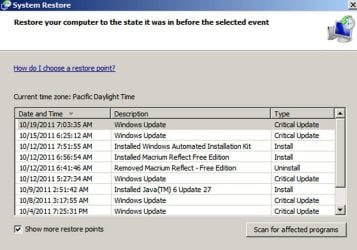
You should see something like what is shown below.

Pick a restore point from the last 2 or 3 days since you installed Service Pack 1 and see if you can restore it.

Is that what you did? If it is not what you did, then you don't know if System Restore works or not.
 

Attachments

  • system restore.jpg
    system restore.jpg
    79.7 KB · Views: 6

My Computer

Computer type
PC/Desktop
Computer Manufacturer/Model Number
Ignatz Special; 4 speed manual gearbox; factory air conditioning; one of one
OS
Windows 7 Home Premium SP1, 64-bit
CPU
Intel Skylake i5-6600K, not overclocked
Motherboard
AsRock Z170M Extreme 4, micro ATX
Memory
8 GB HyperX DDR4-2666 (2 x 4 GB)
Graphics Card(s)
none; graphics are integrated on CPU
Sound Card
onboard: Realtek ALC1150; external: USB Behringer UF0-202
Monitor(s) Displays
Dell S2340M 23 inch IPS
Screen Resolution
1600 x 900
Hard Drives
System: Crucial MX100 series SSD, 128 GB;
Data: Samsung Spinpoint 103SJ, 1 TB;
Backup: WD Caviar Green WD30EZRX-00D8PB0, 3 TB
PSU
Rosewill SilentNight 500 watt fanless, semi-modular
Case
Antec Solo II
Cooling
Noctua NH-U12S; Noctua F12 intake, Noctua S12A exhaust
Keyboard
Microsoft 200 6JH-00001 USB
Mouse
Dell or Microsoft optical wired; USB
Antivirus
Microsoft Security Essentials and Malwarebytes Premium
Browser
Pale Moon
Other Info
All fans PWM; speeds at idle: CPU circa 500 rpm; intake circa 600 rpm; exhaust circa 600 rpm; CPU temps 27 idle and 47 C load in a warm room (27 C/81 F) when running Intel Extreme Tuning Utility stress test.
After doing the repair install I lost all restore points. Have two that are window updates. I just did a restore now and will do another tomorrow and see if it works.
 

My Computer

Computer Manufacturer/Model Number
Vostro 220 Mini Tower Desktop Details | Dell
OS
Windows 7 Home Premium SP 1, 32-bit
CPU
Intel(R) Core(TM)2 Duo CPU E7400 @ 2.80GHz
Motherboard
Dell Inc. 0P301D
Memory
3.00 GB
Graphics Card(s)
(1) Intel(R) G45/G43 Express Chipset (2) Intel(R) G45/G43
Sound Card
(1) High Definition Audio Device (2) High Definition Audio
Monitor(s) Displays
Dell 22" wide E228WFP Analog flat panelq
Mouse
Dell optical usb mouse vostro
Other Info
OPTICAL READER, MOUSE,SPEAKERS, MONITOR, MODEM
Back
Top