Restore Point Folder

blockie

New member
Member
VIP
Local time
6:35 AM
Messages
605
Location
in Assisted Care facility, Calif
The info shadows that comprise each Restore Point must be kept in a unique location. What is the path to that location?
 

My Computer

Computer type
Laptop
Computer Manufacturer/Model Number
Asus
OS
W7 Ultimate
CPU
2.2 bh Intel Core i3-2330M
Motherboard
Asustek Computer Inc. P53E 1.0
Memory
4MB
Graphics Card(s)
On Board
Sound Card
On Board
Monitor(s) Displays
On Board
Screen Resolution
1366 X 768
Hard Drives
ST9500423AS
ST2000DM USB Backup Drive External
Ok. There is really no need to do this, but I'll tell you how to do most of it hence I'm getting mad at what it is doing to my PC.

The folder is stored as a 'Hidden Protected Operating System File'. To unhide it, click the Windows start button and type 'Folder Options'. Open Folder Options, and select the 'View' tab. Make sure that the 'Show hidden Files, Folders, and Drives' bubble is selected. Then make sure that you uncheck 'Hidden Protected Operating System File' . The folder you now need to go to is in the root of your C:\ drive and is called: 'System Volume Information'.

You will now need to right click this folder and click properties. Next, click the 'Security' tab and add your User Account to the list of Users. This will let you view the contents of the 'System Volume Information' (system restore directory) but has a lot of security parameters involved with it, I stopped at this point so maybe you can figure out the rest as I won't be interested in it, but since nobody as helped you yet I figured I'd chip in. Good luck , be secure ;)
 

My Computer

Computer Manufacturer/Model Number
Custom - No OEM
OS
Windows 7 Professional x64
CPU
Intel Core i5 CPU 661 @, 3.33 GHz
Motherboard
BIOSTAR GROUP - TPower I55
Memory
16 GB
Graphics Card(s)
nVidia GeForce GTX 465 1024 MB GDDR5
Monitor(s) Displays
LG Flatron 22"
Screen Resolution
1920x1080
Hard Drives
1 TB - Hitachi
Case
ZALMAN
Keyboard
Dynex W7 Keyboard
Mouse
Logitech MX518
Internet Speed
CABLE 20 Down, 6 Up (wireless)
Did all that and now I can see the folders. Access is denied though. How do I gain access? I am an administrator.
 

My Computer

Computer type
Laptop
Computer Manufacturer/Model Number
Asus
OS
W7 Ultimate
CPU
2.2 bh Intel Core i3-2330M
Motherboard
Asustek Computer Inc. P53E 1.0
Memory
4MB
Graphics Card(s)
On Board
Sound Card
On Board
Monitor(s) Displays
On Board
Screen Resolution
1366 X 768
Hard Drives
ST9500423AS
ST2000DM USB Backup Drive External
You can try ShadowExplorer to browse the shadow copies.

ShadowExplorer.com - About

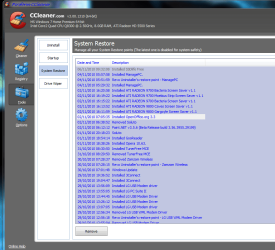
If you want to selectively delete particular restore points, you can use CCleaner.
 

My Computer

Computer Manufacturer/Model Number
Too many to describe...
OS
Windows 7 x64 pro/ Windows 7 x86 Pro/ XP SP3 x86
Try what Bill2 said or right click the 'System Volume Information' folder and click properties. From there click the security tab and under the 'Group or User names' click the 'Edit' button. From here you will click add, then type your Windows 7 user account into the text box and click 'OK'.

After clicking OK it will pop up a bunch of messages just click 'OK' to all them. You will notice these messages are not successful or good messages, but you wanted to be able to get to the folder and this will let you do it. To undo all this follow the first post of steps i gave you after removing what I just told you to do. You will want to do this once your done fooling around in the folder. If you don't its your own loss.

Good luck.
 

My Computer

Computer Manufacturer/Model Number
Custom - No OEM
OS
Windows 7 Professional x64
CPU
Intel Core i5 CPU 661 @, 3.33 GHz
Motherboard
BIOSTAR GROUP - TPower I55
Memory
16 GB
Graphics Card(s)
nVidia GeForce GTX 465 1024 MB GDDR5
Monitor(s) Displays
LG Flatron 22"
Screen Resolution
1920x1080
Hard Drives
1 TB - Hitachi
Case
ZALMAN
Keyboard
Dynex W7 Keyboard
Mouse
Logitech MX518
Internet Speed
CABLE 20 Down, 6 Up (wireless)
hi all in ccleaner under the restore tab it lists all your restore points and you can delete them in there
 

Attachments

  • system restorex.PNG
    system restorex.PNG
    36.4 KB · Views: 33

My Computer

Computer Manufacturer/Model Number
packard bell IXTREME M5722
OS
Operating System : Windows 7 Home Premium Edition 6.01.7600 SP1 (x64)
CPU
Processor : Intel Core 2 Quad Q8300 @ 2500 MHz
Motherboard
Mainboard : Packard Bell (Acer EG43M )
Memory
Physical Memory :8GB Corsair4x 2GB 800MHz C5 DDR2
Graphics Card(s)
Video Card : XFX 6700 AMD
Monitor(s) Displays
Maestro 234DL - BenQ V2220 - BenQ VW2420H
Screen Resolution
Current Display :1920x1080p pixels at 60 Hz in HD LED
Hard Drives
Hard Disks : WDC (1000 GB)
Drive C: (Hard Disk) : 428 GB available on 491 GB
Drive D: (Hard Disk) : 426 GB available on 492 GB
SAMSUNG spinpoint HD103SJ 1000.2 GB
(X 2) KINGSTON SSD NOW V 30GB
PSU
XFX ProSeries 550W PSU
Case
PACKARD BELL IXTREME
Cooling
System Blower Current: 150mA Air Flow16CFM ;Akasa 90mm rear
Keyboard
Gigabyte Aivia K8100
Mouse
TRUST-Wireless Laser Mouse - Carbon edition MI-7770C
Internet Speed
TP-LINK > TL-WN951N / AV500 Gigabit Powerline Adapters
Browser
chrome dev
Other Info
EXTRA COOLING>(FAN CONTROLLER) PC Bay Cooler 3 x 40mm fans; Akasa AK-HD-BL Blue hard drive cooler 2 x 40 mm fan 4500 rpm 29.7 dBA
Bios> American Megatrends Inc.
Version : P01-A1
Date : 08/31/2009
Ya I use that but he wanted to know the folder route
 

My Computer

Computer Manufacturer/Model Number
Custom - No OEM
OS
Windows 7 Professional x64
CPU
Intel Core i5 CPU 661 @, 3.33 GHz
Motherboard
BIOSTAR GROUP - TPower I55
Memory
16 GB
Graphics Card(s)
nVidia GeForce GTX 465 1024 MB GDDR5
Monitor(s) Displays
LG Flatron 22"
Screen Resolution
1920x1080
Hard Drives
1 TB - Hitachi
Case
ZALMAN
Keyboard
Dynex W7 Keyboard
Mouse
Logitech MX518
Internet Speed
CABLE 20 Down, 6 Up (wireless)
Back
Top