Restore will not restore!!

angiesluck

New member
Member
VIP
Local time
1:00 AM
Messages
172
Location
Manchester UK
I tried to do a system restore.. as after disabling the startup programs (to see if this stops the internet explorer popup) my scrolling on my touchpad stopped working. Re-checked all the start up programs again and restarted computer but scrolling still did not come back so tried to enable it in the check boxes but it would'nt check in the box when I clicked on it so I thought I will system restore but when I did it came back with this...
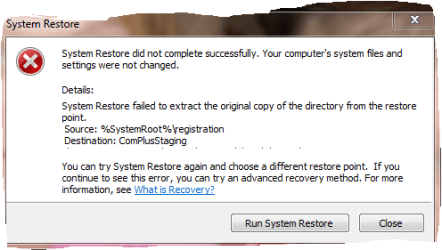
system restore.PNG

help please:)
 

My Computer

Computer Manufacturer/Model Number
Samsung R519
OS
windows 7 home premium 32bit
Try this first. Option Two: Steps 1,2,4,5.
http://www.sevenforums.com/tutorials/1538-sfc-scannow-command-system-file-checker.html?ltr=S

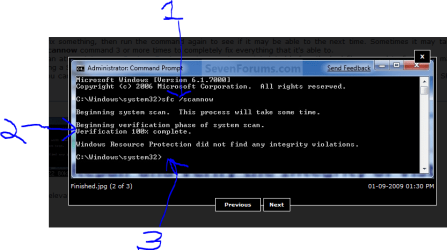
When you type in sfc /scannow there is a space between sfc and /. #1 in Snip.

After running if it states at #2 in pic it "found errors but could not repair all" go to marked #3 and type in sfc /scannow again and hit enter.

Run it up to 3-4 times to try to fix all errors if necessary. It gets some fixed in one pass but usually not all.

Try System Restore again. Worth a shot.

Mike
 

Attachments

  • Cmd SFC scannow.PNG
    Cmd SFC scannow.PNG
    30.1 KB · Views: 15

My Computer

Computer Manufacturer/Model Number
Hopalong/ Godzilla
OS
Windows7 Pro 64bit SP-1; Windows XP Pro 32bit
CPU
Intel Core i7-870 Lynnfield 2.93GHz LGA 1156 95W Quad-Core
Motherboard
ASUS P7P55D-E PRO
Memory
8GB@1400MHz Crucial Ballistix DDR3-1600 4x2GB
Graphics Card(s)
ASUS ENGTX460 DirectCU/2DI/1GD5 1GB 256-bit GDDR5
Sound Card
VIA Onboard
Monitor(s) Displays
Asus VS248H-P 24"; Samsung SyncMaster 941BW 19"ws
Screen Resolution
1920x1080; 1440x900
Hard Drives
Samsung 830 120GB SSD
Intel 320 120GB SSD
Western Digital Caviar Black WD7501AALS 750GB 7200 RPM SATA 3.0Gb/s
Western Digital Caviar Black WD6401AALS 640GB 7200 RPM SATA 3.0Gb/s
PSU
COOLER MASTER Silent Pro RS850-AMBAJ3-US 850W Modular
Case
COOLER MASTER HAF 932 RC-932-KKN5-GP Black
Cooling
Scythe "Mugen-2 Rev.B" (2 ScytheKaze-Jyuni PWM fans)
Keyboard
Logitech K-320
Mouse
Kensington
Antivirus
Avast Inernet Suite
Browser
IE 9 ; Chrome
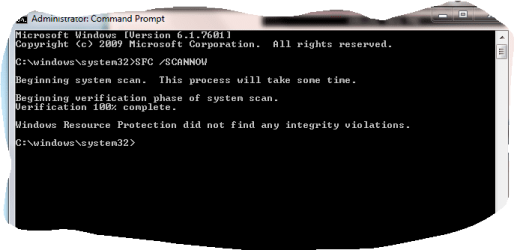
came back with this

SCANNOW.PNG
 

My Computer

Computer Manufacturer/Model Number
Samsung R519
OS
windows 7 home premium 32bit
does anyone know how to switch scrolling bk on too
 

My Computer

Computer Manufacturer/Model Number
Samsung R519
OS
windows 7 home premium 32bit
Try uninstalling the Samsung touch pad software, reinstalling.
 

My Computer

OS
ME/XP/Vista/Win7
but I do not have a disc to re-install it...so how would I get it back?
 

My Computer

Computer Manufacturer/Model Number
Samsung R519
OS
windows 7 home premium 32bit
System restore does not complete - Microsoft Answers
This error can occur if the Shadow Copy services are not running. The backup applications and System Restore depend on these services.
Cick on Start and type services.msc then click Services.
Scroll down and double click the Microsoft Software Shadow Copy Provider.
In the Startup Type menu, it should be Automatic and started.

Note: If it’s not started then try to start the service; however chances are that you may lose all restore points.

Next, scroll down to the Volume Shadow Copy service and perform the same steps.

NOTE: Disabling System restore could delete all the System Restore points stored.

I just found this and fixed mine. Both were set to manual on mine and off.
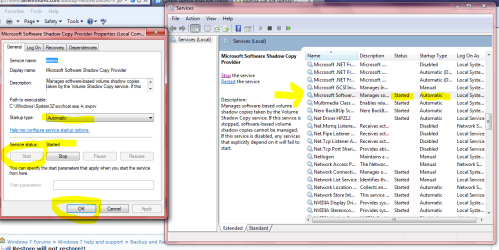
Snips below.
Change curtain to "Auto". Then click "START" then click "OK"
Remember to do both services listed in quote above.

When done the old restore points MAY be deleted. Either way create a new one manually. Type Create Restore point in Start search bar and when it shows click to open new window then click create new restore point. Name it- I usually mark them "Manual" and add the date for reference later.

Mike
 

Attachments

  • Services-Shadow copy.PNG
    Services-Shadow copy.PNG
    54.6 KB · Views: 16
Last edited:

My Computer

Computer Manufacturer/Model Number
Hopalong/ Godzilla
OS
Windows7 Pro 64bit SP-1; Windows XP Pro 32bit
CPU
Intel Core i7-870 Lynnfield 2.93GHz LGA 1156 95W Quad-Core
Motherboard
ASUS P7P55D-E PRO
Memory
8GB@1400MHz Crucial Ballistix DDR3-1600 4x2GB
Graphics Card(s)
ASUS ENGTX460 DirectCU/2DI/1GD5 1GB 256-bit GDDR5
Sound Card
VIA Onboard
Monitor(s) Displays
Asus VS248H-P 24"; Samsung SyncMaster 941BW 19"ws
Screen Resolution
1920x1080; 1440x900
Hard Drives
Samsung 830 120GB SSD
Intel 320 120GB SSD
Western Digital Caviar Black WD7501AALS 750GB 7200 RPM SATA 3.0Gb/s
Western Digital Caviar Black WD6401AALS 640GB 7200 RPM SATA 3.0Gb/s
PSU
COOLER MASTER Silent Pro RS850-AMBAJ3-US 850W Modular
Case
COOLER MASTER HAF 932 RC-932-KKN5-GP Black
Cooling
Scythe "Mugen-2 Rev.B" (2 ScytheKaze-Jyuni PWM fans)
Keyboard
Logitech K-320
Mouse
Kensington
Antivirus
Avast Inernet Suite
Browser
IE 9 ; Chrome

Attachments

  • Capture.JPG
    Capture.JPG
    54.5 KB · Views: 6

My Computer

Computer type
PC/Desktop
Computer Manufacturer/Model Number
Self Built
OS
Win 10 Pro x64
CPU
Intel I5-2500K @3.3GHz
Motherboard
Asrock P67 Extreme4
Memory
16GB G.Skill Ripjaws X (4x4GB)
Graphics Card(s)
EVGA GeForce 750 Ti SC 2GB
Sound Card
ASUS Xonar DG 5.1 Channels 24-bit 96KHz PCI Interface Sound
Monitor(s) Displays
auria eq2367
Screen Resolution
1920 x 1080
Hard Drives
250GB Samsung 850 EVO SSD
1TB WD Blue
1TB Hitachi
PSU
SeaSonic X 650W 80 Plus Gold
Case
Corsair Obsidian 750D
Cooling
Corsair H60, Three 140mm case fans
Keyboard
Logitech Wireless Keyboard K520
Mouse
Logitech Wireless Mouse M310
Internet Speed
Wave Broadband ~ 100 dn 5 up
Antivirus
Windows Defender, Malwarebytes Premium
Browser
Edge, IE11, Chrome
Other Info
Laptop specs: HP g7-1365dx /
CPU: AMD A6-3420M APU with Radeon(tm) HD Graphics /
RAM: Crucial 8Gb (2x4Gb) /
SSD: Crucial M4-CT128M4SSD2 ATA Device/ FW 000F /
GFX: AMD Radeon HD 6520G /
OS: Windows 10 Pro x64

My Computer

Computer Manufacturer/Model Number
Hopalong/ Godzilla
OS
Windows7 Pro 64bit SP-1; Windows XP Pro 32bit
CPU
Intel Core i7-870 Lynnfield 2.93GHz LGA 1156 95W Quad-Core
Motherboard
ASUS P7P55D-E PRO
Memory
8GB@1400MHz Crucial Ballistix DDR3-1600 4x2GB
Graphics Card(s)
ASUS ENGTX460 DirectCU/2DI/1GD5 1GB 256-bit GDDR5
Sound Card
VIA Onboard
Monitor(s) Displays
Asus VS248H-P 24"; Samsung SyncMaster 941BW 19"ws
Screen Resolution
1920x1080; 1440x900
Hard Drives
Samsung 830 120GB SSD
Intel 320 120GB SSD
Western Digital Caviar Black WD7501AALS 750GB 7200 RPM SATA 3.0Gb/s
Western Digital Caviar Black WD6401AALS 640GB 7200 RPM SATA 3.0Gb/s
PSU
COOLER MASTER Silent Pro RS850-AMBAJ3-US 850W Modular
Case
COOLER MASTER HAF 932 RC-932-KKN5-GP Black
Cooling
Scythe "Mugen-2 Rev.B" (2 ScytheKaze-Jyuni PWM fans)
Keyboard
Logitech K-320
Mouse
Kensington
Antivirus
Avast Inernet Suite
Browser
IE 9 ; Chrome

My Computer

OS
ME/XP/Vista/Win7
ok I have reinstalled the touchpad and scrolling is now working

I have made sure all the items listed are set to start and automatic

created a restore point (all others were still there too) restarted computer....tried to do system restore again but same message came back that I have put at beginning of this thread....

So....what else could be stopping it from completing its system restore successfully?

This is driving me potty now
 

My Computer

Computer Manufacturer/Model Number
Samsung R519
OS
windows 7 home premium 32bit
angiesluck,

In fairness to those who endevour to help you in this thread with
one of your specific problems, I suggest you include links to your ongoing Win 7 problems being dealt with at this Forum. ;)

From memory I have seen you seeking help in multiple areas such as Drivers, IE 8 & 9 & now System Restore.
All of your problems may be linked.
It may be time for a repair install - or more!
 

My Computer

Computer Manufacturer/Model Number
LAPTOP. HP Pavilion dv7-4010TX .
OS
Win 7 Ultimate 64-bit. SP1.
CPU
Intel i7 -720QM.[1.6GHz Turbo Boost 2.8GHz. 6MB Cache.]
Memory
8 DDR 3 RAM. 1066MHZ
Graphics Card(s)
ATI 1024 MB. DDR3. Radeon HD5650
Monitor(s) Displays
17.3" High Definition Brightview LCD. LED Backlit.
Screen Resolution
1600 x 900.
Hard Drives
640GB
Case
Laptop / notebook.
Mouse
Logitech Anywhere mouse. MX.
Internet Speed
ADSL [ but too slow ]
My drivers post came about due to me uninstalling Microsoft Security Suite which was suggested by Jacee in a previous post on vista forum to choose which to keep as running it with avast could make them clash....that left behind some files that I was unaware of which caused the device issue to show up purely by chance when I ran a health check in the system performance....They were not actually causing an issue ....just stagnant files.


My issue stands with the internet explorer not working popup.....


The system restore came about when I went to go back to a restore point to see if that would get rid of the problem internet explorer popup and thats when I found it was not working....for some reason.....It was working fine in either March or April when I did a restore when my scrolling did not work after performing something I was told to do on other forum.. So thats why I now have a restore thread :)
 

My Computer

Computer Manufacturer/Model Number
Samsung R519
OS
windows 7 home premium 32bit
This error can occur if the Shadow Copy services are not running. The backup applications and System Restore depend on these services.
Cick on Start and type services.msc then click Services.
Scroll down and double click the Microsoft Software Shadow Copy Provider.
In the Startup Type menu, it should be Automatic and started.

Note: If it’s not started then try to start the service; however chances are that you may lose all restore points.

Next, scroll down to the Volume Shadow Copy service and perform the same steps.

NOTE: Disabling System restore could delete all the System Restore points stored.

I did that several times but it just seems to stay on automatic but goes back to stopped afterwards, as it stays on started until I go off and when I check later its back to stopped again ....weird
 

My Computer

Computer Manufacturer/Model Number
Samsung R519
OS
windows 7 home premium 32bit
just rechecked the services as above and yet again it says they are both set to automatic but are back in the stopped mode.....does this regular so maybe its supposed to go back to stopped after a while then!!
 

My Computer

Computer Manufacturer/Model Number
Samsung R519
OS
windows 7 home premium 32bit
Still not sorted out the restore problem even now......not bothered looking at it for ages.....to be honest not needed it so forgot about it lol.....anyway...I was thinking of emailing Samsung support and asking them and if I get an answer I will post it on here incase anyone else gets the same problem.....cheers anyways
 

My Computer

Computer Manufacturer/Model Number
Samsung R519
OS
windows 7 home premium 32bit
Back
Top