
adamsbryce1695
New member
Hi, I have an Acer Aspire that came with Win7 Home Prem. x64 installed. I made the foolish decision to upgrade to Win 8 Pro on Oct 26th when it came out, and I like the idea, but the system just isn't useable to me, and my windows updates constantly fail. no fun.
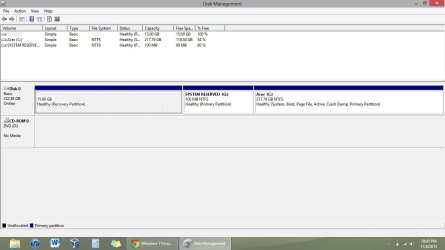
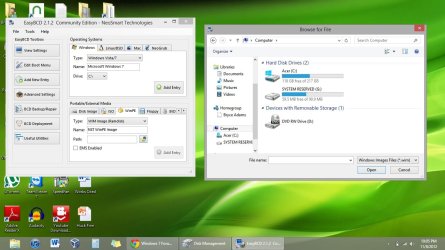
When I press F8 during startup, it goes to Win 8's hideous blue startup options screen, and when I head to recovery, it says there's no windows 8 recovery. However, in Disk Mgmt I can clearly see my OEM 15GB "Recovery Partition" as well as the 100MB System Reserved Partition. I tried to add the Recovery partition in EasyBCD but it wouldn't show the Recovery Partition, only the System Reserved. Screenshots attached.
I didn't make win7 Restore Disks when I first got the computer because it failed on every attempt, so I left it be. Big mistake. Any ideas how to get my beloved win7 back, even though it'll be fresh? any help is much appreciated!
Thanks! -bryce
When I press F8 during startup, it goes to Win 8's hideous blue startup options screen, and when I head to recovery, it says there's no windows 8 recovery. However, in Disk Mgmt I can clearly see my OEM 15GB "Recovery Partition" as well as the 100MB System Reserved Partition. I tried to add the Recovery partition in EasyBCD but it wouldn't show the Recovery Partition, only the System Reserved. Screenshots attached.
I didn't make win7 Restore Disks when I first got the computer because it failed on every attempt, so I left it be. Big mistake. Any ideas how to get my beloved win7 back, even though it'll be fresh? any help is much appreciated!
Thanks! -bryce
Attachments
My Computer
At a glance
Windows 7 Ultimate x646GB
- Computer Manufacturer/Model Number
- Acer Aspire 5349-2592
- OS
- Windows 7 Ultimate x64
- Memory
- 6GB


