Hello,
I think I've fubared this, but thought I might check and see if any could offer hope.
My host PC is Windows 7 Pro 64bit. I run xp mode virtual pc to run an old xp program.
My xp mode worked fine for months, then on Friday, I got an error "xp mode could not enable integration features". I have since read that I can just go to settings for the virtual pc, set it to do a "shut down" instead of a "close" or "hibernate" and this may fix the error.
In my impatience Friday night, however, I did 2 things that I shouldn't have/didn't work.
1) I did a system restore of the Windows 7 PC to Thursday, hoping this would set xp mode back to that restore point.
2) XP mode still would not run after the system restore, so I reinstalled XP mode. XP mode now runs OK, but I've lost some of the customization of the app I was running.
My guess from 1) is that a 'host' system restore does not take the virtual PC back to that time.
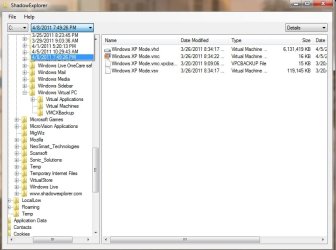
I did manually copy the .vhd file BEFORE I did the system restore or re install, but I guess this is just the base xp mode, and doesn't do me any good without the other files from the %USERPROFILE%\AppData\Local\Microsoft\Windows Virtual PC\Virtual Machines.
Is there any way to recover my xp mode considering I've done a reinstall of xp mode on the pc?
I think I've fubared this, but thought I might check and see if any could offer hope.
My host PC is Windows 7 Pro 64bit. I run xp mode virtual pc to run an old xp program.
My xp mode worked fine for months, then on Friday, I got an error "xp mode could not enable integration features". I have since read that I can just go to settings for the virtual pc, set it to do a "shut down" instead of a "close" or "hibernate" and this may fix the error.
In my impatience Friday night, however, I did 2 things that I shouldn't have/didn't work.
1) I did a system restore of the Windows 7 PC to Thursday, hoping this would set xp mode back to that restore point.
2) XP mode still would not run after the system restore, so I reinstalled XP mode. XP mode now runs OK, but I've lost some of the customization of the app I was running.
My guess from 1) is that a 'host' system restore does not take the virtual PC back to that time.
I did manually copy the .vhd file BEFORE I did the system restore or re install, but I guess this is just the base xp mode, and doesn't do me any good without the other files from the %USERPROFILE%\AppData\Local\Microsoft\Windows Virtual PC\Virtual Machines.
Is there any way to recover my xp mode considering I've done a reinstall of xp mode on the pc?
My Computer
- OS
- windows 7 pro 64bit