Restoring a New Partition

Lappy

New member
Hi everyone,

I'm new here and love the help from everyone in this forum.

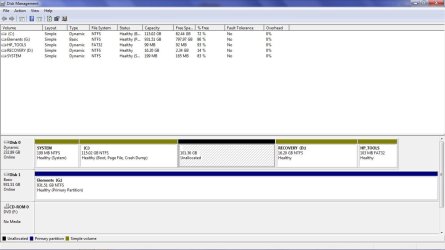
I have a new computer which has Windows 7 Home Premium 64bit. I wanted to create a new partition image of the C:/ because I like having data on a different partition and creating an image of the OS in case things go wrong. Before doing so, I backed up the C:/ using Ghost 2003 in case things would go wrong. Then I proceeded to create a new partition. Well, I did not know that you can ONLY create a maximum of 3 Primary partitions and 1 Extended partition with up to 128 logical volumes in the extended partition on a single hard disk.

I was able to create a new partition. However, the Basic Disc was changed to a Dynamic Disc. I don't have a problem with that, however, I can't create an image anymore with Ghost 2003 with a Dynamic Disc.

I have research these forums extensively without finding the exact answers. I'm positive someone will be able to come to the rescue. Included is a picture of my disk management. Thanks in advance.

My questions are:


  1. Is it possible to go back to where I was prior to creating the new partition?
  2. How can I create an image with Dynamic Discs?
  3. What other possibilities are recommended from other users?
Thanks everyone
 

Attachments

  • Disk Management.jpg
    Disk Management.jpg
    177.3 KB · Views: 38
Last edited:

My Computer

OS
Windows 7 Home Premium 64bit
Try again on the picture.

Any particular reason you need a logical partition or dynamic disks? You can make 4 ordinary primary partitions.

How many partitions do you need of whatever type?
 

My Computer

Computer type
PC/Desktop
Computer Manufacturer/Model Number
Ignatz Special; 4 speed manual gearbox; factory air conditioning; one of one
OS
Windows 7 Home Premium SP1, 64-bit
CPU
Intel Skylake i5-6600K, not overclocked
Motherboard
AsRock Z170M Extreme 4, micro ATX
Memory
8 GB HyperX DDR4-2666 (2 x 4 GB)
Graphics Card(s)
none; graphics are integrated on CPU
Sound Card
onboard: Realtek ALC1150; external: USB Behringer UF0-202
Monitor(s) Displays
Dell S2340M 23 inch IPS
Screen Resolution
1600 x 900
Hard Drives
System: Crucial MX100 series SSD, 128 GB;
Data: Samsung Spinpoint 103SJ, 1 TB;
Backup: WD Caviar Green WD30EZRX-00D8PB0, 3 TB
PSU
Rosewill SilentNight 500 watt fanless, semi-modular
Case
Antec Solo II
Cooling
Noctua NH-U12S; Noctua F12 intake, Noctua S12A exhaust
Keyboard
Microsoft 200 6JH-00001 USB
Mouse
Dell or Microsoft optical wired; USB
Antivirus
Microsoft Security Essentials and Malwarebytes Premium
Browser
Pale Moon
Other Info
All fans PWM; speeds at idle: CPU circa 500 rpm; intake circa 600 rpm; exhaust circa 600 rpm; CPU temps 27 idle and 47 C load in a warm room (27 C/81 F) when running Intel Extreme Tuning Utility stress test.
Hi ignatzatsonic,All I want is 2 partitions: one for the OS and one for data and to be able to create an image of the C:/, that's all.

But Hp computers have a volume for the C:/, one for the Recovery, one for SYSTEM and one HP Tools which makes 4 partitions and I just added another by shrinking the C:/. I understand I can have four ordinary partitions but I don't know what to do with the Recovery, System and HP Tools partitions and I wonder how useful they are.

Also, I tried deleting the new partition I had made and go back to the original size of the C:/ but it keeps the Disc as Dynamic.


My Computer

OS
Windows 7 Home Premium 64bit
Do you want some type of data partition on disk 0?

Or are you satisified with the existing 4: (C, system, hp tools, and recovery), with all data being on the separate disk 1?

There is a way to get out of the dynamic disk thing, but I can't recall offhand what it is.

Sounds like a job for Partition Wizard.

Offhand, I suspect HP Tools is to access all of the crap that HP put on the PC that you do not need.

I assume you want to make a data partition out of the unallocated space on drive 0?
 

My Computer

Computer type
PC/Desktop
Computer Manufacturer/Model Number
Ignatz Special; 4 speed manual gearbox; factory air conditioning; one of one
OS
Windows 7 Home Premium SP1, 64-bit
CPU
Intel Skylake i5-6600K, not overclocked
Motherboard
AsRock Z170M Extreme 4, micro ATX
Memory
8 GB HyperX DDR4-2666 (2 x 4 GB)
Graphics Card(s)
none; graphics are integrated on CPU
Sound Card
onboard: Realtek ALC1150; external: USB Behringer UF0-202
Monitor(s) Displays
Dell S2340M 23 inch IPS
Screen Resolution
1600 x 900
Hard Drives
System: Crucial MX100 series SSD, 128 GB;
Data: Samsung Spinpoint 103SJ, 1 TB;
Backup: WD Caviar Green WD30EZRX-00D8PB0, 3 TB
PSU
Rosewill SilentNight 500 watt fanless, semi-modular
Case
Antec Solo II
Cooling
Noctua NH-U12S; Noctua F12 intake, Noctua S12A exhaust
Keyboard
Microsoft 200 6JH-00001 USB
Mouse
Dell or Microsoft optical wired; USB
Antivirus
Microsoft Security Essentials and Malwarebytes Premium
Browser
Pale Moon
Other Info
All fans PWM; speeds at idle: CPU circa 500 rpm; intake circa 600 rpm; exhaust circa 600 rpm; CPU temps 27 idle and 47 C load in a warm room (27 C/81 F) when running Intel Extreme Tuning Utility stress test.
I suspect you HDD came with 4 primaries and when you went to make another partition Windows made the primary partitions dynamic (as you appear to have discovered). I think you need to convert back from dynamic to basic. See the tutorial:
http://www.sevenforums.com/tutorials/26829-convert-dynamic-disk-basic-disk.html

If you can move the unallocated back into the dynamic partition on the left you can try my method 1: Post 85
http://www.sevenforums.com/tutorials/26829-convert-dynamic-disk-basic-disk-9.html

The current version of Partition Wizard bootable CD will enable you to change the MBR type ID from hex 0x42 (dynamic) to 0x07 (basic primary). I describe the details in the post above. The tutorial has incorporated the second method. Although it appears simpler, it's more work and maybe risk since you have to do a partition recovery.
 

My Computer

Computer type
PC/Desktop
Computer Manufacturer/Model Number
Own build
OS
Windows 7x64 Home Premium SP1
CPU
Intel i7 2600k
Motherboard
ASUS P8Z68 Deluxe
Memory
G.Skill Ripjaws (DDR3-1600) 2x4GB
Graphics Card(s)
Nvidia GeForce GTS 450; Intel HD Graphics 3000(GT2+)
Monitor(s) Displays
Dell Ultrasharp IPS panel U2311H, Samsung SyncMaster P2350
Screen Resolution
1920x1080
Hard Drives
Samsung 850 Pro SSD 256GB, Samsung SSD 840 120GB, Seagates 1TB Barracuda ST31000528AS x2
PSU
Seasonic M12II 520W
Case
Lian Li Lancool PC-K60
Cooling
Case: 1x120mm, 3x140mm CPU: Hyper 212+
Keyboard
Logitech MK520 (wireless)
Mouse
Logitech MK520
Internet Speed
6-7 Mbps
Antivirus
Norton Security Premium, Malwarebytes on 2 (MSE on 3rd PC)
Browser
FireFox
Other Info
Audio: Logitech Z523 2.1
gnatzatsonic,

Like I said, I would be happy with a couple of primaries. Like you say, I don't think the other partitions mean a whole lot they are designed help people in some way but I don't feel like I need them. The best would have been to have joined 3 of them together and have 2 different partitions but I need to shrink the C:/ in order to have more space to allocate to another partition before doing anything else. I'm just going by what I know and I obviously had no idea about basic and dynamic disk before this issue.

Also, what I would prefer to do is reformat the computer and create 2 or 3 partitions but I don't have a Windows 7 CD, all I have is the number on the back that came with the computer.

mjf,

You are right in what you said, my HDD came with 4 primaries and when you went to make another partition Windows made the primary partitions dynamic (as I appear to have discovered). I think I need to convert back from dynamic to basic. I've read the Tutorial to Convert a Dynamic to a Basic but everyone recommends (rightfully so) to do a back up.

I assume and what I'd like to know is if there's a way (with the Windows Tools) to get back to where I was prior to creating the new partition. Since I have the backup I did with Ghost before making any changes, I could recover the whole C:/ with this backup but I obviously can't do while it's still a Dynamic Disk.

Is this only way to convert back to Basic but what is explained in that tutorial?

Thanks for the help so far!
 

My Computer

OS
Windows 7 Home Premium 64bit
I assume the old C: is the new C: plus the unallocated.
Did your image include the system reserved partition at the front?
 

My Computer

Computer type
PC/Desktop
Computer Manufacturer/Model Number
Own build
OS
Windows 7x64 Home Premium SP1
CPU
Intel i7 2600k
Motherboard
ASUS P8Z68 Deluxe
Memory
G.Skill Ripjaws (DDR3-1600) 2x4GB
Graphics Card(s)
Nvidia GeForce GTS 450; Intel HD Graphics 3000(GT2+)
Monitor(s) Displays
Dell Ultrasharp IPS panel U2311H, Samsung SyncMaster P2350
Screen Resolution
1920x1080
Hard Drives
Samsung 850 Pro SSD 256GB, Samsung SSD 840 120GB, Seagates 1TB Barracuda ST31000528AS x2
PSU
Seasonic M12II 520W
Case
Lian Li Lancool PC-K60
Cooling
Case: 1x120mm, 3x140mm CPU: Hyper 212+
Keyboard
Logitech MK520 (wireless)
Mouse
Logitech MK520
Internet Speed
6-7 Mbps
Antivirus
Norton Security Premium, Malwarebytes on 2 (MSE on 3rd PC)
Browser
FireFox
Other Info
Audio: Logitech Z523 2.1
Use Partition Wizard bootable CD to convert Dynamic back to Basic. This is the only way to do it that won't destroy the data. But you should back it up anyway.

I would also try to generate your Recovery Disks if you haven't already, but a Dynamic Recov partition may not be able to either generate Disks or run Factory Recovery from boot.

Then rightclick on the Unallocated space with PW CD to attempt to create a New Logical partition for your data. If it won't allow it you might have to merge the System partition with Win7, or delete the Tools partition to free up a slot to allow creation of Logical extended or another Primary.

You could also in the future clean reinstall to get a better Win7 that is not burdened by all the HP bloatware and useless Utilities which have much better versions built into Win7: http://www.sevenforums.com/installation-setup/125874-re-install-windows-7-a.html#post1086729
 
Last edited:
Use free Partition Wizard bootable CD to convert Dynamic back to Basic. This is the only way to do it that won't destroy the data. But you should back it up anyway.

I would also try to generate your Recovery Disks if you haven't already, but a Dynamic Recov partition may not be able to either generate Disks or run Factory Recovery from boot.

Then rightclick on the Unallocated space with PW CD to attempt to create a New Logical partition for your data. If it won't allow it you might have to merge the System partition with Win7, or delete the Tools partition to free up a slot to allow creation of Logical extended or another Primary.

You could also in the future clean reinstall to get a better Win7 that is not burdened by all the HP bloatware and useless Utilities which have much better versions built into Win7: http://www.sevenforums.com/installation-setup/125874-re-install-windows-7-a.html#post1086729
The current free Partition Wizard no longer has this ability (the paid version does).
I have given the OP links to the relevant tutorial and my instructions on how you can do this (dynamic to basic conversion) with the current version by changing the type ID from 0x42 (dynamic) back to 0x07 (basic).
Then the unallocated should be combined to get back the original 4 primary partitions. The system partition could probably then be made logical.
I would be hesitant to delete the tools partition.
 

My Computer

Computer type
PC/Desktop
Computer Manufacturer/Model Number
Own build
OS
Windows 7x64 Home Premium SP1
CPU
Intel i7 2600k
Motherboard
ASUS P8Z68 Deluxe
Memory
G.Skill Ripjaws (DDR3-1600) 2x4GB
Graphics Card(s)
Nvidia GeForce GTS 450; Intel HD Graphics 3000(GT2+)
Monitor(s) Displays
Dell Ultrasharp IPS panel U2311H, Samsung SyncMaster P2350
Screen Resolution
1920x1080
Hard Drives
Samsung 850 Pro SSD 256GB, Samsung SSD 840 120GB, Seagates 1TB Barracuda ST31000528AS x2
PSU
Seasonic M12II 520W
Case
Lian Li Lancool PC-K60
Cooling
Case: 1x120mm, 3x140mm CPU: Hyper 212+
Keyboard
Logitech MK520 (wireless)
Mouse
Logitech MK520
Internet Speed
6-7 Mbps
Antivirus
Norton Security Premium, Malwarebytes on 2 (MSE on 3rd PC)
Browser
FireFox
Other Info
Audio: Logitech Z523 2.1
I believe the tutorial is a destructive conversion, except for Option 3 which uses free Partition Wizard to convert without destroying data. If this feature is removed from PW CD then the tute needs to be edited to reflect the change.

A System Partition cannot be made logical as an OS cannot boot from a Logical Partition.

You could back up files and a Win7 image of the HD, delete and merge the System partition's space into Win7 partition, mark it Active and then run Startup Repair 3 times to write the System boot files to Win7.

I would also try to make Recovery Disks now if you haven't made them, then test the Recov partition to see if it will run after conversion. If not, you can delete it and create a partition in all of that Unallocated space.
 
Option 3 was added in response to my post 85 to the tutorial. I suggested 2 non destructive options.Brink ran with the second which relies on the partition recovery facility which I believe is still present in the free version.
My first approach used the partition type ID edit capability which the free Partition Wizard still retains. The OS looks at the MBR's partition type ID byte to determine if the partition is dynamic (0x42) or basic (0x07).

It was my understanding that you could boot to a logical partition as long as you had the system reserved partition
http://www.sevenforums.com/tutorials/121536-system-reserved-multi-boot-logical-partitions.html
 

My Computer

Computer type
PC/Desktop
Computer Manufacturer/Model Number
Own build
OS
Windows 7x64 Home Premium SP1
CPU
Intel i7 2600k
Motherboard
ASUS P8Z68 Deluxe
Memory
G.Skill Ripjaws (DDR3-1600) 2x4GB
Graphics Card(s)
Nvidia GeForce GTS 450; Intel HD Graphics 3000(GT2+)
Monitor(s) Displays
Dell Ultrasharp IPS panel U2311H, Samsung SyncMaster P2350
Screen Resolution
1920x1080
Hard Drives
Samsung 850 Pro SSD 256GB, Samsung SSD 840 120GB, Seagates 1TB Barracuda ST31000528AS x2
PSU
Seasonic M12II 520W
Case
Lian Li Lancool PC-K60
Cooling
Case: 1x120mm, 3x140mm CPU: Hyper 212+
Keyboard
Logitech MK520 (wireless)
Mouse
Logitech MK520
Internet Speed
6-7 Mbps
Antivirus
Norton Security Premium, Malwarebytes on 2 (MSE on 3rd PC)
Browser
FireFox
Other Info
Audio: Logitech Z523 2.1
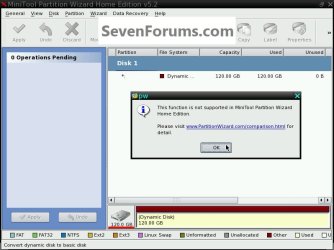
The free Partition Wizard no longer supports converting a Dynamic to a Basic disk.


click to enlarge
PWDynamic.jpg
 

My Computer

Computer Manufacturer/Model Number
* BFK Customs *
OS
W 7 64-bit Ultimate
CPU
Intel Q9550 Yorkfield
Motherboard
ASUS P5Q Pro
Memory
8GB Dominator 8500C5D
Graphics Card(s)
ATI : XFX 5870
Sound Card
Realtek HD Audio 7-1
Monitor(s) Displays
1x 47" LCD HDMI & 3x 26" LCD HDMI
Screen Resolution
1920x1080P & 1920x1200
Hard Drives
1x 80GB Intel X25-M G2 SSD : 1x 500GB & 1x 640GB WD Caviar Black(s)
PSU
Corsair 620HX
Case
Cooler Master RC-690
Cooling
Tuniq Tower 120, 2x 140mm and 3x 120mm case fans
Keyboard
Microsoft 500
Mouse
Razer Diamondback 3G
Internet Speed
14 Mb/s
Other Info
1x Koutech 3Gb/s SATA HDD Hot Swap Rack
The free Partition Wizard no longer supports converting a Dynamic to a Basic disk.

click to enlarge
View attachment 128499
Which again is why I have the change type ID option. It is a current Partition Wizard option. Details in the post link I provided.
 

My Computer

Computer type
PC/Desktop
Computer Manufacturer/Model Number
Own build
OS
Windows 7x64 Home Premium SP1
CPU
Intel i7 2600k
Motherboard
ASUS P8Z68 Deluxe
Memory
G.Skill Ripjaws (DDR3-1600) 2x4GB
Graphics Card(s)
Nvidia GeForce GTS 450; Intel HD Graphics 3000(GT2+)
Monitor(s) Displays
Dell Ultrasharp IPS panel U2311H, Samsung SyncMaster P2350
Screen Resolution
1920x1080
Hard Drives
Samsung 850 Pro SSD 256GB, Samsung SSD 840 120GB, Seagates 1TB Barracuda ST31000528AS x2
PSU
Seasonic M12II 520W
Case
Lian Li Lancool PC-K60
Cooling
Case: 1x120mm, 3x140mm CPU: Hyper 212+
Keyboard
Logitech MK520 (wireless)
Mouse
Logitech MK520
Internet Speed
6-7 Mbps
Antivirus
Norton Security Premium, Malwarebytes on 2 (MSE on 3rd PC)
Browser
FireFox
Other Info
Audio: Logitech Z523 2.1
You guys really threw lots of info at me on the last posts. So it there a consensus that the free Partition Magic will not do the job and allow me to use the bootable CD to convert Dynamic back to Basic?

If I understand correctly, the Tutorial on how to Convert a Dynamic Disk to a Basic Disk is destructive so I'd lose everything on the HD?

mjf, yes, the old C: is the new C: plus the unallocated. My original image included the system reserved partition at the front. What exactly is in that system partition in the front?

I'm not sure what to do right now. Any idea what program to use to do an image of dynamic drives? Maybe that would solve the issue overall.

gregrocker, I read the post about re-install windows 7, does it include a way to re-install when you don't have an original CD?

Thanks again!
 

My Computer

OS
Windows 7 Home Premium 64bit
Please enable your private messaging in User CP at top of page.

Do you have your Recovery Disks?

Do you have a friend with Win7 from whom you can borrow the DVD long enough to extract ISO using ImgBurn then unlock all versions if necessary to reinstall your licensed version with Product Key on COA sticker?
 
You guys really threw lots of info at me on the last posts. So it there a consensus that the free Partition Magic will not do the job and allow me to use the bootable CD to convert Dynamic back to Basic?

If I understand correctly, the Tutorial on how to Convert a Dynamic Disk to a Basic Disk is destructive so I'd lose everything on the HD?

mjf, yes, the old C: is the new C: plus the unallocated. My original image included the system reserved partition at the front. What exactly is in that system partition in the front?

I'm not sure what to do right now. Any idea what program to use to do an image of dynamic drives? Maybe that would solve the issue overall.

gregrocker, I read the post about re-install windows 7, does it include a way to re-install when you don't have an original CD?

Thanks again!
Yes you can convert dynamic to basic using the current Partition Wizard using the steps I outlined. (It's not original see the references).

The tutorial is not destructive if option 3 is followed. But like any technique it can fail and a backup in case of failure is essential.

A clean install would be an option but my last option in your situation. Some people push it all the time. (I sense an email coming your way).
 

My Computer

Computer type
PC/Desktop
Computer Manufacturer/Model Number
Own build
OS
Windows 7x64 Home Premium SP1
CPU
Intel i7 2600k
Motherboard
ASUS P8Z68 Deluxe
Memory
G.Skill Ripjaws (DDR3-1600) 2x4GB
Graphics Card(s)
Nvidia GeForce GTS 450; Intel HD Graphics 3000(GT2+)
Monitor(s) Displays
Dell Ultrasharp IPS panel U2311H, Samsung SyncMaster P2350
Screen Resolution
1920x1080
Hard Drives
Samsung 850 Pro SSD 256GB, Samsung SSD 840 120GB, Seagates 1TB Barracuda ST31000528AS x2
PSU
Seasonic M12II 520W
Case
Lian Li Lancool PC-K60
Cooling
Case: 1x120mm, 3x140mm CPU: Hyper 212+
Keyboard
Logitech MK520 (wireless)
Mouse
Logitech MK520
Internet Speed
6-7 Mbps
Antivirus
Norton Security Premium, Malwarebytes on 2 (MSE on 3rd PC)
Browser
FireFox
Other Info
Audio: Logitech Z523 2.1
I concur that converting is preferable which is why I first recommended it. However now that we learn the PW free edition doesn't contain Conversion Dynamic>Basic any longer, I am not aware of any method that safely converts without risk of data destruction.

Michael: does the PW free edition support the method you outline in the Tutorial's comments? Have you tested this in the same scenario without data loss? Just asking.
 
I cannot personally verify it works but people report it does work by doing the changes with a Hex editor. Any way will have a risk and the OP needs to have full backups.
If you look at the OP's screenshot from diskmanagement and BFK's from PW. PW only shows the whole of the dynamic disk not the components. I now feel the changes will require a Hex editor. It's easy for me to say it's easy, but I think it may freak out the uninitiated.

Now the good news courtesy of Jonathan King who gave the following link in the tutorial thread. It's an older version of PW which should do the conversion automatically.
Jonathan King link to V4.2

1) download the zip and extract
2) run the installer
3) start the application
4) select the disk and go to "Disk" drop down menu
5) select "convert dynamic disk to basic"
6) apply

It should be run from the desktop. Again do at your own risk.
 

My Computer

Computer type
PC/Desktop
Computer Manufacturer/Model Number
Own build
OS
Windows 7x64 Home Premium SP1
CPU
Intel i7 2600k
Motherboard
ASUS P8Z68 Deluxe
Memory
G.Skill Ripjaws (DDR3-1600) 2x4GB
Graphics Card(s)
Nvidia GeForce GTS 450; Intel HD Graphics 3000(GT2+)
Monitor(s) Displays
Dell Ultrasharp IPS panel U2311H, Samsung SyncMaster P2350
Screen Resolution
1920x1080
Hard Drives
Samsung 850 Pro SSD 256GB, Samsung SSD 840 120GB, Seagates 1TB Barracuda ST31000528AS x2
PSU
Seasonic M12II 520W
Case
Lian Li Lancool PC-K60
Cooling
Case: 1x120mm, 3x140mm CPU: Hyper 212+
Keyboard
Logitech MK520 (wireless)
Mouse
Logitech MK520
Internet Speed
6-7 Mbps
Antivirus
Norton Security Premium, Malwarebytes on 2 (MSE on 3rd PC)
Browser
FireFox
Other Info
Audio: Logitech Z523 2.1
Great work Michael and thanks Jonathan.

Was going to PM him to send over my PW 4.2 download via TeamViewer. Even better to have a link.

Be sure to back up your files.
 
Thanks guys for the effort to help me out. It's funny it was so simple to create another partition and the disk to change from Basic to Dynamic but yet it's so hard to go back.

I think I'll do a full backup and try the PW 4.2 version ans see what happens. The other option I thought would be to do the Tutorial method and then just use my original ghost image and start where I was before this.

Anyway, thanks again and I'll keep you posted!
 

My Computer

OS
Windows 7 Home Premium 64bit
Back
Top