Restrict Wireless

Adrian

Microsoft Elevate America
Guru
VIP
Local time
10:28 PM
Messages
1,419
Location
Lake Buena Vista The Magic Kingdom
ISSUE: How do I deny Wireless users from using my Wireless Router
I now see pc's on my Netork tab that are using my broadband connection, I want to deny them usage on my dime.
My hardware is: WRT54GS Linksys Router.
I have forgotten how to create a "WEP/WAP" key.
I'm now using IE9 Beta and I'm able to access the router using 192.168.1.1 but I don't see the option on the security tab.
Appreciate in advance for any help in theis direction.

Adrian
 

My Computer

Computer Manufacturer/Model Number
Custom Build
OS
Windows 7 7600 1 X64
CPU
AMD PHENOM II X 550 PROCESSOR 3.1 ghz
Motherboard
ASUS M4A78-TE
Memory
Corsair 4 gig ddr 3
Graphics Card(s)
ati radeon 3300
Sound Card
ati hd
Monitor(s) Displays
syncmaster 2033sw
Screen Resolution
1600X900 60 hz refresh
Hard Drives
twin_seagates SATA's 1 TB & 500 Gig, hitachi_slimline 160 gig
PSU
antec_550 watt
Case
cooler master GLite
Cooling
stock_heat sink
Internet Speed
20mbs up/ 1.5mbs down
Other Info
favorite child "stewie"
favorite dog "brian"
Most wireless routers or access points allow restrictions based on Network card internal code.
called NIC address.

Most laptops have theri wireless NIC address printed on the bottom of the laptop.

Or, just go to cmd prompt
ipconfig /all

look for the 8 part number like 00-E0-.......
put that in the wireless routers restrict ips to these NIC address and they
can see your router but never get connected.

that plus encryption via WEP should do it.

Rich
 

My Computer

Computer type
Laptop
Computer Manufacturer/Model Number
Toshiba Laptop Qosimo X870
OS
Windows 7 Pro x64 SP1
CPU
Intel Core I7
Motherboard
Toshiba Qosmio
Memory
16 Gigs
Graphics Card(s)
NVIDIA GeForce GTX 670M
Monitor(s) Displays
17.7" laptop
Screen Resolution
1600 x 900
Hard Drives
256 Gig SanDisk SSD for C
256 Gig Intel SSD for D
Internet Speed
50/25 FIOS
Antivirus
Vipre (all you can eat for 10 machines)
Browser
IE and FF
Other Info
I have dos 6.22, wfwg 3.11, win98, 2000 and xp VHD's available for testing. MS's Virtual PC works great.
Most wireless routers or access points allow restrictions based on Network card internal code.
called NIC address.

Most laptops have theri wireless NIC address printed on the bottom of the laptop.

Or, just go to cmd prompt
ipconfig /all

look for the 8 part number like 00-E0-.......
put that in the wireless routers restrict ips to these NIC address and they
can see your router but never get connected.

that plus encryption via WEP should do it.

Rich


I believe you are referring too MAC address filtering which can be used as a secondary security layer. Mine even binds the MAC address to a User name so even if the MAC is spoofed or copied they would also need to have the User name of your machine in order to hack into the wireless connection.


You can change the MAC physical address in Windows for most if not all network cards.
  1. Right click on computer->manage
  2. Select device manager double click on your network card
  3. Select the advanced tab
  4. Select Network Address and enter the MAC address you want to use
This can be usable in situations where your ISP has "locked" your connection to a certain MAC address and not assigning any IP address. It's also found in most home routers on the market for this situation.

You can also change the MAC address using the registry.
Change MAC Address or Physical Address Using Registry Editor (regedit) in Windows - TECHRENA

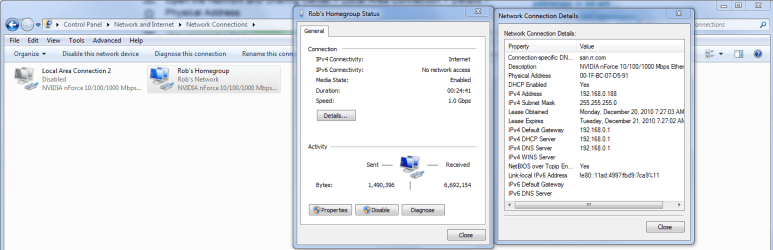
The MAC address shows up as the Physical address under network connection, choose status then "details".
 

Attachments

  • MAC address details.PNG
    MAC address details.PNG
    173 KB · Views: 11

My Computer

Computer type
PC/Desktop
Computer Manufacturer/Model Number
Home built
OS
Windows 7 Ult, Windows 8.1 Pro,
CPU
Q9650-4.275GHz, E8600 4.5GHz, E6750-3.8GHz
Motherboard
Evga 780i FTW
Memory
G.Skill PC2 9600 1200Mhz 5 5 5 15 2T
Graphics Card(s)
GTX480
Sound Card
Asus Xonar D2
Monitor(s) Displays
HannsG
Screen Resolution
1680X1050
Hard Drives
GSkill Phoenix Pro 120GB SSD
PSU
ThermalTake Toughpower 1000Watt modular
Case
ThermalTake XaserV
Cooling
Xigmatek S1283
Keyboard
Logitech G15
Mouse
Logitech G9
Internet Speed
T1

My Computer

Computer Manufacturer/Model Number
Custom Build
OS
Windows 7 7600 1 X64
CPU
AMD PHENOM II X 550 PROCESSOR 3.1 ghz
Motherboard
ASUS M4A78-TE
Memory
Corsair 4 gig ddr 3
Graphics Card(s)
ati radeon 3300
Sound Card
ati hd
Monitor(s) Displays
syncmaster 2033sw
Screen Resolution
1600X900 60 hz refresh
Hard Drives
twin_seagates SATA's 1 TB & 500 Gig, hitachi_slimline 160 gig
PSU
antec_550 watt
Case
cooler master GLite
Cooling
stock_heat sink
Internet Speed
20mbs up/ 1.5mbs down
Other Info
favorite child "stewie"
favorite dog "brian"
ISSUE: How do I deny Wireless users from using my Wireless Router
I now see pc's on my Netork tab that are using my broadband connection, I want to deny them usage on my dime.


Adrian


Good Job :(
 

Attachments

  • No_Free_WiFI.jpg
    No_Free_WiFI.jpg
    71 KB · Views: 1

My Computer

Computer type
PC/Desktop
Computer Manufacturer/Model Number
Built them myself, Science Experiments !
OS
Win7 Enterprise, Win7 x86 (Ult 7600), Win7 x64 Ult 7600, TechNet RTM on AMD x64 (2.8Ghz)
CPU
AMD fx8350 4ghz, AMD-32 2400mhz, AMD-64 3200mhz, AMDx64 2.8G
Motherboard
SIS 755, ECS-K8M890M-M (Ult 7600), GigaByte & others
Memory
2gb, 4gb on the Ult 7600, 4gb on Technet RTM, 32gb on FX8350
Graphics Card(s)
Draw my own Graphics, several nVidia cards
Sound Card
on motherboard
Monitor(s) Displays
19" flat scr, 28" I-Inc widescr,22" Emprex Widescr, 23" Acer
Screen Resolution
1280 x 1024, 1440 x 900, 1920 x 1080
Hard Drives
6 pata Ide HD's & 2 Sata HD's
added 80gb external on Ult 7600 computer,
numerous extra 1tb, 2TB, 3Tb SATA HD's
A collection of ext HD Docks w/ HDs
PSU
430w, 550w, 600w, 700, 800, etc
Case
All Generic Full Towers
Cooling
Open Air & a few fans, some w/ colored LEDs
Keyboard
Compaq & Dell recycled from GoodWill
Mouse
Made in China Optical Wired Mouse
Internet Speed
Fast Cable InterNet
Antivirus
AVG Free on 24 different Desktops, NO Problems!
Browser
IE 8 is preferred, but use FireFox sometimes
Other Info
Linksys Routers, switches, & Hubs
Too Many USB Flash Drives to count, Biggest is 64GB !
Eight computers in my home network.
Sixteen computers at my business network.
Linked via TeamViewer !
Lots of old used spare computer parts everywhere!
Back
Top