Resume from sleep- SLOW

SJMaye

New member
Member
VIP
Local time
3:11 AM
Messages
169
I have been unsing sleep with XP and Vista for years now. Typically it took about a second or 2 to resume. The longest thing was to wait for it to resume the wired ethernet connection. Maybe a couple more seconds.

Now with Windows 7 it takes quite a while. I have not timed it yet, but I can actually boot my shutdown PC faster than resume from sleep. My PC has one of those motherboards that has speed booting.

The odd thing on sleep is I get this pale blue (I am color blind) with words something like Resuming from hibernation. Then goes to a black screen with the animated windows icon with test below stating resuming Windows.

I kid you not, I can do a cold boot and get to use my PC sooner.

Can someone help me fix sleep?
 

My Computer

Computer type
PC/Desktop
Computer Manufacturer/Model Number
Custom
OS
Microsoft Windows 7 Home Premium 64-bit 7601 Multiprocessor Free Service Pack 1
CPU
Intel(R) Core(TM) i7 CPU 860 @ 2.80GHz
Motherboard
ASRock P55 Pro
Memory
8.00 GB
Graphics Card(s)
NVIDIA GeForce GTX 670
Sound Card
(1) High Definition Audio Device (2) Logitech G930 Headset
Screen Resolution
1920 x 1080 x 32 bits (4294967296 colors) @ 60 Hz
Hard Drives
(1) Hitachi HDS5C3020ALA632 ATA Device (2) Samsung SSD 850 EVO 500GB ATA Device (3) EPSON Stylus Storage USB Device (4) (5) Generic- MS/MS-Pro USB Device (6) Generic- SD/MMC USB Device (7) Generic- SM/xD-Picture USB Device
I have been unsing sleep with XP and Vista for years now. Typically it took about a second or 2 to resume. The longest thing was to wait for it to resume the wired ethernet connection. Maybe a couple more seconds.

Now with Windows 7 it takes quite a while. I have not timed it yet, but I can actually boot my shutdown PC faster than resume from sleep. My PC has one of those motherboards that has speed booting.

The odd thing on sleep is I get this pale blue (I am color blind) with words something like Resuming from hibernation. Then goes to a black screen with the animated windows icon with test below stating resuming Windows.

I kid you not, I can do a cold boot and get to use my PC sooner.

Can someone help me fix sleep?

Try this, go to search type cmd (from adminis account) and in cmd type sfc /scannow. This will correct any corruption that may be in the system.
 

My Computer

Computer type
PC/Desktop
Computer Manufacturer/Model Number
Dell XPS 420
OS
Windows 10, Home Clean Install
CPU
Intel Core2 processsor Q8200(2.33Ghz 1333FSB) Quad Core Tech
Motherboard
Dell
Memory
6 gb
Graphics Card(s)
ATI Radeon 256MB HD3650
Sound Card
Intergrated 7.1 Channel Audio
Monitor(s) Displays
Dell SP2009W 20"
Hard Drives
640 GB Serial ATA Hard drive
Cooling
Fan
Keyboard
Dell USB Keyboard
Mouse
Dell Premium Optical USB
Internet Speed
DSL 2.85
Hello richc46,

Thanks for the tip. I ran SFC /scannow. Came up with "Windows Resource Protection did not find any integrity violations".

You know, when I first installed Win 7 sleep worked fine. Shortly after that when coming out of sleep slowly I got a message from the Action Center (I think) saying it recognized it came out of sleep slowly and there were issues.

I cannot find that message anymore in order to investigate. Any other thoughts?
 

My Computer

Computer type
PC/Desktop
Computer Manufacturer/Model Number
Custom
OS
Microsoft Windows 7 Home Premium 64-bit 7601 Multiprocessor Free Service Pack 1
CPU
Intel(R) Core(TM) i7 CPU 860 @ 2.80GHz
Motherboard
ASRock P55 Pro
Memory
8.00 GB
Graphics Card(s)
NVIDIA GeForce GTX 670
Sound Card
(1) High Definition Audio Device (2) Logitech G930 Headset
Screen Resolution
1920 x 1080 x 32 bits (4294967296 colors) @ 60 Hz
Hard Drives
(1) Hitachi HDS5C3020ALA632 ATA Device (2) Samsung SSD 850 EVO 500GB ATA Device (3) EPSON Stylus Storage USB Device (4) (5) Generic- MS/MS-Pro USB Device (6) Generic- SD/MMC USB Device (7) Generic- SM/xD-Picture USB Device
make sure all drivers (sound/graphics/whatever) are up to date and the system board bios too
 

My Computer

Computer Manufacturer/Model Number
self built
OS
Win7 x86
CPU
PhenomII x2 550 (unlocked 4 cores)
Motherboard
Gigabyte GA-MA770T-UD3P
Memory
2x 2GB Kingston 1333
Graphics Card(s)
Gigabyte HD4850 1GB
Sound Card
onboard Realtek
Monitor(s) Displays
Samsung 2233
Screen Resolution
1920x1080
Hard Drives
2x WD 512GB green sata2
PSU
Corsair 620
Case
Armor MX+
Cooling
all stock
Keyboard
MS Digital Media 3000
Mouse
MS Mouse 3000
Internet Speed
adsl2+
Try checking the disk for errors or defragmenting the disk.
 

My Computer

Computer Manufacturer/Model Number
Custom Built
OS
Windows 7 Ultimate 32bit
CPU
AMD Athlon II X2 250
Motherboard
ASRock N68C-S UCC
Memory
2GB DDR3
Graphics Card(s)
Intergrated GPU
Sound Card
Intergrated HD Audio
Monitor(s) Displays
Belinea
Screen Resolution
1024 by 768
Hard Drives
Maxtor S TM3320613AS SATA 320GB 7200RPM 3.5" HDD
PSU
Compaq 100W PSU (might upgrade to 500W for performance)
Case
iCute Server/Gaming Case
Cooling
AMD CPU Cooler included with CPU
Keyboard
Genius USB Keyboard
Mouse
Microsoft Basic Optical Mouse v2.0
Internet Speed
10MBps
Other Info
BELKIN G Wireless Router (no internet access but used for intranet).
Try going to the event viewer and look for any errors. Just type event viewer in search.
 

My Computer

Computer type
PC/Desktop
Computer Manufacturer/Model Number
Dell XPS 420
OS
Windows 10, Home Clean Install
CPU
Intel Core2 processsor Q8200(2.33Ghz 1333FSB) Quad Core Tech
Motherboard
Dell
Memory
6 gb
Graphics Card(s)
ATI Radeon 256MB HD3650
Sound Card
Intergrated 7.1 Channel Audio
Monitor(s) Displays
Dell SP2009W 20"
Hard Drives
640 GB Serial ATA Hard drive
Cooling
Fan
Keyboard
Dell USB Keyboard
Mouse
Dell Premium Optical USB
Internet Speed
DSL 2.85
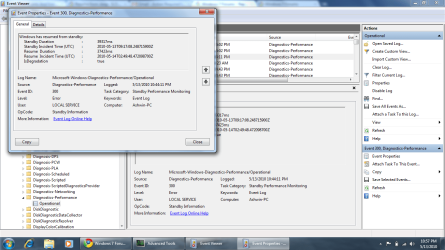
Why not find the culprit by viewing the logged items in "View Performance Details in Event Log"?
 

My Computer

OS
Win7
Why not find the culprit by viewing the logged items in "View Performance Details in Event Log"?

OUCH! I have been looking at the event viewer and seeing nothing. This log is completely different. Here are a couple screenshots I think are related.

Can someone help with these?

Capture3-1.jpg


kernal.jpg

This machine uses a Nvidia N260GTX card. I have had other Nvidia driver issues since switching to Win 7 x64.

Windowsstartslowly.jpg

The Logitech updater I can shutdown, but the other 2 are MS stuff. Should I shut them down, too?

hibernateslowly.jpg

This is my mobo quickboot system. Works great. Only thing odd relating to my current issues is when I look at the power config. it shows using the ASRock InstantBoot configuration telling the machine to go to SLEEP after 30 minutes. That appears to work, but when it wakes up a blank screen with "Resume from HIBERNATION". In researching sleep and hibernation are different. Hibernation is a very low power mode and may take a longer time to bring up. If this is the case it could ben an issue with the ASRock Instant Boot utility.

shutdownslowly.jpg

This one is a non-issue. It is my Harmony remote control program. When you shut it down it actually just minimizes to the systray. I have to manually shut it down form there. I must have forgotten.


Here is the performance details. Can you tell why I was having problems?
Capture4JPG.jpg
 
Last edited:

My Computer

Computer type
PC/Desktop
Computer Manufacturer/Model Number
Custom
OS
Microsoft Windows 7 Home Premium 64-bit 7601 Multiprocessor Free Service Pack 1
CPU
Intel(R) Core(TM) i7 CPU 860 @ 2.80GHz
Motherboard
ASRock P55 Pro
Memory
8.00 GB
Graphics Card(s)
NVIDIA GeForce GTX 670
Sound Card
(1) High Definition Audio Device (2) Logitech G930 Headset
Screen Resolution
1920 x 1080 x 32 bits (4294967296 colors) @ 60 Hz
Hard Drives
(1) Hitachi HDS5C3020ALA632 ATA Device (2) Samsung SSD 850 EVO 500GB ATA Device (3) EPSON Stylus Storage USB Device (4) (5) Generic- MS/MS-Pro USB Device (6) Generic- SD/MMC USB Device (7) Generic- SM/xD-Picture USB Device
Why not find the culprit by viewing the logged items in "View Performance Details in Event Log"?

Ty Dave, that is a suggestion not usually given, but very helpful
 

My Computer

Computer type
PC/Desktop
Computer Manufacturer/Model Number
Dell XPS 420
OS
Windows 10, Home Clean Install
CPU
Intel Core2 processsor Q8200(2.33Ghz 1333FSB) Quad Core Tech
Motherboard
Dell
Memory
6 gb
Graphics Card(s)
ATI Radeon 256MB HD3650
Sound Card
Intergrated 7.1 Channel Audio
Monitor(s) Displays
Dell SP2009W 20"
Hard Drives
640 GB Serial ATA Hard drive
Cooling
Fan
Keyboard
Dell USB Keyboard
Mouse
Dell Premium Optical USB
Internet Speed
DSL 2.85
make sure all drivers (sound/graphics/whatever) are up to date and the system board bios too

Yep. All up to date.
 

My Computer

Computer type
PC/Desktop
Computer Manufacturer/Model Number
Custom
OS
Microsoft Windows 7 Home Premium 64-bit 7601 Multiprocessor Free Service Pack 1
CPU
Intel(R) Core(TM) i7 CPU 860 @ 2.80GHz
Motherboard
ASRock P55 Pro
Memory
8.00 GB
Graphics Card(s)
NVIDIA GeForce GTX 670
Sound Card
(1) High Definition Audio Device (2) Logitech G930 Headset
Screen Resolution
1920 x 1080 x 32 bits (4294967296 colors) @ 60 Hz
Hard Drives
(1) Hitachi HDS5C3020ALA632 ATA Device (2) Samsung SSD 850 EVO 500GB ATA Device (3) EPSON Stylus Storage USB Device (4) (5) Generic- MS/MS-Pro USB Device (6) Generic- SD/MMC USB Device (7) Generic- SM/xD-Picture USB Device
Did you ever come up with a solution? I'm having a similar issue.
 

My Computer

Computer Manufacturer/Model Number
ME!
OS
Windows 7
CPU
Intel Core 2 Duo E7300 Wolfdale
Motherboard
Gigabyte GA-EP45-DS3L
Memory
Patriot Viper Series DDR2 800 (PC2 6400), 240-Pin
Graphics Card(s)
ATI RadeonHD 4850
Monitor(s) Displays
Samsung LCD 23"
Hard Drives
Seagate Barracuda 500 GB
Samsung 1 TB
PSU
Thermaltake PurePower 500W ATX 12V
Case
Antec 900
Cooling
Thermaltake TMG i2 CPU Cooler
No not really. According to the action center my problems center around my quickboot software and video drivers. I don't want to disable quickboot and the video drivers are up to date.

I mainly just do a shutdown since it boots in about 10 seconds.
 

My Computer

Computer type
PC/Desktop
Computer Manufacturer/Model Number
Custom
OS
Microsoft Windows 7 Home Premium 64-bit 7601 Multiprocessor Free Service Pack 1
CPU
Intel(R) Core(TM) i7 CPU 860 @ 2.80GHz
Motherboard
ASRock P55 Pro
Memory
8.00 GB
Graphics Card(s)
NVIDIA GeForce GTX 670
Sound Card
(1) High Definition Audio Device (2) Logitech G930 Headset
Screen Resolution
1920 x 1080 x 32 bits (4294967296 colors) @ 60 Hz
Hard Drives
(1) Hitachi HDS5C3020ALA632 ATA Device (2) Samsung SSD 850 EVO 500GB ATA Device (3) EPSON Stylus Storage USB Device (4) (5) Generic- MS/MS-Pro USB Device (6) Generic- SD/MMC USB Device (7) Generic- SM/xD-Picture USB Device
After review, I really think if you are having a similar problem it is just as the Action Center says, look at those programs it points out. I now believe my fastboot program for the mobo was causing my problem. With that disabled sleep works fine again.
 

My Computer

Computer type
PC/Desktop
Computer Manufacturer/Model Number
Custom
OS
Microsoft Windows 7 Home Premium 64-bit 7601 Multiprocessor Free Service Pack 1
CPU
Intel(R) Core(TM) i7 CPU 860 @ 2.80GHz
Motherboard
ASRock P55 Pro
Memory
8.00 GB
Graphics Card(s)
NVIDIA GeForce GTX 670
Sound Card
(1) High Definition Audio Device (2) Logitech G930 Headset
Screen Resolution
1920 x 1080 x 32 bits (4294967296 colors) @ 60 Hz
Hard Drives
(1) Hitachi HDS5C3020ALA632 ATA Device (2) Samsung SSD 850 EVO 500GB ATA Device (3) EPSON Stylus Storage USB Device (4) (5) Generic- MS/MS-Pro USB Device (6) Generic- SD/MMC USB Device (7) Generic- SM/xD-Picture USB Device
Resume from Hibernation Slow

Hi,

I am facing a similar issue. I think its actually the resume from hibernate that is slowing me down (as opposed to resume from sleep). When I resume it takes probably over 2 minutes. It first goes to a windows 7 loading splash screen, then to a black screen for over a minute, then to a login screen.

I have an ASUS UL30V running windows 7, and it is less than 3 months old (there is literally nothing installed on it), so I can't see what would be slowing it down. In the performance details in event log section, I keep saying entries relating to slow resume, but no details are provided (at least nothing that I can make sense of -see attachment).

Any ideas? I know my windows 7 is uptodate - is there anything else that I should be updating?

Thanks.
 

Attachments

  • desktop.png
    desktop.png
    73.1 KB · Views: 298

My Computer

Computer Manufacturer/Model Number
ASUS UL30V
OS
Windows 7
CPU
ULV SU7300
Memory
4GB DDR3 RAM
Graphics Card(s)
Nvidia Geforce G210M; VRAM:512MB
Hard Drives
500GB
My issue was an instantboot program running in the background. Once this was turned off resuming from sleep was normal. Check your action center flag in systray.
 

My Computer

Computer type
PC/Desktop
Computer Manufacturer/Model Number
Custom
OS
Microsoft Windows 7 Home Premium 64-bit 7601 Multiprocessor Free Service Pack 1
CPU
Intel(R) Core(TM) i7 CPU 860 @ 2.80GHz
Motherboard
ASRock P55 Pro
Memory
8.00 GB
Graphics Card(s)
NVIDIA GeForce GTX 670
Sound Card
(1) High Definition Audio Device (2) Logitech G930 Headset
Screen Resolution
1920 x 1080 x 32 bits (4294967296 colors) @ 60 Hz
Hard Drives
(1) Hitachi HDS5C3020ALA632 ATA Device (2) Samsung SSD 850 EVO 500GB ATA Device (3) EPSON Stylus Storage USB Device (4) (5) Generic- MS/MS-Pro USB Device (6) Generic- SD/MMC USB Device (7) Generic- SM/xD-Picture USB Device
chkdsk <drive letter> :/f :)
 

My Computer

OS
window's 7
CPU
core 2 quad
Motherboard
gigabyte
Memory
2gb corsair
Graphics Card(s)
ati hd4850
Monitor(s) Displays
lg
Screen Resolution
1600 X 900
Case
power logic
Other Info
none of the spec above is accurate
Back
Top