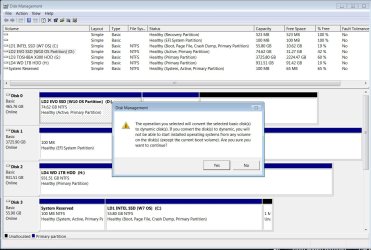
Have W7 (C on one drive & W10 (D on another on a dual boot system. On the W10 D: I had another partition (E w/ nothing on it so used AOMEI Partition Asst to delete the E: partition & just have the entire disk as one but in Disk Management the Recovery Partition is in the middle so I can't figure out how to expand D: (or w/e) to encompass the unallocated space the whole 500GB drive (see red "X")? In AOMEI to resize partition it only shows 74GB but I could change it to 390.63GB (I guess?) or could select where it says "assign free space from (*) to (D" BUT there's an asterisk in both the recovery partition AND the unallocated space so have been afraid to try that. What am I missing??
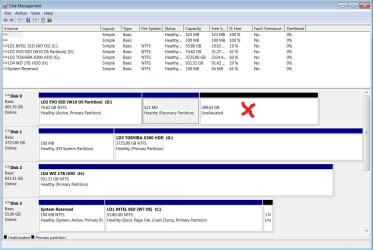
on one drive & W10 (D on another on a dual boot system. On the W10 D: I had another partition (E w/ nothing on it so used AOMEI Partition Asst to delete the E: partition & just have the entire disk as one but in Disk Management the Recovery Partition is in the middle so I can't figure out how to expand D: (or w/e) to encompass the unallocated space the whole 500GB drive (see red "X")? In AOMEI to resize partition it only shows 74GB but I could change it to 390.63GB (I guess?) or could select where it says "assign free space from (*) to (D" BUT there's an asterisk in both the recovery partition AND the unallocated space so have been afraid to try that. What am I missing??My Computers
System One System Two
-
- Computer type
- PC/Desktop
- OS
- Windows 7 Home Premium 64bit with SP1, OEM
- CPU
- Intel Core i7-3770
- Motherboard
- Gigabyte GA-Z77X-UD3H LGA1155
- Memory
- G Skill 8GB (2x4GB) Ripkaws PC3-12800 DDR3 1600MHz
- Graphics Card(s)
- EVGA, GeForce GTX 560 Ti FPB (AR) 1GB GDDR5 4104MHz
- Sound Card
- Creative Sound Blaster Audigy SE, 7.1 channels, 24 bit
- Monitor(s) Displays
- HP ZR24w
- Screen Resolution
- 1920x1200 - 60Hz
- Hard Drives
- Intel 60GB 520 Series SSD, MLC SandForce SF-2281, 550/475 MB/s
WD 1TB Caviar Blue, SATA 6 Gb/s, 7200 RPM
- PSU
- Seasonic X-560, 80 PLUS Gold
- Case
- Cooler Master Elite 430
- Cooling
- 2 stock fans
-
- Antivirus
- MS Security Essentials