Solved Revived computer wont boot up, error 0xC000000F

kenny99

New member
Local time
7:28 AM
Messages
17
Hi guys,

So my computer was having some problems recently. Wouldn't turn on, but there was power to the usb ports. Before i figured out it was the power supply that was dead, I had tried clearing the Bios by shorting the jumper leads & removing the internal battery, but otherwise everything else was untouched.

I've just received the replacement power supply today, so I've hooked it up & everything is ok, but when booting up, it gets to the "Starting Windows" logo & then restarts.
It quotes "Boot Manager Generic Failure 0xC000000F" whenever it restarts itself.

I've tried running the Startup Repair tool from the windows disk, but it doesn't work. The logs show that every check was completed successfully, except:

Repair Action: System Files Integrity check & Repair
Result: Failed, error code = 0x490
I then ran Checkdisk on the C drive, but this shows that the disk is completely fine. What could be the problem?

My pc stats are:
Intel i5 processor
ASRock H61m/U2S2 motherboard
Coodmax CD-P500W power supply

Any help appreciated. Thanks.
 

My Computer

Computer type
PC/Desktop
Computer Manufacturer/Model Number
Custom Build
OS
Windows 7 Ultimate x64
CPU
Intel i5 3.1 Ghz Quad Core
Motherboard
ASRock H61m/U3S3
Memory
2x 4Gb DDR3
Graphics Card(s)
Nvidia GeForce 8600GT
Hard Drives
1TB Samsung F3 Internal drive,
1TB Western Digital Caviar Internal Drive,
1TB Toshiba Canvio External Drive.
PSU
Coodmax CD-P500W
Antivirus
Norton 360
Browser
Firefox 26
boot to windows recovery environment->command prompt. Then:
Code:
sfc /SCANNOW  /OFFBOOTDIR=c:\  /OFFWINDIR=c:\windows

Succeeds? if not then try:
Code:
sfc /SCANNOW  /OFFBOOTDIR=d:\  /OFFWINDIR=d:\windows

Which one works?
 

My Computer

Computer type
Laptop
Computer Manufacturer/Model Number
ACER ASPIRE 5742G
OS
Microsoft Windows 7 Home Premium 64-bits 7601 Multiprocessor Free Service Pack 1
CPU
Intel(R) Core(TM) i3 CPU M 370 @ 2.40GHz
Motherboard
Acer Aspire 5742G
Memory
4,00 GB
Graphics Card(s)
ATI Mobility Radeon HD 5400 Series
Sound Card
(1) AMD High Definition Audio Device (2) Realtek High Defi
Screen Resolution
1366 x 768 x 32 bits (4294967296 colors) @ 60 Hz
Hard Drives
WDC WD5000BEVT-22ZAT0
set WINDOWS_TRACING_LOGFILE=C:\CBS.log

Now do the sfc commands described in #2 . Then

find "[SR]" C:\CBS.log > C:\sfcdetails.txt

copy CBS.log and sfcdetails.txt to usb stick. Plug stick in another machine and post sfcdetails.txt . Post CBS.log as well (zipped).
 

My Computer

Computer type
Laptop
Computer Manufacturer/Model Number
ACER ASPIRE 5742G
OS
Microsoft Windows 7 Home Premium 64-bits 7601 Multiprocessor Free Service Pack 1
CPU
Intel(R) Core(TM) i3 CPU M 370 @ 2.40GHz
Motherboard
Acer Aspire 5742G
Memory
4,00 GB
Graphics Card(s)
ATI Mobility Radeon HD 5400 Series
Sound Card
(1) AMD High Definition Audio Device (2) Realtek High Defi
Screen Resolution
1366 x 768 x 32 bits (4294967296 colors) @ 60 Hz
Hard Drives
WDC WD5000BEVT-22ZAT0
set WINDOWS_TRACING_LOGFILE=C:\CBS.log

Now do the sfc commands described in #2 . Then

find "[SR]" C:\CBS.log > C:\sfcdetails.txt

copy CBS.log and sfcdetails.txt to usb stick. Plug stick in another machine and post sfcdetails.txt . Post CBS.log as well (zipped).
Just about to try your suggestion. I tried running the Startup Repair again, then when it failed again, I took down the problem details, which were:
Problem Event Name: StartupRepairOffline
Problem Signature 01: 6.1.7600.16385
Problem Signature 02: 6.1.7600.16385
Problem Signature 03: unknown
Problem Signature 04: 21200375
Problem Signature 05: ExternalMedia
Problem Signature 06: 6
Problem Signature 07: NoRootCause
Any idea if this means anything relevant?
 

My Computer

Computer type
PC/Desktop
Computer Manufacturer/Model Number
Custom Build
OS
Windows 7 Ultimate x64
CPU
Intel i5 3.1 Ghz Quad Core
Motherboard
ASRock H61m/U3S3
Memory
2x 4Gb DDR3
Graphics Card(s)
Nvidia GeForce 8600GT
Hard Drives
1TB Samsung F3 Internal drive,
1TB Western Digital Caviar Internal Drive,
1TB Toshiba Canvio External Drive.
PSU
Coodmax CD-P500W
Antivirus
Norton 360
Browser
Firefox 26
set WINDOWS_TRACING_LOGFILE=C:\CBS.log

Now do the sfc commands described in #2 . Then

find "[SR]" C:\CBS.log > C:\sfcdetails.txt

copy CBS.log and sfcdetails.txt to usb stick. Plug stick in another machine and post sfcdetails.txt . Post CBS.log as well (zipped).
Just about to try your suggestion. I tried running the Startup Repair again, then when it failed again, I took down the problem details, which were:
Problem Event Name: StartupRepairOffline
Problem Signature 01: 6.1.7600.16385
Problem Signature 02: 6.1.7600.16385
Problem Signature 03: unknown
Problem Signature 04: 21200375
Problem Signature 05: ExternalMedia
Problem Signature 06: 6
Problem Signature 07: NoRootCause
Any idea if this means anything relevant?
NoRootCause ... irrelevant info
 

My Computer

Computer type
Laptop
Computer Manufacturer/Model Number
ACER ASPIRE 5742G
OS
Microsoft Windows 7 Home Premium 64-bits 7601 Multiprocessor Free Service Pack 1
CPU
Intel(R) Core(TM) i3 CPU M 370 @ 2.40GHz
Motherboard
Acer Aspire 5742G
Memory
4,00 GB
Graphics Card(s)
ATI Mobility Radeon HD 5400 Series
Sound Card
(1) AMD High Definition Audio Device (2) Realtek High Defi
Screen Resolution
1366 x 768 x 32 bits (4294967296 colors) @ 60 Hz
Hard Drives
WDC WD5000BEVT-22ZAT0

My Computer

Computer type
Laptop
Computer Manufacturer/Model Number
ACER ASPIRE 5742G
OS
Microsoft Windows 7 Home Premium 64-bits 7601 Multiprocessor Free Service Pack 1
CPU
Intel(R) Core(TM) i3 CPU M 370 @ 2.40GHz
Motherboard
Acer Aspire 5742G
Memory
4,00 GB
Graphics Card(s)
ATI Mobility Radeon HD 5400 Series
Sound Card
(1) AMD High Definition Audio Device (2) Realtek High Defi
Screen Resolution
1366 x 768 x 32 bits (4294967296 colors) @ 60 Hz
Hard Drives
WDC WD5000BEVT-22ZAT0
boot to windows recovery environment->command prompt. Then:
Code:
sfc /SCANNOW  /OFFBOOTDIR=c:\  /OFFWINDIR=c:\windows
Succeeds? if not then try:
Code:
sfc /SCANNOW  /OFFBOOTDIR=d:\  /OFFWINDIR=d:\windows
Which one works?

None of the SFC commands work, they both return the error:

Windows Resource Protection could not start the repair service.
 

My Computer

Computer type
PC/Desktop
Computer Manufacturer/Model Number
Custom Build
OS
Windows 7 Ultimate x64
CPU
Intel i5 3.1 Ghz Quad Core
Motherboard
ASRock H61m/U3S3
Memory
2x 4Gb DDR3
Graphics Card(s)
Nvidia GeForce 8600GT
Hard Drives
1TB Samsung F3 Internal drive,
1TB Western Digital Caviar Internal Drive,
1TB Toshiba Canvio External Drive.
PSU
Coodmax CD-P500W
Antivirus
Norton 360
Browser
Firefox 26
In that recovery environment -> command prompt window:

dir c:\
dir d:\
dir e:\


diskpart
list vol
exit


What drive letter has win7 partition in the listing?

diskpart
select vol c
detail part
select vol d
detail part
select vol e
detail part
exit


Which partition has: "Active: Yes"?
 

My Computer

Computer type
Laptop
Computer Manufacturer/Model Number
ACER ASPIRE 5742G
OS
Microsoft Windows 7 Home Premium 64-bits 7601 Multiprocessor Free Service Pack 1
CPU
Intel(R) Core(TM) i3 CPU M 370 @ 2.40GHz
Motherboard
Acer Aspire 5742G
Memory
4,00 GB
Graphics Card(s)
ATI Mobility Radeon HD 5400 Series
Sound Card
(1) AMD High Definition Audio Device (2) Realtek High Defi
Screen Resolution
1366 x 768 x 32 bits (4294967296 colors) @ 60 Hz
Hard Drives
WDC WD5000BEVT-22ZAT0
Did you really type it exactly (i added a few more spaces to clarify)???
Code:
sfc       /SCANNOW      /OFFBOOTDIR=c:\     /OFFWINDIR=c:\windows
 

My Computer

Computer type
Laptop
Computer Manufacturer/Model Number
ACER ASPIRE 5742G
OS
Microsoft Windows 7 Home Premium 64-bits 7601 Multiprocessor Free Service Pack 1
CPU
Intel(R) Core(TM) i3 CPU M 370 @ 2.40GHz
Motherboard
Acer Aspire 5742G
Memory
4,00 GB
Graphics Card(s)
ATI Mobility Radeon HD 5400 Series
Sound Card
(1) AMD High Definition Audio Device (2) Realtek High Defi
Screen Resolution
1366 x 768 x 32 bits (4294967296 colors) @ 60 Hz
Hard Drives
WDC WD5000BEVT-22ZAT0

My Computer

Computer type
PC/Desktop
Computer Manufacturer/Model Number
Custom Build
OS
Windows 7 Ultimate x64
CPU
Intel i5 3.1 Ghz Quad Core
Motherboard
ASRock H61m/U3S3
Memory
2x 4Gb DDR3
Graphics Card(s)
Nvidia GeForce 8600GT
Hard Drives
1TB Samsung F3 Internal drive,
1TB Western Digital Caviar Internal Drive,
1TB Toshiba Canvio External Drive.
PSU
Coodmax CD-P500W
Antivirus
Norton 360
Browser
Firefox 26
Did you really type it exactly (i added a few more spaces to clarify)???
Code:
sfc       /SCANNOW      /OFFBOOTDIR=c:\     /OFFWINDIR=c:\windows

Yup i typed it exactly as it appears. I even tried typing just "sfc /scannow", that returns a message stating:
There is a system repair pending which requires reboot to complete. Restart Windows and run SFC again.
Does the working directory matter? at the moment its on X:\Sources
 

My Computer

Computer type
PC/Desktop
Computer Manufacturer/Model Number
Custom Build
OS
Windows 7 Ultimate x64
CPU
Intel i5 3.1 Ghz Quad Core
Motherboard
ASRock H61m/U3S3
Memory
2x 4Gb DDR3
Graphics Card(s)
Nvidia GeForce 8600GT
Hard Drives
1TB Samsung F3 Internal drive,
1TB Western Digital Caviar Internal Drive,
1TB Toshiba Canvio External Drive.
PSU
Coodmax CD-P500W
Antivirus
Norton 360
Browser
Firefox 26
In that recovery environment -> command prompt window:

dir c:\
dir d:\
dir e:\


diskpart
list vol
exit


What drive letter has win7 partition in the listing?

diskpart
select vol c
detail part
select vol d
detail part
select vol e
detail part
exit


Which partition has: "Active: Yes"?

This is abit puzzling...First off, the partition marked with a star is the one with windows installed on it right? If so, its the drive F.

See I have 3 internal drives in it. Under diskpart, the main one (marked with the star?) 1TB is F, an extra 1TB drive marked E, and my old main drive which i wiped & now use for media storage. However, this old drive is under the letter C, while the main drive with windows has the letter F, is this supposed to happen??

Also with this, both the C & F drives are marked as the active drives, another problem?
 

My Computer

Computer type
PC/Desktop
Computer Manufacturer/Model Number
Custom Build
OS
Windows 7 Ultimate x64
CPU
Intel i5 3.1 Ghz Quad Core
Motherboard
ASRock H61m/U3S3
Memory
2x 4Gb DDR3
Graphics Card(s)
Nvidia GeForce 8600GT
Hard Drives
1TB Samsung F3 Internal drive,
1TB Western Digital Caviar Internal Drive,
1TB Toshiba Canvio External Drive.
PSU
Coodmax CD-P500W
Antivirus
Norton 360
Browser
Firefox 26
Code:
sfc       /SCANNOW      /OFFBOOTDIR=f:\     /OFFWINDIR=f:\windows
works?
 

My Computer

Computer type
Laptop
Computer Manufacturer/Model Number
ACER ASPIRE 5742G
OS
Microsoft Windows 7 Home Premium 64-bits 7601 Multiprocessor Free Service Pack 1
CPU
Intel(R) Core(TM) i3 CPU M 370 @ 2.40GHz
Motherboard
Acer Aspire 5742G
Memory
4,00 GB
Graphics Card(s)
ATI Mobility Radeon HD 5400 Series
Sound Card
(1) AMD High Definition Audio Device (2) Realtek High Defi
Screen Resolution
1366 x 768 x 32 bits (4294967296 colors) @ 60 Hz
Hard Drives
WDC WD5000BEVT-22ZAT0
Also try http://www.sevenforums.com/tutorials/666-advanced-boot-options.html =>Disable Automatic Restart on System Failure. Then boot. What blue screen of death? stopcode and dll,exe, sys file (if listed) please.

I get the blue screen of death. The stop code given is 0x0000007B, with a bunch of other codes.
This is the main reason. Stop all other troubleshooting for now. You resetted the BIOS did you?
The bios sata is in ahci mode now? in windows it's IDE?
Or vice versa?

Did you have ahci enabled in win7 (and bios)?
 

My Computer

Computer type
Laptop
Computer Manufacturer/Model Number
ACER ASPIRE 5742G
OS
Microsoft Windows 7 Home Premium 64-bits 7601 Multiprocessor Free Service Pack 1
CPU
Intel(R) Core(TM) i3 CPU M 370 @ 2.40GHz
Motherboard
Acer Aspire 5742G
Memory
4,00 GB
Graphics Card(s)
ATI Mobility Radeon HD 5400 Series
Sound Card
(1) AMD High Definition Audio Device (2) Realtek High Defi
Screen Resolution
1366 x 768 x 32 bits (4294967296 colors) @ 60 Hz
Hard Drives
WDC WD5000BEVT-22ZAT0
Also try http://www.sevenforums.com/tutorials/666-advanced-boot-options.html =>Disable Automatic Restart on System Failure. Then boot. What blue screen of death? stopcode and dll,exe, sys file (if listed) please.

I get the blue screen of death. The stop code given is 0x0000007B, with a bunch of other codes.
This is the main reason. Stop all other troubleshooting for now. You resetted the BIOS did you?
The bios sata is in ahci mode now? in windows it's IDE.
Or vice versa?

Did you have ahci enabled in win7 (and bios)?

I checked the Bios settings earlier & I just confirmed again, all Sata ports are set to IDE mode
 

My Computer

Computer type
PC/Desktop
Computer Manufacturer/Model Number
Custom Build
OS
Windows 7 Ultimate x64
CPU
Intel i5 3.1 Ghz Quad Core
Motherboard
ASRock H61m/U3S3
Memory
2x 4Gb DDR3
Graphics Card(s)
Nvidia GeForce 8600GT
Hard Drives
1TB Samsung F3 Internal drive,
1TB Western Digital Caviar Internal Drive,
1TB Toshiba Canvio External Drive.
PSU
Coodmax CD-P500W
Antivirus
Norton 360
Browser
Firefox 26
I get the blue screen of death. The stop code given is 0x0000007B, with a bunch of other codes.
This is the main reason. Stop all other troubleshooting for now. You resetted the BIOS did you?
The bios sata is in ahci mode now? in windows it's IDE.
Or vice versa?

Did you have ahci enabled in win7 (and bios)?

I checked the Bios settings earlier & I just confirmed again, all Sata ports are set to IDE mode
In win7 it was IDE as well????? I don't think so.

Put relevant sata settings to AHCI .... just as they were before resetting.
 

My Computer

Computer type
Laptop
Computer Manufacturer/Model Number
ACER ASPIRE 5742G
OS
Microsoft Windows 7 Home Premium 64-bits 7601 Multiprocessor Free Service Pack 1
CPU
Intel(R) Core(TM) i3 CPU M 370 @ 2.40GHz
Motherboard
Acer Aspire 5742G
Memory
4,00 GB
Graphics Card(s)
ATI Mobility Radeon HD 5400 Series
Sound Card
(1) AMD High Definition Audio Device (2) Realtek High Defi
Screen Resolution
1366 x 768 x 32 bits (4294967296 colors) @ 60 Hz
Hard Drives
WDC WD5000BEVT-22ZAT0
This is the main reason. Stop all other troubleshooting for now. You resetted the BIOS did you?
The bios sata is in ahci mode now? in windows it's IDE.
Or vice versa?

Did you have ahci enabled in win7 (and bios)?

I checked the Bios settings earlier & I just confirmed again, all Sata ports are set to IDE mode
In win7 it was IDE as well????? I don't think so.

Put relevant sata settings to AHCI .... just as they were before resetting.

Brilliant work, computer is booting as I type this! Funny though, I dont recall ever enabling AHCI on windows before., I'd read about changing to IDE from AHCI so i figured that IDE was the default.

Thanks again :)
 

My Computer

Computer type
PC/Desktop
Computer Manufacturer/Model Number
Custom Build
OS
Windows 7 Ultimate x64
CPU
Intel i5 3.1 Ghz Quad Core
Motherboard
ASRock H61m/U3S3
Memory
2x 4Gb DDR3
Graphics Card(s)
Nvidia GeForce 8600GT
Hard Drives
1TB Samsung F3 Internal drive,
1TB Western Digital Caviar Internal Drive,
1TB Toshiba Canvio External Drive.
PSU
Coodmax CD-P500W
Antivirus
Norton 360
Browser
Firefox 26
AHCI was enabled by default in BIOS(?) or someone did it before. After that windows7 was installed and installed ahci mode as well.

For now disable the automatic restart on crash so you see the BSOD with stop codes. How To Disable the Automatic Restart on System Failure in Windows 7
If that was done (stupid it isn't default) we could troubleshoot better.
Also run SFC/SCANNOW (without any extra stuff) in elevated command prompt. Post results

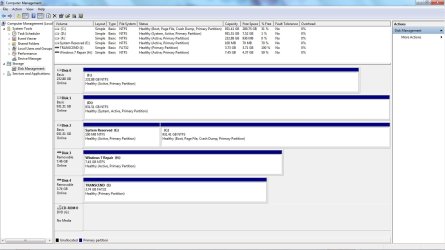
Post screenshot of disk management as well (all fields visible)
 

My Computer

Computer type
Laptop
Computer Manufacturer/Model Number
ACER ASPIRE 5742G
OS
Microsoft Windows 7 Home Premium 64-bits 7601 Multiprocessor Free Service Pack 1
CPU
Intel(R) Core(TM) i3 CPU M 370 @ 2.40GHz
Motherboard
Acer Aspire 5742G
Memory
4,00 GB
Graphics Card(s)
ATI Mobility Radeon HD 5400 Series
Sound Card
(1) AMD High Definition Audio Device (2) Realtek High Defi
Screen Resolution
1366 x 768 x 32 bits (4294967296 colors) @ 60 Hz
Hard Drives
WDC WD5000BEVT-22ZAT0
Scan took a while, plus everything suddenly wanted to update. Funny how much you fall back on in 2 weeks.

Here's a screenshot of the disk management attached, as well as the CBS logs from SFC.

Any way I can hide the E drive? It is now displayed on "My Computer", would rather avoid any chance of someone messing with it.
 

Attachments

  • Disk_management.jpg
    Disk_management.jpg
    124.7 KB · Views: 4

My Computer

Computer type
PC/Desktop
Computer Manufacturer/Model Number
Custom Build
OS
Windows 7 Ultimate x64
CPU
Intel i5 3.1 Ghz Quad Core
Motherboard
ASRock H61m/U3S3
Memory
2x 4Gb DDR3
Graphics Card(s)
Nvidia GeForce 8600GT
Hard Drives
1TB Samsung F3 Internal drive,
1TB Western Digital Caviar Internal Drive,
1TB Toshiba Canvio External Drive.
PSU
Coodmax CD-P500W
Antivirus
Norton 360
Browser
Firefox 26
Where dod you want bootmanager and bootmenu? It is on D now (Disk1). You want it on E (system reserved)? system reserved is useless now. What is/was on D now ... old system disk?
 

My Computer

Computer type
Laptop
Computer Manufacturer/Model Number
ACER ASPIRE 5742G
OS
Microsoft Windows 7 Home Premium 64-bits 7601 Multiprocessor Free Service Pack 1
CPU
Intel(R) Core(TM) i3 CPU M 370 @ 2.40GHz
Motherboard
Acer Aspire 5742G
Memory
4,00 GB
Graphics Card(s)
ATI Mobility Radeon HD 5400 Series
Sound Card
(1) AMD High Definition Audio Device (2) Realtek High Defi
Screen Resolution
1366 x 768 x 32 bits (4294967296 colors) @ 60 Hz
Hard Drives
WDC WD5000BEVT-22ZAT0
Back
Top