Right channel suddenly stopped working

hyperjase

New member
Local time
12:58 PM
Messages
8
Location
Lancashire, UK
Hi all,

I'm pretty sure this is a Win 7 issue as someone else I've spoken to at work has had pretty much the identical issue as I'm having now.

I had an issue with a USB printer, I kept getting a USB Device Not Recognised error, this was on my main pc, and also 2 different laptops, I was making sure it wasn't just my pc! Eventually after I completely unplugged my printer power, it came back on and the drivers installed with no problems.

But now this has given me another issue. Straight after that began working fine again, the right channel stopped working. If you turn the speakers up you can just about hear something, but it's so faint. I have checked my balance settings and they're all aligned correctly, so that isn't an issue. I've even reset my bios settings just in case. Nothing seems to work!

Any advice or help is gratefully appreciated!

Just for info: Mobo Asus P5K-Pro with Realtek onboard sound.

Cheers,

HJ :)
 

My Computer

OS
Windows 7 Ultimate x64
CPU
Intel Core 2 Duo E8400 @ 3.00GHz
Motherboard
Asus P5K-Pro
Memory
4gb DDR2
Graphics Card(s)
ATI Radeon HD 4870 x2
Sound Card
Realtek ALC883 (on board)
Monitor(s) Displays
Ilyama 24" ProLite E2403WS
Screen Resolution
1920 x 1200
Hard Drives
Samsung 1tb SATA2
WD 500gb SATA2
Internet Speed
50mb / Virgin Media
Jus to check, make sure the plugs are all in tight. Especially any headphone jack type plugs, those have 3 connectors and if it is slightly popped out you can lose a channel.
 

My Computer

OS
Windows 7
CPU
i5-750
Motherboard
Asus
Memory
4GB DDR3 1600
Graphics Card(s)
GT220
Nope, checked that a few times, that doesn't hold the answer. You can definitely hear something but it's very very faint. Just updated to the latest drivers, no joy. I tried plugging the speaker out into the black which is rear left and right, on 5.1 mode they work fine as rear left/right.

Damn annoying this!! Just debating if Windows 7 is actually worth all this hassle!

I also have issues with my shift and 1 key, meaning its hard to get a ! (exclamation mark).

HJ
 

My Computer

OS
Windows 7 Ultimate x64
CPU
Intel Core 2 Duo E8400 @ 3.00GHz
Motherboard
Asus P5K-Pro
Memory
4gb DDR2
Graphics Card(s)
ATI Radeon HD 4870 x2
Sound Card
Realtek ALC883 (on board)
Monitor(s) Displays
Ilyama 24" ProLite E2403WS
Screen Resolution
1920 x 1200
Hard Drives
Samsung 1tb SATA2
WD 500gb SATA2
Internet Speed
50mb / Virgin Media
Ah you have the realtek onboard. Which drivers are you using for it?
 

My Computer

OS
Windows 7
CPU
i5-750
Motherboard
Asus
Memory
4GB DDR3 1600
Graphics Card(s)
GT220
The very latest from the Realtek site, R2.43 dated 2010/2/25, prior to this it was using Microsoft's own and had the same issue, although prior to the whole issue I used both MS/Realtek and had no problems!
 

My Computer

OS
Windows 7 Ultimate x64
CPU
Intel Core 2 Duo E8400 @ 3.00GHz
Motherboard
Asus P5K-Pro
Memory
4gb DDR2
Graphics Card(s)
ATI Radeon HD 4870 x2
Sound Card
Realtek ALC883 (on board)
Monitor(s) Displays
Ilyama 24" ProLite E2403WS
Screen Resolution
1920 x 1200
Hard Drives
Samsung 1tb SATA2
WD 500gb SATA2
Internet Speed
50mb / Virgin Media
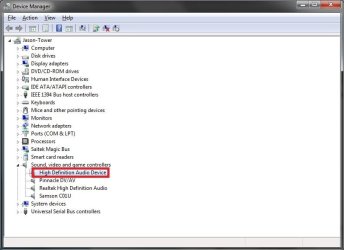
Something odd has happened here, just checked Device Manager and for whatever reason TWO lots of HD audio show up??
 

Attachments

  • HDA.jpg
    HDA.jpg
    40 KB · Views: 123

My Computer

OS
Windows 7 Ultimate x64
CPU
Intel Core 2 Duo E8400 @ 3.00GHz
Motherboard
Asus P5K-Pro
Memory
4gb DDR2
Graphics Card(s)
ATI Radeon HD 4870 x2
Sound Card
Realtek ALC883 (on board)
Monitor(s) Displays
Ilyama 24" ProLite E2403WS
Screen Resolution
1920 x 1200
Hard Drives
Samsung 1tb SATA2
WD 500gb SATA2
Internet Speed
50mb / Virgin Media
If I remember correctly, there is a Realtek driver and a Realtek HD audio driver. I remember having an issue with one of them and had to manually install the other to get it working right.

Go to Asus site and pick them up there, just enter your board and OS and it should take you to the right audio drivers.

http://support.asus.com/download/Download.aspx?SLanguage=en-us
 

My Computer

OS
Windows 7
CPU
i5-750
Motherboard
Asus
Memory
4GB DDR3 1600
Graphics Card(s)
GT220
Something odd has happened here, just checked Device Manager and for whatever reason TWO lots of HD audio show up??

Delete (Uninstall) the one you have outlined in Red, reboot the machine.

Ap
 

My Computer

Computer Manufacturer/Model Number
Assembled in my workshop
OS
Windows 7 Home Premium
CPU
Intel Core 2 Duo @ 3.00gHz
Motherboard
Gigabyte GA-P35-S3G
Memory
4 GB
Graphics Card(s)
ATI Radeon HD 2600 XT
Sound Card
RME 24/96 Card, Realtek Internal Audio PreSonus FireStudio
Monitor(s) Displays
Acer 1917 (x2)
Screen Resolution
1280 x 1024 on both monitors
Hard Drives
Three 250GB Seagate SATA Barracuda 7200rpm
PSU
Rosewill 500-watt
Case
Rosewill mid-tower
Cooling
Noctua NH-U9B (CPU), PwrSupply fan + single large case Fan
Keyboard
Macally w/2/USB ports.
Mouse
Trackman Wheel
Other Info
Event 20/20 bas studio monitors, Yamaha sub.
Rackmount Korg/Roland/Yamaha synthesizers,
Cubase MIDI/audio recording. Sony Soundforge audio/mastering software. CD Architect Mastering. RME & Presonus audio interfaces.
Thanks for both lots of help, although neither did any good, with the drivers from the Asus site loaded it's still the same, the second HD Audio showing keeps reinstalling but seems to be general, not any specific make. Would this be the audio on the output from the Radeon 4870 x2? That has HDMI audio out?

I can definitely hear something from the right channel but it's almost as if it's faded down to 1.

Cheers

HJ
 

My Computer

OS
Windows 7 Ultimate x64
CPU
Intel Core 2 Duo E8400 @ 3.00GHz
Motherboard
Asus P5K-Pro
Memory
4gb DDR2
Graphics Card(s)
ATI Radeon HD 4870 x2
Sound Card
Realtek ALC883 (on board)
Monitor(s) Displays
Ilyama 24" ProLite E2403WS
Screen Resolution
1920 x 1200
Hard Drives
Samsung 1tb SATA2
WD 500gb SATA2
Internet Speed
50mb / Virgin Media
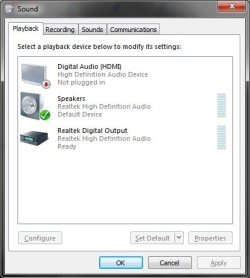
Ok quick update, think I've figured out what it was, there's a digital audio output (SPDIF) on the mobo, this is the screen that shows what audio outputs I have.
 

Attachments

  • sounds.jpg
    sounds.jpg
    23.7 KB · Views: 43

My Computer

OS
Windows 7 Ultimate x64
CPU
Intel Core 2 Duo E8400 @ 3.00GHz
Motherboard
Asus P5K-Pro
Memory
4gb DDR2
Graphics Card(s)
ATI Radeon HD 4870 x2
Sound Card
Realtek ALC883 (on board)
Monitor(s) Displays
Ilyama 24" ProLite E2403WS
Screen Resolution
1920 x 1200
Hard Drives
Samsung 1tb SATA2
WD 500gb SATA2
Internet Speed
50mb / Virgin Media
hey , i have that problem tooo

hey , this problem is annoying me too ! and a lot ! could you tell me how did u get this thing working ? if you did ^^ Thanks
 

My Computer

OS
Win 7 64 bit
The usual problem is you have got it on the wrong frequency/bits combination.

Try different hz/bits combinations ;)
 

My Computer

Computer type
PC/Desktop
Computer Manufacturer/Model Number
D.I.Y.
OS
WIN7 Ultimate 64bit
CPU
AMD FX8150/Trinity A10-5700
Motherboard
Asus Sabertooth v.1 /Asus F2A85-M Pro
Memory
G-Skill 2400 x2 @ 1866 (both pc's)
Graphics Card(s)
Sapphire (factory OC version) AMD 7770
Sound Card
onboard
Monitor(s) Displays
T260 Samsung
Screen Resolution
1920x1080
Hard Drives
Western Digital Sata 2TB/1TB Caviar Blacks
Buffalo 1TB usb (excellent drive)
PSU
Be-Quiet 700W E-9/Be-Quiet 550W E-9(E-9 = built by FSP)
Case
Antec P183/Antec P180mini
Cooling
x2 Xigmatek SXHH7-U01 + C-Master R4-EXBB-20PK-R0 120mm Fans
Keyboard
Cherry
Mouse
MS Explorer 3.0
Other Info
LG Blu ray combo
Pioneer 207D/208 Blu ray burners
Back
Top