Solved Right click breaks windows explorer AND computer window

WizardOfBoz

New member
Local time
2:31 PM
Messages
51
Reposting here (rather than in Backup thread) to get a broader number of brains.

Pic below.

Unexpected results and crash of Windows Explorer (WE). If I right click on any individual element in the left pane of a WE window, I get a notice: "Windows Explorer has Stopped Working". WE then restarts. I don't have a problem when right clicking on the main headers (Computer, Network, Libraries, or Favorites) in the LH pane, I get the expected menu. Now, if I use left clicks to get the C: drive listed in the right hand pane of WE, and right click it, I get the expected menu.

Background:
I had a pretty reliable clean install of Win 7 64. In the past few days I did a few things
1) Signed up for onedrive, successfully. There's a onedrive icon under favorites, in Windows Explorer (WE)
2) Tried to sign up for homegroup. Complete fail. Cannot get rid if vestiges of some old homegroup. Also, couldn't get homegroup set up to work under Norton 360.
3) Installed Truecrypt 7.1a and installed a secure partition.
4) Installed EASEUS backup
5) Noticed the problem a first time. Tried
a) deleting the truecrypt file and uninstalling TC,
b) deleting EASEUS
c) goofing around with registry entries as others have suggested, including deleting
[HKEY_CLASSES_ROOT\*\shellex\ContextMenuHandlers\BriefcaseMenu]
@="{85BBD920-42A0-1069-A2E4-08002B30309D}" and then adding it back
d) One or more of these appeared to work, as the right click problem went away.
6) Thought EASEUS was the problem, so installed AOMEI Backupper.
7) And noticed the problem starting again.
8) Removing AOMEI and rebooting did not solve the problem
9) This time, neither removing the reg key, nor reinstalling it, helped.

Any ideas on what causes this issue to happen only in the LH pane?

Thanks.

Capture_zpsb044a707.jpg
 

My Computer

Computer type
Laptop
Computer Manufacturer/Model Number
Lenovo
OS
Win 7 Pro 64
CPU
Core i5 M540
Memory
4Gb
Hard Drives
Seagate 1Tb SSHD
Hum WOB I have a very similar situation which I cannot get to the bottom of and that is type a long post right click the spelling mistake and the whole darn message disappears and I get that message too.

I have tried sfc chkdsk /f /r malware scans galore and still it keeps doing it.

But I have come across tis in a Google this which I am not sure if I am game to use it until someone says ok to go.
http://www.sevenforums.com/general-...ows-explorer-stopped-working-right-click.html
 

My Computer

Computer type
PC/Desktop
Computer Manufacturer/Model Number
Own build (new) Desk1 / Asus ROG Win 7 / Desk2 1st build
OS
Desk1 7 Home Prem / Desk2 10 Pro / Main lap Asus ROG 10 Pro 2 laptop Toshiba 7 Pro Asus P2520 7 & 10
CPU
Desk1 i5 3750K / Laptop i7 GTX 860M / Desk2 i5 2500
Motherboard
Desk1 Asus P877-V / Desk2 Gigabyte H67 UD3H / Laptop ?
Memory
Desk1 8GB (1866) / Desk2 16GB (1333) / Laptop 8Gb DDR3
Graphics Card(s)
Desk 1& 2NVidia GTX 650 & Laptops on board Intel
Sound Card
Desk 1 & 2 -XONAR DG Realtek High Def audio Laptop
Monitor(s) Displays
Desk 1 Benq HD 2450 / Desk2 Philips 24" / Laptop 17.5"
Screen Resolution
1920x1080 D1 & D2 & Laptop 1
Hard Drives
Desk1 Samsung 120GB 830 SSD
Asus ROG 256GB 850 Pro SSD
Desk2 Samsung 840 256 SSD
Toshiba 120GB EVO
PSU
Desk 1 Corsair HX 1050/ Laptop ? / Desk 2 Corsair HX 650
Case
Desk 1 Cooler HAF XM ? Toshiba laptop / Desk2 Coolermaster
Cooling
Fans on all Desk1 -2 Desk2 - all Coolermasters 5 Laptop ?
Keyboard
Desk 1 MS Sidewinder X6 Desk 2 MS Sidewinder X 4
Mouse
Desk 1&2 - Gigabyte MS 900 gamer - laptop - Logitec wireless
Internet Speed
ADSL2+
Other Info
One other Desktop (tester) and spare Toshba laptop both with SSD's
Running Kaspersky 2016 ISS on all machines config'd identically
Logitec audio stereo systems on each machine (x3)
Canon MG5250MFC
Router/modem TP-Link running WPA2SK
System Repair Engineer

Hum WOB I have a very similar situation which I cannot get to the bottom of and that is type a long post right click the spelling mistake and the whole darn message disappears and I get that message too.

I have tried sfc chkdsk /f /r malware scans galore and still it keeps doing it.

But I have come across tis in a Google this which I am not sure if I am game to use it until someone says ok to go.
http://www.sevenforums.com/general-...ows-explorer-stopped-working-right-click.html

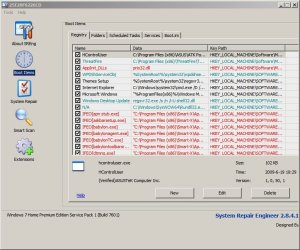
I downloaded System Repair Engineer and noticed the following:

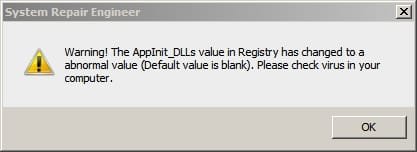
It's no longer developed or supported. It crashed a couple of times. It reported a couple of problems that were not actually problems.

As for fixing Explorer I see a fix for right click not working in Explorer or System Tray but I'm not sure what it does.

Mis-detected errors - these are not the only ones.

SRE.jpg

SRE2.jpg

Scan log:

View attachment SREngLOG.zip
 

My Computer

Computer type
Laptop
Computer Manufacturer/Model Number
ASUS
OS
Microsoft Windows 7 Home Premium 64-bit 7601 Multiprocessor Free Service Pack 1
CPU
AMD C-60 APU with Radeon(tm) HD Graphics
Motherboard
ASUSTeK COMPUTER INC. X501U
Memory
4.00 GB
Graphics Card(s)
AMD Radeon HD 6290 Graphics
Sound Card
(1) AMD High Definition Audio Device (2) Realtek High Defi
Screen Resolution
1366 x 768 x 32 bits (4294967296 colors) @ 60 Hz
Hard Drives
Hitachi HTS545050A7E380 SATA Disk Device
Antivirus
Comodo CIS & FW, SecureAplus App Whitelisting, Threatfire
Browser
Cyberfox 64bit, Opera 64bit, Airfox
Other Info
Spy-The-Spy, HitmanPro.Alert, Norton Connect Safe, MJRegWatcher, BitDefender TrafficLight, Voodoo Shield, Zemana AntiMalware
This is really dissapointing - Systems Repair Engineer seems like a neat program, but it's no longer supported (the website's even gone). Anyone know of a more recent, similar program?

I tried nirsoft's ShellExView and was not able to find a dll to disable that would allow rt click/left pane to work.

I've got to think that this is a bug in Windows. If two different and closely related ways to get the same information (only difference is right pane or left pane) give different results, this is bizarre.
 

My Computer

Computer type
Laptop
Computer Manufacturer/Model Number
Lenovo
OS
Win 7 Pro 64
CPU
Core i5 M540
Memory
4Gb
Hard Drives
Seagate 1Tb SSHD
Stuff to try

Okay well try this if you like:

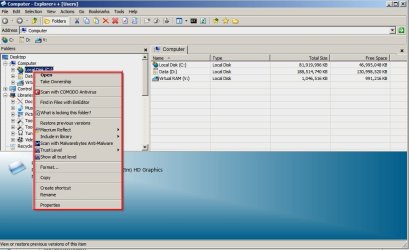
Suggest running Explorer++

It's portable and runs without installation so just extract the files to a folder on your desktop and run it. Then try right clicking your C drive in the left pane and if it works post a screenshot of the menu like this:

Explorer Plus Plus.jpg

If it works without crashing it would appear that it's not a System File problem but more likely a problem with installed software that integrates a file/folder/drive context menu in the Explorer Shell. Sometimes it can be due to a buggy or out of date shell extension so check for updates for any software that you can see has installed a right click context menu anywhere that you can right click on a drive, folder, zipped folder or any type of file. You get different context menus for different file types.

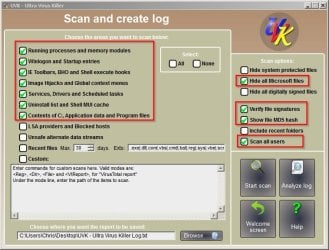
If you like you could try running the portable version of UVK:

UVK - Ultra Virus Killer

If you run UVK and from the GUI choose Scan and create log then tick the following options before scanning

Ultra Virus Killer.jpg

- it might provide some useful information but it's not guaranteed that the problem will be obvious to spot. You could zip and upload the results here. Inspect it first and remove any information that you think is a privacy issue.
 
Last edited:

My Computer

Computer type
Laptop
Computer Manufacturer/Model Number
ASUS
OS
Microsoft Windows 7 Home Premium 64-bit 7601 Multiprocessor Free Service Pack 1
CPU
AMD C-60 APU with Radeon(tm) HD Graphics
Motherboard
ASUSTeK COMPUTER INC. X501U
Memory
4.00 GB
Graphics Card(s)
AMD Radeon HD 6290 Graphics
Sound Card
(1) AMD High Definition Audio Device (2) Realtek High Defi
Screen Resolution
1366 x 768 x 32 bits (4294967296 colors) @ 60 Hz
Hard Drives
Hitachi HTS545050A7E380 SATA Disk Device
Antivirus
Comodo CIS & FW, SecureAplus App Whitelisting, Threatfire
Browser
Cyberfox 64bit, Opera 64bit, Airfox
Other Info
Spy-The-Spy, HitmanPro.Alert, Norton Connect Safe, MJRegWatcher, BitDefender TrafficLight, Voodoo Shield, Zemana AntiMalware
I myself Also suggest highly to get rid of spybot. IMHO That software is complete junk now.

By junk I mean it has messed up more systems then I can count.
 

My Computer

Computer type
PC/Desktop
Computer Manufacturer/Model Number
Custom Built
OS
Windows 10 Pro
CPU
AMD Ryzen 5 2400G Processor with Radeon RX Vega 11 Graphics
Motherboard
ASRock X470 Master SLI/AC AM4 AMD Promontory X470 SATA 6Gb/s
Memory
G.SKILL Ripjaws V Series 16GB (2 x 8GB) 288-Pin DDR4 SDRAM D
Graphics Card(s)
2047MB NVIDIA GeForce GTX 1060 6GB (EVGA)
Sound Card
Motherboard Built in
Monitor(s) Displays
Acer R240HY bidx 23.8-Inch IPS HDMI DVI VGA (1920 x 1080) Wi
Screen Resolution
1920 x 1080
Hard Drives
1TB Sandisk SSD PLUS (Main drive)
500 GB Seagate 7200 RPM (Games)
500 GB Western Digital 7200 RPM (Virtual Machines)
PSU
CORSAIR TX Series TX650M 650W 80+ Gold Modular Power Supply
Case
CORSAIR CARBIDE SPEC-02 Mid-Tower Gaming Case, Red LED Fan
Cooling
220mm, two 120mm, and four 60mm fans
Keyboard
Wired Dell keyboard
Mouse
Wireless Logitech mouse
Internet Speed
250mb down, 30mb up
Antivirus
Panda Cloud Antivirus
Browser
Chrome-ish x64
Other Info
Your awesome for reading this.
Thanks, all. Well, WE was working correctly yesterday. So I reinstalled OneDrive. This morning, WE crashes on Left Pane Right Click (LPRC, henceforth). So I right click the C: drive (or any other specific file) in the right hand pane, no problem. I get a menu. The same thing in the left half pane, WE crashes and reinstalls.

I installed Windows Explorer++. No crash on LPRC. One differerence is that WE has "Favorites" in the LH pane, with my Onedrive listed. E++ does not have Favorites, but I can view that drive by looking for users\myname\OneDrive. Hmmm.
Given that OneDrive is added to the LH pane, I am wondering if something with OneDrive is causing this crash. I deleted OneDrive from favorites. LHRC still crashes the thing. After it reinstantiates, LHRC still kills WE.

I'm going to uninstall one drive and reboot. Then I'll uninstall spybot and reboot. But I just installed spybot, and the problem begain before that installation.

More info before I go. Here is some of the crash file, from windgb. It starts out useless:

Symbol search path is: *** Invalid ***
****************************************************************************
* Symbol loading may be unreliable without a symbol search path. *
* Use .symfix to have the debugger choose a symbol path. *
* After setting your symbol path, use .reload to refresh symbol locations. *
****************************************************************************

And then adds something that may be useful to you experts:

Loading unloaded module list
.........................................
This dump file has an exception of interest stored in it.
The stored exception information can be accessed via .ecxr.
(b08.d48): Access violation - code c0000005 (first/second chance not available)
*** ERROR: Symbol file could not be found. Defaulted to export symbols for ntdll.dll -
*** ERROR: Symbol file could not be found. Defaulted to export symbols for KERNELBASE.dll -
ntdll!NtWaitForMultipleObjects+0xa:
00000000`76d9186a c3 ret
 

My Computer

Computer type
Laptop
Computer Manufacturer/Model Number
Lenovo
OS
Win 7 Pro 64
CPU
Core i5 M540
Memory
4Gb
Hard Drives
Seagate 1Tb SSHD

My Computer

Computer type
Laptop
Computer Manufacturer/Model Number
ASUS
OS
Microsoft Windows 7 Home Premium 64-bit 7601 Multiprocessor Free Service Pack 1
CPU
AMD C-60 APU with Radeon(tm) HD Graphics
Motherboard
ASUSTeK COMPUTER INC. X501U
Memory
4.00 GB
Graphics Card(s)
AMD Radeon HD 6290 Graphics
Sound Card
(1) AMD High Definition Audio Device (2) Realtek High Defi
Screen Resolution
1366 x 768 x 32 bits (4294967296 colors) @ 60 Hz
Hard Drives
Hitachi HTS545050A7E380 SATA Disk Device
Antivirus
Comodo CIS & FW, SecureAplus App Whitelisting, Threatfire
Browser
Cyberfox 64bit, Opera 64bit, Airfox
Other Info
Spy-The-Spy, HitmanPro.Alert, Norton Connect Safe, MJRegWatcher, BitDefender TrafficLight, Voodoo Shield, Zemana AntiMalware
Callender,

Thanks very much for this. Here's some data:

On another forum (Microsoft) it was suggested that I try a safe boot. Didn't help: problem persisted.

I also reported that (at least yesterday), deleting (or adding back) the following registry key made no difference:
HKEY_CLASSES_ROOT\*\shellex\ContextMenuHandlers\BriefcaseMenu]@="{85BBD920-42A0-1069-A2E4-08002B30309D}

Further, I reported (words to the effect):
"I had a mind to delete onedrive again, to see if that helped. Before this all, I made a restore point. Then, used regedit to save all the ContextMenuHandlers tags and values (export). Then to Control Panel/Remove Programs to delete onedrive. Noticed that I had installed Onedrive for Business at some point (probably due to MS's strategy to have an install process that is so confusing, you'll end up installing a bunch of c**pware THEY want you to have but that you, in the cold hard light of day, would never want.... But I digress). Decided, "What the heck, why not get rid of all of OneDrive for this test, starting with OneDrive for Business?". So I removed that program. Saved ContextMenuHandlers tags and values into another .reg file. A "comp" command comparing the before and after ContextMenuHandler.reg files showed no difference. On a lark, I checked and now Windows Explorer works fine!

So:
1) LPRC crashes WE.
2) Saved ContextMenuHandlers tags and values in ContextMenuHandler.reg
3) Removed Onedrive for Business
4) Saved ContextMenuHandlers tags and values in ContextMenuHandlerA1.reg
5) Compared the two .reg files. No differences. OneDrive for business doesn't change those flags
6) Checked WE, and now LPRC works just fine, just as one would hope and expect a healthy program to react. "


So, to your point, I did install the registry mod to cause crashdumps for WE crashes. The reporting service was off, I turned it on. But I can't duplicate the crash now!

Any ideas on where the root cause of this lies? It seems very strange that removing a Microsoft product (OneDrive for Business) from a Microsoft Win 7 64 SP1 O/S should fix a problem in a very basic tool.
 

My Computer

Computer type
Laptop
Computer Manufacturer/Model Number
Lenovo
OS
Win 7 Pro 64
CPU
Core i5 M540
Memory
4Gb
Hard Drives
Seagate 1Tb SSHD
OneDrive

Explorer++ - it's possible to just bookmark favorites.

Sorry, I know nothing about OneDrive as I've never used it. Some thoughts are:

If you know what version was installed but check that it was the latest version and didn't require updates.

Check any folder sync path to see if it's correct.

Could be some sort of permissions issue but I'd expect to see an "acess denied" message.

Check your User Shell Folders and see if anything looks wrong:

HKEY_CURRENT_USER\Software\Microsoft\Windows\CurrentVersion\Explorer\User Shell Folders

Also have a look at the OneDrive (not business) tutorial here as it seems folder sync could be problematic:

http://www.sevenforums.com/backup-restore/275667-sync-backup-store-your-files-cloud-onedrive.html

Maybe try contacting the author who knows more than I do on the subject.

As for Explorer crash dumps - might as well leave them enabled just in case of future problems.
 

My Computer

Computer type
Laptop
Computer Manufacturer/Model Number
ASUS
OS
Microsoft Windows 7 Home Premium 64-bit 7601 Multiprocessor Free Service Pack 1
CPU
AMD C-60 APU with Radeon(tm) HD Graphics
Motherboard
ASUSTeK COMPUTER INC. X501U
Memory
4.00 GB
Graphics Card(s)
AMD Radeon HD 6290 Graphics
Sound Card
(1) AMD High Definition Audio Device (2) Realtek High Defi
Screen Resolution
1366 x 768 x 32 bits (4294967296 colors) @ 60 Hz
Hard Drives
Hitachi HTS545050A7E380 SATA Disk Device
Antivirus
Comodo CIS & FW, SecureAplus App Whitelisting, Threatfire
Browser
Cyberfox 64bit, Opera 64bit, Airfox
Other Info
Spy-The-Spy, HitmanPro.Alert, Norton Connect Safe, MJRegWatcher, BitDefender TrafficLight, Voodoo Shield, Zemana AntiMalware
All good advice, for which I thank you.

I do wish that Microsoft would siphon some of the resources they use to cram complexity into the next version of Windows into creating something like PC-Doctor used to be. And to work as hard at reliability as they do at "a whole new look for Windows 8".

I guess I'm a throwback, tho. I use my PC for word processing, excel, and numerical simulations (using JDesigner in Systems Biology Workbench, R statistical program, and Octave, a math program that Matlab users will be comfortable with). I use to be a power user, but the numeriical intensity of graphical programs now far outstrips models of disease and drug action.

Anyway, I'm going to go back to writing, using Word. I think I can avoid breaking my machine if that's all I do!

Thanks,

Jim
 

My Computer

Computer type
Laptop
Computer Manufacturer/Model Number
Lenovo
OS
Win 7 Pro 64
CPU
Core i5 M540
Memory
4Gb
Hard Drives
Seagate 1Tb SSHD
More thoughts

Just some more ideas that come to mind.

It's possible that OneDrive isn't compatible with some other third party software that you've installed.

For example I've heard of cases where Explorer crashed if Dropbox and 7-zip were installed but either would work fine without the other.

So in theory - check for updates for any software that installed a context menu or shell extension.

Have a look at these softwares to get a list:

ShellMenuView

ShellExtView

If you see any software in the list that you installed a long time ago and didn't update - check for updates. If there's anything you don't use and can live without - uninstall it.

If testing by disabling certain items (non-microsoft stuff) sometimes a reboot is required to take effect so it's time consuming.

Another idea:

You could temporarily install CPM: Download Comodo Programs Manager - MajorGeeks

If you run it it might detect partially installed software (something that wasn't fully removed or didn't install correctly).

Warning: If you leave CPM installed it will check for windows updates every time you run it and it also installs it's own service and will monitor every program install.
 

My Computer

Computer type
Laptop
Computer Manufacturer/Model Number
ASUS
OS
Microsoft Windows 7 Home Premium 64-bit 7601 Multiprocessor Free Service Pack 1
CPU
AMD C-60 APU with Radeon(tm) HD Graphics
Motherboard
ASUSTeK COMPUTER INC. X501U
Memory
4.00 GB
Graphics Card(s)
AMD Radeon HD 6290 Graphics
Sound Card
(1) AMD High Definition Audio Device (2) Realtek High Defi
Screen Resolution
1366 x 768 x 32 bits (4294967296 colors) @ 60 Hz
Hard Drives
Hitachi HTS545050A7E380 SATA Disk Device
Antivirus
Comodo CIS & FW, SecureAplus App Whitelisting, Threatfire
Browser
Cyberfox 64bit, Opera 64bit, Airfox
Other Info
Spy-The-Spy, HitmanPro.Alert, Norton Connect Safe, MJRegWatcher, BitDefender TrafficLight, Voodoo Shield, Zemana AntiMalware
Hmmm. I do have 7zip. At first, I started a download from CNET. Used to be, you could get good stuff from CNET. Now everything on their site comes with cr*pware. I stopped it the second it asked "Do you want to install our wonderful IntrusivWare Program in addition to 7zip?" But it did get some crud on my disk. Malwarebytes removed it. Point is, it may not be 7zip per se, but rather the fellow travelers.

I looked at my ContextMenuHandlers in registries. Noticed something, which may be nothing. LEt me test you. Here are the keys (I've removed the HKEY_CLASSES_ROOT\*\shellex\ContextMenuHandlers part from each line):

\ SkyDriveEx]@="{CB3D0F55-BC2C-4C1A-85ED-23ED75B5106B}"
\7-Zip]@="{23170F69-40C1-278A-1000-000100020000}"
\Adobe.Acrobat.ContextMenu]@="{D25B2CAB-8A9A-4517-A9B2-CB5F68A5A802}"
\ANotepad++64]@="{B298D29A-A6ED-11DE-BA8C-A68E55D89593}"
\BriefcaseMenu]@="{85BBD920-42A0-1069-A2E4-08002B30309D}"
\BUContextMenu]@="{F7CAA2A1-67A2-44BB-B20F-202FD8EB1DAB}"
\Open With]@="{09799AFB-AD67-11d1-ABCD-00C04FC30936}"
\Open With EncryptionMenu]@="{A470F8CF-A1E8-4f65-8335-227475AA5C46}"
\SDECon32]@="{44176360-2BBF-4EC1-93CE-384B8681A0BC}"
\SDECon64]@="{44176360-2BBF-4EC1-93CE-384B8681A0BC}"
\Sharing]@="{f81e9010-6ea4-11ce-a7ff-00aa003ca9f6}"
\Symantec.Norton.Antivirus.IEContextMenu]@="{FAD61B3D-699D-49B2-BE16-7F82CB4C59CA}"
\WinMerge]@="{4E716236-AA30-4C65-B225-D68BBA81E9C2}"
\XXX Groove GFS Context Menu Handler XXX]@="{6C467336-8281-4E60-8204-430CED96822D}"
\{90AA3A4E-1CBA-4233-B8BB-535773D48449}]@="Taskband Pin"
\{a2a9545d-a0c2-42b4-9708-a0b2badd77c8}]@="Start Menu Pin"

Did you notice that the first key has an extra space at the start? Is that right? Can a key start with a space? In any case, 7zip is in there.

I'll check out those other programs. Thanks much, Jim
 

My Computer

Computer type
Laptop
Computer Manufacturer/Model Number
Lenovo
OS
Win 7 Pro 64
CPU
Core i5 M540
Memory
4Gb
Hard Drives
Seagate 1Tb SSHD
Skydrive Context Menu Handlers

Well spotted! It doesn't look right but that doesn't mean much. What would be really helpful is for another member who has SkyDrive/ OneDrive installed to check out that registry key to confirm if it's correct.

All I can say currently is that I've checked the following keys and subkeys on my machine and none of them contain any spaces!

HKEY_CLASSES_ROOT\*\OpenWithList
HKEY_CLASSES_ROOT\*\shellex\ContextMenuHandlers
HKEY_CLASSES_ROOT\Directory\Background
HKEY_CLASSES_ROOT\Directory\shell
HKEY_CLASSES_ROOT\Directory\shellex\ContextMenuHandlers
HKEY_CLASSES_ROOT\Drive\shell
HKEY_CLASSES_ROOT\Drive\shellex\ContextMenuHandlers
HKEY_CLASSES_ROOT\Folder\shell
HKEY_CLASSES_ROOT\Folder\shellex\ContextMenuHandlers

I suppose that it should be possible to backup - copy (export) that key then modify it so that there's no space. I wouldn't personally mess about with it without a system image backup that could be restored in the event of problems.
 

My Computer

Computer type
Laptop
Computer Manufacturer/Model Number
ASUS
OS
Microsoft Windows 7 Home Premium 64-bit 7601 Multiprocessor Free Service Pack 1
CPU
AMD C-60 APU with Radeon(tm) HD Graphics
Motherboard
ASUSTeK COMPUTER INC. X501U
Memory
4.00 GB
Graphics Card(s)
AMD Radeon HD 6290 Graphics
Sound Card
(1) AMD High Definition Audio Device (2) Realtek High Defi
Screen Resolution
1366 x 768 x 32 bits (4294967296 colors) @ 60 Hz
Hard Drives
Hitachi HTS545050A7E380 SATA Disk Device
Antivirus
Comodo CIS & FW, SecureAplus App Whitelisting, Threatfire
Browser
Cyberfox 64bit, Opera 64bit, Airfox
Other Info
Spy-The-Spy, HitmanPro.Alert, Norton Connect Safe, MJRegWatcher, BitDefender TrafficLight, Voodoo Shield, Zemana AntiMalware
Well, a document by Jeroen Mostert "", here, states that

"A key name may only contain printable ASCII characters (that is, characters with
values from 32 through 127) and may not contain spaces, backslashes \ or the
wildcards * and ?. Note that you can create keys containing an illegal character,
but Microsoft's documentation specifies that you should not use them."


Given that the key name is what's between the square brackets, I think Microsoft's Onedrive
definitely creates a key that contains an illegal space. I don't think that I messed with that
key, but I guess I might have morked it up mysel f. Again, I doubt it. I agree, it would be
interesting to see if other folks have the space. Guys and gals of sevenforums?

Whether this is the issue crashing WE on LPRC, I don't know.
 

My Computer

Computer type
Laptop
Computer Manufacturer/Model Number
Lenovo
OS
Win 7 Pro 64
CPU
Core i5 M540
Memory
4Gb
Hard Drives
Seagate 1Tb SSHD
Conext Menu Handlers

Now this is interesting - on another forum a user with a similar issue. Not exactly the same but they've posted a list of context menu handlers that they see on their machine.

You've got:

\ SkyDriveEx]@="{CB3D0F55-BC2C-4C1A-85ED-23ED75B5106B}"

They've got:

\ SkyDriveEx = {CB3D0F55-BC2C-4C1A-85ED-23ED75B5106B}

It still looks odd.

Like I said I know nothing about OneDrive but it seems that your version requires a license key and if you've got that handy it might be possible to uninstall it - reboot - then reinstall it but if you go down that route I'd suggest asking for help maybe by starting another thread!
 

My Computer

Computer type
Laptop
Computer Manufacturer/Model Number
ASUS
OS
Microsoft Windows 7 Home Premium 64-bit 7601 Multiprocessor Free Service Pack 1
CPU
AMD C-60 APU with Radeon(tm) HD Graphics
Motherboard
ASUSTeK COMPUTER INC. X501U
Memory
4.00 GB
Graphics Card(s)
AMD Radeon HD 6290 Graphics
Sound Card
(1) AMD High Definition Audio Device (2) Realtek High Defi
Screen Resolution
1366 x 768 x 32 bits (4294967296 colors) @ 60 Hz
Hard Drives
Hitachi HTS545050A7E380 SATA Disk Device
Antivirus
Comodo CIS & FW, SecureAplus App Whitelisting, Threatfire
Browser
Cyberfox 64bit, Opera 64bit, Airfox
Other Info
Spy-The-Spy, HitmanPro.Alert, Norton Connect Safe, MJRegWatcher, BitDefender TrafficLight, Voodoo Shield, Zemana AntiMalware
Careful, as I posted on another forum, too. I find it interesting that the key in the registry has the illegal space, but also has the copyright infringing on BSkyB's "SkyDrive" name! Doubly illegal!

Given that removing Onedrive for Business fixed the problem (just checked - still working!), I suspect that the registry is NOT the problem. Still, fun to find an issue.
 

My Computer

Computer type
Laptop
Computer Manufacturer/Model Number
Lenovo
OS
Win 7 Pro 64
CPU
Core i5 M540
Memory
4Gb
Hard Drives
Seagate 1Tb SSHD
Well I did a reset in Advanced settings in IE as Brink suggested to me and the problem disappeared as I did get rid of SkyDrive or One Drive well before that.
Worth a try.
 

My Computer

Computer type
PC/Desktop
Computer Manufacturer/Model Number
Own build (new) Desk1 / Asus ROG Win 7 / Desk2 1st build
OS
Desk1 7 Home Prem / Desk2 10 Pro / Main lap Asus ROG 10 Pro 2 laptop Toshiba 7 Pro Asus P2520 7 & 10
CPU
Desk1 i5 3750K / Laptop i7 GTX 860M / Desk2 i5 2500
Motherboard
Desk1 Asus P877-V / Desk2 Gigabyte H67 UD3H / Laptop ?
Memory
Desk1 8GB (1866) / Desk2 16GB (1333) / Laptop 8Gb DDR3
Graphics Card(s)
Desk 1& 2NVidia GTX 650 & Laptops on board Intel
Sound Card
Desk 1 & 2 -XONAR DG Realtek High Def audio Laptop
Monitor(s) Displays
Desk 1 Benq HD 2450 / Desk2 Philips 24" / Laptop 17.5"
Screen Resolution
1920x1080 D1 & D2 & Laptop 1
Hard Drives
Desk1 Samsung 120GB 830 SSD
Asus ROG 256GB 850 Pro SSD
Desk2 Samsung 840 256 SSD
Toshiba 120GB EVO
PSU
Desk 1 Corsair HX 1050/ Laptop ? / Desk 2 Corsair HX 650
Case
Desk 1 Cooler HAF XM ? Toshiba laptop / Desk2 Coolermaster
Cooling
Fans on all Desk1 -2 Desk2 - all Coolermasters 5 Laptop ?
Keyboard
Desk 1 MS Sidewinder X6 Desk 2 MS Sidewinder X 4
Mouse
Desk 1&2 - Gigabyte MS 900 gamer - laptop - Logitec wireless
Internet Speed
ADSL2+
Other Info
One other Desktop (tester) and spare Toshba laptop both with SSD's
Running Kaspersky 2016 ISS on all machines config'd identically
Logitec audio stereo systems on each machine (x3)
Canon MG5250MFC
Router/modem TP-Link running WPA2SK
Ok, this is an interesting problem because its not simple. I did get rid of the prepending space in the skydrive registry key. Create restore point. Go to that key in regedit. Export to KeyOrig.reg. Edit file to eliminate space and save as KeyModi.reg on desktop. Delete the key in regedit. Close regedit. Right click on KeyModi.reg file and select Merge. Provide two affirmative answers to the questions windows ask, and you've got a spaceless key (tho one that still infringes on b2skyb's trademark of skydrive). This SEEMED to fix the problem, but later on, it was back.

So I went back and used the other poster's suggestion. With NirSoft's excellent ShellExView, I disabled a bunch of shell extensions, one at a time. It seems that the SpyBot S&D Explorer extension was at least part of the problem. Given MS' inclusion of a space in a registry key, I'm not ruling out the possibility that Windows is not doing something it's supposed to. In fact, the same command behaving differently depending upon the invoking context (left pane right click fail, right pane right click ok) is prima facie evidence that the implementation is not perfect. But anyway, after deinstalling spybot, my WE is functioning as expected.

This does not rule out a perniciously instable and non-robust Windows Explorer implementation. In fact, given that others are reporting issues depending upon which combination of several shell extensions are installed, I'd say that there is a bug in Windows. A frequently used program like WE should NOT be able to be crashed due to bizarre and arbitrary combinations of other program installations. This reminds me of the old TV program "Green Acres", in which the electric power would fail depending upon which combination of appliances you had plugged in.

The episode did allow others to introduce me to Explorer++, and I searched out Q-Dir. Both are excellent alternatives or adjuncts to the standard WE.

Thanks to all, esp. Callender, for your help in all this.

[Cross Posted on the Microsoft Forum]
 

My Computer

Computer type
Laptop
Computer Manufacturer/Model Number
Lenovo
OS
Win 7 Pro 64
CPU
Core i5 M540
Memory
4Gb
Hard Drives
Seagate 1Tb SSHD

My Computer

Computer type
PC/Desktop
Computer Manufacturer/Model Number
Own build (new) Desk1 / Asus ROG Win 7 / Desk2 1st build
OS
Desk1 7 Home Prem / Desk2 10 Pro / Main lap Asus ROG 10 Pro 2 laptop Toshiba 7 Pro Asus P2520 7 & 10
CPU
Desk1 i5 3750K / Laptop i7 GTX 860M / Desk2 i5 2500
Motherboard
Desk1 Asus P877-V / Desk2 Gigabyte H67 UD3H / Laptop ?
Memory
Desk1 8GB (1866) / Desk2 16GB (1333) / Laptop 8Gb DDR3
Graphics Card(s)
Desk 1& 2NVidia GTX 650 & Laptops on board Intel
Sound Card
Desk 1 & 2 -XONAR DG Realtek High Def audio Laptop
Monitor(s) Displays
Desk 1 Benq HD 2450 / Desk2 Philips 24" / Laptop 17.5"
Screen Resolution
1920x1080 D1 & D2 & Laptop 1
Hard Drives
Desk1 Samsung 120GB 830 SSD
Asus ROG 256GB 850 Pro SSD
Desk2 Samsung 840 256 SSD
Toshiba 120GB EVO
PSU
Desk 1 Corsair HX 1050/ Laptop ? / Desk 2 Corsair HX 650
Case
Desk 1 Cooler HAF XM ? Toshiba laptop / Desk2 Coolermaster
Cooling
Fans on all Desk1 -2 Desk2 - all Coolermasters 5 Laptop ?
Keyboard
Desk 1 MS Sidewinder X6 Desk 2 MS Sidewinder X 4
Mouse
Desk 1&2 - Gigabyte MS 900 gamer - laptop - Logitec wireless
Internet Speed
ADSL2+
Other Info
One other Desktop (tester) and spare Toshba laptop both with SSD's
Running Kaspersky 2016 ISS on all machines config'd identically
Logitec audio stereo systems on each machine (x3)
Canon MG5250MFC
Router/modem TP-Link running WPA2SK
Back
Top