Solved Windows Explorer - Control Panel and Computer windows empty on opening

bk4him

New member
Member
Local time
9:00 PM
Messages
17
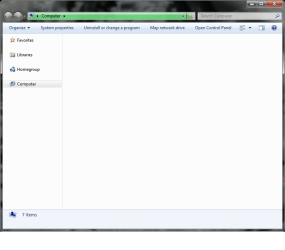
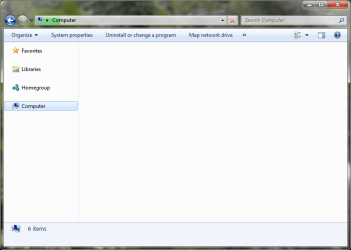
Hi everyone! I am having a problem with Windows Explorer that upon opening the Computer window or the Control Panel, the screen is blank with 4 icons (Favorites, Libraries, Homegroup, and Computer) in the left pane.

Windows gave me a notice about MS SkyDrive was causing a problem, but uninstalling it was of no help. Any suggestions?

PS: Maybe I should remove DreamScene?
UPDATE: DreamScene removed with no change.
 

Attachments
  • computer screen.png
    computer screen.png
    29.6 KB · Views: 8
Last edited:

My Computer

Computer type
Laptop
Computer Manufacturer/Model Number
HP Elitebook Moblie Workstation 8760w
OS
Windows 7 Ultimate x64 SP1
CPU
Intel i7-2620m
Motherboard
unk
Memory
CORSAIR Vengeance 16 GB (2x8GB)
Graphics Card(s)
NVIDIA Quadro 3000M
Sound Card
IDT High Definition
Monitor(s) Displays
Laptop Display, HP 2511x
Screen Resolution
1920x1080
Hard Drives
SanDisk SDSSDXP240G (240 GB SSD)
WDC WD7500BPKT-80PK4 (750 GB HDD)
Keyboard
Internal, MS Wireless 3000
Mouse
Synaptics LuxPad, Synaptics TouchStyk, MS Wireless 5000
Antivirus
Microsoft Security Essentials
Browser
Google Chrome
Note the green in the Address bar at the top. Wait for it to complete (goes all the way to the right) then you should see content in the right window.

This happens to me some times as well but I have no idea why.
 

My Computer

Computer type
PC/Desktop
Computer Manufacturer/Model Number
Lenovo IdeaCenter 450
OS
Windows 10 Pro X64
CPU
Intel Quad Core i7-4770 @ 3.4Ghz
Memory
16.0GB PC3-12800 DDR3 SDRAM 1600 MHz
Graphics Card(s)
Intel Integrated HD Graphics
Sound Card
Realtek HD Audio
Monitor(s) Displays
HP 22" LCD
Screen Resolution
1680 x 1050
Hard Drives
250GB Samsung EVO SATA-3 SSD
2TB Seagate ST2000DM001 SATA-2
1.5TB Seagate ST3150041AS SATA
Keyboard
Dell USB
Mouse
Lenovo USB
Internet Speed
Cable via Road Runner 3MB Upload, 30MB Download
Antivirus
Windows Defender, MBAM Pro, MBAE
Browser
Seamonkey
Other Info
UEFI/GPT
PLDS DVD-RW DH16AERSH
Thanks for your reply. Tried that and with no luck as the bar became stuck at the approx. 95% mark and has not moved for at least ten minutes now. However, a small workaround that I have encountered is to press Start+E twice which will bring me to two Computer windows, one which seems to be immune to the problem, the other one with the problem of being blank. This is not an ideal solution though (at least for me).
 

Attachments

  • progress bar.png
    progress bar.png
    25.3 KB · Views: 3

My Computer

Computer type
Laptop
Computer Manufacturer/Model Number
HP Elitebook Moblie Workstation 8760w
OS
Windows 7 Ultimate x64 SP1
CPU
Intel i7-2620m
Motherboard
unk
Memory
CORSAIR Vengeance 16 GB (2x8GB)
Graphics Card(s)
NVIDIA Quadro 3000M
Sound Card
IDT High Definition
Monitor(s) Displays
Laptop Display, HP 2511x
Screen Resolution
1920x1080
Hard Drives
SanDisk SDSSDXP240G (240 GB SSD)
WDC WD7500BPKT-80PK4 (750 GB HDD)
Keyboard
Internal, MS Wireless 3000
Mouse
Synaptics LuxPad, Synaptics TouchStyk, MS Wireless 5000
Antivirus
Microsoft Security Essentials
Browser
Google Chrome
When you removed dream scene it didn't set the file back the way they should be.
This might. sfc /scannow run from the cmd prompt/cmd Run it three times and boot after each. It's Windows 7 way of checking it own files and repairing them if it can.
What you call your Start key is properly called the Windows Flag Key.
 

My Computer

Computer type
PC/Desktop
Computer Manufacturer/Model Number
Home made Desktop
OS
Windows 10 Pro. 64/ version 1709 Windows 7 Pro/64
CPU
Intel i7-6800K @ 4.3
Motherboard
ASUS X-99 Deluxe II
Memory
Corsair Platinum 16 gig @2400
Graphics Card(s)
EVGA GTX 1070 OC
Monitor(s) Displays
Asus 27" LED LCD/VE278Q
Screen Resolution
1920-1080 or 1280-720 HDMI
Hard Drives
INTEL SSD 730-240 Gb Sata 3.0/
PSU
EVGA Platium 1200W
Case
Phanteks Luxe Tempered Glass 8 fans/ one radiator
Cooling
XSPC/ Water Cooled CPU
Keyboard
Das 4 Professional
Mouse
Logitech M705/MX Anywhere 2-S
Internet Speed
100 mbits
Antivirus
Microsoft Security Essentials/ Malwarebytes Premium 3.0/ SAS
Browser
I.E. 11 default/Firefox/ ISP Time Warner Cable/Spectrum
Other Info
LG BluRay Burner/
Sound system-KLipsch-THX/
Icy Dock ssd Hot Swap bays.
Running first system scan now...
 

My Computer

Computer type
Laptop
Computer Manufacturer/Model Number
HP Elitebook Moblie Workstation 8760w
OS
Windows 7 Ultimate x64 SP1
CPU
Intel i7-2620m
Motherboard
unk
Memory
CORSAIR Vengeance 16 GB (2x8GB)
Graphics Card(s)
NVIDIA Quadro 3000M
Sound Card
IDT High Definition
Monitor(s) Displays
Laptop Display, HP 2511x
Screen Resolution
1920x1080
Hard Drives
SanDisk SDSSDXP240G (240 GB SSD)
WDC WD7500BPKT-80PK4 (750 GB HDD)
Keyboard
Internal, MS Wireless 3000
Mouse
Synaptics LuxPad, Synaptics TouchStyk, MS Wireless 5000
Antivirus
Microsoft Security Essentials
Browser
Google Chrome
Windows BlueScreened at the 20% mark of the System File Checker.

Problem signature:
Problem Event Name: BlueScreen
OS Version: 6.1.7601.2.1.0.256.48
Locale ID: 1033
Additional information about the problem:
BCCode: 50
BCP1: FFFFFA804FA65C8A
BCP2: 0000000000000000
BCP3: FFFFF800037E361C
BCP4: 0000000000000005
OS Version: 6_1_7601
Service Pack: 1_0
Product: 256_1
Files that help describe the problem:
C:\Windows\Minidump\082012-31683-01.dmp
C:\Users\USER\AppData\Local\Temp\WER-70200-0.sysdata.xml

I'm attempting the sfc /scannow once more.


My Computer

Computer type
Laptop
Computer Manufacturer/Model Number
HP Elitebook Moblie Workstation 8760w
OS
Windows 7 Ultimate x64 SP1
CPU
Intel i7-2620m
Motherboard
unk
Memory
CORSAIR Vengeance 16 GB (2x8GB)
Graphics Card(s)
NVIDIA Quadro 3000M
Sound Card
IDT High Definition
Monitor(s) Displays
Laptop Display, HP 2511x
Screen Resolution
1920x1080
Hard Drives
SanDisk SDSSDXP240G (240 GB SSD)
WDC WD7500BPKT-80PK4 (750 GB HDD)
Keyboard
Internal, MS Wireless 3000
Mouse
Synaptics LuxPad, Synaptics TouchStyk, MS Wireless 5000
Antivirus
Microsoft Security Essentials
Browser
Google Chrome
sfc /scannow did not find any errors. Still facing the problem.
 

My Computer

Computer type
Laptop
Computer Manufacturer/Model Number
HP Elitebook Moblie Workstation 8760w
OS
Windows 7 Ultimate x64 SP1
CPU
Intel i7-2620m
Motherboard
unk
Memory
CORSAIR Vengeance 16 GB (2x8GB)
Graphics Card(s)
NVIDIA Quadro 3000M
Sound Card
IDT High Definition
Monitor(s) Displays
Laptop Display, HP 2511x
Screen Resolution
1920x1080
Hard Drives
SanDisk SDSSDXP240G (240 GB SSD)
WDC WD7500BPKT-80PK4 (750 GB HDD)
Keyboard
Internal, MS Wireless 3000
Mouse
Synaptics LuxPad, Synaptics TouchStyk, MS Wireless 5000
Antivirus
Microsoft Security Essentials
Browser
Google Chrome
One possible fix is to do a System Restore to before you installed DreamScene.
 

My Computer

Computer type
PC/Desktop
Computer Manufacturer/Model Number
Lenovo IdeaCenter 450
OS
Windows 10 Pro X64
CPU
Intel Quad Core i7-4770 @ 3.4Ghz
Memory
16.0GB PC3-12800 DDR3 SDRAM 1600 MHz
Graphics Card(s)
Intel Integrated HD Graphics
Sound Card
Realtek HD Audio
Monitor(s) Displays
HP 22" LCD
Screen Resolution
1680 x 1050
Hard Drives
250GB Samsung EVO SATA-3 SSD
2TB Seagate ST2000DM001 SATA-2
1.5TB Seagate ST3150041AS SATA
Keyboard
Dell USB
Mouse
Lenovo USB
Internet Speed
Cable via Road Runner 3MB Upload, 30MB Download
Antivirus
Windows Defender, MBAM Pro, MBAE
Browser
Seamonkey
Other Info
UEFI/GPT
PLDS DVD-RW DH16AERSH
The problem was not caused by DreamScene, nor was it related to DreamScene at all. However, making a new User Account solved the problem, I may just migrate to a new Account.
 

My Computer

Computer type
Laptop
Computer Manufacturer/Model Number
HP Elitebook Moblie Workstation 8760w
OS
Windows 7 Ultimate x64 SP1
CPU
Intel i7-2620m
Motherboard
unk
Memory
CORSAIR Vengeance 16 GB (2x8GB)
Graphics Card(s)
NVIDIA Quadro 3000M
Sound Card
IDT High Definition
Monitor(s) Displays
Laptop Display, HP 2511x
Screen Resolution
1920x1080
Hard Drives
SanDisk SDSSDXP240G (240 GB SSD)
WDC WD7500BPKT-80PK4 (750 GB HDD)
Keyboard
Internal, MS Wireless 3000
Mouse
Synaptics LuxPad, Synaptics TouchStyk, MS Wireless 5000
Antivirus
Microsoft Security Essentials
Browser
Google Chrome
I am migrating to a new account. Problem solved!
 

My Computer

Computer type
Laptop
Computer Manufacturer/Model Number
HP Elitebook Moblie Workstation 8760w
OS
Windows 7 Ultimate x64 SP1
CPU
Intel i7-2620m
Motherboard
unk
Memory
CORSAIR Vengeance 16 GB (2x8GB)
Graphics Card(s)
NVIDIA Quadro 3000M
Sound Card
IDT High Definition
Monitor(s) Displays
Laptop Display, HP 2511x
Screen Resolution
1920x1080
Hard Drives
SanDisk SDSSDXP240G (240 GB SSD)
WDC WD7500BPKT-80PK4 (750 GB HDD)
Keyboard
Internal, MS Wireless 3000
Mouse
Synaptics LuxPad, Synaptics TouchStyk, MS Wireless 5000
Antivirus
Microsoft Security Essentials
Browser
Google Chrome
Glad to hear it, thanks for letting us know.
 

My Computer

Computer type
PC/Desktop
Computer Manufacturer/Model Number
Lenovo IdeaCenter 450
OS
Windows 10 Pro X64
CPU
Intel Quad Core i7-4770 @ 3.4Ghz
Memory
16.0GB PC3-12800 DDR3 SDRAM 1600 MHz
Graphics Card(s)
Intel Integrated HD Graphics
Sound Card
Realtek HD Audio
Monitor(s) Displays
HP 22" LCD
Screen Resolution
1680 x 1050
Hard Drives
250GB Samsung EVO SATA-3 SSD
2TB Seagate ST2000DM001 SATA-2
1.5TB Seagate ST3150041AS SATA
Keyboard
Dell USB
Mouse
Lenovo USB
Internet Speed
Cable via Road Runner 3MB Upload, 30MB Download
Antivirus
Windows Defender, MBAM Pro, MBAE
Browser
Seamonkey
Other Info
UEFI/GPT
PLDS DVD-RW DH16AERSH
Actual solution

Turns out, the problem was related to a corrupt desktop icon. After deletion of all desktop icons, the problem was solved.
 

My Computer

Computer type
Laptop
Computer Manufacturer/Model Number
HP Elitebook Moblie Workstation 8760w
OS
Windows 7 Ultimate x64 SP1
CPU
Intel i7-2620m
Motherboard
unk
Memory
CORSAIR Vengeance 16 GB (2x8GB)
Graphics Card(s)
NVIDIA Quadro 3000M
Sound Card
IDT High Definition
Monitor(s) Displays
Laptop Display, HP 2511x
Screen Resolution
1920x1080
Hard Drives
SanDisk SDSSDXP240G (240 GB SSD)
WDC WD7500BPKT-80PK4 (750 GB HDD)
Keyboard
Internal, MS Wireless 3000
Mouse
Synaptics LuxPad, Synaptics TouchStyk, MS Wireless 5000
Antivirus
Microsoft Security Essentials
Browser
Google Chrome
Back
Top