
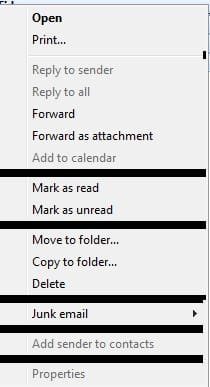
Solved Right-click Context menu blackens

barsim

New member
Member
Local time
3:24 PM
Messages
50
Hi,
After using certain program (I believe Skype) the right-click menu blackens.
Restarting the PC solves the problem till the next time.
What should be the the permanent solution?
Thank you
 

Attachments

  • Right-click context menu After Skype use.jpg
    Right-click context menu After Skype use.jpg
    25.1 KB · Views: 39

My Computer

Computer type
PC/Desktop
Computer Manufacturer/Model Number
HP Compaq dc5800
OS
Microsoft Windows 7 Professional 64-bit 7601 Multiprocessor Free Service Pack 1
CPU
Intel(R) Core(TM)2 Duo CPU E8400 @ 3.00GHz
Motherboard
Hewlett-Packard 2820h
Memory
6.00 GB, usable: 5.92 GB
Graphics Card(s)
ATI Radeon HD 3400 Series
Sound Card
(1) High Definition Audio Device (2) HD Webcam C270
Monitor(s) Displays
HP
Screen Resolution
1920 x 1080 x 60 hertz
Hard Drives
ST3500418AS ATA Device
Fixed hard disk media
Partitions: 2
Size: 465.76 GB
Other Info
BIOS: Hewlett-Packard
Default System BIOS
Version: 786F2 v01.51
Release Date: 8/1/2008
I see the example is a mail program. Does it blank only on the mail program or is a general issue and happens also in Explorer?
 

My Computers

System One System Two

  • Computer type
    PC/Desktop
    Computer Manufacturer/Model Number
    custom build
    OS
    Windows 7 HP 64
    CPU
    i5 6600K - 800MHz to 4200MHz
    Motherboard
    GA-Z170-HD3P
    Memory
    4+4G GSkill DDR4 3000
    Graphics Card(s)
    IG - Intel 530
    Monitor(s) Displays
    Samsung 226BW
    Screen Resolution
    1680x1050
    Hard Drives
    (1) -1 SM951 – 128GB M.2 AHCI PCIe SSD drive for Windows 7 and Lubuntu
    (2) -1 WD SATA 3 - 1T for Data
    (3) -1 WD SATA 3 - 1T for backup
    PSU
    Thermaltake 450W TR2 gold
    Keyboard
    Old and good Chicony mechanical keyboard
    Mouse
    Logitech mX performance - 9 buttons (had to disable some)
    Internet Speed
    500Mb/s
    Browser
    Firefox 64
    Other Info
    TinyWall firewall
  • Computer type
    Laptop
    System Manufacturer/Model Number
    Asus Q550LF
    OS
    Windows 7 Pro
    CPU
    i7-4500U 800MHz to 3.0GHz
    Motherboard
    Asus Q550LF
    Memory
    (4+4)G DDR3 1600
    Graphics Card(s)
    IG intel 4400 + NVIDIA GeForce GT 745M
    Sound Card
    Realtek
    Monitor(s) Displays
    LG Display LP156WF4-SPH1
    Screen Resolution
    1920 x 1080
    Hard Drives
    BX500 120G SSD for Windows and programs +
    1T HDD for data
    Internet Speed
    500 Mb/s
    Browser
    Firefox
    Other Info
    TinyWall firewall
I see the example is a mail program. Does it blank only on the mail program or is a general issue and happens also in Explorer?
Thank you for the reply.
It's a general issue, when it happens no matter which icon I click or in this case email.
 

My Computer

Computer type
PC/Desktop
Computer Manufacturer/Model Number
HP Compaq dc5800
OS
Microsoft Windows 7 Professional 64-bit 7601 Multiprocessor Free Service Pack 1
CPU
Intel(R) Core(TM)2 Duo CPU E8400 @ 3.00GHz
Motherboard
Hewlett-Packard 2820h
Memory
6.00 GB, usable: 5.92 GB
Graphics Card(s)
ATI Radeon HD 3400 Series
Sound Card
(1) High Definition Audio Device (2) HD Webcam C270
Monitor(s) Displays
HP
Screen Resolution
1920 x 1080 x 60 hertz
Hard Drives
ST3500418AS ATA Device
Fixed hard disk media
Partitions: 2
Size: 465.76 GB
Other Info
BIOS: Hewlett-Packard
Default System BIOS
Version: 786F2 v01.51
Release Date: 8/1/2008
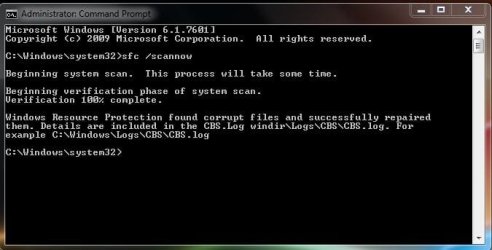
Schedule a disk check. Right click on C: drive - Properties - Tools - Error check - Check now. When asked to run on next boot = Yes. Pay attention on the results.
After disk check, open a cmd window and type
sfc /scannow
 
Last edited:

My Computers

System One System Two

  • Computer type
    PC/Desktop
    Computer Manufacturer/Model Number
    custom build
    OS
    Windows 7 HP 64
    CPU
    i5 6600K - 800MHz to 4200MHz
    Motherboard
    GA-Z170-HD3P
    Memory
    4+4G GSkill DDR4 3000
    Graphics Card(s)
    IG - Intel 530
    Monitor(s) Displays
    Samsung 226BW
    Screen Resolution
    1680x1050
    Hard Drives
    (1) -1 SM951 – 128GB M.2 AHCI PCIe SSD drive for Windows 7 and Lubuntu
    (2) -1 WD SATA 3 - 1T for Data
    (3) -1 WD SATA 3 - 1T for backup
    PSU
    Thermaltake 450W TR2 gold
    Keyboard
    Old and good Chicony mechanical keyboard
    Mouse
    Logitech mX performance - 9 buttons (had to disable some)
    Internet Speed
    500Mb/s
    Browser
    Firefox 64
    Other Info
    TinyWall firewall
  • Computer type
    Laptop
    System Manufacturer/Model Number
    Asus Q550LF
    OS
    Windows 7 Pro
    CPU
    i7-4500U 800MHz to 3.0GHz
    Motherboard
    Asus Q550LF
    Memory
    (4+4)G DDR3 1600
    Graphics Card(s)
    IG intel 4400 + NVIDIA GeForce GT 745M
    Sound Card
    Realtek
    Monitor(s) Displays
    LG Display LP156WF4-SPH1
    Screen Resolution
    1920 x 1080
    Hard Drives
    BX500 120G SSD for Windows and programs +
    1T HDD for data
    Internet Speed
    500 Mb/s
    Browser
    Firefox
    Other Info
    TinyWall firewall
Schedule a disk check. Right click on C: drive - Properties - Tools - Error check - Check now. When asked to run on next boot = Yes. Pay attention on the results.
After disk check, open a cmd window and type
sfc / scannow
Thank you for the help!
Ran both. The error check and system scan. Double checked; elevated command prompt=>sfc /scannow
 

Attachments

  • ACP.JPG
    ACP.JPG
    46.3 KB · Views: 11

My Computer

Computer type
PC/Desktop
Computer Manufacturer/Model Number
HP Compaq dc5800
OS
Microsoft Windows 7 Professional 64-bit 7601 Multiprocessor Free Service Pack 1
CPU
Intel(R) Core(TM)2 Duo CPU E8400 @ 3.00GHz
Motherboard
Hewlett-Packard 2820h
Memory
6.00 GB, usable: 5.92 GB
Graphics Card(s)
ATI Radeon HD 3400 Series
Sound Card
(1) High Definition Audio Device (2) HD Webcam C270
Monitor(s) Displays
HP
Screen Resolution
1920 x 1080 x 60 hertz
Hard Drives
ST3500418AS ATA Device
Fixed hard disk media
Partitions: 2
Size: 465.76 GB
Other Info
BIOS: Hewlett-Packard
Default System BIOS
Version: 786F2 v01.51
Release Date: 8/1/2008
I'm glad you fix it.
 

My Computers

System One System Two

  • Computer type
    PC/Desktop
    Computer Manufacturer/Model Number
    custom build
    OS
    Windows 7 HP 64
    CPU
    i5 6600K - 800MHz to 4200MHz
    Motherboard
    GA-Z170-HD3P
    Memory
    4+4G GSkill DDR4 3000
    Graphics Card(s)
    IG - Intel 530
    Monitor(s) Displays
    Samsung 226BW
    Screen Resolution
    1680x1050
    Hard Drives
    (1) -1 SM951 – 128GB M.2 AHCI PCIe SSD drive for Windows 7 and Lubuntu
    (2) -1 WD SATA 3 - 1T for Data
    (3) -1 WD SATA 3 - 1T for backup
    PSU
    Thermaltake 450W TR2 gold
    Keyboard
    Old and good Chicony mechanical keyboard
    Mouse
    Logitech mX performance - 9 buttons (had to disable some)
    Internet Speed
    500Mb/s
    Browser
    Firefox 64
    Other Info
    TinyWall firewall
  • Computer type
    Laptop
    System Manufacturer/Model Number
    Asus Q550LF
    OS
    Windows 7 Pro
    CPU
    i7-4500U 800MHz to 3.0GHz
    Motherboard
    Asus Q550LF
    Memory
    (4+4)G DDR3 1600
    Graphics Card(s)
    IG intel 4400 + NVIDIA GeForce GT 745M
    Sound Card
    Realtek
    Monitor(s) Displays
    LG Display LP156WF4-SPH1
    Screen Resolution
    1920 x 1080
    Hard Drives
    BX500 120G SSD for Windows and programs +
    1T HDD for data
    Internet Speed
    500 Mb/s
    Browser
    Firefox
    Other Info
    TinyWall firewall
I'm glad you fix it.
Hi,
Unfortunately it's proven to be temporary solution only; the correct one is as follows:
Start=>Right Click Computer=>Properties=>Advanced System Settings=>Advanced tab=>Settings (Under Performance)=>Custom Radio button: Uncheck the box; Fade or Slide Menus Into View=>Apply & OK
 

My Computer

Computer type
PC/Desktop
Computer Manufacturer/Model Number
HP Compaq dc5800
OS
Microsoft Windows 7 Professional 64-bit 7601 Multiprocessor Free Service Pack 1
CPU
Intel(R) Core(TM)2 Duo CPU E8400 @ 3.00GHz
Motherboard
Hewlett-Packard 2820h
Memory
6.00 GB, usable: 5.92 GB
Graphics Card(s)
ATI Radeon HD 3400 Series
Sound Card
(1) High Definition Audio Device (2) HD Webcam C270
Monitor(s) Displays
HP
Screen Resolution
1920 x 1080 x 60 hertz
Hard Drives
ST3500418AS ATA Device
Fixed hard disk media
Partitions: 2
Size: 465.76 GB
Other Info
BIOS: Hewlett-Packard
Default System BIOS
Version: 786F2 v01.51
Release Date: 8/1/2008
Back
Top