Right click "Take Ownership" not working correctly

glatzfront

New member
Local time
6:31 PM
Messages
26
Asus laptop with Windows 7 Professional


Right click "Take Ownership";
changes Owner to "owner (ASUSI-PC\owner)", not "Administrators (ASUSI-PC\Administrators)" as expected?
it does add "(Administrators (ASUSI-PC\Administrators)" with full permissions.


Below is the second Reg Key I tried after uninstalling the first (first key had same result as second key)


Windows Registry Editor Version 5.00

[HKEY_CLASSES_ROOT\*\shell\takeownership]
@="Take ownership"
"HasLUAShield"=""
"NoWorkingDirectory"=""

[HKEY_CLASSES_ROOT\*\shell\takeownership\command]
@="cmd.exe /c takeown /f \"%1\" && icacls \"%1\" /grant administrators:F"
"IsolatedCommand"="cmd.exe /c takeown /f \"%1\" && icacls \"%1\" /grant administrators:F"

[HKEY_CLASSES_ROOT\exefile\shell\takeownership]
@="Take ownership"
"HasLUAShield"=""
"NoWorkingDirectory"=""

[HKEY_CLASSES_ROOT\exefile\shell\takeownership\command]
@="cmd.exe /c takeown /f \"%1\" && icacls \"%1\" /grant administrators:F"
"IsolatedCommand"="cmd.exe /c takeown /f \"%1\" && icacls \"%1\" /grant administrators:F"

[HKEY_CLASSES_ROOT\dllfile\shell\takeownership]
@="Take ownership"
"HasLUAShield"=""
"NoWorkingDirectory"=""

[HKEY_CLASSES_ROOT\dllfile\shell\takeownership\command]
@="cmd.exe /c takeown /f \"%1\" && icacls \"%1\" /grant administrators:F"
"IsolatedCommand"="cmd.exe /c takeown /f \"%1\" && icacls \"%1\" /grant administrators:F"

[HKEY_CLASSES_ROOT\Directory\shell\takeownership]
@="Take ownership"
"HasLUAShield"=""
"NoWorkingDirectory"=""

[HKEY_CLASSES_ROOT\Directory\shell\takeownership\command]
@="cmd.exe /c takeown /f \"%1\" /r /d y && icacls \"%1\" /grant administrators:F /t"
"IsolatedCommand"="cmd.exe /c takeown /f \"%1\" /r /d y && icacls \"%1\" /grant administrators:F /t"
 

My Computer My Computer

At a glance

Win7 Premium
OS
Win7 Premium
Have you tried this one?

http://www.sevenforums.com/tutorials/1911-take-ownership-shortcut.html

It looks a little different than the one you have showing,

Code:
Windows Registry Editor Version 5.00

; Created by: Shawn Brink
; http://www.sevenforums.com
; Tutorial: http://www.sevenforums.com/tutorials/1911-take-ownership-shortcut.html


[-HKEY_CLASSES_ROOT\*\shell\runas]

[HKEY_CLASSES_ROOT\*\shell\runas]
@="Take Ownership"
"HasLUAShield"=""
"NoWorkingDirectory"=""
Position="middle"

[HKEY_CLASSES_ROOT\*\shell\runas\command]
@="cmd.exe /c takeown /f \"%1\" && icacls \"%1\" /grant administrators:F /c /l"
"IsolatedCommand"="cmd.exe /c takeown /f \"%1\" && icacls \"%1\" /grant administrators:F /c /l"


[-HKEY_CLASSES_ROOT\Directory\shell\runas]

[HKEY_CLASSES_ROOT\Directory\shell\runas]
@="Take Ownership"
"HasLUAShield"=""
"NoWorkingDirectory"=""
Position="middle"

[HKEY_CLASSES_ROOT\Directory\shell\runas\command]
@="cmd.exe /c takeown /f \"%1\" /r /d y && icacls \"%1\" /grant administrators:F /t /c /l /q"
"IsolatedCommand"="cmd.exe /c takeown /f \"%1\" /r /d y && icacls \"%1\" /grant administrators:F /t /c /l /q"


[-HKEY_CLASSES_ROOT\dllfile\shell\runas]

[HKEY_CLASSES_ROOT\dllfile\shell\runas]
@="Take Ownership"
"HasLUAShield"=""
"NoWorkingDirectory"=""
Position="middle"

[HKEY_CLASSES_ROOT\dllfile\shell\runas\command]
@="cmd.exe /c takeown /f \"%1\" && icacls \"%1\" /grant administrators:F /c /l"
"IsolatedCommand"="cmd.exe /c takeown /f \"%1\" && icacls \"%1\" /grant administrators:F /c /l"


[-HKEY_CLASSES_ROOT\Drive\shell\runas]

[HKEY_CLASSES_ROOT\Drive\shell\runas]
@="Take Ownership"
"HasLUAShield"=""
"NoWorkingDirectory"=""
Position="middle"

[HKEY_CLASSES_ROOT\Drive\shell\runas\command]
@="cmd.exe /c takeown /f \"%1\" /r /d y && icacls \"%1\" /grant administrators:F /t /c /l /q"
"IsolatedCommand"="cmd.exe /c takeown /f \"%1\" /r /d y && icacls \"%1\" /grant administrators:F /t /c /l /q"

[-HKEY_CLASSES_ROOT\exefile\shell\runas]

[HKEY_CLASSES_ROOT\exefile\shell\runas]
"HasLUAShield"=""

[HKEY_CLASSES_ROOT\exefile\shell\runas\command]
@="\"%1\" %*"
"IsolatedCommand"="\"%1\" %*"

That's the one under number 2 in the tutorial.
 

My Computer My Computer

At a glance

Win 10 Pro x64Intel I5-2500K @3.3GHz16GB G.Skill Ripjaws X (4x4GB)EVGA GeForce 750 Ti SC 2GB
Computer type
PC/Desktop
Computer Manufacturer/Model Number
Self Built
OS
Win 10 Pro x64
CPU
Intel I5-2500K @3.3GHz
Motherboard
Asrock P67 Extreme4
Memory
16GB G.Skill Ripjaws X (4x4GB)
Graphics Card(s)
EVGA GeForce 750 Ti SC 2GB
Sound Card
ASUS Xonar DG 5.1 Channels 24-bit 96KHz PCI Interface Sound
Monitor(s) Displays
auria eq2367
Screen Resolution
1920 x 1080
Hard Drives
250GB Samsung 850 EVO SSD
1TB WD Blue
1TB Hitachi
PSU
SeaSonic X 650W 80 Plus Gold
Case
Corsair Obsidian 750D
Cooling
Corsair H60, Three 140mm case fans
Keyboard
Logitech Wireless Keyboard K520
Mouse
Logitech Wireless Mouse M310
Internet Speed
Wave Broadband ~ 100 dn 5 up
Antivirus
Windows Defender, Malwarebytes Premium
Browser
Edge, IE11, Chrome
Other Info
Laptop specs: HP g7-1365dx /
CPU: AMD A6-3420M APU with Radeon(tm) HD Graphics /
RAM: Crucial 8Gb (2x4Gb) /
SSD: Crucial M4-CT128M4SSD2 ATA Device/ FW 000F /
GFX: AMD Radeon HD 6520G /
OS: Windows 10 Pro x64
Thanks for your help

This looks like what I have now, I would like Administrators to be the owner.

"This will allow you to be able to instantly take ownership of a file, folder (and all contents), or drive (and all contents) by changing the owner to the current user and grant the Administrators group full access permission."

Any other ideas?
 

My Computer My Computer

At a glance

Win7 Premium
OS
Win7 Premium
What are you trying to take ownership of and why? Changing ownership could screw up your system if used incorrectly. I'm not expert on the subject. In mu opinion there's no point in changing ownership unless you are trying to delete a stubborn folder/ file and for anything else you'd need to be able to restore original permissions in the event of problems. (Easier said than done)

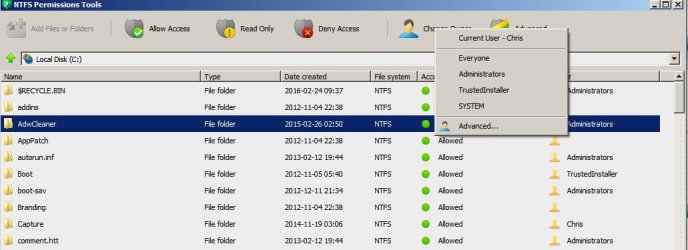
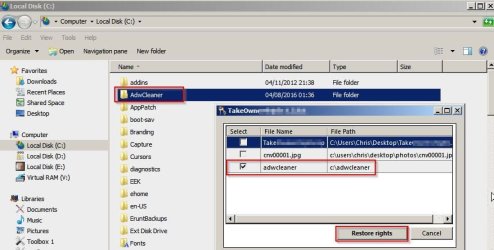
There are a couple of utilities that you could use instead of messing about with command lines and permissions dialog boxes.

Take Ownership 1.jpg

Take Ownership 2.jpg

So what are you trying to accomplish exactly?
 
Last edited:

My Computer My Computer

At a glance

Microsoft Windows 7 Home Premium 64-bit 7601 ...AMD C-60 APU with Radeon(tm) HD Graphics4.00 GBAMD Radeon HD 6290 Graphics
Computer type
Laptop
Computer Manufacturer/Model Number
ASUS
OS
Microsoft Windows 7 Home Premium 64-bit 7601 Multiprocessor Free Service Pack 1
CPU
AMD C-60 APU with Radeon(tm) HD Graphics
Motherboard
ASUSTeK COMPUTER INC. X501U
Memory
4.00 GB
Graphics Card(s)
AMD Radeon HD 6290 Graphics
Sound Card
(1) AMD High Definition Audio Device (2) Realtek High Defi
Screen Resolution
1366 x 768 x 32 bits (4294967296 colors) @ 60 Hz
Hard Drives
Hitachi HTS545050A7E380 SATA Disk Device
Antivirus
Comodo CIS & FW, SecureAplus App Whitelisting, Threatfire
Browser
Cyberfox 64bit, Opera 64bit, Airfox
Other Info
Spy-The-Spy, HitmanPro.Alert, Norton Connect Safe, MJRegWatcher, BitDefender TrafficLight, Voodoo Shield, Zemana AntiMalware
I agree with Callender as this is no good to use Administrator.

Use your own account-name, as you are the administrator already.

For "Take Ownership" will be very troublesome.
Already the UAC is there.
And Administrator means leaving your home main door open.

Let say, you install a program.
In normal way, the prompt on UAC.
In Administrator mode, ex; no prompt and you cannot control any malware to go right inside your core, where it is difficult to find.
Should there be any problem, you need to use the Administrator mode to do.
This is almost like using Administrator to do your normal computing.
Should any other user hit a problem, then the Administrator will be doing extra work.
Hence, this is why the Administrator cannot be seen, avoid unnecessary issue later on.

Let the Administrator go to sleep, as your account is almost near to Administrator level, that is 1 level down.
This is the differences between you, as 'mini' administrator (small cap 'a') and Administrator as full access.
Do note is you are in the Administrator mode, and any malware are happy to get what they want.

Quote: I'm not expert on the subject.
imo, there are 2 things best leave it alone; Administrator mode AND Registry setting. As these 2 are the highest level.
 

My Computer My Computer

At a glance

Windows 7 x64
Computer type
Laptop
Computer Manufacturer/Model Number
Toshiba L630 and L735
OS
Windows 7 x64
Hard Drives
240 GB SSD
Take Ownership is Old School.
Download and install "Grant Admin Full Control".
I call that, Take Ownership on steroids! :geek:

That program is the first thing I install on a new setup.

Good luck!
TechnoMage :cool:
 

My Computer My Computer

At a glance

Win 7 Pro, SP1, x86, Win-11/Pro/64AMD8GB CrucialVarious
Computer type
PC/Desktop
Computer Manufacturer/Model Number
Various
OS
Win 7 Pro, SP1, x86, Win-11/Pro/64
CPU
AMD
Motherboard
Various
Memory
8GB Crucial
Graphics Card(s)
Various
Sound Card
OnBoard
Monitor(s) Displays
Acer 21.5"
Hard Drives
Crucial SSD, 500 GB
PSU
OEM
Case
SFF Slim Line Case
Cooling
OEM
Keyboard
eMachines
Mouse
Logitech Wireless
Internet Speed
varies
Antivirus
Windows Defender/Super Anti-Spyware
Browser
Firefox
Thanks to all that have helped
 

My Computer My Computer

At a glance

Win7 Premium
OS
Win7 Premium
Back
Top