hi all is this the way to disable Microsoft Virtual Wifi Miniport Adapter? in cmd as admin "netsh wlan stop hostednetwork" no quotes. then stop the service by typing "netsh wlan set hostednetwork mode=disallow" also no quotes
and if you want to turn it back on netsh wlan set hostednetwork mode=allow ? then netsh wlan start hostednetwork (without the question mark!)
Last edited:
My Computer
At a glance
Operating System : Windows 7 Home Premium Edi...Processor : Intel Core 2 Quad Q8300 @ 2500 MHzPhysical Memory :8GB Corsair4x 2GB 800MHz C5 ...Video Card : XFX 6700 AMD
Computer Manufacturer/Model Number
packard bell IXTREME M5722
OS
Operating System : Windows 7 Home Premium Edition 6.01.7600 SP1 (x64)
CPU
Processor : Intel Core 2 Quad Q8300 @ 2500 MHz
Motherboard
Mainboard : Packard Bell (Acer EG43M )
Memory
Physical Memory :8GB Corsair4x 2GB 800MHz C5 DDR2
Graphics Card(s)
Video Card : XFX 6700 AMD
Monitor(s) Displays
Maestro 234DL - BenQ V2220 - BenQ VW2420H
Screen Resolution
Current Display :1920x1080p pixels at 60 Hz in HD LED
Hard Drives
Hard Disks : WDC (1000 GB)
Drive C: (Hard Disk) : 428 GB available on 491 GB
Drive D: (Hard Disk) : 426 GB available on 492 GB
SAMSUNG spinpoint HD103SJ 1000.2 GB
(X 2) KINGSTON SSD NOW V 30GB
PSU
XFX ProSeries 550W PSU
Case
PACKARD BELL IXTREME
Cooling
System Blower Current: 150mA Air Flow16CFM ;Akasa 90mm rear
EXTRA COOLING>(FAN CONTROLLER) PC Bay Cooler 3 x 40mm fans; Akasa AK-HD-BL Blue hard drive cooler 2 x 40 mm fan 4500 rpm 29.7 dBA
Bios> American Megatrends Inc.
Version : P01-A1
Date : 08/31/2009
thanks Brink just needed advice i run the commands and they all work ok to turn it back on i used this command first netsh wlan set hostednetwork mode=allow
My Computer
At a glance
Operating System : Windows 7 Home Premium Edi...Processor : Intel Core 2 Quad Q8300 @ 2500 MHzPhysical Memory :8GB Corsair4x 2GB 800MHz C5 ...Video Card : XFX 6700 AMD
Computer Manufacturer/Model Number
packard bell IXTREME M5722
OS
Operating System : Windows 7 Home Premium Edition 6.01.7600 SP1 (x64)
CPU
Processor : Intel Core 2 Quad Q8300 @ 2500 MHz
Motherboard
Mainboard : Packard Bell (Acer EG43M )
Memory
Physical Memory :8GB Corsair4x 2GB 800MHz C5 DDR2
Graphics Card(s)
Video Card : XFX 6700 AMD
Monitor(s) Displays
Maestro 234DL - BenQ V2220 - BenQ VW2420H
Screen Resolution
Current Display :1920x1080p pixels at 60 Hz in HD LED
Hard Drives
Hard Disks : WDC (1000 GB)
Drive C: (Hard Disk) : 428 GB available on 491 GB
Drive D: (Hard Disk) : 426 GB available on 492 GB
SAMSUNG spinpoint HD103SJ 1000.2 GB
(X 2) KINGSTON SSD NOW V 30GB
PSU
XFX ProSeries 550W PSU
Case
PACKARD BELL IXTREME
Cooling
System Blower Current: 150mA Air Flow16CFM ;Akasa 90mm rear
EXTRA COOLING>(FAN CONTROLLER) PC Bay Cooler 3 x 40mm fans; Akasa AK-HD-BL Blue hard drive cooler 2 x 40 mm fan 4500 rpm 29.7 dBA
Bios> American Megatrends Inc.
Version : P01-A1
Date : 08/31/2009
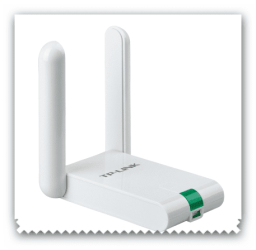
i was going through different wireless adapters i own usb/pci and none that i have auto start this service in windows 7 apart from a new one i have got a few days ago TP-Link TL-WN822N 300MBPS >>>> Welcome to TP-LINK
setup 300Mbps wireless data rates ideal for video streaming online gaming and Internet calling
Dual external antennas deliver enhanced reception and transmission performance compared with internal antennas
Easy one-touch wireless security
encryption with the Quick Security Setup button Supports WPA/WPA2 security as well as WEP 64/128/152 bit encryption
Provides Mini-USB port
Supports Infrastructure and Ad-Hoc modes
Supports Windows 2000/XP/Vista/7
Fully compatible with all IEEE 802.11b/g/n products
Supports Sony PSP X-link for online gaming for Windows XP Bundled CD provides easy and hassle-free installation and configuration
EXTRA COOLING>(FAN CONTROLLER) PC Bay Cooler 3 x 40mm fans; Akasa AK-HD-BL Blue hard drive cooler 2 x 40 mm fan 4500 rpm 29.7 dBA
Bios> American Megatrends Inc.
Version : P01-A1
Date : 08/31/2009
I have purchased an Epson Projector with a wireless adapter. It will work for a few minutes then quite. Their tech support said to disable the virtual miniport adapter. That works through control panel - then after a few minutes it kicks off again and locks the projector and it all has to be restarted. Is there away to disable the miniport while the projector is in use then restart it again...?
Thanks for any help... I started the opening post commands then ran into an must be admin to restart. I am the only one using this laptop. And I own it. And my login is as an Administrator so I do not understand that either.