Robocopy Backup - ERROR 5 (0x00000005)

ridgedale

New member
Local time
1:42 AM
Messages
9
Hi,
I'm wondering if anyone might be able to shed some light on why I am getting the following such errors when running a robocopy batch file (as administrator) which cause the backup script to stall (- albeit temporarily):

2013/07/30 21:10:43 ERROR 5 (0x00000005) Copying File C:\Users\Tim\My Documents\Harey 8-128.jpg
Access is denied.

Waiting 30 seconds... Retrying...

2013/07/30 21:12:20 ERROR 5 (0x00000005) Copying File C:\Users\Tim\My Documents\TimsData\Year1.pdf
Access is denied.

Waiting 30 seconds... Retrying...

2013/07/30 21:15:27 ERROR 5 (0x00000005) Copying File C:\Users\Tim\My Documents\TimsData\Tim\Heddon's Mouth - Printable Walk - South West Coast Path.htm
Access is denied.

Waiting 30 seconds... Retrying...

I am using the following backup command:

Code:
robocopy "%srcPath%\My Documents" "%dstPath%\My Documents" /b /v /ts /fp /bytes /tee /e /dcopy:t /copy:dt /a-:sh /xf desktop.* /np /log+:%logPath%\mwk1log.txt

I realise that if I limit the retries and wait time from the defaults the stall time will be shortened and the file(s) skipped. However, that does not resolve the issue why robocopy is having a problem copying the file(s).

I have found that if the erroring files are moved from the source location to the desktop, the following errors arethen recorded in the log:

2013/07/30 21:11:13 ERROR 2 (0x00000002) Copying File C:\Users\Tim\My Documents\Harey 8-128.jpg
The system cannot find the file specified.

2013/07/30 21:13:53 ERROR 2 (0x00000002) Copying File C:\Users\Tim\My Documents\TimsData\Year1.pdf
The system cannot find the file specified.

2013/07/30 21:15:57 ERROR 2 (0x00000002) Copying File C:\Users\Tim\My Documents\TimsData\Tim\Heddon's Mouth - Printable Walk - South West Coast Path.htm
The system cannot find the file specified.

... which is understandable as it has been moved. Then the backup script continues. But when I check the destination directory I find the file has been copied anyway! :huh:

Additional Notes:
The target device is an attached external USB drive.
I have already checked that the permissions on the files/folders concerned are correct.
The files affected appear to consistently be .jpg, .pdf or .htm files.
The files do not appear to be corrupt as they can be opened and worked on as required.
The batch file works fine apart from the intermittent errors copying files.

Any advice would be greatly appreciated. :confused:
 

My Computer

Computer type
PC/Desktop
OS
Windows 7 Professional 64 bit
Hi,

I have seen instances of a bug with the dcopy:t switch - try the script without that switch. You could also try the COPY:DATSOU switch, although I'm unclear if that copies the folder time stamps too.

Code:
robocopy "%srcPath%\My Documents" "%dstPath%\My Documents" /b /v /ts /fp /bytes /tee /e /copy:dt /a-:sh /xf desktop.* /np /log+:%logPath%\mwk1log.txt
 

My Computer

Computer type
PC/Desktop
Computer Manufacturer/Model Number
Golden Mk. I.4
OS
Windows 10 Pro x64 ; Xubuntu x64
CPU
Intel i7 860 @ 2.80 GHz O/C'ed to 4.0GHz
Motherboard
Gigabyte P55A-UD3R Rev.1. Award BIOS F13
Memory
16GB Corsair Vengance DDR3 @ 661 MHz Dual Channel (9-9-9-24)
Graphics Card(s)
EVGA NVidia GTX 560 1024MB
Sound Card
Realtek Integrated
Monitor(s) Displays
Dual Samsung SyncMaster 2494HS
Screen Resolution
1920*1080 and 1920*1080
Hard Drives
1*Samsung 840 EVO 120GB SSD;
1*OCZ Vertex 2 60GB SSD;
2*Samsung F3 SpinPoint 1TB in RAID0;
1*Samsung F1 SpinPoint 1TB;
2*Western Digital 1TB External USB 3.0
1*Western Digital 500GB External USB 3.0
1*Seagate 500GB External USB 2.0
PSU
Thermaltake ToughPower QFan 750W
Case
Thermaltake Element S VK60001W2Z
Cooling
Corsair H60 Water Cooling, 2*230mm and 2*80mm case fans
Keyboard
Logitech G110
Mouse
Logitech MX518
Hi Golden,

Thank you for your feedback.
I'm slightly confused by your reference to the dcopy:t switch, which I have not used. :confused:
The switch I have used is the copy:dt switch. Did you mean that both switch forms are buggy and I should therefore try the copy:datsou switch?
 

My Computer

Computer type
PC/Desktop
OS
Windows 7 Professional 64 bit
If you check your script, you will see you did use that switch:

robocopy "%srcPath%\My Documents" "%dstPath%\My Documents" /b /v /ts /fp /bytes /tee /e /dcopy:t /copy:dt /a-:sh /xf desktop.* /np /log+:%logPath%\mwk1log.txt

Try running without it.
 

My Computer

Computer type
PC/Desktop
Computer Manufacturer/Model Number
Golden Mk. I.4
OS
Windows 10 Pro x64 ; Xubuntu x64
CPU
Intel i7 860 @ 2.80 GHz O/C'ed to 4.0GHz
Motherboard
Gigabyte P55A-UD3R Rev.1. Award BIOS F13
Memory
16GB Corsair Vengance DDR3 @ 661 MHz Dual Channel (9-9-9-24)
Graphics Card(s)
EVGA NVidia GTX 560 1024MB
Sound Card
Realtek Integrated
Monitor(s) Displays
Dual Samsung SyncMaster 2494HS
Screen Resolution
1920*1080 and 1920*1080
Hard Drives
1*Samsung 840 EVO 120GB SSD;
1*OCZ Vertex 2 60GB SSD;
2*Samsung F3 SpinPoint 1TB in RAID0;
1*Samsung F1 SpinPoint 1TB;
2*Western Digital 1TB External USB 3.0
1*Western Digital 500GB External USB 3.0
1*Seagate 500GB External USB 2.0
PSU
Thermaltake ToughPower QFan 750W
Case
Thermaltake Element S VK60001W2Z
Cooling
Corsair H60 Water Cooling, 2*230mm and 2*80mm case fans
Keyboard
Logitech G110
Mouse
Logitech MX518
Hi Golden,

Doh! Apologies I must be going blind! I thought you'd quoted my code! :o
I'll give that a try and come back to you.
Thanks again.
 

My Computer

Computer type
PC/Desktop
OS
Windows 7 Professional 64 bit
Hi Golden,

Sorry about the delay in getting back to you.
Unfortunately, removing the /dcopy:t switch made no difference. Exactly the same errors as before.
I'll try the /copy:datsou switch instead of the /copy:dt switch as suggested and compare the logs.
I'll keep you posted.

Thanks for your patience. :)
 
Last edited:

My Computer

Computer type
PC/Desktop
OS
Windows 7 Professional 64 bit
Hi Golden,

Finally, I've managed to get a comparison between the three slightly different scripts following your suggested changes.

It appears the script fails identically with the inclusion of the /dcopy:t or /copy:datsou switches.
With the /copy:dt switch it appears there are no more backup failures relating to .pdf files. Having said that none of the three revisions have produced an error free backup.

This is all a bit of a mystery as a straight drag copy or copy and paste work without any hitch. :rolleyes:

If you have any further thoughts they would be most welcome.

Thanks again and apologies for the delay in responding. :o
 

My Computer

Computer type
PC/Desktop
OS
Windows 7 Professional 64 bit
2013/07/30 21:12:20 ERROR 5 (0x00000005) Copying File C:\Users\Tim\My Documents\TimsData\Year1.pdf
Access is denied.

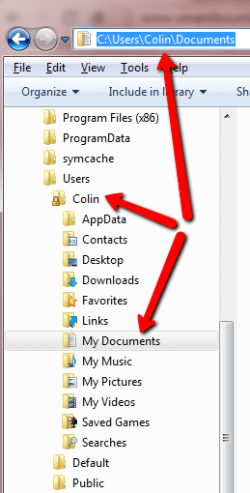
Mmm, I wonder if its the old "Library/junction point" problem.

C:\Users\Tim\My Documents is actually C:\Users\Tim\Documents...............try it yourself : browse to \Users\Tim\My Documents in Windows Explorer....now highlight it in the address bar of Windows Explorer.

ccc.png

Edit the path in robocopy to read C:\Users\Tim\Documents........does the error still occur?
 

My Computer

Computer type
PC/Desktop
Computer Manufacturer/Model Number
Golden Mk. I.4
OS
Windows 10 Pro x64 ; Xubuntu x64
CPU
Intel i7 860 @ 2.80 GHz O/C'ed to 4.0GHz
Motherboard
Gigabyte P55A-UD3R Rev.1. Award BIOS F13
Memory
16GB Corsair Vengance DDR3 @ 661 MHz Dual Channel (9-9-9-24)
Graphics Card(s)
EVGA NVidia GTX 560 1024MB
Sound Card
Realtek Integrated
Monitor(s) Displays
Dual Samsung SyncMaster 2494HS
Screen Resolution
1920*1080 and 1920*1080
Hard Drives
1*Samsung 840 EVO 120GB SSD;
1*OCZ Vertex 2 60GB SSD;
2*Samsung F3 SpinPoint 1TB in RAID0;
1*Samsung F1 SpinPoint 1TB;
2*Western Digital 1TB External USB 3.0
1*Western Digital 500GB External USB 3.0
1*Seagate 500GB External USB 2.0
PSU
Thermaltake ToughPower QFan 750W
Case
Thermaltake Element S VK60001W2Z
Cooling
Corsair H60 Water Cooling, 2*230mm and 2*80mm case fans
Keyboard
Logitech G110
Mouse
Logitech MX518
Hi Golden,

Unfortunately, that change made no difference either. :(
I may well have to resort to script that does not use robocopy, if no solution can be found, which would be a shame given the logging detail the tool provides.

Any further thought/suggestions would be very welcome.
Thanks again.
 

My Computer

Computer type
PC/Desktop
OS
Windows 7 Professional 64 bit

My Computer

Computer type
PC/Desktop
Computer Manufacturer/Model Number
Golden Mk. I.4
OS
Windows 10 Pro x64 ; Xubuntu x64
CPU
Intel i7 860 @ 2.80 GHz O/C'ed to 4.0GHz
Motherboard
Gigabyte P55A-UD3R Rev.1. Award BIOS F13
Memory
16GB Corsair Vengance DDR3 @ 661 MHz Dual Channel (9-9-9-24)
Graphics Card(s)
EVGA NVidia GTX 560 1024MB
Sound Card
Realtek Integrated
Monitor(s) Displays
Dual Samsung SyncMaster 2494HS
Screen Resolution
1920*1080 and 1920*1080
Hard Drives
1*Samsung 840 EVO 120GB SSD;
1*OCZ Vertex 2 60GB SSD;
2*Samsung F3 SpinPoint 1TB in RAID0;
1*Samsung F1 SpinPoint 1TB;
2*Western Digital 1TB External USB 3.0
1*Western Digital 500GB External USB 3.0
1*Seagate 500GB External USB 2.0
PSU
Thermaltake ToughPower QFan 750W
Case
Thermaltake Element S VK60001W2Z
Cooling
Corsair H60 Water Cooling, 2*230mm and 2*80mm case fans
Keyboard
Logitech G110
Mouse
Logitech MX518
Hi Golden,

Thanks for your feedback again.

I would have thought it more logical if it was the My Documents / Documents issue that all copied files would result in errors, but the vast majority of the files backup fine.

It looks like this will remain unresolved and I'll have to write an alternative backup script method.

Thanks again for your patience. :)
 

My Computer

Computer type
PC/Desktop
OS
Windows 7 Professional 64 bit
No worries. Sorry we couldn't solve it. Let us know if you crack it one day.
 

My Computer

Computer type
PC/Desktop
Computer Manufacturer/Model Number
Golden Mk. I.4
OS
Windows 10 Pro x64 ; Xubuntu x64
CPU
Intel i7 860 @ 2.80 GHz O/C'ed to 4.0GHz
Motherboard
Gigabyte P55A-UD3R Rev.1. Award BIOS F13
Memory
16GB Corsair Vengance DDR3 @ 661 MHz Dual Channel (9-9-9-24)
Graphics Card(s)
EVGA NVidia GTX 560 1024MB
Sound Card
Realtek Integrated
Monitor(s) Displays
Dual Samsung SyncMaster 2494HS
Screen Resolution
1920*1080 and 1920*1080
Hard Drives
1*Samsung 840 EVO 120GB SSD;
1*OCZ Vertex 2 60GB SSD;
2*Samsung F3 SpinPoint 1TB in RAID0;
1*Samsung F1 SpinPoint 1TB;
2*Western Digital 1TB External USB 3.0
1*Western Digital 500GB External USB 3.0
1*Seagate 500GB External USB 2.0
PSU
Thermaltake ToughPower QFan 750W
Case
Thermaltake Element S VK60001W2Z
Cooling
Corsair H60 Water Cooling, 2*230mm and 2*80mm case fans
Keyboard
Logitech G110
Mouse
Logitech MX518
Yeah yeah I know its a while since last post but I have same problem with robocopy on windows 7

I fixed it using Xcopy:

xcopy /s/e/i/d/r/k/y/z *.* <dest>

Using robocopy evenwith /zb and /copy: DT failed, but the above xcopy picks up on those files that robocopy fails and copies those over...

Using xcopy for backups
 

My Computer

Computer type
Laptop
Computer Manufacturer/Model Number
Alienware
OS
Windows 7 Ultimate x64
I keep having the same problem. The keeps saying "Access is denied. with all the files" I'm doing this from home to my external hard drive. Here is the command I'm using.


robocopy "c:" "G:\Win7_RobocopyBackup\c" /e /copyall /xo /log:"robolog
.txt" /z /r:3 /w:6
 

My Computer

Computer type
PC/Desktop
OS
N/A
CPU
Processor Intel(R) Core(TM) i7-4770 CPU @ 3.40GHz, 3401 Mhz,
Back
Top