
Greetings everyone and thanks for looking at my issue.
This weekend i migrated my in-house file server to an offsite hosting company.
i ran the following command from the new server to grab the old server data and robocpy it up to the new.
this is the command
ROBOCOPY \\10.x.x.x\sharename E:\Shared-Folders\shrednamematch /E /SEC /zb /a /r:1 /w:1
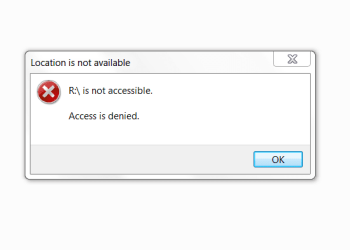
everything copied over except now i am getting several people who cant access the new share, i went in an checked the security perms, and they appear to be correct? any ideas of what i should look at or did incorrect? and how do i fix this, they cant access the new share, (SEE ATTACHMENT FOR ERROR)
thanks
Mike
This weekend i migrated my in-house file server to an offsite hosting company.
i ran the following command from the new server to grab the old server data and robocpy it up to the new.
this is the command
ROBOCOPY \\10.x.x.x\sharename E:\Shared-Folders\shrednamematch /E /SEC /zb /a /r:1 /w:1
everything copied over except now i am getting several people who cant access the new share, i went in an checked the security perms, and they appear to be correct? any ideas of what i should look at or did incorrect? and how do i fix this, they cant access the new share, (SEE ATTACHMENT FOR ERROR)
thanks
Mike
Attachments
My Computer
- Computer type
- PC/Desktop
- OS
- NJ


