
I replaced a 1 TB HDD that was full with a 2 TB HDD and now it squaks about permissions. "You don't currently have permission to access this folder", yet if I click continue, it opens.
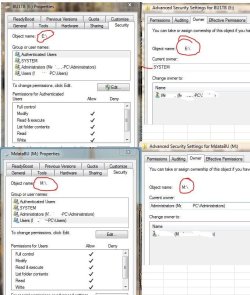
This new drive is assigned M:, I have another HDD in the system that is assigned E. Here are the permissions/owners assigned to each drive.
E: works without issue, note it does not have "full control" and the current owner is "SYSTEM"
Drive M: has everything "full control" and is assigned to my administrator account. Appreciate any assistance here!
This new drive is assigned M:, I have another HDD in the system that is assigned E. Here are the permissions/owners assigned to each drive.
E: works without issue, note it does not have "full control" and the current owner is "SYSTEM"
Drive M: has everything "full control" and is assigned to my administrator account. Appreciate any assistance here!
Attachments
My Computer
- Computer type
- PC/Desktop
- Computer Manufacturer/Model Number
- Self Build
- OS
- Windows 7 Professional X64 Service Pack 1
- CPU
- AMD Phenom II X4 955 3.20GHz
- Motherboard
- Gigabyte GA-MA790X-UD4P
- Memory
- 8G
- Graphics Card(s)
- GX550 Ti
- Sound Card
- On board
- Monitor(s) Displays
- Asus VW246H & Syncmaster 2243swx
- Screen Resolution
- 1920x1080 & 1920x1080
- Hard Drives
- M4-CT128 SSD2, Samsung 840 256GB, 1 WDC 1TB
- PSU
- Corsair TX750W-V2
- Case
- Antec
- Cooling
- 2 120mm fan
- Keyboard
- Microsoft Wireless 3050
- Mouse
- Microsoft Wireless 5000
- Internet Speed
- 72/6Mbs (Cable)
- Other Info
- Asus AC1900 router, 8 port Trendnet Switch - Logitech Webcam Pro 9000


